Bing Chat gains image answers with knowledge cards and optimized answers
Microsoft announced a number of new features that have been added to Bing Chat this week, including images within answers, optimized knowledge answers and more. “Some of these features may appear temporarily in your Bing chat experience as we experiment with them,” the Bing team wrote.
Let’s dig in.
Image answers with knowledge cards. Bing Chat has been getting more visual but now, some of those visuals can let you trigger knowledge cards. “Click on the image to launch a knowledge card that allows you to explore more information about their habitat, diet, lifecycle, and other facts,” Bing wrote.
Here is what it looks like:
Optimized answers. Bing Chat also has gained new optimized answers that show you answers related to shopping, weather, finance, jobs, autos, and recipes. In the example below, you can compare different product results in a more visual manner.
Other features. Bing Chat also now allows you to export answers to PDF, text file, or Microsoft Word. There is also improved the copy and paste of the code or other blocks of formatted text Bing Chat generates. Finally, you can now include prompts for formatting like paragraphs, bullets, or numbering.
Why we care. We continue to see small and large improvements to generative AI tools, like Bing Chat. The Bing Chat interface is becoming more and more search-friendly, more and more user-friendly and the answers continue to get better.
@media screen and (min-width: 800px) { #div-gpt-ad-3191538-7 { display: flex !important; justify-content: center !important; align-items: center !important; min-width:770px; min-height:260px; }
}
@media screen and (min-width: 1279px) { #div-gpt-ad-3191538-7 { display: flex !important; justify-content: center !important; align-items: center !important; min-width:800px!important; min-height:440px!important; }
}
About the author
Barry Schwartz a Contributing Editor to Search Engine Land and a member of the programming team for SMX events. He owns RustyBrick, a NY based web consulting firm. He also runs Search Engine Roundtable, a popular search blog on very advanced SEM topics. Barry can be followed on Twitter here.
Google rolling out related topics filter on desktop search results
Google is now rolling out the related topics search filter feature on desktop search results.
The related topics filter first launched on mobile search last December. Now Google is bringing it fully to desktop search.
What it looks like. Here’s a screenshot of the new filter menu, compared to the old version.
Old version:
New version:
Here is what it looks like when you filter on these “explore topic” related topic filters:
Here is how the mobile version launched back in December 2022:
What Google said. Google posted this news on Twitter:
“Last December, we made it easier on mobile to explore topics related to your search. Now this is available to all desktop users searching in English in the US. Related topics appear alongside filters at the top of the search results page.”
Google has been testing this on desktop for several months. So if this looks familiar to you, that’s why.
“Both topics and filters are shown in the order that our systems automatically determine is most helpful for your specific query. If you don’t see a particular filter you want, you can find more using the ‘All filters’ option, which is available at the end of the row.”
Why we care. Google is constantly adapting and trying new interfaces. Be it the new SGE or these smaller changes, including perspectives, about this image and more. This is a new change to the Google interface that may impact what people see and click on within the desktop search results.
@media screen and (min-width: 800px) { #div-gpt-ad-3191538-7 { display: flex !important; justify-content: center !important; align-items: center !important; min-width:770px; min-height:260px; }
}
@media screen and (min-width: 1279px) { #div-gpt-ad-3191538-7 { display: flex !important; justify-content: center !important; align-items: center !important; min-width:800px!important; min-height:440px!important; }
}
About the author
Barry Schwartz a Contributing Editor to Search Engine Land and a member of the programming team for SMX events. He owns RustyBrick, a NY based web consulting firm. He also runs Search Engine Roundtable, a popular search blog on very advanced SEM topics. Barry can be followed on Twitter here.
Quick SEO wins: 4 simple tactics to boost your organic traffic
Optimizing for search requires time and effort, as most SEO experts would attest.
It could take several months or even years to outrank established competitors who have been optimizing their sites for a long time.
That said, many websites can take advantage of low-hanging fruits to boost their search visibility.
You can uncover untapped potential with the help of SEO specialists or simple tools. Here are four ideas to help you get started.
Who would have thought that some people, even tech-savvy ones, get the most important on-page SEO techniques wrong today?
Yes, I am talking about title tags. You can see them:
When you bookmark a page.
When they appear in a browser tab.
On search result pages (SERPs).
There are three main use cases for title tags. Depending on which you focus on, your SEO may suffer more or less.
Let’s say you want to show the brand in tabs and bookmarks first, plus mimic the actual menu structure.
Then you may end up with something like:
“Example.com” – Topic – Specific Keyword
Yet, for the best possible SEO results, you’d rather go with the most important keyword first:
Specific Keyword – Topic – “Example.com”
But when your brand or domain name is extremely long, you might run into issues.
Having something like allothershortdomainnameswerealreadygone.com in the title is not helpful.
If that’s the case, you might prefer to use just the following structure:
Specific Keyword – Topic
On WordPress, some themes still go with the brand first. Most themes will add “Example.com” to each title tag (usually at the end).
When the brand or URL in the title is as long as or longer than the specific keyword (and topic), you may even end up with duplicate content issues.
With the free Yoast SEO plugin for WordPress, you can quickly and easily adapt that title tag structure.
Otherwise, you may have to tweak the WordPress theme manually, which is not recommended as it gets messy quickly.
But title tags are important beyond preventing duplicates.
While they have been devalued as a ranking signal recently, the title is still what searchers will first see.
When you’re lazy (and most WordPress users are), you will also use the H1 heading as the title.
This works fine in many cases, especially if you have optimized the H1 well, as it’s a significant ranking signal for Google.
However, headlines are meant mostly for readers already on the actual page or for those perusing social media.
What happens then is that headlines may become way too long to serve as title tags.
Some headlines also simply ignore the most significant keywords and go for clickbait instead, which hides the true topic, for instance:
“You won’t believe what happened then! THIS!”
This example doesn’t even have a single keyword in it. You need to edit your title tag manually then and add some.
2. Check your rankings on Google Search Console
One of the first things to do when it comes to SEO is to connect and check your Google Search Console (GSC).
Even as a professional, you will uncover a wealth of valuable data from Google.
True, the data is never fully disclosed, so it’s just part of the picture. But once you know that and don’t “rely” on it, you are safe and can use it as long as it’s beneficial.
One of the best use cases of GSC is looking for low-hanging fruit.
Google will show you many of the even obscure long-tail keywords you are ranking for already. Also, you will see the average estimated position you have for those keywords.
Go to Performance (the top graph on the homepage of GSC once you log in and choose the project you look at) >Full Report or simply the Performance menu item on the left side menu.
By default, you will see Queries sorted by Top queries, showing which keywords drive the most traffic.
This data is relatively limited according to many reports. Many keywords (especially local) are hidden for privacy reasons.
The keywords that drive the most traffic might surprise you. For example, you may rank well for off-topic content, resulting in loads of irrelevant traffic.
Look for relevant keywords with high potential and low effort.
To uncover hidden gems, we simply sort Top queries by Impressions by clicking it at the right side of the table:
Above is a partial screenshot from the GSC of my own blog.
I already get several clicks for the keyphrase “Google sucks.” It is also the most popular by the number of impressions. Many other anti-Google phrases show up in that list.
Why? I have a well-ranking article on Google search alternatives that I’ve been updating for a decade. Someone in the comments said, “Google sucks.”
I get a lot of traffic and (often angry) comments from it, but no business inquiries.
You won’t believe what happens next, though.
Let’s filter the results and focus on what I offer. Let’s make GSC show keyphrases that do not contain the keyword “Google.”
I get more than 3.9k impressions for the useful keyword pair “SEO acronym,” yet zero clicks. The same thing happens with #3, “ethical SEO.”
“Ethical SEO” could mean actual business, while “SEO acronym” could mean incoming links.
“Ethical SEO” could be both an informational query and a transactional one – I smell opportunity here.
“SEO acronym” might be only informational, but given the link attraction opportunity, it’s still valuable.
But one thing is obvious: I get way too many keyphrases with no clicks on top.
So why won’t people click?
There are many possible reasons people don’t click your link in search results:
Your content may be irrelevant to the user’s intent.
Your title tag and meta description might be not enticing enough.
Your “published” or “last updated” date may be too far in the past.
The most likely cause for not earning clicks is that you’re not getting impressions.
Searchers might be theoretically seeing your page in the results, but it may be too far down to get noticed.
Guess what?
That’s the case with the first example, “SEO acronym.” My average position is 15.9.
How do I know? I clicked the keyphrase and GSC showed me the ranking stats.
When I click the checkbox on the right from Average position, I also see the ranking fluctuations.
There it shows that in recent weeks I have been around #12 to #13.
This is on top of page two or just “below the scroll” when seeing continuous scroll results from the U.S. (I can currently only view them using a VPN service as I’m based in Germany):
Ranking almost in the top 10 and getting a lot of impressions is like an invitation to do something about it. You can update the article and expand it by adding:
Expert quotes.
Visualization.
Current data.
More outgoing links.
You can make the content more helpful or add more publicity for the existing content by pitching it to other bloggers using outreach.
Ideally, you can combine techniques, as pitching legacy content with no new insights might be futile.
Adding some relevant internal links from current content to the one almost ranking top 10 may suffice.
Get the daily newsletter search marketers rely on.
An SEO audit is one of the first things an SEO expert will offer you.
I’d instead call it a website audit as it deals with things that are not just “strictly SEO” the way old-school practitioners limit themselves to.
In recent years, I even started offering what I call an online presence audit to consider a brand’s overall presence on the web.
It’s not just one website, but often several, and you are most likely using numerous third-party services (think social media and directories).
Your site may be perfectly optimized, but when you have another copy with the same content elsewhere online, you may suffer from duplicate content issues.
A simple website audit may uncover many issues, especially when a seasoned SEO expert is involved. They might be “looking for the hole in the whole” as an old Polish idiom says.
For example, are you giving away all your content on third-party sites while your site is empty?
That’s a common mistake nowadays. Bloggers blog on Medium, LinkedIn or simply Facebook. Photographers publish their best work on Instagram.
Yet even less sexy content creators tend to spend most of their time and effort on building Mark Zuckerberg’s empire.
One company I worked for decided overnight that “we have to be on Instagram” because “everybody else is already.”
The thing is, their B2B brand had no visual content to share. So the illustrator formerly responsible for the blog’s visual content had to create something from scratch for Instagram and had no time left for other tasks.
Business people are often easily wowed by shiny new toys. A website audit will show you what you neglected instead. There is often massive potential due to such and other ridiculous mistakes.
If you don’t have resources right now, you can start with free website auditing tools.There are numerous out there. Some of the more prominent ones are:
Woorank has a text input where you can check your website URL right away, but you have to sign up for a 14 days free trial to see the actual results beyond some basic info about your homepage.
HubSpot Website Grader lets you “grade” your website for free in exchange for your mail address.
Sitebulb offers a free trial for 14 days. That should be enough for a first look at your website.
ContentKing makes you sign up for a free trial before viewing the assessment.
Sitechecker requires a 7-day trial to get a website audit.
Consider lesser-known and not-as-sophisticated tools that may offer some direct insights, such as SEOptimer.
Some full-fledged SEO tools suites also offer site audit features. For instance, the Semrush site audit will give you many data points to improve your website. You must sign up (but can do so with your Google account) to see them.
Ubersuggest also lets you see some valuable insights after signing up with Google.
4. Look up People Also Ask questions and add answers
It’s the most popular SERP feature in Google after site links and is typically visible on more than two-thirds of Google results.
These PAAs will often be displayed on huge one-word keywords.
So when you search for “Twitter,” Google may show you a PAA asking, “What are the benefits of Twitter?”
The answer will get lots of traffic despite not ranking for the one-word keyword itself.
It’s easy to check PAA questions to find opportunities for your site and market.
Simply search Google for competitive keywords relevant to your business. For us, it could be for “SEO.”
Google will very likely show some PAA questions below some of the results.
It’s almost impossible to rank for “SEO” nowadays. You want to find more specific keyword combinations when you’re new to the discipline.
Yet we’re not after the super-hard keyword today or less complicated two or three-word phrases. We want to see the PAAs Google attaches to it.
When I search for “SEO,” I get Related questions on top (after the first result) instead of the PAA design formerly used:
This may be because these questions are potentially auto-generated.
They sound funny due to grammar mistakes, but remember that people often use voice search to ask them.
No matter how the questions come about, they are often a surefire way to earn search traffic.
Take the questions and answer them as specifically, clearly and effectively as possible while using numbered lists or tables.
It won’t hurt to repeat the question, but please don’t copy the grammatical abominations from Google search. That might get you in trouble with Google’s spam filters.
When I take a look at the second question (“What are the four types of SEO?”), I see a site I had never heard of there and an answer that might be wrong. I bet you could create a better one.
Opinions expressed in this article are those of the guest author and not necessarily Search Engine Land. Staff authors are listed here.
@media screen and (min-width: 800px) { #div-gpt-ad-3191538-7 { display: flex !important; justify-content: center !important; align-items: center !important; min-width:770px; min-height:260px; }
}
@media screen and (min-width: 1279px) { #div-gpt-ad-3191538-7 { display: flex !important; justify-content: center !important; align-items: center !important; min-width:800px!important; min-height:440px!important; }
}
About the author
Tadeusz Szewczyk, also known as Tad Chef, is a professional blogger and SEO since 2004. Even though based in Berlin, Germany he has covered blogs, social media and search for a global audience starting in 2006. In 2007 he launched his own blog – SEO 2.0 – and also published on numerous other marketing blogs ever since. In recent years he wrote for the social media accounts of many clients as well. You can connect with Tad on LinkedIn and Twitter or visit his website and read his blog about social SEO.
Why your website needs a resource center and how to create it
What if you had a hub on your website where all your visitors could discover your amazing content?
What if this hub helped your audience get solutions and answers, find relevant information, learn about your products/services, and discover new content?
You can – it’s called a resource center.
Also known as a knowledge base, resource library, or content hub, creating one for your website could help your audience find your best content – and ultimately boost things like engagement, website traffic and conversions.
Let’s talk about how.
What is a resource center?
A resource center is a hub where all your best content resides, on a page that’s laid out for a great user experience.
A resource center is typically organized and laid out in a way that helps visitors find content on particular topics or types of content.
Think of a resource center as a library – a categorized, organized collection of your best content meant for readers to browse. Here they can learn more about your niche, find solutions to their problems, get relevant information, and even discover more about your products or services.
As far as the content you’ll find inside a resource center, you’re not limited to blogs.
You can add any type of content you’ve created to your resource library, including gated and ungated content like:
Why do you need a resource center on your website?
Creating a resource center for your website has plenty of benefits – both for your audience and your brand.
It highlights older content that may otherwise remain hidden in the bowels of your website, boosting audience discovery.
It’s more engaging and targeted than a chronological timeline of your most recent posts.
A library full of useful and expert content immediately signals your expertise to visitors.
It encourages visitors to browse your content and thus stay longer on your site, increasing its “stickiness.”
It makes your content on specific topics much easier to find. This is great for visitors, but also for people on your team who use your content in their jobs, like your sales team for sales enablement.
Since it’s basically a library of valuable content, your resource center is extremely link-worthy and may help build your backlink profile.
Creating topic hubs (also called pillar pages) within your resource center helps search engines better understand the relationships between pages and topics – which may boost your SEO.
Overwhelmingly, buyers do extensive research before talking to a salesperson or reaching the decision stage – 70% read at least 3-5 pieces of content before talking to sales. A curated resource center makes this process easier for them.
How to create an organized and helpful resource center
What do you need to create a brand resource center or content library? Start with understanding your audience’s needs, then gather your best content.
1. Understand the needs of your audience
Who will be coming to your resource center, and what will they be looking for?
These are questions you must understand before building yours.
Ultimately, it all comes down to knowing your audience and their information needs in your niche.
If you’ve been creating content for a while that gets traction, you should have a pretty good grasp on this already. However, it’s a smart idea to revisit what you know and make sure it’s still accurate through updated audience research.
Be warned: If your content is ineffective, then creating a resource center probably won’t help the situation. There are plenty of reasons why content can fail to bring a return on investment (ROI), but two major ones are:
Creating content without fully understanding who you’re writing to.
So, before you can create a resource hub with any value, you must have a content strategy, and you must know your audience’s needs. (You also need a good amount of content published, but that goes without saying.)
2. Gather and organize your content by topic and keywords
First things, first: You’ll need to gather the content that will appear in your resource center. Specifically, you’ll need to gather URLs, page titles, and topics/keywords.
You can also include a category for content type (ebooks, white papers, guides, case studies, podcasts, etc.), but remember this isn’t the most useful way to sort content for your audience.
For example, when users browse your resource page, they probably won’t think, “I need an ebook.” They’re more likely to be looking for a specific topic like “content strategy” or “SEO.”
That means sorting content by type is probably more useful for you and your team – so consider whether including this category is worth it (and whether your team uses your content enough to need to search for specific types).
Of course, the easiest way to gather and organize everything is in a spreadsheet (similar to a content audit).
Create columns for recording the details about each piece (URL, title, topic, keywords, content type, etc.), and gather your best pieces across a wide array of categories.
This part might be tedious, but you’ll be thankful later that you were organized from the start.
3. Create a dedicated resource page on your site
This may or may not be obvious, but your resource page needs a dedicated page on your website.
From this library “home page,” you can either link directly to your content pieces or create landing pages for each one with a short summary and a download link. Or, you could include a mixture of both (i.e., include both gated and ungated content).
Which strategy should you choose? Consider:
If you’re mostly rounding up posts that have appeared on your blog (guides, how-to’s, and other educational content), you can link directly to these pieces from your resource center.
If you have a large library of downloadable content pieces/lead magnets like ebooks, case studies, white papers, etc., consider linking to landing pages for each of these.
For the best mix, consider adding both types of content – downloadable/gated content and free/ungated content.
4. Determine how users will browse and search your resources
Laying out your resource center has an infinite number of possibilities. The key, however, is to ensure your page is easy to read, browse and navigate.
If you don’t have a lot of content yet, then a simple page organized by content topic will suffice.
However, you’ll need to consider a more complex scheme if you have vast amounts of content, such as:
Creating category pages for each main topic.
Building dynamic pages with options for filtering, searching, and sorting content.
Adding visual elements like page thumbnails or previews.
Creating “featured content” sections for each topic.
Here are some examples for inspiration.
CoSchedule has a unique organizational scheme for their resources – they created individual “topic libraries” with each page dedicated to a specific topic (for example, marketing or marketing strategy).
These libraries/topic hubs are laid out with an article on the right side and a menu of topics and content types on the left:
Another unique example is the QuickBooks resource center. Content is sorted by topic in drop-down menus at the top of the page:
And if you scroll the page, it’s also sorted by topic, with a few articles highlighted under each one:
Lastly, Moz’s resource center is a robust and well-thought-out example. It’s topic-focused for the person who has a specific problem, question, or information need.
Each topic category takes you to a hub page for that topic.
All the content is filterable (by related topics, difficulty level, and content type), and multiple content types are represented (articles, videos, webinars, etc.).
5. Optimize your resource center pages
If your resource center is multilayered – for instance, you have a top-level page with multiple sub-pages for topic categories – ensure each page is optimized.
Research and use keywords
Resource center pages – especially top-level topic pages – have the potential to rank in Google.
Make sure you research the keywords your audience uses to search for your topics, and use them in the titles and text you include on these pages.
Focus on the user experience and readability
Your resource library should be effortless to read, browse, and find relevant content.
That’s why working with a web designer or UX designer at the building stage is important to ensure the page looks and functions well.
Improve SEO by adding short descriptions of each content piece
For better optimization, don’t populate your resource center with a plain list of links.
Add short descriptions or summaries to each asset to help readers understand what it’s about and whether it’s relevant to their needs. Bonus: These descriptions can include keywords.
Here’s an example of descriptive text on one of Proven Winners’ topic pages:
Create category pages with descriptive text
Along with descriptive text accompanying each content piece, include this text on your category pages/topic hubs.
Explain the topic, define key terms, and link to related pages your audience will find helpful.
6. Add calls to action
Even though your resource center should focus on giving value through useful and educational content, that doesn’t mean you can’t gently direct your audience toward your relevant paid offerings.
Including strategic calls to action based on your goals is, therefore, very smart.
For example, Moz’s keyword research topic page includes a CTA to their SEO certification course.
Adding this CTA on this page makes sense because the target audience wants to learn SEO skills. Moz equates taking the paid course to “leveling up.”
Similarly, keep your CTAs in line with your audience’s journey. What would a logical next step be for them after browsing your resource center that would also move them closer to becoming a customer?
That said, don’t spam your readers with CTAs – that will lead to annoyance and may even make them bounce. Use them sparingly but purposefully for the best results.
7. Share and promote your resource center
An optimized, organized resource center chock-full of amazing content is an ultra-valuable resource.
For that reason, don’t be shy about promoting and sharing your content library/hub.
Include a link to your content resource center in your top navigation menu.
Add CTAs to your resource center in your blog content.
Promote your resource center through social media posts.
Link to it in your email newsletter.
Post social media updates whenever you refresh your resource library with new content.
Get the daily newsletter search marketers rely on.
More resource center examples
To get a broader idea of what’s possible for your own resource library, check out these additional examples of brands that did it right.
Kareo
Kareo creates software for managing medical practices. Their resource center is well-organized and easily browsed with filters and a search function.
Content is organized by type and topic. You can even filter it to find relevant content for roles like office manager or provider/physician.
Zoom
Zoom’s resources page has advanced filters and sorting options that help you find the exact topic you’re looking for.
Content types range from reports to white papers, guides, blog posts, ebooks, and videos. You can also filter by product and industry. Each content piece includes a preview thumbnail and descriptive text.
Canva
Canva’s resources page is relatively simple. It includes a featured resources section at the top.
Keep scrolling, and you’ll find a grid of their most recent content, including a simple way to filter by content type and industry.
It’s not robust like other examples, but it gets the job done.
American Alliance of Museums
The American Alliance of Museums is an organization for museum professionals like curators, conservators, historians, and archivists. Their resource library is a great example of an organization’s approach to a content hub.
Their resources are gated (only members can access them with a login), but they offer a preview to non-members through exhaustive, optimized category pages (the articles themselves are locked).
WebFX
WebFX has a unique resources page with multiple layers. Each topic category has its own page. At the top of each, you’ll find a list of sub-topics to browse.
After that, their most recent and featured articles on that topic are displayed in a grid. Underneath these is a pillar-type page with links to articles on related topics throughout.
Create a resource page and prove your authority
A resource center, library, or hub is a great idea if you have a lot of valuable content (think months or years’ worth) on your site.
Without a place to centralize all of this content and make it discoverable, your older pieces will continue to get buried as you produce new ones.
But introduce a resource center, and suddenly the rabbit hole turns into a beautiful spread of content that anyone can easily find and access.
When you create a content library, you become the curator of your brand content. How you organize, categorize, and lay out that content will determine how useful your library is to your audience.
Do it well, and you’ll have an incredible resource in and of itself that will help drive engagement, web traffic, and conversions.
Opinions expressed in this article are those of the guest author and not necessarily Search Engine Land. Staff authors are listed here.
@media screen and (min-width: 800px) { #div-gpt-ad-3191538-7 { display: flex !important; justify-content: center !important; align-items: center !important; min-width:770px; min-height:260px; }
}
@media screen and (min-width: 1279px) { #div-gpt-ad-3191538-7 { display: flex !important; justify-content: center !important; align-items: center !important; min-width:800px!important; min-height:440px!important; }
}
About the author
Julia McCoy is the founder of Content Hacker, 7x author, and a leading strategist around creating exceptional content and brand presence that lasts online. At 19 years old, she used her last $75 to build a 7-figure writing agency which she sold ten years later. In the 2020s, she’s devoted to teaching founders and marketers the strategy, skills, and systems they need to build a business through inbound content, so they can create more lasting impact in the world.
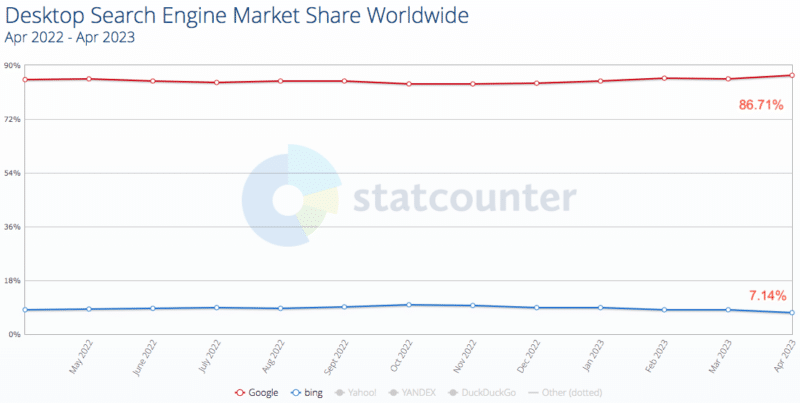
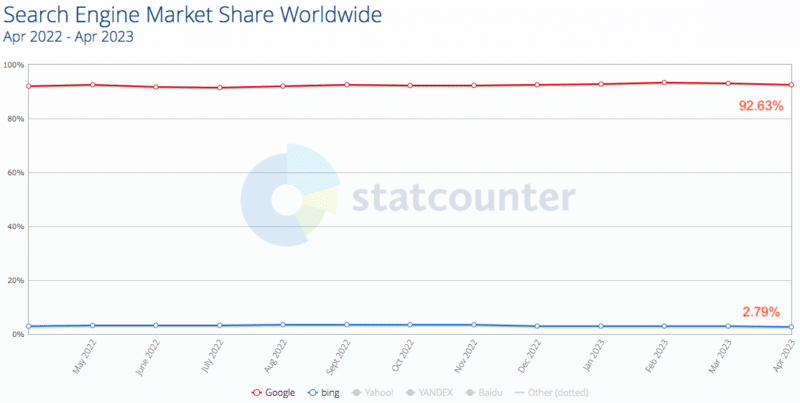
These 2 charts show Microsoft Bing’s search market share problem
Despite having gotten the jump on Google when it launched the new Bing, featuring its own generative search experience fueled by GPT-4, data shows Microsoft has failed to gain market share.
In fact, if the latest numbers from StatCounter are directionally accurate, it appears Bing is actually losing market share to Google.
Why we care. It would be nice to live in a world where we didn’t have to rely so heavily on Google. It was encouraging to see Bing making some small gains. But we later learned the New Bing attracted new Edge users who then used Google Search. And now that Google has unveiled its Search Generative Experience, Bing has lost its first-mover advantage and it seems we won’t see a true search competitor anytime soon.
7.14%. That’s Microsoft Bing’s worldwide desktop market share as of April, according to Statcounter. The new Bing launched in February.
Why this number is a problem: Bing’s market share peaked in October 2022, at 9.92%. And the 7.14% figure is actually lower than April 2022 (8.05%).
Meanwhile, Google’s desktop search market share is 86.71%.
2.79%. The picture gets even bleaker for Microsoft Bing when you look at search engine market share worldwide, across all devices (desktop, mobile, tablet), also via Statcounter. While Bing is at just 2.79%, Google is at 92.63%.
Why this number is a problem: Bing’s market share peaked in October 2022, at 3.59%. And the 2.79% figure is actually lower than April 2022 (3.02%).
Google isn’t vying with Microsoft Bing. News headlines discussing the AI search competition between Google and Bing tend to focus on the rivalry element instead of simply admitting the reality. Which is that these two charts show Microsoft’s problem: even with the new Bing and all the investments Microsoft has made in search – they’re still not making meaningful gains on Google.
@media screen and (min-width: 800px) { #div-gpt-ad-3191538-7 { display: flex !important; justify-content: center !important; align-items: center !important; min-width:770px; min-height:260px; }
}
@media screen and (min-width: 1279px) { #div-gpt-ad-3191538-7 { display: flex !important; justify-content: center !important; align-items: center !important; min-width:800px!important; min-height:440px!important; }
}
About the author
Danny Goodwin has been Managing Editor of Search Engine Land & Search Marketing Expo – SMX since 2022. He joined Search Engine Land in 2022 as Senior Editor. In addition to reporting on the latest search marketing news, he manages Search Engine Land’s SME (Subject Matter Expert) program. He also helps program U.S. SMX events. Goodwin has been editing and writing about the latest developments and trends in search and digital marketing since 2007. He previously was Executive Editor of Search Engine Journal (from 2017 to 2022), managing editor of Momentology (from 2014-2016) and editor of Search Engine Watch (from 2007 to 2014). He has spoken at many major search conferences and virtual events, and has been sourced for his expertise by a wide range of publications and podcasts.
The interplay between organic and paid Google search by Digital Marketing Depot
With Google dominating the search engine market share, it’s no wonder that every business wants to appear in its search engine results pages as much as possible. But small- to medium-sized businesses need a well-designed strategy to compete against larger corporations. Pursuing both SEO and PPC can maximize visibility in search results, making the playing field a little more even.
While many marketers understand that SEO and SEM work better together, the relationship between organic and paid search is complex, and it can have significant consequences on your success in SERPs. This white paper from Semify provides practical insights on how to win in both categories by exploring the relationship between SEO and PPC. It discusses how organic search results impact ad click performance and how to leverage your PPC success to inform your SEO strategy.
@media screen and (min-width: 800px) { #div-gpt-ad-3191538-7 { display: flex !important; justify-content: center !important; align-items: center !important; min-width:770px; min-height:260px; }
}
@media screen and (min-width: 1279px) { #div-gpt-ad-3191538-7 { display: flex !important; justify-content: center !important; align-items: center !important; min-width:800px!important; min-height:440px!important; }
}
About the author
Digital Marketing Depot is the resource center for digital marketing strategies and tactics. Created by Third Door Media, Digital Marketing Depot features a robust library of hosted white papers, eBooks, original research, and webinars on a wide range of digital marketing topics- from advertising, analytics, data and content management, to email marketing, SEO and PPC campaign management, and much more. Visit us at http://digitalmarketingdepot.com.
How to steal your competitors’ featured snippets with ChatGPT (prompts included)
Are you struggling to rank for featured snippets and missing out on valuable traffic?
I used to spend countless hours trying to optimize my content, making educated guesses on how to win those elusive featured snippets. The process was time-consuming and very hit-or-miss.
Now, I can harness ChatGPT – including its understanding of SEO and exceptional writing skills – to generate near-perfect optimized snippets, saving me time and boosting my traffic.
Here, I’ll share my seven-step process for using ChatGPT to optimize for the paragraph-style featured snippet.
While this process doesn’t work 100% of the time, I’ve had a much higher success rate compared to when I was doing this manually.
Find a keyword you’re currently ranking within the top 5 positions in Google where there’s a featured snippet and you don’t rank for it.
The easiest way to do that is with your rank tracking tool. Otherwise, you’ll have to manually find these. Here’s how to do it with two popular tools:
Using Ahrefs
Go to Site Explorer. Enter your domain and filter keywords that trigger featured snippets where your website is ranking in positions 2-5:
Using Semrush
Go to Organic Research. Enter your domain and filter keywords that trigger featured snippets where your website is ranking in positions 2-5:
For the biggest impact, find a keyword that has the highest volume and highest ranking.
The higher your rank, the more likely you’ll get the featured snippet.
Step 2: Identify existing featured snippet-worthy content
Now that you have a keyword you can potentially rank in the featured snippet position, you need to see if there’s any current content on your page that could rank for it.
Do a search on Google for your keyword and ensure that the featured snippet shows up. Check mobile and desktop.
Once you find it, then read the current featured snippet so you have a good understanding of what it says.
Next, open up your article and do a search for the keyword. Your goal is to identify an existing sentence or paragraph that could be a featured snippet candidate.
In the example I’ll be showing you, I’m looking for a definition of the keyword.
If you find something, this is what you’ll work on optimizing. If you don’t, then you’ll first need to have ChatGPT write one for you. We’ll get to that step soon.
Step 3: Prime ChatGPT’s understanding of optimizing for featured snippets
Fire up ChatGPT and select the GPT-4 model if it’s available to you. I highly recommend you work with this one.
You’ll want to prime ChatGPT with how to optimize for featured snippets so that it has this context in your chat to help optimize for yours.
Paste in this prompt:
“How do I optimize a paragraph to rank for the featured snippet in Google for a query?“
Step 4: Craft a featured snippet with ChatGPT
Now, let’s get ChatGPT to improve or write your featured snippet.
Prompt:
“I want to rank my article in Google for the featured snippet for the search query: [insert keyword]
Currently, Google shows a paragraph from my competitor’s website in the featured snippet position for the search query. Here it is:
[insert your competitor’s featured snippet]
Below is my paragraph that I want to rank in the featured snippet position. Rewrite utilizing feature snippet optimization advice so that it’s better than my competitor’s and Google is more likely to rank mine: [insert your current paragraph]“
Alternative
If you don’t have a current paragraph targeting the featured snippet for the query, then paste this into the prompt:
“Write a featured snippet for me to include in my article so that it will rank for this position instead of the other website. Use the guidelines above about how to optimize for the featured snippet position in Google.“
Get the daily newsletter search marketers rely on.
Step 5: Have ChatGPT evaluate your new featured snippet
You can’t always trust that ChatGPT will output the best possible featured snippet on the first try. For this step, you’ll want to have ChatGPT compare your new featured snippet against the current ranking one to see which one it considers better.
Start a brand new chat and paste in this prompt again:
“How do I optimize a paragraph to rank for the featured snippet in Google for a query?“
Once it answers, paste in this prompt:
“Which paragraph is more likely to rank in the featured snippet position in Google for the search query: [insert your keyword]
Paragraph A:
[paste in your competitor’s current featured snippet showing in Google]
Paragraph B:
[paste in the featured snippet paragraph ChatGPT generated for your]“
It should say paragraph B. If it doesn’t, then start a new chat and repeat step 4 above, then come back to this section and try again until it selects your paragraph.
Tip: If you want another opinion on whether your featured snippet paragraph is better than your competitors, perform this step in another chatbot like Google Bard.
Step 6: Publish your featured snippet in the best spot
Now that you have an optimized featured snippet, the last step is to publish it in the best spot within your article.
To identify the best spot, go look at your competitor’s article and see where their paragraph is for the featured snippet. Is it positioned higher up on the page? In the middle? At the bottom?
At least put yours in a position to match theirs while making sure it flows with the content before and after it.
If you want to increase your chances of getting the featured snippet, put yours higher up in your article than your competitor.
You’ll want to put your featured snippet in its own paragraph right below its own heading, such as an H2 or H3. The heading can be one of two styles: a statement or a question.
Which one you use really depends on the query, the search intent and what your competitor does. I tend to use more questions than statements. You’ll want to test this for yourself.
In our example, I’d structure it like this:
H2: What is dollar cost averaging?
Paragraph: Dollar-cost averaging is an investment technique designed to minimize the impact of market fluctuations by consistently allocating a fixed amount of money towards purchasing stocks, ETFs, or mutual funds over regular intervals. This approach ensures shares are acquired at various price points, reducing the risk of buying at a market peak and promoting long-term financial growth.
Step 7: Wait for results, rinse and repeat
Depending on your site’s authority, you’ll likely have to wait 1 to 14 days to see if you’ve won the featured snippet.
It doesn’t hurt to manually paste your article’s URL into the top of Google Search Console and click request indexing.
But if you’re optimizing featured snippets at scale, this won’t be very effective. You’ll need patience and wait for Google to crawl your article again.
Final tips
If you’re not having any success after a couple of tries, here are a few things you can try testing:
Move your featured snippet content to the top of your page and put it in a blockquote. Make it stand out to users and Googlebot.
Paste your featured snippet content into the Hemingway Editor and make any improvements it recommends. Grammarly is another great tool.
If your featured snippet title was a question, try making it a statement ending with a colon.
Remove the featured snippet title and place the featured snippet content right below your H1.
Give ChatGPT your and your competitor’s featured snippet content and its surrounding text. Then ask it to evaluate the text for winning the featured snippet and rewrite yours. This additional context of the surrounding text may help it produce better content for you.
Opinions expressed in this article are those of the guest author and not necessarily Search Engine Land. Staff authors are listed here.
@media screen and (min-width: 800px) { #div-gpt-ad-3191538-7 { display: flex !important; justify-content: center !important; align-items: center !important; min-width:770px; min-height:260px; }
}
@media screen and (min-width: 1279px) { #div-gpt-ad-3191538-7 { display: flex !important; justify-content: center !important; align-items: center !important; min-width:800px!important; min-height:440px!important; }
}
About the author
Tony Hill is an entrepreneur who has been operating several niche websites since 2005. His expertise and passion is at the intersection of SEO and AI. You can connect with him on Twitter @tonythill
In this article, I’ll explain what link earning is, why it’s essential and the types of results you can generate.
Link earning: What it is and how it differs from link building
I’ve been building links for over 20 years, and I can tell you that it never gets easier.
From shotgun outreach to guest post writing.
As an industry, we’ve been repeating the same approaches and seeing diminishing returns, or worse, being asked to hand over some cash for “admin” fees for adding your link.
The message is clear from those in webmaster power land.
Links = cash
Backlink merchants have emerged in droves to capitalize on this trend, acting as the middle person, the negotiator, and the heavy lifter.
How long before generative AI takes over the whole process of identifying link opportunities, writing blog posts, and even email sites for you?
Link building is the next big AI task, probably losing link value in the process.
Enter link earning.
That old-fashioned idea that your business and content earn links for you based on merit, not money.
And buckle your safety belts because link earning is coming, and either you’re onboard, or you’ll get left behind.
Link earning: You have to make it and can’t fake it
“If you pay an SEO agency to get you 50 “high-quality links” a month for $5,000 and refuse to pay a digital PR agency to get you 10 mentions in relevant publications for the same price, I’d argue you’re making a very unwise tradeoff.”
The idea of inferred links is simple to grasp.
If Google is good enough to understand entities, it can crawl a page and understand when a business is being discussed online.
Of course, this turns the SEO game into the “Upside Down” from Stranger Things.
Because the ethos should be that mentions matter, links might happen.
I can hear an old-school SEO spitting out their coffee with rage.
Sure, we all like links, but what if they were nice-to-haves, not must-haves?
Wouldn’t that change a business’s approach to link building?
Get the daily newsletter search marketers rely on.
How to earn links today and beyond
If I were to push a motto for SEO this year, it would be “Move fast, create things.”
Create content.
Create stories.
Create link opportunities.
When it comes to link earning, it’s these things that matter.
But first, let’s throw the old-hat methods under the bus.
Forgetabout creating content and promoting it to death
This is what the gurus teach, and it has some merit. If you spend hours creating a piece of fantastic content, you should spend far longer promoting it.
And sure, this can work.
But it has some significant drawbacks. Just because your “ultimate guide” might be a beast of an article, it ignores a basic rule of thumb.
The article is entirely based on your ranking goals.
Your promotion is based on the “Hey, I wrote this, you might like it too” remit in the hope they’ll share, mention, and even link to your content.
People are busy. People are self-interested.
The chances your content is so good that they’ll log into their site and give you a backlink is highly unlikely.
Your working theory should be that even the best content gets ignored.
Forget about guest posting for links
I’m a fan of guest posting. This is a guest post.
Guest posting helps to build brand fame.
But for links?
Come on. We’ve been told long ago to put a fork in that type of link building because it was “done.”
And yet, guest posts are still the go-to link method for most SEO agencies and websites.
The idea that a link in a post, buried in the deepest darkest corners of a low-traffic website, has little value should not be a shock.
But guest posting is easy.
“OK, clever SEO, tell us what’s better?”
The solution is a mindset that businesses can adapt to easily.
“How do we earn links?”
Link earning = Thought leadership, data and stories
Link building is selfish. You go to webmasters, interrupt their day and say in a Golum-esque voice.
“Look at my precious content. Reads it; you will. He wants it you do. Links to it, you tricksy little webmaster.”
No wonder people ask for money for link placements.
Link earning is different.
It’s adding to the conversation.
It’s taking the expertise in a business and helping others with that expertise.
It’s creating stories from data that people will want to hear about – not forcing content down throats.
But too often, we don’t think about how building this takes place.
You build E-E-A-T through the network effect.
Mentions online.
Links.
Content on your site.
Content on the sites of others.
You build connections with other web properties.
But the quality and speed that this happens is where specialists come in.
Mentions in authoritative web properties.
Links from authoritative websites.
Quality content on your site.
Quality content on the sites of others that shows your expertise.
The benefits are clear:
Faster rankings.
Increased traffic.
Traffic referrals.
Brand growth.
Exposure to a new audience.
Reach.
But let’s look at an example of link earning in the wild.
Link earning creates new traffic
To give some context to this image, one of my agency’s clients is a discount code website.
Typically, these types of sites are not glamorous and difficult to build links, and you’d have to rely on those traditional methods, as we discussed earlier.
Here’s how link earning handles this.
The team spotted an interesting post on social media about a supermarket loyalty card not being allowed to be used by those under the age of 18.
When it comes to link earning, speed of action matters.
Having spotted this post on social media, our team quickly leveraged our client’s brand and expertise with a pitch to journalists.
The result: more than 50 links, referral traffic to the client’s website and media mentions.
But are do-follows important?
The demise of ‘do-follow’ links
“Do-follow” links (i.e., links without the nofollow attribute) were all the rage once. Today, they usually scream “link buying.”
That’s not to say such links don’t happen. They do and, of course, they add value.
But any half-decent SEO can spot a paid link from one naturally occurring, and if the SEO can, then so can Google.
“Well, it’s something where I imagine, over time, the weight on the links. At some point, it will drop off a little bit as we can’t figure out a little bit better how the content fits in within the context of the whole web. And to some extent, links will always be something that we care about because we have to find pages somehow. It’s like, how do you find a page on the web without some reference to it? “But my guess is over time, it won’t be such a big factor as sometimes it is today. I think already, that’s something that’s been changing quite a bit.”
That was 2022, and Google has been moving fast with updates on everything from link spam to content.
Our data results show that do-follow links are definitely nice and need to have. But no-follow links do impact websites.
‘No-follows’ lead to fame, fame leads to ‘do-follows’
There are plenty of views on nofollow links not passing any ranking signals to websites.
Our in-house data disagrees with this view, but we also must remember that nofollow links in authority websites matter for more than just the links.
These sites are in the business of generating traffic, and this means real humans (remember them?) visit webpages.
This causes click-throughs to websites, searches, online conversations, talks in forums, group chats, emails, dark social and human conversation.
These nofollow links end up causing natural fame, which turns into organically created do-follows.
Link earning is a fame game
Fame makes everything easier.
A good news story can sell out products in a day.
A social influencer can make you famous with a single post.
And links and mentions, whether they follow or not, help build fame.
Link earning is the game of fame.
It’s kickstarting traffic and links. It gets people talking.
Of course, the other option is sending that outreach email. And yes, there’s a time and a place for that.
But should that be your go-to?
I don’t think so. Choose fame.
Choose link earning.
Opinions expressed in this article are those of the guest author and not necessarily Search Engine Land. Staff authors are listed here.
@media screen and (min-width: 800px) { #div-gpt-ad-3191538-7 { display: flex !important; justify-content: center !important; align-items: center !important; min-width:770px; min-height:260px; }
}
@media screen and (min-width: 1279px) { #div-gpt-ad-3191538-7 { display: flex !important; justify-content: center !important; align-items: center !important; min-width:800px!important; min-height:440px!important; }
}
About the author
Andrew Holland is the Director of SEO at JBH, an award-winning Digital PR and SEO agency. His SEO background stems from a 17-year career in the police, where a number of years were spent within intelligence, utilizing SEO within internal systems to catch criminals. After developing chronic asthma, Andrew left the police and launched a freelance SEO and digital marketing career, and has worked with a wide range of clients, from SMEs to 8-figure businesses. Today, he directs the SEO delivery for one of the UK’s fastest-growing Digital PR and SEO agencies. Building organic visibility, trust and fame for consumer brands.
Google to update the helpful content system algorithm in the coming months
Google will roll out a new update for the helpful content system in the coming months. This update will allow Google Search to “more deeply understands content created from a personal or expert point of view,” the company wrote.
What is changing. Google said:
“We’re also improving how we rank results in Search overall, with a greater focus on content with unique expertise and experience.”
“We’ll roll out an update to this system that more deeply understands content created from a personal or expert point of view, allowing us to rank more of this useful information on Search.”
This update will help Google Search show more “hidden gems” within the Google search results, Google explained.
More on the helpful content update. Google’s helpful content update specifically targets “content that seems to have been primarily created for ranking well in search engines rather than to help or inform people.”
This algorithm update aims to help searchers find “high-quality content,” Google told us. Google wants to reward better and more useful content that was written for humans and to help users.
Searchers get frustrated when they land on unhelpful webpages that rank well in search because they were written for the purpose of ranking in search engines. This is the type of content you might call “search engine-first content” or “SEO content.”
Google’s helpful content algorithm aims to downgrade those types of websites while promoting more helpful websites, designed for humans, above search engines.
Google said this is an “ongoing effort to reduce low-quality content and make it easier to find content that feels authentic and useful in search.”
Why we care. This new update has not rolled out yet, but it will in the “coming months.” We will notify you when the update does launch and what to expect from this update for your sites, content and your clients. Until then, keep creating helpful content and you should (hopefully) be fine in the long run.
@media screen and (min-width: 800px) { #div-gpt-ad-3191538-7 { display: flex !important; justify-content: center !important; align-items: center !important; min-width:770px; min-height:260px; }
}
@media screen and (min-width: 1279px) { #div-gpt-ad-3191538-7 { display: flex !important; justify-content: center !important; align-items: center !important; min-width:800px!important; min-height:440px!important; }
}
About the author
Barry Schwartz a Contributing Editor to Search Engine Land and a member of the programming team for SMX events. He owns RustyBrick, a NY based web consulting firm. He also runs Search Engine Roundtable, a popular search blog on very advanced SEM topics. Barry can be followed on Twitter here.
Google will replace FID with INP as Core Web Vitals metric
Interaction to Next Paint (INP) will replace First Input Delay (FID) as a Core Web Vitals metric starting in March 2024, Google announced at Google I/O today.
What is Interaction to Next Paint? INP is a metric that uses data from the Event Timing API. It assesses the responsiveness of a webpage.
An interaction that causes a page to become unresponsive results in a poor user experience, Google said. INP observes the latency of all interactions a user has made with the page and reports a single value which all (or nearly all) interactions were below.
Google provided the following example of what poor versus good responsiveness looks like:
On the left, long tasks block the accordion from opening. This causes the user to click multiple times, thinking the experience is broken. When the main thread catches up, it processes the delayed inputs, resulting in the accordion opening and closing unexpectedly.
Rankings impact. Google reiterated that Core Web Vitals do not guarantee good rankings in Google Search, wrote Martin Splitt, Developer Relations Engineer at Google.
“Great page experience involves more than Core Web Vitals. Good stats within the Core Web Vitals report in Search Console or third-party Core Web Vitals reports don’t guarantee good rankings,” according to Splitt.
A good page experience is part of Google’s overall core ranking system. Core Web Vitals – while maybe not a direct ranking signal – is one way you can try to understand whether you’re achieving a good page experience.
However, Google uses other signals as part of its core ranking system to determine what makes a good page experience, outside of Core Web Vitals.
“There are many aspects to page experience, including some listed on this page,” Danny Sullivan, Google’s Search Liaison, told Search Engine Land. “While not all aspects may be directly used to inform ranking, they do generally align with success in search ranking and are worth attention.”
What is changing. Google will replace the FID metric with the INP metric as part of the Core Web Vitals in March 2024. Google Search Console will include INP in the Core Web Vitals report later this year so you can start measuring your new INP scores.
When INP replaces FID in March 2024, the Google Search Console report will stop showing FID metrics and use INP going forward.
Timeline for INP change
Why we care. A lot of SEOs have focused a lot of time on Core Web Vitals and the FID score, for better or worse. Now those same SEOs will likely shift their focus from FID to INP. Here is a guide from Google on how to optimize for INP.
Overall, I still recommend you don’t get bogged down in these metrics. Even Google says they’re only one aspect to consider when looking to improve your site’s page experience.
You know, when browsing your website, whether it is responsive and fast. You don’t always need a third-party tool to tell you that. So make excellent sites for your users but don’t obsess about these scores.
@media screen and (min-width: 800px) { #div-gpt-ad-3191538-7 { display: flex !important; justify-content: center !important; align-items: center !important; min-width:770px; min-height:260px; }
}
@media screen and (min-width: 1279px) { #div-gpt-ad-3191538-7 { display: flex !important; justify-content: center !important; align-items: center !important; min-width:800px!important; min-height:440px!important; }
}
About the author
Barry Schwartz a Contributing Editor to Search Engine Land and a member of the programming team for SMX events. He owns RustyBrick, a NY based web consulting firm. He also runs Search Engine Roundtable, a popular search blog on very advanced SEM topics. Barry can be followed on Twitter here.