Top 10 SEO benefits of building a brand that people trust

A strong brand bolsters marketing efforts. From being just another provider, it transforms you into a business your audience wants to buy from.

You might not think about brand building’s relationship with organic search. After all, SEO‘s primary goal is getting brands into the top spots in Google for non-branded search terms.

Let’s dig into the relationship between SEO and brand building and how they benefit your business.

1. Rankings

The goal of SEO is audience generation. Generally, SEO builds audiences of people who may not know you already.

Through content, SEO aims to meet searchers where they’re at, solve their problems and nurture them to conversion.

Audience generation requires significant effort. You’ll likely need a well-built, well-optimized site and a solid content strategy to do it well.

Don’t be dismayed. SEO has compounding benefits that will serve your brand – as long as your site can hold its rank. In less-competitive industries, this could last years. 

Equally, the more well-written, strategic articles you publish, the easier to rank.

The more ranks you land in top positions, the more clicks you get. Therefore, more people will know who you are. 

To this extent, SEO builds brand awareness.

2. Brand recognition

If your brand isn’t ranking for a desirable keyword, someone else – a competitor – will be.

Even the most well-known brands should take SEO seriously and claim spots at the top of SERPs.

Granted, you’ll rank for your brand name anyway, but what about all other questions, queries, and problems surrounding your product or service?

A strong brand equals trust, likely improving your click-through rate (CTR). But you can only take your share of clicks and traffic if you’ve made the efforts required to rank.

When people see your brand in SERPs for a non-branded keyword, you want people to click on your website instead of a competitor. 

If you’re not there, you’re losing valuable traffic, giving it away to a competitor who showed up when the searcher needed them the most.

Don’t rest on your laurels when it comes to your brand. It only takes one brand to consistently show up when you’re not to capture the traffic that could’ve been yours.

3. Controlling the brand narrative

Without a proper SEO strategy, you could lose clicks for searches that include your brand name. 

If your brand is building new audiences (as it should be), it would be best to serve user queries throughout the decision-making process. 

It is SEO’s role to ensure that brand-related keywords are ranking well. And if they’re not, SEO needs to develop a plan to make this happen.

Generally, you will rank easily for your brand name, but search terms like “[brand name] reviews” or “is [brand name] trustworthy?” are anyone to take. 

You could lose clicks to review websites or social media. This matters, even if they’re your accounts. 

On your site, you can set up pages designed to meet search intent and funnel traffic accordingly based on what they’re searching for. You don’t have this same agility with social media, for example.

What’s worse than your owned reviews or social media platforms ranking for brand keywords is the potential of a complaint or published letter unfairly critiquing your brand. 

Or, a well-intentioned advocate who hasn’t done your brand justice when answering, “Can [brand name] be trusted?”

If you haven’t done the work to show up in SERPs, then it’s open for others to take that spot. 

4. Traffic

As mentioned, the better you rank, the more traffic you get.

For more brands, it’s not enough to snipe a lucky rank eight or even a rank four on page one. Your brand should be working toward those top spots.

Kevin Indig shares the importance of click curves and how to find your own. From the graph below, Indig shows how clicks reduce with ranks. 

It should be no surprise that rank 1, Page 1 has the highest clicks with close to 25% CTR on mobile. The CTR drops rapidly by rank.

When a page ranks number four, CTR is less than 10%. The graph below shows that position six or beyond can expect a less than 5% CTR.

Desktop vs Mobile CTR

In a study of 4 million Google search results, Backlinko found that, on average, moving up one spot in the search results will increase CTR by 2.8%. It pays to develop a strong presence in SERPs.

In this article, I have already linked to two sources, Indig and Backlinko.

To find the research, I had to perform a Google search and sift through the results until I found a source I would trust to feature in this article.

This is a perfect example of how trusted brands attract links. 

If your brand is known for being a credible source of information, it is more likely to gain backlinks naturally.


Get the daily newsletter search marketers rely on.


6. Conversions

Often, when someone finds your site through search engines, it will be their first touchpoint with your brand.

If SEO and content have done their jobs well, the traffic finding your site is qualified, meaning they’re likely to convert.

And if the site serves the traffic well, there’s every chance you can convert the user, perhaps within that session.

It may be that the initial search is non-branded. This puts the user on your site for the first time.

Later, pleased with your service through the website and inspired by your offering,  they search for your brand and return to the site. 

With your credibility already in their minds, the second search is more likely to result in a conversion.

People buy from brands they trust, so whether your audience is booking an appointment, requesting a demo or signing up for a newsletter, SEO is about attracting qualified traffic that may convert later down the line.

SEO helps traffic solve problems and introduces them to your brand so you can capture a conversion through search or other marketing channels.

7. Revenue and profit

Traffic and conversions are great, but businesses need revenue and profit the most.

A strong SEO strategy provides answers and support to users across the entire marketing funnel. Your content and website architecture should allow your brand to keep showing up in relevant search queries. 

You need a returning core audience/customers to have a brand that grows and thrives. Through SEO and content, you can prove your expertise, support your consumers and build an ongoing relationship with them.

Once a brand is trusted, sales will start to roll in.

The role of trust and brand is very obvious when looking at analytics for ecommerce sites. The pages with the most brand searches will have the highest conversion rates.

A search like “[brand name] + [product name]” is more likely to convert than a search like “How to solve [problem]?” You need a known brand before you can get that brand name, product name search.

You must answer those non-converting keywords like “how to solve [problem]?” before you can build enough trust to clinch the sale.

8. Loyalty/retention

Even better than a one-time customer or passive subscriber is a repeat customer or an audience who engages with your emails or other marketing efforts like social media.

Your qualified audiences who once found you through a search on Google can transform into your most loyal followers and advocates.

This loyalty and retention is another fine example of SEO’s compounding efforts. Here, you can start to review Customer Lifetime Value (CLV) to truly understand the benefits of those top ranks. 

9. Advocacy

Advocates are perhaps your most valuable consumer. Your advocates are your loyal and retained customers first. 

As you continue to look after them, they will become your champions, advocates or brand ambassadors online. You want these. Advocates share your content and recommend you to others. 

Although advocacy is not the easiest thing to measure, it is indirectly impacted by SEO.

Advocates had to discover you and receive a level of service (even if it’s in your content) to build enough trust to covert, buy and become loyal and retained customers.

Where possible, advocacy should be considered in the CLV. If you can nurture customers to advocacy and each customer tells three friends who also convert, then it increases the CLV. This is one of the motivations for refer-a-friend schemes and similar.

10. More first-party data

Assuming you execute SEO and brand relations well, you will have more growth and valuable first-party data. 

With larger data sets comes better analysis which you can use to make decisions to continue growing and feeding your SEO. The data provided by SEO is transferable to many forms of marketing, too. 

If you know people are searching for content on Google, they’re probably searching for it on other search engines, too.

Likely, a well-placed social media post with your customers’ exact pain points (that you know from SEO) will stop a scroll and encourage engagement with your band on other forms of marketing.

SEO and branding go hand in hand

Your best chance of keeping your brand discoverable by audiences, new and old, is by building brand awareness and SEO at the same time.

Building a brand helps all your marketing channels, as does the data your SEO efforts provide. 

Without SEO, your brand is at risk of ranking only for its brand name, which is useless for audience generation.

Equally, without SEO, you will lose visibility for some brand-related searches, potentially giving your warm audience away to competitors.

If you want a robust business, you are best doubling down efforts on brand awareness and audience generation, and SEO is the key to that success.

Without SEO, building audiences and keeping you relevant in the biggest search engine, it will take only one competitor to show up where you didn’t and better serve your prospective customers.

Be loud with your brand and get it in front of as many people as you can, you deserve the traffic, and your audiences will be only too glad to meet you in the SERPs.


Opinions expressed in this article are those of the guest author and not necessarily Search Engine Land. Staff authors are listed here.


Related stories

New on Search Engine Land

@media screen and (min-width: 800px) { #div-gpt-ad-3191538-7 { display: flex !important; justify-content: center !important; align-items: center !important; min-width:770px; min-height:260px; } } @media screen and (min-width: 1279px) { #div-gpt-ad-3191538-7 { display: flex !important; justify-content: center !important; align-items: center !important; min-width:800px!important; min-height:440px!important; } }

About the author

Zoe Ashbridge

Zoe Ashbridge is a Senior SEO Strategist and Co-Founder at forank. Zoe has a background in digital marketing and digital project management. Zoe supports businesses worldwide with actionable SEO strategy for internal teams, consultancy and search engine marketing implementation. Zoe writes about SEO, Digital Marketing and Entrepreneurship.

https://searchengineland.com/seo-benefits-building-brand-trust-408143



How to turn polls and surveys into great content

Want to know what your customers need and want from your content?

Ask them. Then use that information to get creating.

But don’t just ask one person. Ask many. Pull from the power of the crowd.

To do that, consider creating polls and surveys – and then use the information you glean from them to create great content.

Here’s why and how.

Why polls and surveys are valuable information sources for content marketing

First, why should you conduct polls and surveys? They take a bit of planning and work to set up – so why should you bother when you can just look at your analytics or gather statistics from other sources?

Because there are some things you can only learn with these types of research. 

Get deeper audience insights

At its core, your content marketing is only as good as your knowledge of your audience.

If you know them, understand them, and can root out their deep pains, challenges, and dreams, you can create content that speaks to them personally and hits them in the heart.

You’ll be able to give them unmatched value in content because your content will be tailor-made for them.

The question is, how do you unearth those kinds of insights about your audience? How do you get to understand them deeply?

There’s no better way than asking them directly. And polls and surveys let you do that on a scale magnified by 100, 1,000, or even 10,000, depending on your audience size and your brand reach.

Learn why instead of just what

You can get a lot of information on what your audience is doing by looking at your site analytics, conversion rates, and website traffic.

But often, what’s more important to understand is why they’re behaving a certain way. And statistics can’t tell you that. For instance:

  • Why does our audience resonate with this topic but not that one?
  • What pain points are we not solving for them?
  • What types of information do they rely on us to provide – and what makes them look elsewhere?
  • What’s their biggest challenge in our industry?
  • What ultimate goals do our audience want to achieve?

Polls and surveys can enlighten you about all of these things in a scalable way.

Get insights unique to your business and audience

No two brand audiences are exactly alike.

Sure, they can be similar or overlapping. But ultimately, your audience is unique to your business because (hopefully) your business provides a unique solution in your market that attracts specific people.

That means if you rely on other sources to gather data and insights about your audience, those insights won’t be totally accurate or authentic.

If you want to truly understand your audience, you need to open up communication with them and learn from them directly about who they are and what they want.

Polls and surveys help you do that.

4 tips for creating polls and surveys that yield useful data

Not all polls and surveys are enlightening. To get good information, you need a well-crafted instrument.

1. Know the differences between polls and surveys – and the right time to use each

Polls and surveys are fundamentally different, and employing one over the other will give you vastly different insights.

Polls are quick, involve a single question, and include a select set of pre-written answers. All the poll-taker has to do is choose the answer they agree with most, that sounds most like them, or that fits their preferences.

As such, polls are great for feeling out the general sentiment of your audience. You’ll get a bird’s eye view of the majority opinion with a good poll.

Here’s an example of the simplest poll imaginable. It appears at the end of a blog post and asks the reader whether what they just read was helpful or not:

Simple poll

In contrast, surveys are more detailed and open-ended. They may include one or dozens of questions about one or many topics.

Surveys often include multiple question types: yes/no, short answer, multiple choice, ranking, etc.

This makes surveys great for getting opinions, collecting insights, measuring your audience’s preferences, and understanding their underlying motivations. 

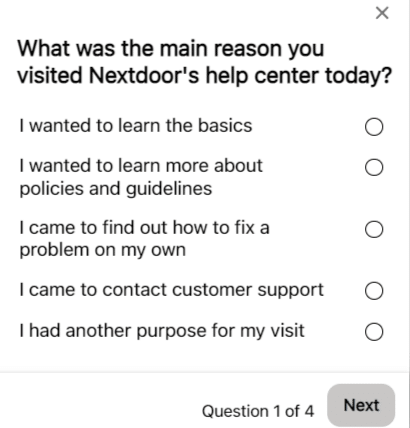
Here’s another example from Nextdoor asking for feedback on their help center experience with a short, four-question survey:

Nextdoor survey

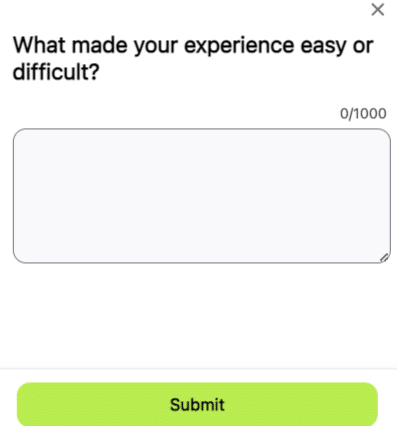
Note that the first question looks a lot like a poll. However, because there are multiple questions and question types, including an open-ended one, this is definitely a survey.

Nextdoor question

To sum up:

  • Use polls to get a quick understanding of your audience’s overall sentiment about a specific question or topic.
  • Use surveys to dig deeper into their motivations, preferences, and opinions.

2. Use polls and surveys formally or informally

You don’t have to use a special tool to create a poll or survey. 

If you need in-depth insights on a deep topic, definitely use a tool and create a formal survey.

However, if you just want to get a general idea of how people feel about something, create an informal, spur-of-the-moment poll or survey. You don’t have to use a tool for this:

  • Ask your followers an open-ended question on social media, or open up a topic for discussion in the comments. Analyze the responses.
  • Create a quick social media poll on Facebook or Twitter.
  • At the end of your email newsletter, ask for replies and feedback to a specific question.

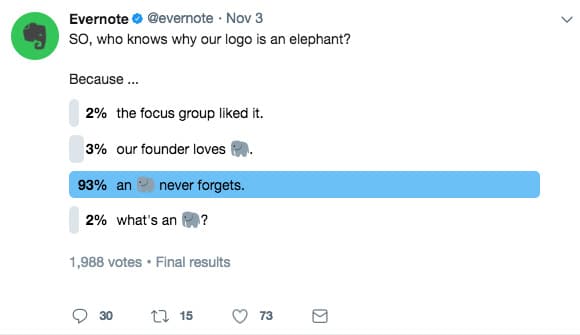
Don’t forget, you can also create quick polls just to engage with your audience and for no other reason. This is an easy but fun way to add to your social media calendar.

Evernote Twitter Poll

3. Set a goal for your poll/survey

What are you ultimately hoping to learn from your poll/survey? What’s the bit of knowledge at the heart of it all that you’re trying to find out?

Similarly, what’s the main assumption you’re trying to prove correct – or disprove?

This is your goal. Especially for surveys, if you have a clear goal before creating one, you’re bound to get better results and stronger insights.

4. Ask the right questions

There’s an art to writing and formulating survey questions.

The way you phrase a question can completely change the type of answers you’ll get.

For example, take these two questions. They both ask for an opinion on essentially the same thing but will elicit completely different responses:

  • Open-ended question (literally any answer is possible): What do you think of our content?
  • Closed question (the possible responses are narrowed): Overall, how helpful do you find the content on our blog? Rate from 1-10.

Now, there’s a time and a place for open-ended questions. Various answers and opinions can be enlightening – as long as you have the time and resources to sift through them all.

Generally, if you want to keep things simple and easy to sort/analyze, ask closed questions with only a select number of possible answers.

Here is a great guide to writing useful survey questions that will give you clear, unbiased answers.


Get the daily newsletter search marketers rely on.


How to use the information gleaned from polls and surveys to create great content

Now, how do you use polls and surveys to inform content creation?

In a nutshell: Use polls and surveys to directly ask a large chunk of your audience what they want from your content. Doing this in various ways will yield lots of topic ideas.

Finally, don’t forget that your survey itself could be the star of your next content piece.

Let’s break it all down.

Find out what topic is the most interesting

This is one of the quickest and easiest ways to use polls to create content.

Let’s say you’re stuck deciding between three different topics for your next blog post. You’re not sure which one your audience will be interested in most.

So, ask them! Set up a quick poll and let your audience vote on the topic they’d be most interested in. The winner is the one you’ll write about next.

Plus, you can use this knowledge to inform more content topics later. Are there any related topics to address? Your audience would probably find these interesting, too.

Discover your audience’s most pressing challenges and address them in your content

Deep audience insights about their toughest obstacles can be great fodder for content.

For example, a survey can help you pinpoint the biggest challenges they face that relate to your business or what you sell. These challenges can be broken down into smaller chunks and addressed with content.

Imagine you’re a business consultant and identify that your audience struggles with business planning. You could break that topic into smaller chunks, each a topic for a blog post (start-up costs, researching the market, figuring out licenses and registration, setting up bookkeeping, etc.).

You could also create an ultimate guide to business planning and go through all the details while linking to your sub-topic pieces.

Your audience’s pain points are a great starting place for brainstorming content topics. Surveys are the answer to find those pains and hear them described in your audience’s own words.

Gather keywords for content from their responses

This is one of the perks of including open-ended questions in your surveys (and generally asking for feedback):

You’ll get written responses in your audience’s own words, with terms and key phrases they regularly use in their vocabulary when discussing your industry.

These are gold mines for keywords. 

  • Look for repeated phrases that have significance to the larger topic.
  • Look for unique turns of phrases or alternate ways of phrasing common terms.
  • Look for trends in how your audience phrases topical terms – are they all referring to something in the same way or using similar wording?

Record your analysis in a list for later research and insertion in your content.

Create an original research report

Depending on your survey’s depth, accuracy, and sample size, you could turn the results into a compelling research report on a specific topic.

If this is your goal from the outset (to use your survey results to create content), ensure you have a good grasp of survey planning, design, and analysis.

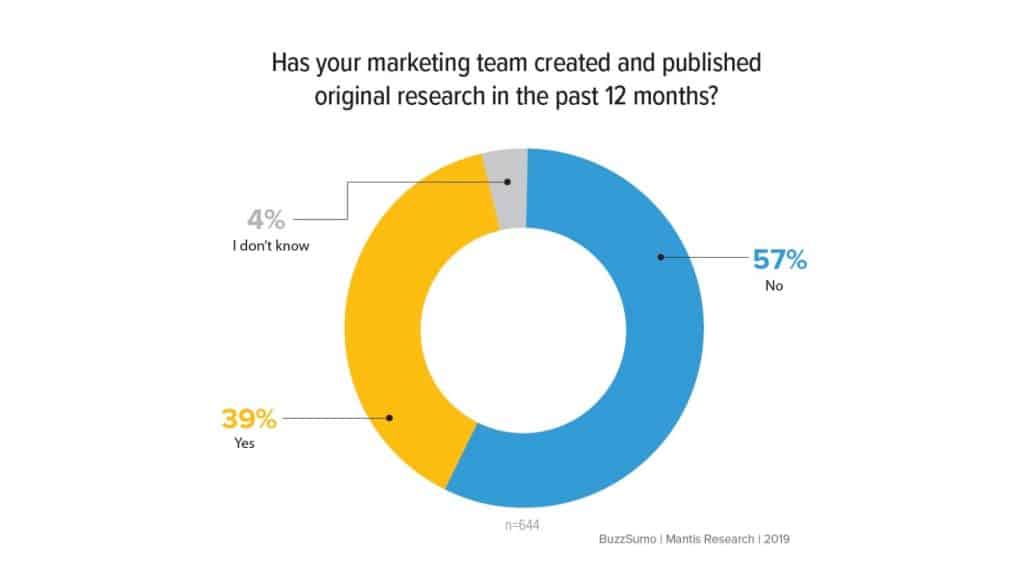
Remember that few brands do original research because it’s a time-intensive process requiring skills to execute well. But when it’s done right, you can expect incredible results (original research reports are link magnets!).

Original research content

If you’re interested in this route, read this Orbit Media guide to using original research in your content.

Collect new content topic ideas

Sometimes, the simplest survey will generate the most useful results. Hence: Ask your audience what types of posts they’d like to see on your blog.

You can conduct this survey in a simple post on social media with one open-ended question (“What kind of content topics would you like to see on our blog?”). Ask for ideas and suggestions in the comments. 

You can also pose this question at the end of blog posts and emails. It’s simple and quick, and you’ll likely get varied responses that inspire many new ideas.

Polls and surveys: The unsung heroes of content creation

Now that you know how much potential exists inside a single poll or survey, ignoring them as tools in your content marketing would be silly.

A well-crafted poll or survey can bring surprising results, including a direct line to your ideal customer’s thoughts about your niche and brand.

One survey alone – or one well-timed, well-worded poll – can give you fodder for an enormous amount of content. So what are you waiting for?


Opinions expressed in this article are those of the guest author and not necessarily Search Engine Land. Staff authors are listed here.


Related stories

New on Search Engine Land

@media screen and (min-width: 800px) { #div-gpt-ad-3191538-7 { display: flex !important; justify-content: center !important; align-items: center !important; min-width:770px; min-height:260px; } } @media screen and (min-width: 1279px) { #div-gpt-ad-3191538-7 { display: flex !important; justify-content: center !important; align-items: center !important; min-width:800px!important; min-height:440px!important; } }

About the author

Julia McCoy

Julia McCoy is the founder of Content Hacker, 7x author, and a leading strategist around creating exceptional content and brand presence that lasts online. At 19 years old, she used her last $75 to build a 7-figure writing agency which she sold ten years later. In the 2020s, she’s devoted to teaching founders and marketers the strategy, skills, and systems they need to build a business through inbound content, so they can create more lasting impact in the world.

https://searchengineland.com/polls-survey-great-content-407960


Google no longer requires video descriptions as part of structured data

Adding a description to your videos in structured data is no longer required – but Google still recommends doing it.

As a result of this change, Google Search Console won’t report errors for missing description property items.

Structured data change. Google moved the “description” property from “required” to “recommended” in the structured data documentation. You can see that here.

The description of the video is used to help Google understand the video, but it is no longer a requirement for video structured data.

Search Console change. The description property is no longer required for Video structured data items, Google wrote here, adding “it’s still strongly recommended to help Google better understand the content of your video.”

Missing description issues will no longer appear as “critical issues” in that rich results report. If you haven’t been using descriptions for your video structured data, you may see an increase in the number of valid Video structured data items.

Why we care. This should make it easier for you to publish video structured data and have Google pick them up as rich results. Your video thumbnails may show up for more videos and you may see a higher click-through rate from those search result snippets in Google Search.


Related stories

New on Search Engine Land

@media screen and (min-width: 800px) { #div-gpt-ad-3191538-7 { display: flex !important; justify-content: center !important; align-items: center !important; min-width:770px; min-height:260px; } } @media screen and (min-width: 1279px) { #div-gpt-ad-3191538-7 { display: flex !important; justify-content: center !important; align-items: center !important; min-width:800px!important; min-height:440px!important; } }

About the author

Barry Schwartz

Barry Schwartz a Contributing Editor to Search Engine Land and a member of the programming team for SMX events. He owns RustyBrick, a NY based web consulting firm. He also runs Search Engine Roundtable, a popular search blog on very advanced SEM topics. Barry can be followed on Twitter here.

https://searchengineland.com/google-no-longer-requires-video-descriptions-as-part-of-structured-data-408201


AI in search: Insights from Bing’s Fabrice Canel

I recently connected with Fabrice Canel, a 26-year search veteran at Microsoft and principal product manager leading the team crawling, processing and indexing at Bing.

Canel offers insights into the state of artificial intelligence in search and the integration of chat experiences in the new Bing. 

Can you discuss your most recent announcements with Bing Chat?

Fabrice Canel (FC): In February 2023, we introduced the world to the all-new AI-powered Bing and Microsoft Edge, your copilot for the web. Since then, more users have been using Bing than before, and we recently hit 100 million daily users and 100 million chats. 

We then enabled the new AI-powered Bing in Windows, Skype, Edge mobile and Bing mobile, including voice access.

In recent weeks, we’ve added various ways to interact with new AI-powered experiences that extend these capabilities to millions of additional people across devices and around the globe.

  • Bing Image Creator offers the ability to create images with your own words, enabling new AI-powered visual Stories allowing to explore topics that interest Bing customers with facts, image-based timelines, polls, actions, and related topics, 
  • AI-generated stories provide Bing customers with multiple ways to consume bite-sized information – through text, images, video, and audio,
  • AI-generated Bing Knowledge Cards help Bing customers explore topics that interest Bing customers with facts, image-based timelines, polls, actions, and related topics.
  • Another way to access and interact with the new Bing is by enabling it in the SwiftKey keyboard app, which puts the Bing AI experience one touch away from any iOS or Android mobile experience that supports a third-party keyboard. You can see the full announcement here. (Author’s note: Bing acquired SwiftKey in 2016.)

Can you discuss the thoughts behind integrating Chat experiences into Search (philosophy, expectations)?

FC: Let’s go behind the scenes. I want to share a little bit more about the new Bing and how it came to be. 

Next-generation model. The new Bing is running on a new, next-generation large language model customized specifically for search. It takes key learnings and advancements of past models and is even faster, more accurate and more capable. In short, it is much more capable of synthesizing, summarizing, chatting and creating.

Microsoft Prometheus model. We have developed a proprietary way of working with our next-generation model to best leverage its power.

We call this collection of capabilities and techniques the Prometheus model. This combination gives Bing customers more relevant, timely and targeted results, with improved safety.

When we had a breakthrough in large language models (LLMs), much like other LLMs, it was trained with data through a given point in time, so we thought that we could make the user experience richer, more relevant, and more accurate by combining it with the power of Bing’s back-end.

To be more concrete, we developed a proprietary technology called Prometheus, a first-of-its-kind AI model that combines the fresh and comprehensive Bing index, ranking, and answers results with the creative reasoning capabilities of most-advanced models. 

Prometheus leverages the power of Bing and language models to generate a set of internal queries iteratively through a component called Bing Orchestrator. It aims to provide an accurate and rich answer for the user query within the given conversation context. All within a matter of milliseconds. We refer to this Prometheus-generated answer as the Chat answer.

Selecting the relevant internal queries and leveraging the respective Bing search results is a critical component of Prometheus since it provides relevant and fresh information to the model, enabling it to answer recent questions and reduce inaccuracies – this method is called grounding.

Put another way, the model reasons over the data provided by Bing; hence, Bing data ground it via the Bing Orchestrator. 

The diagram below illustrates how Prometheus works at a high level.

Prometheus

The last step is when Prometheus attaches relevant Bing search answers, such as weather, stock, sports, news, and so on, to the Chat answer to provide a richer and more engaging user experience that further leverages the power of Bing. 

Thanks to the Bing grounding technique, Prometheus is also able to integrate citations into sentences in the Chat answer so that users can easily click to access those sources and verify the information. 

Sending traffic to these sources is important for a healthy web ecosystem and remains one of our top Bing goals. This matters to us because there won’t be a web ecosystem if we don’t send traffic to the people creating the content. People are investing in content for a reason, and if they don’t get rewarded, they’ll stop doing so.

Applying AI to the core search algorithm. We’ve also applied an AI model to our core Bing search ranking engine, leading to the largest relevance jump in two decades.

This AI model makes even basic search queries more accurate and relevant. The new models improved our understanding of documents on the internet and better understanding of how to match those documents up with user queries.

New user experience – Merging Search and Chat. We reimagined how Bing customers interact with search, browser and chat by pulling them into a unified experience. This will unlock a completely new way to interact with the web.

While Prometheus is a remarkable, pioneering AI-based innovation from a user experience perspective, it was unclear how we should integrate its capabilities into Bing. There were two main points of view:

  • Some in our team felt that search is such an ingrained habit that we needed to keep the UX like today’s web search and add the Prometheus-powered Chat answer on the main UX. Just like any other answer, the Chat answer would earn its place based on its relevance to the query.
  • Others in Bing felt that this was an opportunity to change the search paradigm from the classic web and answers results to a new interactive, chat-based way of searching.

Both schools of thought were partially correct, yet neither had the complete picture.

The team advocating for classic search generally used navigational queries to defend their point of view.

The team pushing for the conversational approach would present research-like search sessions such as shopping or travel. I plotted their queries in a graph below to illustrate this observation.

Bing Search vs Bing Chat - use cases

It then became clear that some queries would perform better in the classical or Search mode while others would do better in a conversational or Chat mode.

Also, some users may prefer one over the other, depending on the query. Therefore, the ideal Bing search product must smoothly transition between Search and Chat modes based on the user’s intent and preference. 

Our design team took on the challenge and, after multiple iterations, developed a new UX that unified Search and Chat in a single interface. Users could easily switch back and forth by clicking on UX elements on the page or simply scrolling or swiping up and down.

This product or UX innovation is arguably just as important as the Prometheus technology to ensure people can intuitively use the product to its full potential.

I feel that UX and SEO nearly always have the same goals these days. What are your thoughts on that?

FC: I agree. It’s important to understand what you want a user to do when they come to one of your webpages.

You should design your webpages to do that well. Destination UX also matters for search engines. Relevance is only a part of the equation.

If they come to your site and are really interested in converting, but they don’t because of a problem with your site, that’s a bad experience for the search engine, too. 

Google has its E-E-A-T standards, and the Bing equivalent of E-E-A-T is very similar. It’s not just about the content itself. Users want to get actions done, and we want to rank pages higher that help them do that.


Get the daily newsletter search marketers rely on.


Given the potential for errors, how would Bing advise people to use the output from Bing Chat?

FC: It’s hard to believe It’s been just over two months since we released the new AI-powered Bing and Edge to the world. We have learned a lot and shipped several improvements in that time.

We are delighted by the virtuous feedback cycle and iteration driving strong Bing improvements of our models and the experience. 

For instance, we have introduced the ability to toggle the tone of chat between:

  • Precise, which focuses on shorter, more search-focused answers.
  • Creative, which gives responses that are longer and more descriptive.
  • The middle setting, Balance, is somewhere in between. 

Bing customers will notice a color change in the UX between purple, blue and green, depending on which is selected. Our goal is to let Bing customers decide on the type of chat behavior that best meets their needs. We’ll continue to tune this experience based on feedback.

At Bing, we’re committed to delivering the best possible result. If you ask Bing Chat if the Earth is flat it will tell you that Earth is not flat, even if there is a lot of misleading content online on this topic. 

We have made huge investments in AI because we’re optimistic about what it can do to help people, industry and society.

We’re committed to bringing technology and people together to realize the promises of AI responsibly. Feedback and data will help to improve the quality of the answers. Keep your feedback coming.

Should people use Bing Chat to create and publish content without editing it?

FC: We do our best to find the best content. 

Are we there yet? No, we are not perfect yet. No one is. 

Will we be someday? Maybe. Remember that it’s a tool, and this problem is harder than you might think. 

For example, sometimes there are multiple conflicting answers from highly reputable websites. It can be hard to figure out which one is wrong.

I went through this exercise recently trying to answer a question on a complex math geometry problem for my daughter, and I found two different answers from respected experts. One was right, but it took me 1 to 2 hours to figure it out. Even experts make mistakes.

How does Bing Search’s usage compare with Bing Chat’s usage for those that have access to it?

FC: It’s still incredibly early, we released only two months ago, and most Bing customers are experiencing this ability to chat with a search engine for the first time in their life. They are discovering and learning. They are finding value in having search, chat, answers, and creation capabilities all in one experience. 

There are now more than 100 million daily active users of Bing. New scenarios like chat drive engagement, including over 100 million chats.

Of the millions of users in Preview, one-third are new to Bing, creating net-new opportunities for publishers and webmasters. This is still early data, but the signs are encouraging.

For SEO, as it is still early, my recommendation is to stick with the same SEO playbooks as before.

But please keep track of our communication and monitor data to make necessary adjustments as the usage of the new Bing continues to increase, transforming how people search.

In the coming weeks, we will start reporting Bing Chat clicks and impressions on the Bing Webmaster Tools website and Bing Webmaster Tools API. 

Can you discuss the importance of data freshness? 

FC: The recent breakthrough in LLMs is great, but these models are trained with data through a given point in time. What’s special at Bing is that you benefit from the LLMs and the power of Bing Search’s back end.

This means that Bing Chat contains content published seconds ago online. You can Bing Chat what’s happening today – that’s happening right now.

Freshness matters a lot these days, especially for the younger generation. I found it fascinating to see my kids using Bing Chat to learn more about recent events. Bing can handle these types of queries well, even in Bing Chat, because it’s built on top of the Bing index.

One area where people spend a lot of time is on news-type events, including things like celebrity news. People spend a lot of time on things that are happening right now.

Can you provide an overview of what IndexNow is?

FC: IndexNow is an easy way for website owners to instantly inform all search engines about the latest content changes on their websites.

In its simplest form, IndexNow is a simple ping so that search engines know that a URL and its content have been added, updated, or deleted, allowing search engines to reflect this change in their search results quickly.

I find it interesting that you ask this question and speak about IndexNow in the context of Bing Chat which leverages the best-in-class AI models. 

While AI is great in helping retrieve the best content online and to see what’s changed on a website, we simply don’t know with 100% precision if you have added, modified or deleted content on your site. But you know that with 100% precision, or at least your CMS knows that. 

Instead of repeatedly crawling to discover if your content has changed, we provide webmasters the ability to ask search engines crawler to visit to collect the latest content changes.

Since we enabled the IndexNow protocol in the Fall of 2021, the adoption of IndexNow has continued to grow.

Today, more than 20 million websites publish over 2.5 billion URLs to the IndexNow API daily. This month, IndexNow attributed to 10% of all new URLs clicked in web search results.

It’s also great to see more search engines, content management systems (i.e., Wix), and top websites adopting IndexNow. We target that more the 50% of the web will adopt IndexNow within two years. 

Why is crawling so complex? Just how large is the web?

The true size of the internet is infinite. Every day we discover more than 70 billion distinct URLs. There is so much spam and duplicate content.

Spammers grab domains and generate hundreds of subdomains. No search engine communicates on index size anymore because it’s not a good measure of quality. 

The big issue is how you navigate through all the low-quality content to index what matters. To make this easier, we need webmasters to help guide search engines to the real stuff. The best way to do this is with a combination of IndexNow plus XML sitemaps. This is a good setup for all search engines.

How much traffic does Bing anticipate will go to websites in the new Bing Chat model?

FC: In the next few weeks, we will start reporting Bing Chat clicks and impressions in Bing Webmaster Tools so that each website owner can compare them to Bing Search pages.

Search engines have played a role in helping people find the content they want. The new Bing is helping to better address people’s search needs with new capabilities like chat, answers, and content creation. 

Our goal is to satisfy our Bing users and drive more traffic to publishers in this new world of search. It is a top goal for us, and we measure success partly by how much traffic we send from the new Bing/Edge. 

The early progress is encouraging. Based on our data from the preview, we are driving more traffic from all types of users. We have brought more people to Bing/Edge for new scenarios like chat and are seeing increased usage.

Then, we have uniquely implemented ways to drive traffic to publishers, including citations within the body of the chat answers linked to sources and citations below the chat results to “learn more” with links to additional sources. 

We enable an expanded hover experience where hovering over a link from a publisher will display more links from that publisher, giving the user more ways to engage and driving more traffic to the publisher’s website.

We are also listening, and we’re hearing positive feedback as we look for opportunities to maximize these new experiences for the entire ecosystem. 

How does one create content likely to be cited by Bing Chat? 

FC: With the release of the all-new AI-powered Bing and Microsoft Edge, we have enhanced our Bing Webmaster Tools Guidelines to support the experience.

We listed that ranking within Bing Chat generally relies on the same parameters as the main web search results page.

So, since this is still early at this point, I recommend sticking with the same SEO playbooks as before, and most of the recommended playbooks are listed in our Bing Webmaster Tools Guidelines.


Opinions expressed in this article are those of the guest author and not necessarily Search Engine Land. Staff authors are listed here.


Related stories

New on Search Engine Land

@media screen and (min-width: 800px) { #div-gpt-ad-3191538-7 { display: flex !important; justify-content: center !important; align-items: center !important; min-width:770px; min-height:260px; } } @media screen and (min-width: 1279px) { #div-gpt-ad-3191538-7 { display: flex !important; justify-content: center !important; align-items: center !important; min-width:800px!important; min-height:440px!important; } }

About the author

Eric Enge

Eric Enge is President of Pilot Holding. Previously, Eric was the founder and CEO of Stone Temple, an award-winning digital marketing agency, which was acquired by Perficient in July 2018. He is the lead co-author of The Art of SEO, a 900+ page book that’s known in the industry as “the bible of SEO.” In 2016, Enge was awarded Search Engine Land’s Landy Award for Search Marketer of the Year, and US Search Awards Search Personality of the Year. He is a prolific writer, researcher, teacher and a sought-after keynote speaker and panelist at major industry conferences.

https://searchengineland.com/ai-search-bing-fabrice-canel-406520


Bing Chat available to more users, gains more visual answers, chat history and third-party developer capabilities

Microsoft is now rolling out its new Bing Chat to all users who download Microsoft Edge, there is no more waitlist. Over half a billion chats were conducted on Bing Chat since it launched 3-months ago, Yusuf Mehdi, Corporate Vice President, said.

What is new

There are four main points of what is new with Bing Chat:

  • Removal of the waitlist for Bing Chat by going from a “Limited Preview” to an “Open Preview”
  • Gaining more visual answers for Bing Chat with rich images and videos
  • Offering a multi-session experiences with new chat history and persistent chats within the Edge browser
  • Exporting and sharing Bing Chats
  • Developer access to build third party apps on top of Bing Chat

Let’s dig in a bit more into these changes.

Bing Chat waitlist is gone

Bing has moved from a “Limited Preview” to an “Open Preview,” removing the “waitlist” to access Bing Chat. You still need to use Microsoft’s browser, Edge, and/or the Bing mobile app to access Bing Chat.

You also need to be logged in to your Microsoft account while on Bing Chat within the Edge browser for it to work.

Bing Chat more visual

Bing has updated the answers within Bing Chat to be more visually appealing by improving the formatting and layout, adding more rich images and rich videos, and also by adding charts and graphs when relevant.

Here is a screenshot of the new more visual look for Bing Chat on mobile:

Visual Pop Still 800x450

Also, Bing Image Creator is available in all languages, which means over 100 different languages, talk about getting more visual:

Image Creator Still 800x450

Microsoft also redesigned Edge to show chats in a better and more visual format. This includes streamlined look, rounded corners, organized containers and semi-transparent visual elements, the company said. Here is what that looks like:

Edge Actions Still 800x450

You will also be able to ask Bing Chat for answers by uploading images as part of your chat. After you upload an image, Bing Chat can search the web for related content.

In addition, Bing Chat in Microsoft Edge has improved summarization capabilities for long documents, both in PDF and HTML formats.

Bing Chat multi-session experiences

Microsoft has been talking about adding chat history for some time now and now Microsoft is rolling it out for Bing Chat. You can use Bing Chat and be able to pick up where you left off, then you can return to previous chats in Bing’s chat history.

There is a “recents” tab on the right side to pickup where you left off. You can also see a “saved” tab for chats you saved for later.

Chat History Still 800x450

You can even go from the Bing Chat interface into the Edge sidebar interface, so you can browse the web and continue your chat. The screenshot below shows that in action:

Edge Persistent Chat Still 800x450

Export and share your chats

Microsoft is also adding the ability to export and share your chats from Bing Chat or Edge sidebar. You will be able to share your chats on social media or move them into tools like Microsoft Word, if you so desire.

In this screenshot, you can see the export and share icons at the top right of the chat window:

Export Still 800x450

Third-party developer access

Microsoft said soon, developers will be able to build third-party plug-ins into the Bing chat experience. This is also something Bing hinted was coming weeks ago. In the screen shot below, you can see an example of OpenTable helping you find and book a reservation with a restaurant. This is something OpenAI’s ChatGPT already supports.

Bing Actions Still 800x450

Why we care

Watching how Microsoft continues to evolve these AI chat features is exciting. Watching how it may shape the future of a new search experience is even more exciting.

We all know Google I/O is around the corner, and seeing Microsoft and Google go at it with these fast-paced emerging technologies is thrilling.


Related stories

New on Search Engine Land

@media screen and (min-width: 800px) { #div-gpt-ad-3191538-7 { display: flex !important; justify-content: center !important; align-items: center !important; min-width:770px; min-height:260px; } } @media screen and (min-width: 1279px) { #div-gpt-ad-3191538-7 { display: flex !important; justify-content: center !important; align-items: center !important; min-width:800px!important; min-height:440px!important; } }

About the author

Barry Schwartz

Barry Schwartz a Contributing Editor to Search Engine Land and a member of the programming team for SMX events. He owns RustyBrick, a NY based web consulting firm. He also runs Search Engine Roundtable, a popular search blog on very advanced SEM topics. Barry can be followed on Twitter here.

https://searchengineland.com/bing-chat-available-to-more-users-gains-more-visual-answers-chat-history-and-third-party-developer-capabilities-406909


YouTube has a new interface, and not everyone is excited about it

Following a significant overhaul last year, it appears that YouTube may be undertaking another visual transformation, this time targeting the video page, which has remained relatively unchanged in recent years.

The change was noticed and posted on Twitter by @XenoPanther.

The new design. At present, the web-based video page features a video window accompanied by the title and other details/descriptions displayed below it. However, with the redesign witnessed by a select few over recent weeks, this information is now situated to the right of the video and appears much narrower. Buttons for likes, dislikes, sharing, and more are located underneath, along with a selection of five or so recent comments.

This creates an interface that closely resembles a mobile layout. Consequently, the “Up Next” videos and additional recommendations no longer appear on the right edge of the screen. Instead, they are presented in a grid at the bottom, mirroring the appearance of the YouTube homepage. Users might even encounter a “Latest YouTube posts” section while scrolling.

FvHtLgoXsAEM3Un 800x450

While the experience of watching a video remains largely unaffected, the relocation of comments and other details to the periphery constitutes a significant change in the interface. It is evident that the redesign’s primary objective is to emphasize other videos for viewers to watch, using much larger thumbnails. This provides a more relaxed viewing experience, although it remains uncertain whether the redesign strikes the right balance between information, comments, and recommendations.

Not everyone is thrilled. The angriest comment comes from u/Psyren1317, who replied “Holy hell is this new layout disastrous,” before saying “Whoever designed this mess should be fired. Yikes.” 

Redditor u/DaGrumpyOne lived up to their username, replying “It’s unusable now.” While u/texaslegrefugee decried the change saying “The entire “library” experience is absolutely terrible. It’s as over-designed as it can get, and nothing but confusing chaos. It takes forever to find anything.”

“Yo @YouTube The new video UI layout is absolutely awful. The massive thumbnails from other videos on the bottom of my screen are so distracting. Literally, no one asked for this.”

Why we care. Naturally, any modifications to the interface can potentially influence watch time and user engagement, ideally in a positive manner. Advertisers should be concerned about these changes because an enhanced viewing experience, which encourages users to spend more time on the platform, could lead to increased ad impressions and higher chances of their advertisements being seen by their target audience. Consequently, a well-balanced and captivating interface that seamlessly integrates information, comments, and recommendations can prove advantageous for advertisers, as it can potentially amplify their reach and impact on viewers.


Related stories

New on Search Engine Land

@media screen and (min-width: 800px) { #div-gpt-ad-3191538-7 { display: flex !important; justify-content: center !important; align-items: center !important; min-width:770px; min-height:260px; } } @media screen and (min-width: 1279px) { #div-gpt-ad-3191538-7 { display: flex !important; justify-content: center !important; align-items: center !important; min-width:800px!important; min-height:440px!important; } }

About the author

Nicole Farley

Nicole Farley is an editor for Search Engine Land covering all things PPC. In addition to being a Marine Corps veteran, she has an extensive background in digital marketing, an MBA and a penchant for true crime, podcasts, travel, and snacks.

https://searchengineland.com/youtube-has-a-new-interface-and-not-everyone-is-excited-about-it-406684


GA4 custom funnel reports are here

Custom funnel reports can now be created inside Google Analytics 4 (GA4), allowing you to view the steps you can follow to complete a task and assess the number of users who abandon the process between each step.

How custom funnels work. Custom funnel reports are created using funnel explorations. To build a custom funnel report, you must first create a funnel exploration and save it as a report. Google Analytics then utilizes the exploration as a template for constructing the report. The report is saved in the report library, which contains all the reports within a specific property. From the library, you can easily add the funnel report to their left navigation for quick access.

Prerequisites. To create a funnel report and add it to the navigation, you must have Editor or Administrator privileges.

Creating and adding funnel reports. Creating a funnel report involves opening or creating a funnel exploration, saving the exploration as a report, and providing a name and description for the new report. You can then add the report to your navigation by accessing the report library, editing the desired collection, and dragging the funnel report into the appropriate topic.

Recreating funnel explorations from reports. If the original exploration used for creating a funnel report is deleted, you can recover the exploration by opening the funnel report in the Explore section.

Analyzing the funnel. The analysis includes examining abandonment rates, completion rates, funnel steps, and open and closed funnels. You can also use the table below the bar chart to further analyze data and segment it by dimensions.

Customizing the chart and date range. You can zoom in and out of the bar chart for a more detailed view and adjust the default 28-day date range using the drop-down menu in the top right of the report.

Limitations and restrictions. There are specific limits and restrictions when creating custom funnel reports, such as the maximum number of custom reports per property (200) and certain unsupported conditions for funnel explorations. Additionally, once a funnel exploration is saved as a report, any changes made to the exploration do not affect the report, and vice versa.

Dig deeper. Learn more about custom funnels on the Analytics Help blog.

Why we care. Understanding the paths customers take while interacting with a brand or product allows you to make data-driven decisions for optimizing advertising campaigns. By analyzing user behavior, identifying drop-off points, and pinpointing areas for improvement, advertisers can enhance user experience, increase conversion rates, and ultimately maximize their return on investment.


Related stories

New on Search Engine Land

@media screen and (min-width: 800px) { #div-gpt-ad-3191538-7 { display: flex !important; justify-content: center !important; align-items: center !important; min-width:770px; min-height:260px; } } @media screen and (min-width: 1279px) { #div-gpt-ad-3191538-7 { display: flex !important; justify-content: center !important; align-items: center !important; min-width:800px!important; min-height:440px!important; } }

About the author

Nicole Farley

Nicole Farley is an editor for Search Engine Land covering all things PPC. In addition to being a Marine Corps veteran, she has an extensive background in digital marketing, an MBA and a penchant for true crime, podcasts, travel, and snacks.

https://searchengineland.com/ga4-custom-funnel-reports-are-here-406611


10 ways to build quality backlinks for any website

One of my biggest challenges with designing link building campaigns is that a successful strategy for one website may not work on another.

For instance, the technique for an information-heavy affiliate marketing site may yield a different number of links for an ecommerce product page or localized service pages.

The techniques below can be used for almost any situation, with varying degrees of scale depending on many factors.

But before we get into the strategies, you need to ensure you are using the right one for your company’s situation.

Every website and situation is slightly more unique than the last. These variables can be due to the company structure, overall marketing strategy, or the website’s niche.

Several factors can make one website harder to build links than others.

Below is a list of top questions to help you understand which technique to use and scale based on the website’s current situation.

A litmus test for link strategy

  • How many topics are there to discuss in your niche?
  • What type of website will get the links? 
  • Are specific link building techniques easier or harder to do in your niche?
  • Is your website in a “Your Money or Your Life” niche (YMYL)?
  • How competitive are your keywords?
  • What type of content is currently available? Or what are your content capabilities?
  • Which pages do you want to rank?
  • What are your prospecting and outreach capabilities? Do you have an in-house team, or are you outsourcing to a link building agency?
  • Do you have a following? Will anyone share your content naturally?
  • Are you focused locally, nationally or internationally?
  • Do you have the time and resources to perform the link building strategy?

Asking yourself these questions is the first step before selecting a link building strategy. By understanding these variables, the strategy may yield more links or links to the target website pages.

Out of all these questions, the type of website has the most significant impact on which technique is used. Let’s look more into how to select pages for link building.

Different websites can produce wildly different types of content or need different pages to rank.

Some sites may produce little informational content, like many ecommerce sites, while others build their entire marketing program around informational content production, like educational affiliate sites.

The list of website types below has the most common types of websites.

Affiliate websites

These sites can come in many forms, including blogs, coupon sites, product listicles, product directories, review sites, shopping comparisons and more. Typically, these sites need links to the articles or brand listing pages.

Almost any technique below can be used for affiliate websites but guest posting, resource page links, and competitor link building will be very effective in most niches.

Marketplace or directories

These sites connect buyers and sellers, usually facilitating transactions. Some examples include Etsy, Upwork and Themeforest.

Building links directly to the listing pages or informational articles is possible with the strategies below.

Ecommerce

An ecommerce site will want links to brand, product or category pages to improve ranking. These are one of the most challenging pages to get links for. 

Guest posting, competitor link building, resource pages, image link building, and product samples can build links to almost any page when done correctly. 

But my favorite technique is finding unlinked brand mentions of the site’s products. For example, if an ecommerce site sells Nike shoes, find articles mentioning Nike Shoes and ask for a link. 

However, a direct-to-consumer CPG ecommerce site may have a lot of informational content that can be used for link building.

Consider the skyscraper technique and create content that is designed for link building.

Online training and certificates

These websites can improve enrollment page rankings with links to enrollment pages. These links are difficult to secure, but they use similar techniques to ecommerce.

Universities

Both online and brick-and-mortar universities likely have a lot of authoritative content, some of which professors can write. 

Blogs like to cite reputable sources, a unique angle universities can leverage to secure links. These sites will often have a blog but need links to the program pages.

I’ve found that building links to informational pages and internally linking to the program pages can yield a lot of natural links.

Direct-to-consumer CPG

Consumer packaged goods (CPG) that sell directly to consumers via the website tend to produce content heavily and have an ecommerce section. 

Additionally, they tend to spend a lot of time building brand awareness. 

Strategies like guest posting, unlinked brand mentions, image link building, product samples, and even blogger roundups can yield many links for these brands. 

Informational articles or ecommerce pages are ideal targets for links.

I highly recommend leveraging HARO with a CPG brand.

National with a local focus

A company with a national presence but targets local keywords has unique link building challenges. These sites typically have a page for each location, which is ideal for building links.  

I’ve found great success with travel or even local bloggers finding links to a location page.

However, consider creating long-form content to rank for national keywords and not just focus on local. This will ensure you develop a diverse and natural link profile.

SaaS and tech (B2B or B2C)

A large technology company or startup can find links directly to informational articles, solutions pages, industry pages or informational articles.

Competitor link building, guest posting and resource page links can yield a lot of links to these types of pages. A resource link may go directly to a product or homepage, but they are still excellent links.

Local services

Local businesses tend to have fewer resources to produce content, but a primary focus will mostly be the home, location or service pages. 

Local sites that attend local events are good sources for a few “low-hanging fruit” links.

Still, digital PR, competitor link building and roundup articles for local businesses can secure links for the local market. 

Travel bloggers listing the business’s city on their site can make sense to link to your website on pages about your city.

The strategies below can work for any of the website types listed. However, if the site runs an active content marketing program, specific strategies will work better than others. 


Get the daily newsletter search marketers rely on.


1. Distribute content through established blogger relationships

Since opening my business in 2018, I started building relationships with bloggers.

This approach is focused on email outreach to bloggers, authors, or publishers and then securing links through those relationships. 

An email to someone you know tends to receive a much higher response rate than a cold email, which may receive 1-5% successful response rate.

Successful ways to engage a publisher or author include:

  • Meeting at events.
  • Performing a free broken link analysis of their site.
  • Sponsoring or advertising on the website.
  • Contributing to their community.
  • Sharing an exciting story.
  • Sending free product samples.

A guest post is a technique that can either focus on finding guest posting opportunities for team members or building relationships with existing contributors to a site. 

However, it’s easy to waste time writing articles for low-quality blogs, so ensure you use your time wisely and contribute to high-quality sites.

The easiest way to find guest posting opportunities is to go to Google with the search operator {keyword} intitle: “write for us”/”guest author”/”contributor.” Then go down the list and begin pitching article topics.

Sites that link to competitors but not your site have been one of my go-to strategies for securing links in any niche.

Tools like Ahrefs, Moz, Majestic, and Semrush all have large databases of links. 

Each tool has features that make it easy to enter one or many competitors to get a list of referring domains and links. 

Using one of the tools above, enter a competitor domain, find a list of unique referring domains, use a tool like PitchBox or Buzzstream to find a list of emails, then begin outreach.

Popularized by Brian Dean, this technique involves:

  • Analyzing top-ranking sites for a given keyword.
  • Building content that creates unique value compared to the top-ranking articles.
  • Reaching out to the sites linking to those articles.
  • Asking them to update their link with yours.

First, identify a popular topic, research the best content available, and then create a more comprehensive, up-to-date version.

Finally, connect with bloggers and influencers in your niche to ask for backlinks to your content.

5. Journalist pitching with HARO or #journorequest

Finding journalists and bloggers searching for sources, data, or information for upcoming articles can increase response rates from these campaigns.

Use pitch request lists like Help a Reporter Out (HARO) or #journorequest hashtag on Twitter, develop a pitch deck for a specific subject matter expert at the company, and identify relevant requests. 

After that, you can contact them by email in HARO, comment on the #journorequest tag thread, or reach out directly on Twitter to the writer making the #journorequest.


Get the daily newsletter search marketers rely on.


This approach leverages existing resource pages that list websites, articles, products, or other assets to provide valuable resources for readers.

A simple way to get started is to research using Google, Ahrefs or BuzzStream. 

Use the search operators below, upload to Ahrefs Batch Analysis tool, export the list, filter out low Domain Rating (DR) domains, then upload to BuzzStream to get emails and outreach.

  • “keyword” + inurl:resources
  • “keyword” + intitle:resources
  • “keyword” + intitle:links
  • “keyword” + “useful resources”
  • “keyword” + “useful links” 

Replace “keyword” with your target keyword(s) or niche-related terms.

This strategy is used to create backlinks to a website that already uses imagery from your website but needs to be cited correctly. 

After identifying these images, outreach and request proper citation and a link. This approach works well when a site has a lot of unique images, ideally that are custom created.

Start by doing a reverse image search in Google Images or TinEye and clicking on the image to find the source URL.

Then, upload the site list to BuzzStream to begin outreach or use the forms directly on the site.

8. Universal unlinked mention

Traditionally, the term was “unlinked brand mentions” to explain a process of finding unlinked mentions of the main company’s brand. 

However, I use a broad definition to explain “unlinked mentions” and consider it to be any mention of the company, products/services, competitors’ names, or even topically relevant articles.

Because this modification to the unlinked brand mentions strategy includes many more keywords, almost every website affiliate website, ecommerce selling brands, CPG, Saas, and startups using PR, to name a few.

Having articles with unique statistics will make link building outreach much more effective, but they can also earn links by ranking for keywords with “statistics” or “study” in them. 

Bloggers and journalists are always searching for sources and data to include in upcoming articles, and many start by googling terms like “SEO statistics.” These can secure links without a single email being sent. 

For example, an Ahrefs article about 78 SEO Statistics for 2023 ranks in Google at position 1 for “seo statistics” and has almost 2,000 referring domain links.

Start by keyword brainstorming to create a list of keywords that look like [keyword] + “statistics” or “study.” Then google the keyword and see what type of studies are showing up. 

Analyze the top-ranking articles and either create a roundup of statistics online or perform a new study.

Podcasting is becoming very prevalent, but not all have a website. Find podcasts with websites where they promote or reuse the content in written form. 

Podcasts are great for increasing brand awareness, but the objective is to secure a website link that will drive ranking improvement.

In your selected niche, Google [keyword]+podcasts to find a podcast website, then visit the website to ensure they summarize the podcast episodes in an article. 

From this list, listen to each podcast to understand their angle on the topic. 

Finally, engage with the hosts or other guests on social media and prepare to pitch.

Link building remains essential to a successful SEO strategy for websites in various niches. 

Understand the unique aspects of your website and niche so you can tailor your approach to secure the most effective links. 

The strategies above can be applied to diverse website types, including affiliate websites, ecommerce platforms, universities, and local businesses. 

When you ask the right questions and select the appropriate technique for your website, you can dramatically improve rankings or traffic.


Opinions expressed in this article are those of the guest author and not necessarily Search Engine Land. Staff authors are listed here.


Related stories

New on Search Engine Land

@media screen and (min-width: 800px) { #div-gpt-ad-3191538-7 { display: flex !important; justify-content: center !important; align-items: center !important; min-width:770px; min-height:260px; } } @media screen and (min-width: 1279px) { #div-gpt-ad-3191538-7 { display: flex !important; justify-content: center !important; align-items: center !important; min-width:800px!important; min-height:440px!important; } }

About the author

Kevin Rowe

Kevin Rowe is the Founder of PureLinq, an enterprise link building solution, and an SEO Product Marketer. He has designed and implemented almost every type of link building technique over his 14 year stint in SEO. Since 2009, Kevin has worked on SEO, link building, and advanced analytics programs for enterprise clients like Hyatt Hotels, Kaplan University, Bullet Proof Coffee, VMware, Novartis, Coca Cola, and so much more. After studying at the Park School of Communications @ Ithaca College, he found a passion for content development and messaging which led him to publication in Forbes, Fast Company, Huffington Post, and Search Engine Land.

https://searchengineland.com/build-quality-backlinks-405264


4 performance PR secrets to boost your search visibility

Most SEOs are familiar with the monumental challenge of achieving visibility for competitive keywords.

Google’s Page 1 is often dominated by content from major publishers in the form of bylines and listicles about the best offerings on the {keyword} market. 

You can’t expect to beat Conde Nast, Wirecutter, CNET, et al. 

So how do you join them and leverage the power of those platforms to get your brand some high-powered visibility and third-party credibility? 

This article tackles performance PR trade tips that can give you a hand in landing big placements and reaping discovery and revenue benefits. 

If you want to be a good partner to your media publisher network (which is a good idea for helping you get steady placement opportunities), don’t be afraid to share data you see on trends.  

Our team does significant research to help surface emerging trends for our media partners that will also provide opportunities for our brands. 

For instance, in the early days of COVID-19, we helped get a fitness brand some great placements by letting our media partners know we saw a spike in demand for “at-home fitness equipment” and related keywords.  

Every quarter, we work closely with our brands, our SEO team, and the aforementioned trend resources to develop a new list of keywords in focus. 

We relay those to our top media partners and make suggestions for relevant product placements (and proactive commission structures).

More often than not, those recommendations help us get our brands included. 

Remember, media publishing is as competitive as any other industry, so you’ll tend to reap the benefits of giving your partners intel that will give them a leg up. 

While trend recognition represents a great opportunity for brands and publishers alike, it’s not where you’ll find the bulk of your results from performance PR. 

Typically, our publisher partners will share six-month editorial calendars centered around seasonality and key holidays (e.g., best Memorial Day grill specials, most romantic gifts for Valentine’s Day). 

Those articles are generally evergreen, long-term SEO anchors, meaning the title and boilerplate copy remain the same. They’re simply updated every year, often keeping the same brand list and refreshing the offers and products. 

This makes the bar for inclusion extremely high. A successful placement could last for years. 

When you pitch for inclusion here, ensure you’re putting your best foot forward: top-selling, ultra-relevant SKUs and aggressive commission structures.   

Along with the tried-and-true evergreen content, there can be room to integrate themes into holiday content.

For instance, COVID-era Valentine’s Day content played into the trends of the day, like home cooking and cocktails, which gave liquor brands and meal kits time in the sun.  

Outside the holiday mileposts, there’s always room for other adjustments as trends emerge.

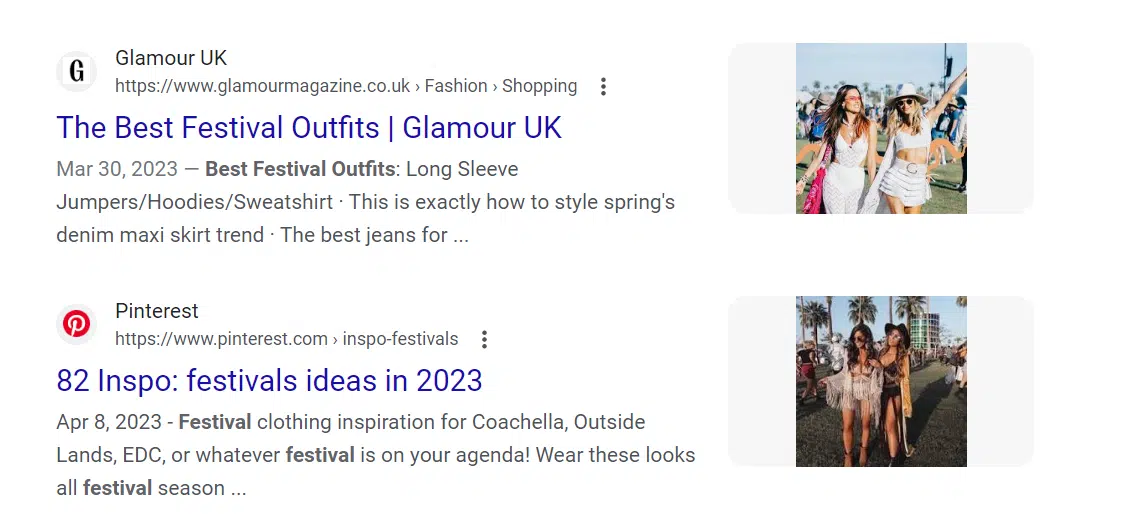
Recently, we researched and found out that festival and concert outfits (for Coachella, Taylor Swift concerts, etc.) were trending. We dug into our brand catalogs and selected glittery, flashy, fun SKUs to fit that trend.  

Sure enough, the combination of trend data, relevant SKUs, and proactive commission structures led to placements on high-ranking listicles like the following (note the original Pinterest inspiration as well): 

Festival trends

Get the daily newsletter search marketers rely on.


Brands and publishers do have some competing interests to be aware of. 

One frequent sticking point is that brands would prefer publishers to point exclusively to their sites for purchasing options, while publishers almost always provide multiple options for purchase.  

No, it’s not ideal for a brand’s Amazon listing to be cited alongside their website.

Still, we’ve heard directly from publishers that Google tends to favor articles with multiple paths to purchase, so they favor the same setup. 

If the choice is between multiple and no listings, we always recommend our brands go with the flow. 

4. Placements can go (far) beyond the SERP 

It’s easy to think of SEO in a bit of a vacuum, but remember: consumers engage with media platforms outside of keyword searches. 

Social media repurposing – featuring the brand in things like Reels and Stories – represents more incremental placements to access with performance PR. Your team should make sure to understand their placement options. 

Of course, you’ll still pay a commission for sales garnered through those listings. But even the most standout SEO teams won’t be able to deliver the organic impact of holistic performance PR campaigns.  

Using performance PR to drive brand discovery and visibility

Combining volume, audience, and trusted third-party credibility creates a huge opportunity for brand/product discovery and instant revenue. 

Given a commission structure that works for your brand’s business model, performance PR represents a highly impactful option to help your brand reach aggressive growth goals – if you know how to build the relationships that open content doors. 


Opinions expressed in this article are those of the guest author and not necessarily Search Engine Land. Staff authors are listed here.


Related stories

New on Search Engine Land

@media screen and (min-width: 800px) { #div-gpt-ad-3191538-7 { display: flex !important; justify-content: center !important; align-items: center !important; min-width:770px; min-height:260px; } } @media screen and (min-width: 1279px) { #div-gpt-ad-3191538-7 { display: flex !important; justify-content: center !important; align-items: center !important; min-width:800px!important; min-height:440px!important; } }

About the author

Kristina Nolan

Kristina Nolan is VP of Media Services at DMi Partners, where she has worked to grow eCommerce, CPG, and a range of B2C brands for over seven years. Kristina’s affiliate chops are bolstered by a background in PR and performance media and a strong track record of partnership growth with top affiliate networks and publishers. Her acumen and insights, as well as her track record of driving profitable growth for her client portfolio and strategic leadership in helping her clients adapt to new consumer behavior during the COVID pandemic, has helped her earn regular speaking opportunities at conferences including eTail, ShareASale’s ThinkTank, and more.

https://searchengineland.com/performance-pr-secrets-boost-search-visibility-404190


ChatGPT fails: 13 common errors and mistakes you need to know

I’ve written about ways to use ChatGPT for SEO and content marketing-related tasks, like keyword research, crafting title tags and local SEO.

I use it at least once daily for a variety of tasks. The more you use the platform, the more valuable it will be to you to understand its limitations.

The founder of OpenAI (the company that built ChatGPT) has called the tool “incredibly limited” and a “horrible product” and has cautioned users about how much they rely on it:

Multiple publications have published content with errors on meaningful YMYL (“Your Money or Your Life”) topics like personal finance and health.

This article discusses the most common technical errors and the frequent mistakes when using ChatGPT and how to address them.

Common ChatGPT errors

ChatGPT errors

If you’ve been using ChatGPT for a “long” time (i.e., since late 2022), you’ve probably seen the prompt below at some point.

"ChatGPT is at capacity" message

Obviously, a new software product in an emerging technology field that’s massively popular will run into problems.

If you’re making ChatGPT an integral part of your daily workflow, knowing the common issues you may encounter is helpful.

ChatGPT also has issues familiar to any website, such as 404 not found errors, 5xx internal server errors, 403 access denied errors, and Cloudflare errors like 1020 and 524 errors.

Often these can be fixed by clearing your cache, using (or turning off) a VPN, or ensuring you’re typing the web address correctly.

And there are also several errors more specific to the platform:

1. API issues

Often, users may hit specific character limits, token limits, or limits in functionality with the ChatGPT API.

2. Character limits

There are limits to how many characters you can enter into ChatGPT and how many characters ChatGPT responses can be.

They vary depending on your version (e.g., GPT-3.5 has an input limit of 2048, and GPT-4 is 4,096) and in the web interface versus the API.

3. Connection time out on long responses

If ChatGPT is processing a long and complex response, it will sometimes just time out.

You might see this when asking the platform to perform functions like writing code or analyzing and responding to long inputs.

4. Unfinished responses

Not an error per se, but frequently, if you ask ChatGPT to write code or a long text, it will just stop mid-way.

You can type continue, and it will finish within the next few prompts in these instances.

5. Limited messages

ChatGPT, at the time of writing, limits the number of messages you can use per time period, even for paid accounts. 

Similarly, there is specific rate-limiting for different GPT versions, OpenAI tools, and account types.

6. Login issues

Depending on the level of access required or session duration. ChatGPT may log you out, or you may not have access to certain features with certain account statuses.

Most of these issues can be resolved by:

  • Reworking your prompts to fit into character limits.
  • Making sure you’re logged in and can access the functionality you’re attempting to use with your account level.
  • Asking ChatGPT to regenerate responses.
  • Starting a new chat.

Get the daily newsletter search marketers rely on.


Common ChatGPT mistakes

ChatGPT mistakes

ChatGPT makes many mistakes, including:

  • Getting verifiable facts wrong.
  • Detailing a process it “supposedly” used to generate an answer that is impossible given the platform’s limitations.
  • Generating broken code.
  • Broken formatting or ignoring instructions in the output.
  • And more.

Other users have detailed instances of the platform lying to get a CAPTCHA solved and issues with simple math problems related to age and distance.

Some of this has improved with GPT-4, but not all. Here is a prompt and output using the latest version of ChatGPT:

ChatGPT distance mistake

While it’s fun to do “gotcha” prompts and catch ChatGPT saying incorrect or goofy things, it’s more beneficial to be aware of areas where ChatGPT can be wrong – the “categories of wrongness,” if you will.

Understanding these will make you both a better prompt engineer and output editor. Let’s walk through the most common categories of mistakes I know.

7. Confident but wrong

The “hallucination” issue is a significant problem for ChatGPT and other generative AI solutions.

ChatGPT will answer all kinds of questions that it doesn’t know the answer to in a compelling way. That doesn’t make the answer right.

The example screenshot above shows that it doesn’t use any qualifying language or hedge at all. You get a decisive answer without equivocating.

8. Not understanding word and character counts

ChatGPT is terrible at estimating and understanding character counts in any precise way. 

If you’re doing work related to SEO and content, this is a major limiting factor. You might be looking to write title tags, meta descriptions, or content where meeting a word count is necessary:

ChatGPT character count mistakes

This is actually pretty close. I’ve had instances where the tool was much farther off.

9. Mistakes in reasoning

I searched for “logic puzzles” and grabbed the first list of “easy logic puzzles” I found.

ChatGPT got the first three puzzles correct, then the fourth one wrong:

ChatGPT logic puzzle mistakes

10. Coding errors

There are several real-life examples now of people using ChatGPT to build websites, apps and browser extensions or troubleshoot coding issues.

That said, ChatGPT can also generate code that doesn’t work. I’ve encountered the following issues when using ChatGPT to help code:

  • The code just doesn’t function properly. (Actions not being executed when users use a tool.).
  • Calculations built by ChatGPT’s code being incorrect.
  • Using the wrong API. (Often, it’s because it isn’t aware of the API you want to use because the API came out or was updated after the training data period for GPT, which ended in late 2021. Despite this, ChatGPT doesn’t let you know.)
  • Ignoring or “forgetting” instructions and project requirements or constraints.

Again, it’s imperative you always check the code you’re deploying carefully and test the output of anything ChatGPT helps with. 

Some users have also reported that GPT- 4 or even legacy mode (rather than the new default, Turbo) leads to better results for coding tasks.

11. Outdated information

The training data for ChatGPT may be updated at some point and various plugins and tools have started to integrate web crawling and real-time data.

Still, the web version of ChatGPT currently can’t crawl the web and isn’t aware of information from before late 2021.

This is important, particularly when coupled with the “confident but wrong” issue.

12. Short memory

There is a limit to how many characters within a chat ChatGPT will “remember” so it will frequently make mistakes due to losing the context of your early prompts or its early answers.

13. Formatting mistakes

As with coding, if you ask ChatGPT to perform functions like creating a table or formatting text in a certain way, it will sometimes make mistakes or ignore specific instructions.

Avoiding and addressing ChatGPT’s mistakes

So how can you get the most out of ChatGPT while dealing with the platform’s issues and limitations?

Focusing on these key areas can help you avoid much of the potential downside of using ChatGPT in your day-to-day tasks:

Be aware of limitations

Staying up to date with specific product limitations like (i.e., character limits for prompts and responses, the date of training data for GPT, etc.) will help you craft prompts that generate good responses and QA outputs better. 

OpenAI does a good job of updating this information with new releases. Some items here are things they’ve explicitly said they are addressing.

Review and edit outputs carefully

This should be fairly obvious, but you must carefully edit any text and QA code before publishing or deploying it. 

Due to how convincingly confident ChatGPT can be, I’d strongly recommend having a domain expert review content and code before it’s deployed. 

It’s relatively easy to be fooled by some of the content and assertions put out by ChatGPT, especially if a topic isn’t your area of expertise.

But if you have deep experience on a topic, it’s easier to catch misleading or inaccurate statements.

Layer tools and processes on top of the API 

OpenAI has rolled out plugins and made a ChatGPT-specific API available. 

You can address some of the platform’s limitations by using different tools that others create or by creating some yourself.

Now that you know the potential pitfalls of ChatGPT, you can go on and establish guardrails for using the tool – leveraging its benefits while avoiding many of the negatives.


Opinions expressed in this article are those of the guest author and not necessarily Search Engine Land. Staff authors are listed here.


Related stories

New on Search Engine Land

@media screen and (min-width: 800px) { #div-gpt-ad-3191538-7 { display: flex !important; justify-content: center !important; align-items: center !important; min-width:770px; min-height:260px; } } @media screen and (min-width: 1279px) { #div-gpt-ad-3191538-7 { display: flex !important; justify-content: center !important; align-items: center !important; min-width:800px!important; min-height:440px!important; } }

About the author

Tom Demers

Tom Demers is the co-founder and managing partner of Measured SEM and Cornerstone Content. His companies offer paid search management, search engine optimization (SEO), and content marketing services to businesses of varying sizes in various industries.

https://searchengineland.com/chatgpt-fails-errors-mistakes-400153