How to Retarget People Who Click on Curated Content

Shares 302

social media how toDo you share curated content on social media?

Wondering how to retarget people who click on the third-party content you share?

In this article, you’ll discover two ways to retarget people who click links to content you share, whether that content is yours or someone else’s.

How to Retarget People Who Click on Curated Content by Mike Allton on Social Media Examiner.

How to Retarget People Who Click on Curated Content by Mike Allton on Social Media Examiner.

What Is Link Retargeting?

Retargeting gives you the power to keep your brand top of mind for consumers, even when they’re researching other options. Link retargeting is a new concept that takes retargeting to another level.

It works like this: People who click a short link you share via email, a social media post, or elsewhere can be shown retargeted ads. What’s different is the linked content doesn’t have to be owned content. You can share a link to any page or article and display retargeted ads to those who click that link, even if they haven’t visited your website.

Link retargeting offers two significant benefits. First, you can create social media or email campaigns that share links to articles and content from your archive, and allow your audience to self-select which topics interest them. Then you can target the audience segments that clicked on specific articles or groups of articles.
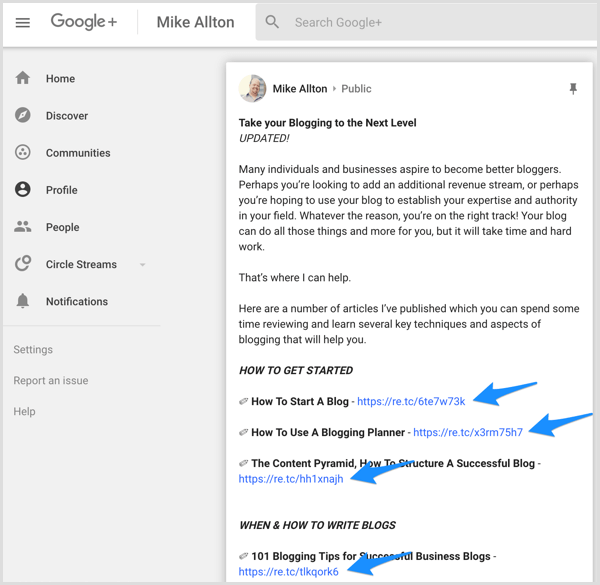
Share short links to your content on social media.

For instance, if you want to use Facebook ads to raise awareness of your blogging planner, you might send a series of emails to your subscriber list. In each email, include short links to a variety of blogging-related articles so you can build up a custom segment of subscribers who are interested in that topic.

The second benefit is that when you create audience-building campaigns, not all of the content has to come from your own site. You can curate content from other trusted sources and retarget folks who click those links. To illustrate, if you own a nursery, you might share content about planning a garden from Better Homes and Gardens or Fine Gardening.

Now let’s look at two services you can use for link retargeting. Meteor.link uses your Facebook pixel to build your custom audience as though link clicks were directly to your site, whereas RetargetLinks can actually handle Google ads for you within the platform. Here’s how to get started with both services.

#1: Meteor.link: Pixel Placement Service

Meteor.link lets you create short links that include your Facebook pixel to build a custom audience from anyone who clicks on those links.

The Startup plan is $9 per month and allows you to insert one pixel. It has a limit of 200 links per month, but no restrictions on the number of clicks. The Pro plan ($29 per month) can handle five pixels at once, offers vanity URLs, and allows you to create up to 1,000 short links per month. The Growth plan ($99 per month) allows 20 pixels and unlimited short links.

Meteor.link dashboard.

Set Up the Facebook Pixel

With this tool, you need to use your Facebook, Twitter, or LinkedIn pixel. What does that mean, exactly?

Normally, you build audiences by putting a snippet of code (a pixel) on your website so the network can track traffic to your content and note known viewers. With Meteor.link, you’ll use your Facebook pixel, for example, as part of the retargeted link, which allows you to build a custom audience you can retarget with Facebook ads.

You’ll need the pixel name and ID to enter into Meteor.link. You can get the information for your Facebook pixel through Facebook Ads Manager. Just choose Pixels in the Measure & Report column, as shown below.

Access the Facebook pixel via Ads Manager.

Tip: It’s a good idea to create a new pixel for your ad campaigns so you can differentiate between Meteor.link clicks and the website traffic your normal pixel would be tracking.

Create a Short Link With Meteor.link

Once you have your pixel in place, go to Meteor.link and sign up for a free 7-day trial. You can select any plan to begin and adjust it later if needed.

On your dashboard, paste the URL you want to shorten into the URL field and then click Next.

Paste a URL into Meteor.link.

Next, select the type of pixel (Facebook, Twitter, or LinkedIn) from the drop-down menu and paste the pixel information in the Pixel Name and ID fields.

Enter your pixel name and pixel ID in Meteor.link.

When you’re finished, click Create and then click Next to create your shortened link. And that’s it! Now all you need to do is share the link.

Your shortened link in Meteor.link.

In the Meteor.link dashboard, you can see all of your links, clicks, and even some demographic information about your growing audience. Note that there’s no campaign or tagging ability that might separate different kinds of links. Every time a user clicks the link, it fires whatever pixel you associated with the link.

When you’re ready to start an ad campaign on Facebook, select whichever pixel you’ve decided to associate with the links you’ve shortened so you can target that audience. To target different user interests, use the filtering options within Ads Manager itself.

#2: RetargetLinks: All-In-One Service

RetargetLinks offers an all-in-one platform that’s simple to use. It differs from Meteor.link in that it allows you to create banner ads and manage the ad display campaign from the system’s dashboard. RetargetLinks has no monthly subscription fee; you pay only for the banner ads, which cost $8 per 1,000 ad impressions (volume discounts are available). You also get a branded URL for free.

Create an Account

To get started, go to RetargetLinks and click Register. Then enter your name, email address, and a URL you want to shorten.

Set up an account with RetargetLinks.

After you click Create Your Account, you’ll see the RetargetLinks dashboard, which has two tabs – one for links and one for ads.

Create a Campaign

To set up a campaign, click the Ads tab on the dashboard. This is where you’ll see all of the campaigns you’ve created and any ads you’ve set up.

Click the RetargetLinks Ads tab.

At the top of the left column, type in the name of your new campaign. You can name your campaign anything you wish, but I like to organize campaigns according to objective. As soon as you begin typing, additional fields will appear.

Create a campaign in RetargetLinks.

After you’ve entered your campaign name, you can add a specific URL for the campaign, such as the landing page for your ebook. This is where people who click on your banner ads will go.

You can also enter a start date and/or end date if you wish.

When you’re finished, click Create. Here’s what the resulting screen looks like:

View your campaign on the Ads tab in RetargetLinks.

Right away, you’ll notice the warnings that you have 0 links and 0 ads uploaded. That’s okay! You’re going to tackle that next.

Create Links

Remember that the whole point of this service is to share links that people click on, and then you can target specific ads to those people. RetargetLinks allows you to set up different campaigns for different goals, and create links and ads that are relevant.

You have two choices for creating links. The first option is to enter URLs into the URL field one at a time on the Links tab. Each time you’ll select which campaign you want to associate with that URL.

Paste the link you want to shorten in RetargetLinks.

The second option is to use the RetargetLinks Chrome extension to generate URLs while browsing other sites. I find this option to be the most convenient. Whether you’re on your own blog or visiting other people’s content, you can use the RetargetLinks extension to click a button in your browser, shorten a link, and assign it to a campaign.

The Chrome extension integration also allows you to shorten links directly within Agorapulse, Buffer, Facebook, Twitter, and so on.

Shorten a link with the RetargetLinks Chrome extension.

Set Up Banner Ads

You won’t need banner ads right away because you have to generate more than 250 clicks to have an audience of sufficient size. But you’re free to begin working on and uploading graphics whenever you’re ready.

You can create banner ads that are square, vertical, or horizontal, in a variety of sizes. They’re all listed on the Ads tab within each campaign. After you’ve uploaded ads, you see previews of the graphics listed and can choose to remove any specific graphic if it’s not performing well.

Upload files for your banner ads in RetargetLinks.

As soon as you’ve accrued enough links and clicks, you can launch your campaign and start displaying your banner ads to people who expressed interest in the content of your links.

You get reports on every link and campaign you set up in terms of clicks. When you begin running banner ads, you can pull up a quick report that shows you banner impressions, clicks, and so forth.

View banner ad performance analytics in RetargetLinks.

#3: Share the Links to Build Custom Audiences

Once you’ve generated one or more links, you need to share them to get people to click on them and be added to your audience. Share the links on your social channels, add them in emails, or include them in your own blog posts and content.

You can share these shortened links to Facebook, Twitter, LinkedIn, Google+, or Pinterest as often as you like. Studies have shown that as long as you put some breathing room between shares, each successive share will reach more people and drive more clicks. I’ve actually put some of my campaign URLs into automatically repeating queues so they’re shared again and again.

You might be wondering what the benefit is of sharing links to your email subscribers just so you can place ads in front of them later. Aren’t they already on your list? While they may be subscribers, what you may not know is how interested they are in a particular offer or type of offer.

Pampers ran an email campaign where they shared a variety of articles to help parents of children of different ages, each with unique shortened links and campaigns. People who clicked the link to an article about babies who are getting close to walking, for instance, may soon be in need of Cruisers diapers, so Pampers could show them an ad for that product.

Wrapping Up

Your next step is to think about how you’ll incorporate link retargeting into your overall marketing plan. What will you advertise? Who’s your target audience? What kinds of content can you use that would be of interest and attract that audience? You can then form a set of requirements and choose the best service to meet those requirements.

Retargeting advertising is a cost-effective approach to generating high volumes of repeat traffic and sales. However, identifying the best audience and monetization approach, the right content, the most effective ad copy, and the optimal combination of ad targeting and budget takes some time to sort out.

You’ll need to be patient. Your preliminary budgets will be an investment in future sales. The beauty of these systems is that once you figure out the best combination for your business, you’ll likely be able to put everything on autopilot.

What do you think? Will you consider using link retargeting for your business? How might this tactic fit into your marketing plan? Please share your thoughts in the comments below.

Discover two ways to retarget people who click links to content you share, whether the links are to your content or curated content.

Shares 302

How to Retarget People Who Click on Curated Content


Twitter to Display News Articles More Prominently by @MattGSouthern

Twitter is going to start displaying more links shared by those in your network in the home timeline.

In addition, Twitter will group together multiple tweets that mention the same link.

This will look similar to how Facebook displays links that several of your friends have shared.

Twitter’s move to display news articles more prominently continues its push toward being a destination for real-time news updates.

Twitter is clearly trying to differentiate itself from other social networking apps. In fact, the App Store stopped listing it in the social networking category in 2016. It has since been listed in the news category.

A Twitter spokesperson has confirmed to Buzzfeed that this feature has rolled out to all users — including those on Android, iOS, and web browsers.

http://tracking.feedpress.it/link/13962/9018472


How GDPR Impacts Marketers: What You Need to Know

Shares 671

social media how toAre you confused by the European Union (EU) General Data Protection Regulation (GDPR)?

Wondering how GDPR affects your marketing?

In this article, you’ll find a plain-language overview of GDPR, how it could impact your data collection, and what you need to do to make sure you’re compliant before May 25, 2018.

How GDPR Impacts Marketers: What You Need to Know by Danielle Liss on Social Media Examiner.

How GDPR Impacts Marketers: What You Need to Know by Danielle Liss on Social Media Examiner.

What Is GDPR?

The General Data Protection Regulation (GDPR) is a European Union (EU) law taking effect on May 25, 2018. GDPR is designed to give greater protection to an individual’s personal information and how it’s collected, stored, and used. There are strict requirements placed on companies that possess the personal data of people located in the EU.

Potential Fines

After May 25, 2018, organizations that aren’t in compliance with GDPR’s requirements could face large fines (up to 4% of a company’s annual global turnover or €20 million), which vary based on the severity of the infraction.

When Does GDPR Apply?

A financial transaction isn’t necessary for the GDPR to apply. A non-EU-based business must comply with the GDPR if it collects or processes personal data of any EU resident (EU citizenship is not required).

Personal Data

Under GDPR, personal data is defined as information that can be used to identify someone, directly or indirectly. This includes IP address, cookies, location data, name, and email address.

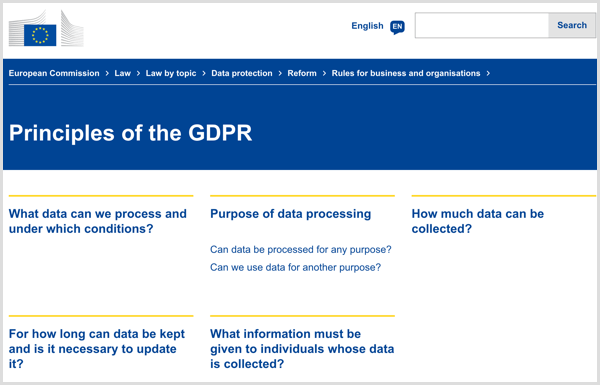
Principles of the GDPR

GDPR may require significant changes in how a company discloses and obtains consent to collect personal data.

#1: What Is Required Under GDPR?

Explicit Consent

If you’re collecting personal data from an EU resident, you must obtain explicit consent, which generally means that consent should be:

  • Voluntary. Have the user take affirmative action.
  • Specific and informed. Make sure people are aware of what you’re collecting, how it’s being used, and whom it may be shared with.
  • Unambiguous. Don’t disguise with redirects to terms of service overflowing with legal jargon.

More specifically, for consent to meet GDPR standards, it must:

  • Contain a clear statement of consent, using plain language that’s easy to understand (no legalese).
  • Require a positive opt-in (i.e., no pre-ticked boxes, silence, or inaction).
  • Be separate from any other terms and conditions.
  • Explain why the entity wants the data and what it will do with the data.
  • Name any third-party controllers that will rely on the consent.
  • Explain how the data subject may withdraw consent.
  • Avoid making consent a precondition of service.

GDPR elements.
When the processing of personal data has multiple purposes, individuals must be informed of each purpose and allowed to consent or decline each purpose separately. Additional requirements apply when obtaining consent from children. Entities must also keep records of consent obtained from data subjects.

Strict Privacy by Default

Strict privacy settings should be the default setting. A user shouldn’t have to go into their settings to make manual changes to opt into stricter settings.

Rights to Data

Under GDPR, individuals have greater control over how their personal information is collected, stored, and used. Individuals have a right to access their data, which means the right to know where, why, and how their data is processed. This includes the right to request a report to access their data. Additionally, individuals have a right to be forgotten, which means their data can be deleted.

Breach Notification

Organizations have a duty to report certain types of data breaches to the relevant supervisory authority within 72 hours, unless the breach is harmless and poses no risk to the individual. If a breach is concluded to be high risk, the company must also inform the individuals impacted.

Appointment of Data Protection Officer

GDPR data protection office.In some cases, companies must appoint a data protection officer. This is required when: 1) an entity regularly monitors sensitive personal information (e.g., race, genetic data, etc.), 2) an entity regularly monitors personal data on a large scale, or 3) is a public authority.

Information of Children

Under GDPR, a company may not collect personal data of anyone under 16 without parental consent. Implement a process to verify age and to obtain parental consent when necessary.

Takeaway: Under GDPR, companies must ensure that they have clear policies in place to maintain compliance.

#2: How Does GDPR Impact Non-EU Companies?

For many social media marketers, there are many questions about whether compliance is necessary for companies outside of the EU. However, non-EU companies must comply with GDPR if: 1) they collect or process personal data of any EU resident, or 2) the company’s activities relate to offering goods or services to EU citizens, regardless of whether payment is required.

This compliance is mandated for any EU resident, regardless of EU citizenship. Even an American citizen who’s only temporarily located in the EU is protected by GDPR.

Remember that a financial transaction isn’t necessary for the GDPR to apply. Any non-EU-based business must comply with the GDPR if it collects or processes personal data.

Takeaway: All companies must obtain explicit consent from the data subject, including non-EU companies. Simply being located outside of the EU doesn’t relieve a company of compliance.

#3: GDPR Compliance Action Plan for Social Media Marketers

Audit and Implement GDPR Compliance Strategy

First, conduct an audit of your website.
GDPR compliance.

  • Determine what data you hold, where it came from, and whom you share it with.
  • Determine what information you have pertaining to existing EU residents.
  • Review which third-party service providers you use and ensure they’re GDPR-compliant.

After you’ve completed the initial audit, review all information to determine what you need to do to comply with GDPR. Next, prepare an action plan to update your privacy policy and methods for obtaining consent.

Update Your Privacy Policy

Ensure your privacy policy is updated to address GDPR. Discuss what information you collect, how it’s used, and any third-party service providers you share the information with. Include the process to follow to invoke the right to access personal data or the right to be forgotten.

Remember, while your privacy policy will reference the requirements of GDPR, having it installed doesn’t mitigate your need to obtain informed consent.

Obtain Explicit Consent

After you’ve determined what personal information you collect or process, obtain explicit consent, described above, for each reason you collect such data. For instance, if you use cookies for affiliate links and a Facebook pixel, you’ll need explicit consent for each use.

Takeaway: The goal of your GDPR strategy will first help you determine what personal information you collect and then put new procedures into place to ensure compliance.

#4: Potential Areas of Concern for Social Media Marketers

GDPR social media concerns.If you still aren’t sure exactly what personal data you may be collecting, here are a few examples that are common for social media marketers, along with some tips on how to stay compliant for each.

Google Analytics

If you use Google Analytics, you may be collecting user ID/hashed personal data, IP addresses, cookies, or behavior profiling. To be GDPR-compliant while using Google Analytics, either 1) anonymize the data before storage and processing begin, or 2) add an overlay to the site that gives notice of the use of cookies and asks for the user’s permission prior to entering the site.

Retargeting Ads and Tracking Pixels

If your website uses remarketing ads, including the Facebook pixel, inform website visitors of this immediately when they enter your site and obtain informed consent.

If you publish sponsored content, ask your client if they use tracking pixels or cookies and why. If the company uses pixels or cookies to capture personal information or to remarket to your audience, you must get consent from visitors immediately when they enter your site.

Email Opt-In

On the subscription form, have a checkbox for the visitor to consent to everything they’re about to subscribe to. If your newsletter uses tracking pixels to see when they open it, put a visible disclaimer before they subscribe. Verify if your email service provider offers GDPR tools.
GDPR site opt-in example.

Affiliate Links

If you use affiliate links, you need to get consent for cookie usage. You can gain consent on an individual post or as an overlay. Consent must come before the visitor clicks the affiliate link because a cookie will be placed on their browser to track sales activity.

Display Ads

If you have ads on your website from a third-party ad server, upon entering your site, users should immediately consent to your use of a third-party server that collects user data for advertising and marketing purposes. If your ad server uses cookies to gather data on the visitor for targeting purposes, inform visitors upon entering your site and get consent for using cookies for this purpose.

Contact Forms

Before users submit their information in a contact form, get their explicit consent with a checkbox.

Comments

Before users can leave a comment, get consent by using a checkbox and disclose that your site will store their comments and, as needed, information relating to the comment such as the date and computer’s IP address. Let them know how the information is used. Also, include a reminder that some information may be displayed publicly, such as name or URL, if they’re submitted with the comment.

Product Sales

GDPR social media concerns.If you’re selling services or products to EU residents, only collect necessary information from your customers upon checkout and obtain explicit consent prior to submitting the purchase to let them know how you’ll use that information.

Takeaway: Ensure that you obtain consent for each purpose of the data collection (e.g., one checkbox may say that they authorize being added to your mailing list and another consent to having personal data stored for communication about purchases).

Remember, if you aren’t sure about what type of data a plugin or marketing tool collects, investigate it with the developer to ensure that you’re not using non-compliant tools.

#5: Plugins to Help You Manage GDPR

If you’re looking for tools to help you manage GDPR compliance, here are a few WordPress plugin options:

  • GDPR: a nearly all-in-one solution with options for consent management, privacy policy configurations, fulfilling data export requests, and more.
  • Shariff Wrapper: prevents the automatic transmission of data via sharing plugins.
  • GDPR Personal Data Reports: generates a personal data report for users invoking their Right of Access.
  • Wider Gravity Forms Stop Entries: allows Gravity Forms users to stop sensitive information from being stored on their servers.
  • Delete Me: allows users to delete their own accounts and profiles.

Conclusion

Ready or not, GDPR is coming and you need to be compliant by May 25, 2018. Even if you’re a non-EU company, GDPR is likely going to impact your social media marketing business; however, by following a few simple steps, you can ensure your compliance.

What do you think? What steps have you taken to make your business GDPR-compliant? Please share your thoughts in the comments below.
Find a plain-language overview of GDPR, how it could impact your data collection, and what you need to do to be compliant before May 25, 2018.

Shares 671

https://www.socialmediaexaminer.com/how-gdpr-impacts-marketers/


Instagram Lets Users Upload Multiple Photos and Videos to Stories by @MattGSouthern

Instagram has rolled out an update that will allow users to upload multiple photos and videos to their stories at the same time.

Once uploaded, viewers will still have to tap through to see each photo and video. The real benefit of this update is that it will save time when it comes to adding multiple pieces of media to a story.

”Whether you want to preview your entire story to make sure it’s just right or you’re waiting for a strong connection to upload all of your photos and videos from the day, it’s now faster and easier than ever to share to your story after the moment has passed.”

When uploading media to a story there will now be a new icon at the top right corner of the screen. Tap the icon to begin selecting multiple photos or videos. Users can select up to 10 pieces of media to upload in one session.

Users can preview each piece of media before uploading, and apply edits to individual pieces as desired. Media will be uploaded in the order it was selected.

This update is currently available on Instagram for Android, and will be available on iOS within the coming weeks.

http://tracking.feedpress.it/link/13962/9014648


How to Protect Your Business From a Social Phishing Scam

Shares 577

social media how toAre you ready to respond if someone pretends to be you on social media?

Wondering how to protect your customers and brand from a social phishing attack?

From erroneous links to outright brand impersonation, social phishing is becoming more frequent.

In this article, you’ll discover four ways to protect your business from social phishing scams.

How to Protect Your Business From a Social Phishing Scam by Ben Beck on Social Media Examiner.

How to Protect Your Business From a Social Phishing Scam by Ben Beck on Social Media Examiner.

What Is a Social Phishing Attack?

Phishing is a criminal activity in which scammers target Internet users and your customers by imitating your legitimate company or brand. These attacks lure prospects and customers to provide sensitive data that can lead to the theft of their identity. Phishers might use a company’s logo, a similar URL, or other markers of its identity to convince people they’re the real company.

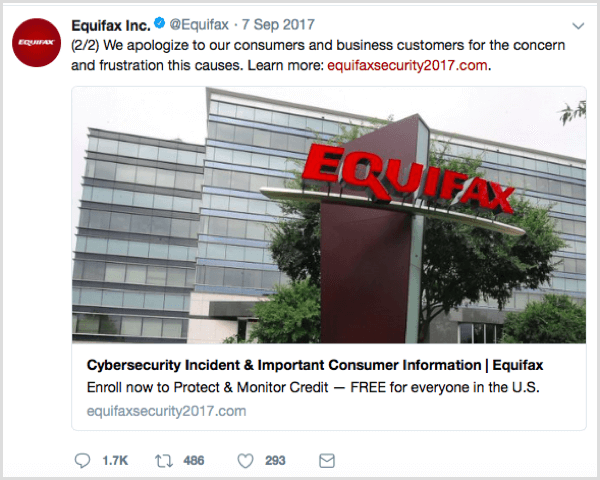
To illustrate, check out these two tweets from the official Equifax social account. The first tweet has the URL equifaxsecurity2017.com, which leads to a real website set up by the credit-reporting company.

Equifax social post with correct URL,

The second tweet (inadvertently tweeted from the genuine Equifax account) has the URL securityequifax2017.com, which could have linked to a phishing site. The subtle changes in the URL make it hard for customers to catch.

Instead, the URL in the second tweet led to a site created by Nick Sweeting, who wanted to point out how easy it is to create a phishing website that fools people into sharing their information.

Equifax social post with incorrect URL.

Phishers target social networks because so many people use them. In the U.S., 81% of people are on some form of social media platform. The impact on businesses and customers is likely to increase. A 2017 phishing report by RiskIQ revealed a 100% increase in phishing via social media from Q3 to Q4.

As a social media manager, you play a crucial role in building your company’s brand, handling customer service issues, and executing marketing plans. The last thing you need is to have social phishers pretending to be your brand to scam your customers out of sensitive information or funds. This article offers tips to help protect your identity and report social imposters.

#1: Monitor Your Brand

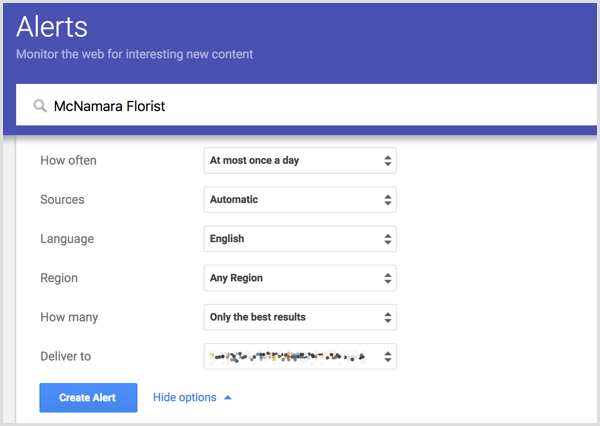
Having monitoring and listening systems in place will give you an eagle-eye view of who’s mentioning your brand name online and in what context. Google Alerts is a great tool for monitoring social media mentions of your company’s brand and business name.

When you set up a Google Alert for a word or phrase, you receive an email when someone mentions it online, allowing you to find mentions you might otherwise miss. After you receive an alert in your inbox, you can see if this mention is from your actual company or scammers. When you set up the alert, you can choose whether to receive alerts weekly, daily, or as they happen.

Set up a Google Alert for your business.

The best part? Google Alerts are super-easy to set up and totally free. Enter the term you want to monitor in the field at the top. Then choose your settings for the frequency, source, language, and so on. When you’re done, click Create Alert. To edit your settings, simply return to the Google Alerts page and click the Edit icon.

You may also want to use a tool that specifically monitors social media platforms. For example, Mention and Hootsuite are fee-based tools for monitoring your brand name and reputation across social media platforms. Whether you use these tools depends on your needs.

For instance, say a lot of your customers use social media to get help from customer support. These tools can help you find an identity phisher who’s pretending to be a customer support agent on Twitter and Facebook. People who don’t verify that your company owns the account may end up submitting sensitive information.

#2: Protect Your Social Community With HTTPS

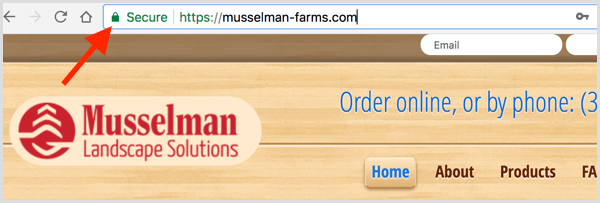
The HTTPS lock shown in a browser bar confirms that traffic to and from a website is encrypted and the only people who can read that traffic are associated with that website. Enabling HTTPS on your site will add an extra layer of security for you and your customers to keep user communications, identity, and web browsing private.

Look for the HTTPS lock in your browser's address bar.

Additionally, as you curate content for your audience, be vigilant about verifying that each URL you share is from a site that has enabled HTTPS. Tell your customers to look for the lock next to any URL address before they submit any sensitive data, such as a username, password, or banking information. Also, encourage them not to enter sensitive information on an unlocked site.

#3: Report Social Phishing Scams

If you find a phisher impersonating your business or brand, you can take action to protect your brand and your social media audience. First, contact law enforcement. If someone is impersonating your business, it’s a big deal. In the United States, report the fraudulent activity to the FBI Internet Crime Complaint Center.

You should also contact the social platform about the account impersonating your brand. Each major social platform offers support for shutting down any accounts that are impersonating your business or brand. The following links point to the current support page for each social media platform:

If someone is impersonating your business, report the fraudulent activity to the FBI Internet Crime Complaint Center.

Each week, set time aside to check for variations of your brand name and report any fake profiles.

#4: Educate Your Social Team

As a social media manager, you might have all of the knowledge and tools to keep your company profiles safe, but what about your co-workers? Teach everyone on your social team (and in your company) to recognize social phishing and understand how damaging a phishing scam can be for the company, its customers, and your social audience.

To help your co-workers spot fake handles, make sure everyone has a list of your company’s social media user handles. Also, encourage your staff not to click links sent to them through social accounts, even from friends, if the link seems suspicious. This will stop them from inadvertently downloading malware that can compromise customer accounts and sensitive company information.

To protect your accounts from hackers, make a policy that social media login credentials are stored securely in a password keeper and that the logins are updated regularly.

Conclusion

As a social media manager, you can help keep your company, customers, and co-workers safe from phishers. Learning a few signs to watch out for, pausing before you click, and informing others will go a long way.

You can also use tools to monitor mentions of your company, and report to the FBI and social media platforms anyone impersonating your business to get customers’ important information.

What do you think? Have you used any of these tools or tactics to prevent phishers? How have they worked for you? Please share your thoughts in the comments.

Discover four ways to protect your business from a social phishing attack and respond if someone pretends to be you on social media.

Shares 577

https://www.socialmediaexaminer.com/how-to-protect-business-from-social-phishing-scam/


Instagram Lets Users Export Everything They’ve Shared by @MattGSouthern

Instagram now has a tool that will let users download a copy of everything they’ve shared to the network.

The tool, which can be accessed here, is currently only able to be used on desktop browsers. Access via iOS and Android will be available in the future.

Users can request a copy of their data using the tool, which will be sent to them within 48 hours via email. The email will contain a link to a file with the following information:

  • Photos
  • Comments
  • Profile information
  • Archived stories
  • Post and story captions
  • Uploaded contacts
  • Usernames of followers and people you follow
  • Direct messages

Instagram notes that it can only work on one request per account at a time. So users can not re-request a copy of their data until the first request has been completed.

The company is launching this tool in order to comply with the data portability rule outlined in Europe’s GDPR privacy law, which goes into effect on May 25th.

http://tracking.feedpress.it/link/13962/8973544


Snapchat Lets Anyone Create AR Face Lenses by @MattGSouthern

With an update to Snapchat’s Lens Studio, anyone can now create custom augmented reality (AR) face lenses.

Previously, Snapchat’s Lens Studio let users create basic location-based lenses, called “World Lenses,” as well as lenses that applied AR effects to the surrounding environment.

This is the first time regular users have been able to create custom face lenses for Snapchat.

Lens Studio offers the following templates for users to begin creating AR face lenses:

  • Face Paint: Uses face mapping to apply artistic elements, such as makeup and accessories, to a person’s face.
  • Photo: Import an image and Snapchat’s ‘detect face’ functionality will align it to a face lens.
  • Distort: Stretch, expand, and contort a face in all different directions.
  • Trigger: Interactive lenses that trigger different elements to appear based on moving parts of the face.
  • 2D Objects: Attach 2D illustrations to the head.
  • 3D Objects: Attach 3D objects to the head or face.
  • Baseball Cap: Attach a custom designed baseball cap to the head.

In addition to these updates, Lens Studio is adding GIPHY integration so users can add animated GIF stickers to both world and face lenses.

http://tracking.feedpress.it/link/13962/8972734


Platforms for Finding, Connecting and Managing Social Media Influencers

There are a variety of tools at your disposal for engaging with influencers and creating campaigns.

April 25, 2018 4 min read

Opinions expressed by Entrepreneur contributors are their own.

With the rise in popularity and effectiveness of social media influencer marketing, it’s easier now than ever to jump right in and find the tools for your needs.

But, with the increasing number of businesses getting into influencer marketing, comes an increasing number of influencer platforms that will help you manage your campaigns.

If you’re reading this post, then you’re probably already aware of the power of tapping into influencers to promote your brand and products. But, in case you aren’t and need some “influential” data to convince you, check these stats out:

  • 61 percent of buyers have been influenced by suggestions found on Twitter (Source)
  • 63 percent of surveyed marketers plan on increasing their budgets for influencer marketing (Source)
  • The number of people using ad blockers online jumped 30 percent in 2016 (Source)

That last stat is important because it means that traditional display advertising is losing its effectiveness and reach. Social influencer marketing bypasses ad blockers because it appears as an organic, social post from accounts, rather than a banner on the side of a site.

Before we get into the different platforms you can use for your next influencer campaign, be aware that there are a variety of cost structures. Many platforms today use a SaaS (software as a service) model, which bundles together account services, influencer management and search, campaign tools, etc. Some may let you use their software for free, but will take a percentage of whatever you pay the influencers. Influencers manage their own cost and normally charge per engagement. If you’re looking for pay-per-click or transaction, then your best bet will be affiliate marketing, which some may call another version of influencer marketing. Most platforms use some combination of these different pricing methods in order to meet the needs and demands of their clients.

Check out some of the tools we’ve researched to help you determine the right one for your social influencer marketing needs.

Related: 5 Social Media Rules Every Entrepreneur Should Know

Related: 10 Laws of Social Media Marketing

Related: 12 Social Media Mistakes That Entrepreneurs Make

Related: This Instagrammer With More Than 2 Million Followers Literally Cooks Her Content

Related: 10 Proven Ways to Make Millions on Social Media

Pay-per-post

IZEA is a feature-packed tool that is popular with both brands and influencers and can scale with you as your business expands.

  • A-la-carte service caters to small and large businesses.
  • Marketplace where businesses can set their own prices and where influencers can find business.
  • Can use influencer network to create custom content for your own brand’s use.
  • SaaS available.

Free access; pay for what you approve

Tribe is a sleek tool with a user-friendly experience and straightforward campaign management.

  • Influencers create content for you to approve before you pay.
  • You set the price (cost-per-engagement) you’re willing to pay with each influencer.
  • User-generated content becomes yours to use on other advertisements, social posts, etc.
  • An influencer network of over 31,000 accounts to choose from.

Influenz is simple yet effective, Influenz is great for new marketers looking to get started.

  • A straightforward, Instagram-only marketplace.
  • Brands create a listing with campaign assets, parameters and available budget.
  • Influencers search through available listings and choose which ones to participate.
  • You set your own budget so the listing will be adjusted based on total spent


SaaS

NeoReach starts at $399 per month, but if you’re serious about influencer marketing and succeeding at it, this tool is the one for you.

  • Search database of influencers using over 40 filters, i.e. gender, location, brand affinity and more.
  • Automation tools to help you manage and onboard your own influencers efficiently.
  • Sophisticated, visual and in-depth reporting to measure campaigns.
  • 24/7 help desk.

Assembly, which starts at $199 per month, can help if you’ve got your own set of influencers and need a tool to manage them through.

  • Search through their network of influencers and request them for your campaigns or onboard your own.
  • Basic package allows you onboard unlimited number of influencers, have up to five team members and up to five different brands.
  • Different campaign objectives allow you to pay for what you want: reach, engagement, original content.
  • White labeling available.

Tomoson starts at $49 per month, but if you don’t have a large budget but need a lot of options, consider this simple tool.

  • Crawls internet to find existing content related to your brand.
  • Can schedule social media posts.
  • Leverage a variety of incentives to attract a diverse set of influencers: free product, large discounts, etc.
  • Deep insights into an influencer’s social media engagement and activity.

Keep in mind that this is just a small percentage of the available tools out there for influencer management. If you’re an influencer, you could also sign up for these services and join their network.

https://www.entrepreneur.com/article/311240


Pinterest Business Profiles to Display Total Monthly Viewers by @MattGSouthern

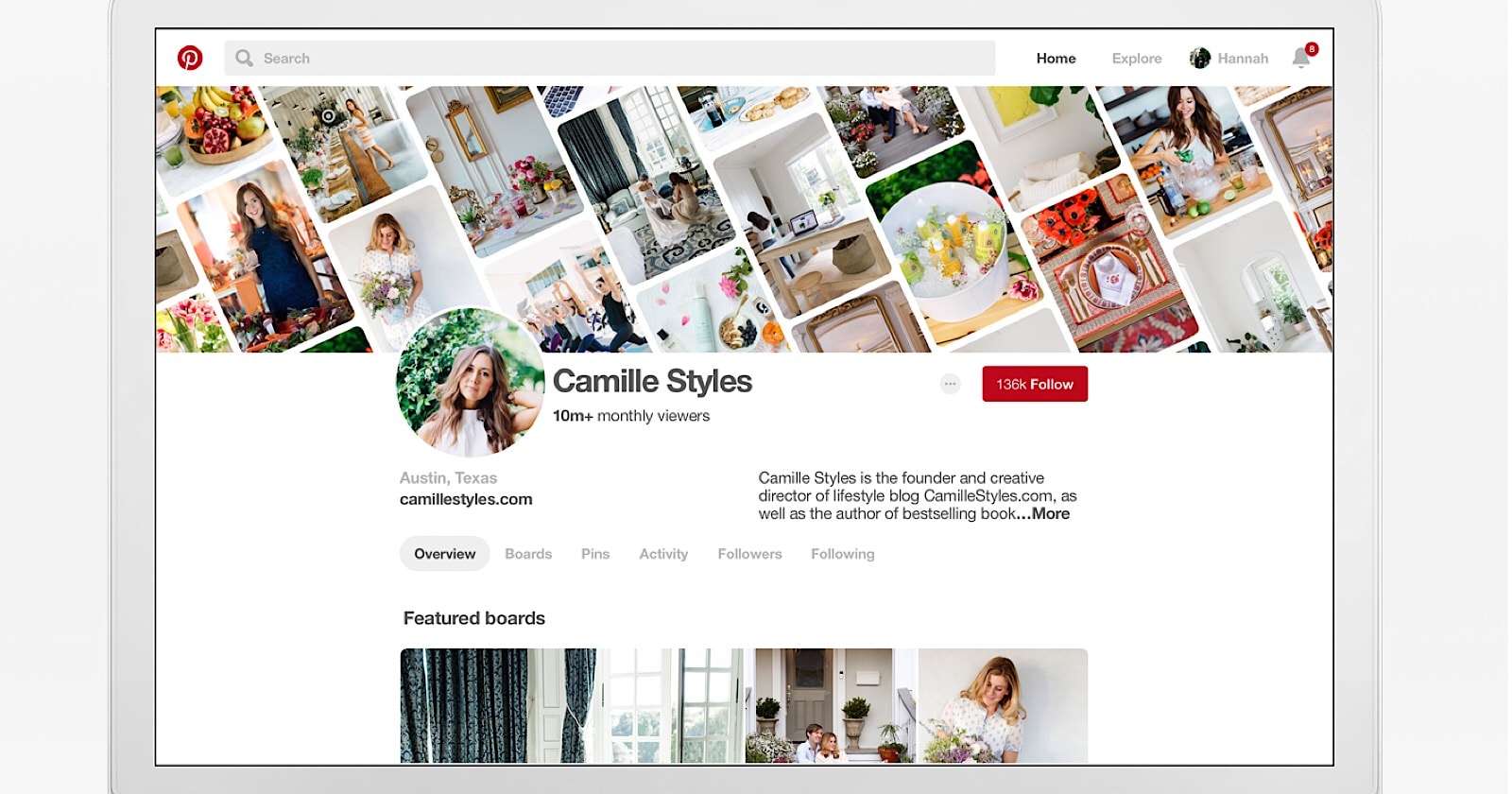
Pinterest is making several changes to the appearance of business profiles, including the addition of a monthly viewer statistic.

Everyone, not just account administrators, will be able to see this statistic. It will show users the total number of people who saw the business’s pins within the last 30 days.

This statistic may prove to be even more influential than total follower count. Followers can be bought, but actual views are harder to fake.

On the other hand, views can technically be bought by promoting pins. So if you’re dissatisfied with how your monthly viewer count looks to other users, that’s one way to give it a boost.

Along with this new stat, Pinterest is also giving business profiles the ability to add dynamic cover images. The will let businesses highlight the content they want users to see first, which can include individual pins or entire boards.

These changes will be rolling out over the next couple of months.

http://tracking.feedpress.it/link/13962/8962506


Facebook Publishes Internal Enforcement Guidelines & Announces Appeals Process by @martinibuster

Facebook announced the publication of their internal documents used by their moderators as well as expanding on a way to appeal decisions made on banned posts. The formal name of the document is Internal Enforcement Guidelines.

Why Did Facebook Make the Guidelines Public?

Facebook’s Monika Bickert, Vice Presiddent of Global Policy Management published the following reasons why they are making these guidelines public:

“We decided to publish these internal guidelines for two reasons. First, the guidelines will help people understand where we draw the line on nuanced issues. Second, providing these details makes it easier for everyone, including experts in different fields, to give us feedback so that we can improve the guidelines – and the decisions we make – over time.”

How Does Facebook Enforce it’s Posting Rules?

Facebook uses a combination of artificial intelligence, user reports and a worldwide team of 7,500 content reviewers. They analyze posts, images, and videos in order to determine if they are violating community standards.

It’s a difficult job because Facebook aims to create a safe place for people to connect with each other while also policing the speech. Anyone who’s ever moderated a forum community can tell you that it’s easy to make a mistake and over moderate a member’s post. Recognizing that mistakes can be made is probably a reason why Facebook decided to implement an appeal process.

How Will Facebook’s Appeal Process Work?

This feature will be rolling out over the course of a year. According to Facebook, the goal will initially focus on appeals related to posts removed for nudity/sex, hate speech or graphic violence. Here is how Facebook state the appeal process will work:

“If your photo, video or post has been removed because we found that it violates our Community Standards, you will be notified, and given the option to request additional review.

This will lead to a review by our team (always by a person), typically within 24 hours.
If we’ve made a mistake, we will notify you, and your post, photo or video will be restored.”

Reaction From Social Media Professionals

I asked Melissa Fach, the Community & Social Manager at Pubcon and owner of SEOAware Internet Marketing if she had any insights to share about Facebook’s new transparency about their guidelines.

“I think FB is in major overhaul mode and they need to work hard to change their rep.

What I like is the new appeal process – not for those of us that know what is okay and what isn’t, but for those that are ignorant about some of the rules. This gives them an opportunity to learn.

The crazy narratives on Facebook need to change. I hope we are moving in that direction.”

What do the Guidelines Cover?

The moderation guidelines are divided into six sections:

  1. Violence and Criminal Behavior
  2. Safety
  3. Objectionable Content
  4. Integrity and Authenticity
  5. Respecting Intellectual Property
  6. Content-Related Requests

The section on Objectionable Content may be of interest to many folks. This section is divided into four sections, covering the following topics:

  1. Hate Speech
  2. Graphic Violence
  3. Adult Nudity and Sexual Activity
  4. Cruel and Insensitive

You can read the entire Facebook Internal Enforcement Guidelines here.

Images by Shutterstock, modified by Author

http://tracking.feedpress.it/link/13962/8959998