Twitter Cracks Down on Automation and Use of Multiple Accounts by @MattGSouthern

Twitter has new rules in place to prevent applications and services from utilizing automation for the purposes of posting spam.

In addition, Twitter is also making changes to its API which will limit users’ ability perform coordinated actions across multiple accounts.

These new guidelines are being put in place, Twitter says, to “stay ahead of malicious activity targeting the crucial conversations taking place on Twitter.”

Here is a look at the specific policies being put in place:

  • An application or service must not permit users to simultaneously post identical or substantially similar content to multiple accounts.
  • An application or service must not permit users to simultaneously perform actions such as Likes, Retweets, or follows from multiple accounts.
  • An application or service must not permit users to use of any form of automation (including scheduling) to post identical or substantially similar content, or to perform actions such as Likes or Retweets, across multiple accounts.
  • Users of TweetDeck will no longer be able to select multiple accounts through which to perform an action such as Tweeting, Retweeting, liking, or following.

Changes to comply with these policies must be put in place by March 23, 2018. Otherwise the application or service may be suspended.

http://tracking.feedpress.it/link/13962/8347043


Snapchat Now Supports Animated GIFs from GIPHY by @MattGSouthern

Snapchat has been updated with support for a new library of animated GIFs from new partner GIPHY.

GIFs can be added to snaps in the form of stickers. Users can either choose from a selection of recommended animations, or search for their own by keyword.

Animated stickers can be used with any combination of other effects. Multiple animations can also be added to a single snap.

Animated GIFs can be added to snaps by following the steps below:

  • Take a photo or video
  • Tap the stickers button
  • Select an animation from the GIPHY collection, or search for one of your own
  • Select an animation and place it on the snap where desired

A unique effect can be created with GIFs when taking a video snap. Choosing a GIF and long-pressing on the video will attach the GIF to a specific person or object.

Some creative snaps can be made with this feature. For example, you can take a snap of a group of people and attach an animated smiley to all of their faces.

Along with rolling out the GIF feature, Snapchat announced plans to add new tabs in the Friends and Discover screens. The tabs will help users filter between friends’ stories, group chats, and subscriptions in Discover. This particular feature could be in response to complaints about Snapchat’s recent redesign.

Animated GIFs are now available in the latest Snapchat update on iOS and Android. Tabs in the Friends and Discover screens will be added in the near future.

http://tracking.feedpress.it/link/13962/8336323


Snapchat Gives Creators Access to Audience Analytics by @MattGSouthern

Select creators on Snapchat are getting access to analytics data about their audience. This includes insights such as story views, engagement, and demographics.

Only those who are part of Snapchat’s Official Stories program are getting access to this data. Being in the program is like having a verified profile on Instagram, and is limited to creators who have “cultivated a large audience.”

Snapchat previously offered little in the way of analytics data. The only way for a creator to get any kind of data was to look at their own story before it expired and see how many views it received.

Now, not only will story views be logged, but creators can dig deep into the data to see where the views are coming from, how old the viewers are, a breakdown of men and women, and so on.

Creators that are serious about making money and growing their brand on Snapchat should spend some time studying their audience insights. The more that creators know about their audience, the better they can tailor content to those who are most engaged.

Many within the industry are speculating whether this will be enough to lure top creators away from Instagram and back to Snapchat. Instagram became fiercely competitive with Snapchat after mimicking the popular Stories feature. The number of daily active users publishing stories on Instagram has actually exceeded Snapchat’s entire daily active user base.

More and more influencers are opting to share their stories on Instagram, rather than continuously feeding two platforms with content. However, Instagram doesn’t offer a robust analytics service like the one Snapchat is rolling out.

With this move Snapchat is clearly fighting to remain competitive, especially among top influencers. While Snapchat may not be seeing meteoric growth, it’s no slouch either. Snapchat recently gained 10 million new daily active users in Q4 2017, raising the total from 178 million to 187 million. During the same period the company’s revenue grew 72 percent to $285.7 million.

Time will tell if audience insights will drive more top creators to Snapchat and encourage them to spend on advertising. The next quarterly report should answer a lot of questions.

http://tracking.feedpress.it/link/13962/8323287


Facebook Reveals New Tool for Posting Personal Lists by @MattGSouthern

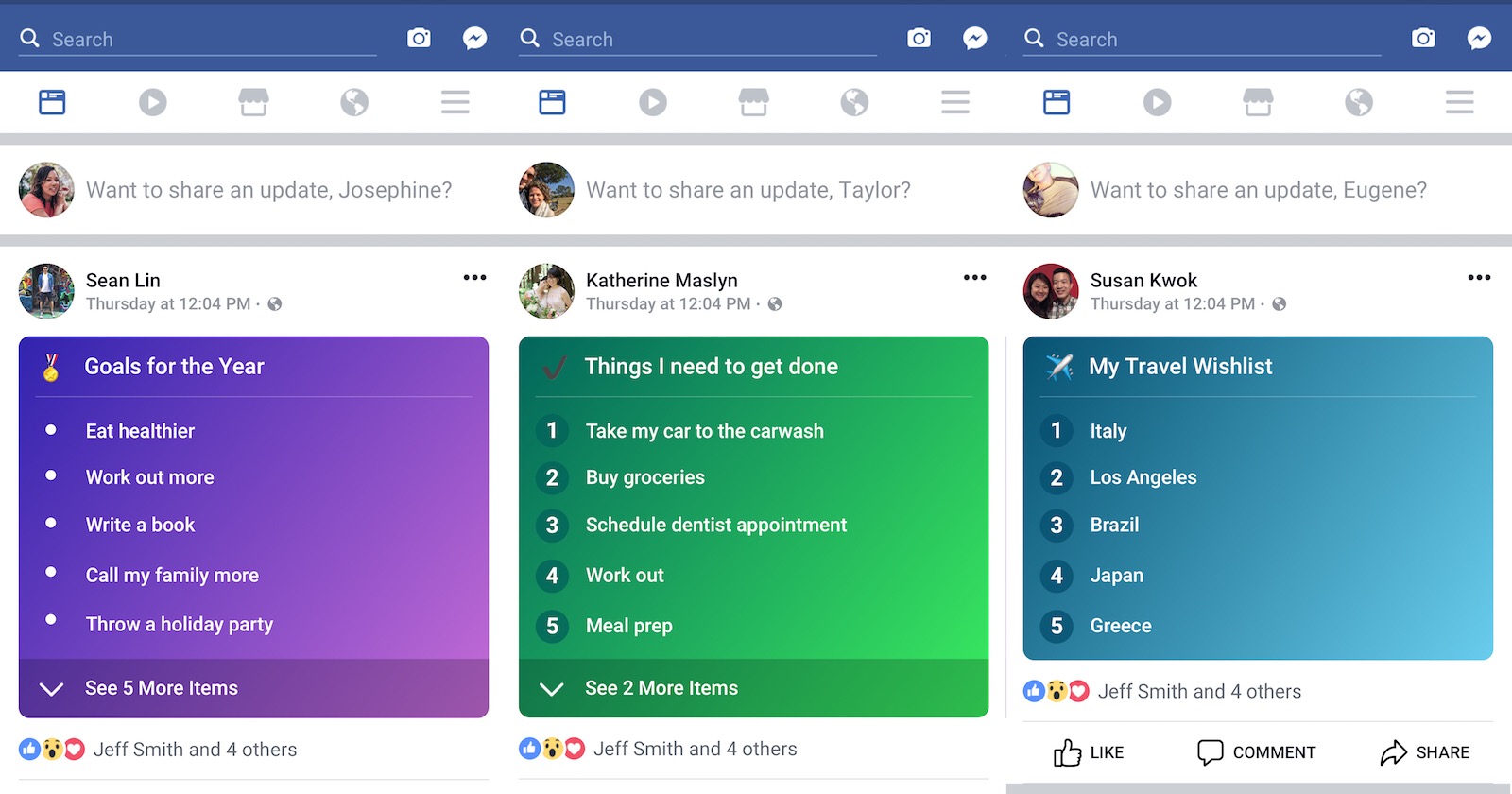
Facebook has released a new type of timeline post that allows users to create and publish personal lists.

Lists can be about anything— to-do lists, top 10 lists, bucket lists, lists of dream travel destinations, and so on.

This feature was first spotted last month, but TechCrunch is now reporting that it’s being rolled out more widely.

By all accounts this is Facebook making good on its promise to make the social network more personal. Creating and sharing lists encourages people to reveal more about themselves, which could lead to greater engagement between friends and family members.

This update also serves Facebook’s interests of keeping people within the Facebook ecosystem. With a new form of native content to share, users may be less inclined to share content from outside sources.

One may also argue that getting users to create lists of things they like generates more personal info to sell to advertisers. A Facebook executive has already squashed that theory on Twitter:

For as long as I’ve been on the web, one thing that never seems to change is peoples’ affinity for sharing lists. I see this feature being a big deal for Facebook once everyone has access to it.

http://tracking.feedpress.it/link/13962/8322001


Facebook to Roll Out Subscription Tool for Publishers on iOS by @MattGSouthern

Facebook has come to an agreement with Apple, which will allow the social network to launch a subscription tool for publishers on iOS.

It would perhaps be more accurate to say Facebook can now launch a subscription tool on Apple’s iOS in such a way that it pleases both parties.

Facebook was free to launch a subscription tool on iOS before, and even has a version of the tool on Android, but the company took issue with Apple’s fees.

Apps that sell subscriptions directly within their iOS app have to give 30% of their revenue to Apple. It’s a mandatory fee Apple charges for anything sold by a third party in an iOS app.

Facebook doesn’t take any amount of revenue away from publishers when subscriptions are sold using its tool, so it’s easy to see why the company would take issue with a 30% cut from Apple.

According to Recode, the dispute over fees has been resolved and the subscription tool will be available on iOS in March. There are no further details about how the dispute was settled.

Publishers can use Facebook’s subscription tool to add a paywall to their articles, similar to what some publishers are doing in Google Search. The first few article views will be free, then users will be prompted to sign up for a subscription.

When a user has reached their limit of free articles they will be sent to the publisher’s website where they can then sign up for a subscription.

http://tracking.feedpress.it/link/13962/8321742


Instagram is Showing Users When a Screenshot of Their Story is Taken by @MattGSouthern

Instagram is now letting users know when someone has taken a screenshot or screen recording of their story.

Snapchat treats screenshots the same way, and the fact that Instagram didn’t was appealing to some users.

On the other hand, there are users who are glad that people no longer have the freedom to screenshot stories and remain anonymous.

Whether a majority of users will appreciate this remains to be seen, which is why Instagram is rolling this feature out as a limited test for the time being.

Users can find out if a screenshot has been taken of their photo by checking who has viewed the story in the “seen by” area. A circle-like icon will appear next to a person’s name if they have taken a screenshot.

Given that this feature is just a test, according to TechCrunch, it’s not known if it will be implemented on a wider scale. It all depends on user response, which has been lukewarm so far.

This will only affect stories, users will not be shown when a screenshot of a regular Instagram post is taken.

http://tracking.feedpress.it/link/13962/8284454


5 Ways to Further Your Reach

Are you feeling a stagnant air in your business? Strategy planning is a key element of any business, so here are 5 simple ways to further your reach!

How to Further Your Reach

1. Invest in yourself!

Let everyone know who you are by professionally branding your business. Start with a logo and simple website. Creating a relationship with a professional designer will help you throughout your businesses lifetime, you never know when you’ll need something! It helps to have someone on standby who understands your brand and can help support your direction. Designers do a lot more than just create pretty pictures. We create marketing plans, help plan strategies, consult and more. As you grow, your advertising needs change and your designer should be there by your side to guide you. When you are professionally branded and have a user friendly, modern website, it gives your business instant legitimacy in the eyes of your customer. If you are unsure about your logo or website, lots of designers do brand consulting and can help point you in the right direction and show you where you need improvement.

2. Utilize Social Media

The best thing about Social Media is that it is FREE! The worst? You can get lost, easily. The best advice I ever heard was pick the best social media for your business and focus your time and energy on creating great content for your audience there. Do not spread yourself thin posting to countless social media accounts every day. If your biggest audience is on Facebook, utilize groups, events and business pages. Maybe you find your following is more Instagram central. Post updates, stories and go live! Pick your best social media platform and run with it. What about sponsored posts, you ask? Personally, I hardly ever sponsor posts because I know how to reach my target on social media. When I have a post performing exceptionally well, reaching thousands without much effort, I will occasionally boost those. It is already performing for me and converting it to a paid ad will only help my reach!

3. The Right Content

You picked your perfect social media platform, but now you need to post. Create relevant content for your target customer. We’re not talking click bait. Research shows valuable content builds better customer relationships and leads to positive returns for your business! Create each piece with a “Call to Action” or the intent to trigger a specific action in your customer. Pro Tip: Create your content for a few weeks and mass upload them as scheduled posts!

4. Be Engaged

The right content grabs your customer’s attention, now it’s time to engage WITH them! Your created content gets people excited and they want to learn more about you. You start getting comments and messages, engage with them and reply! Your customer base needs to think of you as someone they can count on, someone they are comfortable with. When people feel like they already ‘know’ you from connecting and engagement on social media, you’ve already built the foundation of trust in your relationship with them. Comment on posts in and outside of your social media community. I’m not talking about a sales pitch saying “I’m Sally & I do blah blah blah..”. Comment on things that ENGAGE YOU and that YOU are the expert in. Show off your knowledge, the rest will follow. Engaged networking goes a long way with expanding your reach beyond your own two walls.

5. Get Listed!

Are you listed on the big 7? What is the big 7? Google, Bing, Yahoo, Yelp, Foursquare, YP & Superpages. Maybe your business doesn’t need to be listed on all 7, but you can absolutely benefit from being listed on the others. Not only is it a FREE way to get out to your customer base, it helps populate your website and business on search engine rankings. Listed on these websites goes back to tip #1, instant business legitimacy in the eyes of your customer.

What about you? Do you know or practice any other creative ways to further your reach that should be included in this list? Let me know!

5 Ways to Further Your Reach


6 Outdated Social Media Tactics That Need to Die by @marktraphagen

If one definition of insanity is doing the same thing over and over again and expecting different results, then many social media managers must be crazy.

Are you practicing social media with the same cookie cutter tactics that have been used since Mark Zuckerberg moved into his Harvard dorm room?

Social media cookie cutter tactics

Despite seeing no measurable gains or attributable success from their social media campaigns, many social media managers keep running them in the same way.

While in some cases the cause may be laziness, in most instances I suspect it’s just ignorance of any other way, or blind faith in “best practices” that have no basis in verified data.

Stop!

OK, I’ll be a little more helpful than that.

Before you can start investing your time in strategies and tactics that do actually produce results, you need to stop wasting time on those that don’t.

So here are six that you can halt immediately.

1. Only Posting Links

Way too many brand social media accounts have links to their own content as most or even all of their posts.

Now, you absolutely should not be shy about sharing links to your own content. You created it, you’re justifiably proud of it (I hope), and your followers ought to be people who are interested in it.

But if your social accounts are mostly, or (yikes!) all links to your own content, your followers will lose interest, and may even begin to unfollow you.

No one (intentionally) signs up for advertising.

What to Do Instead

  • Balance your owned-content links with posts of general interest and helpfulness to your audience, including shares of content from other good, non-competitive resources. Your goal should be for people to think of your social account as helpful, not just promotional.
  • Mix in posts that don’t link out anywhere, but are useful and helpful all by themselves. For example, you could post short tips, or useful insights. Or get a conversation started relevant to your business and your audience. That last tip is especially important for Facebook, where the news feed algorithm now strongly favors posts more likely to create “meaningful interactions” among your followers.

2. Jumping from Follow to Pitch

You come across someone on a social network who looks interesting. Some of your friends are already connected with the person. So you hit “follow.” Almost immediately, your inbox goes “ding.”

Jumping from Follow to Pitch Example

There’s the windup and…the pitch!

What’s wrong here?

Sending an automated pitch message or email immediately after someone follows you comes off as cold, impersonal, and makes the follower feel like she or he is nothing but a prospect to you.

What would you think of a new neighbor you invited over to a dinner party if as soon as he came through the door he started handing out his business cards to all your guests. What are your guests likely to think of the neighbor?

That’s exactly how most people feel when they get a pitch message from you immediately after they’ve followed you.

What to Do Instead

  • Use social for what it does best: building relationships, not direct selling.
  • Put newer followers on a list to get real engagement from you before you even think of sending a direct message. Go through this list and like some posts each day. Better yet, add meaningful comments where you can.
  • Your goal should be to turn cold followers into (potentially) warm prospects, so that when it does come time to try a more direct pitch, you don’t come across as a rude stranger.

3. Mass Following to Gain Followers

An all-too-common practice, especially on Twitter and Instagram, is mass following huge numbers of accounts.

Why?

Because a lot of accounts will follow back anyone who follows them, thus helping the mass-follower to pump up their follower count and “social proof.”

Accounts that do this are easy to spot. They typically have an almost equal ratio of followers-to-following, and/or despite having tens or hundreds of thousands of followers, minimal engagement-per-post.

Ratio of Twitter followers to following

What’s wrong with doing this tactic (since it obviously “works”)?

At least two things:

  • Social media users are more wary theses days of following fake- or low-value-appearing accounts. Many are probably savvy that a near-equal ratio of followers-to-following is a tip off that the account didn’t follow them because of genuine interest.
  • Your feed will be virtually useless to you. Because you mass-followed people with little-to-no regard for their actual value, your feed will be full of junk, or at least a lot of posts that mean little to you. I suspect most people who mass follow spend little time in their feeds, which is another reason they aren’t worth following.

What to Do Instead

Read my Search Engine Journal post 9 Proven Tips to Get More Social Media Followers. Done!

In that post I provide methods that not only help you grow your following, but ensure it will be a valuable following, one that will help build your business and reputation.

4. Using Auto-Engagement Bots

Auto-engagement bots are programs that automatically like or reshare posts of accounts you follow.

Similar to the auto-following tactic described above, the aim here is to fake interest in order to raise your visibility and esteem with your followers, and in hopes of getting engagement back from them.

Engagement bots on social media

As with auto-followers, accounts using auto-engagement bots are not hard to spot.

I have one guy who follows me on Instagram whose account likes my photos within seconds after I post them, no matter when. I can post at 3 in the afternoon or 3 in the morning, and boom! there’s that like. I seriously doubt he’s sitting up 24/7 just waiting for my next vacation photo.

Here are the primary reasons this needs to die:

  • As mentioned above, it’s easily detectable. As social media users become more savvy to and wary of such tricks, they’ll spot them more frequently, thus lowering the credibility and reputation of your brand.
  • It ruins your own feed. Many social networks use engagement signals as part of the algorithm that determines what you see in your feed. If you engage with everything, the algo has nothing to go on.
  • You miss the opportunities that come from actually looking at the posts in your feed and participating in valuable conversations that actually help build your influence and opportunities.

What to Do Instead

  • Engage for real. Yes, this takes time. It means you have to be in your feed regularly, taking the time to read interesting posts, liking and sharing those that are truly worthwhile, and commenting where you can add something useful.
  • If you find it hard to find or justify that time, ask yourself why you are on social media in the first place, and what you hope to gain from it. If the primary benefit is the reputation, influence, and relationships you’ll get, do you really think engagement-botting will gain you those?
  • Craft ways you can be more efficient at finding posts worth engaging. On Twitter, build lists of the most valuable people you follow and prioritize that feed for engagement.

5. Obeying “Best Times to Post” Studies

Let me say immediately that there is nothing wrong with wanting to post at times when the most people following you are most likely to be online (and thus more likely to see your post).

The problem with “best times to posts” studies is simple: they are based on averages. That is, they typically look at a large number of users and then conclude that the hour in which the largest number of them are active on the network is the ideal time for all users.

The most fundamental flaw with such an analysis is the assumption that your following is “average.”

Now, of course, only “above average” people would follow you, but that’s not what I mean here!

My point is that there is no guarantee that an average figured across a large number of diverse users matches your particular audience.

The results of these studies typically fall into a classic bell curve. The peak of the curve is the hours when the largest number of people in the sample group are on the network at the same time. However, there are still a lot of people in both the head and tail of that curve, and it’s quite possible that your audience’s peak times occur somewhere in those regions.

Typical bell curve

Since the study wasn’t conducted using your unique audience, you can’t be sure that the best times recommended are really your best times.

What to Do Instead

  • Check if your social media platforms or tools show when your audience is online.
    • Facebook Insights shows this for Pages.
    • Followerwonk and other tools show most active hours for your Twitter followers.
    • Many social media posting and scheduling tools will show stats for what days of the week and/or hours your followers are most active.
  • Run your own tests. Warning: getting accurate insights this way is labor intensive! Schedule posts on a network for different times and on different days of the week. Do this for a while, and you may begin to see patterns of when your posts get more engagement.

Finally, the following is just my theory, and I haven’t tested it, but it makes sense to me. Because more and more networks have feeds controlled by algorithms that decide which posts get seen when, it may not matter so much when you post (at least for time of day).

While it’s still true (mostly) on Twitter that a tweet goes out to your entire following at the time you post it, and quickly loses visibility after that (unless it gets significant engagement), on many other networks, your post is only seeded out to a small subset of your following at the time it is posted. Then the algorithm begins to decide whether or not it has value to other people in your network, and trickles it out to them over time.

If I’m right about this theory, then my recommendation would be to post on those networks during the earliest part of the day when more of your followers begin to come online. (Again, you can easily see this for a Facebook page in Insights). That way the post has a better chance of picking up momentum (i.e., good initial engagement) that will get it shown to more people as the day goes forward.

6. Not Optimizing Your Content for Sharing

Many experienced content creators have learned how to optimize their content for SEO, but far fewer think about optimizing for social sharing.

Posting on Mark Schaefer’s blog, Steve Rayson revealed data that showed in many verticals, social sharing has declined as the amount of available content has risen. That means your content competes on a roulette wheel with far fewer winning slots (shares) than there used to be.

Do not leave social sharing to chance

The good news is that making your site content easy to share, more likely to be shared, and better-looking when it is shared is a lot easier than search engine optimizing the same content.

What to Do

  • Figure out on which networks your audience is most active and only show sharing buttons for those networks.
  • Use the power of limited choice. Scientific studies show that too many options cause brain fatigue, and subjects are less likely to make any choice at all. Keep your sharing buttons to a minimum. I’d suggest three-to-four at the most.
  • Place your social share buttons at the top of your content. That might seem counterintuitive. Won’t people most want to share something after they’ve read it? The hard truth is that most people share content without reading all of it. A study by social sharing button vendor AddThis showed that making social buttons prominent was the most important factor, but having them at the top makes them easiest to find for anyone ready to share.
  • Use click-to-tweet pullouts, significant quotes from your post that users can tweet out with one click. There are plugins for most blogging software to help you create these.
  • Use Open Graph tagging. Open Graph tags allow you to specify and control what shares of your content will look like, including the share text, the URL, and the shared image. OG tags are recognized by most major social networks. Without them, shares of your content might not be how you’d want them represented in social feeds.

What other social media practices do you see that make you hope you’ll see their obituary soon? Hit me up on Twitter and let me know!

More Social Media Marketing Resources:

http://tracking.feedpress.it/link/13962/8250205


Facebook to Begin Measuring Post Reach Based on Actual Views by @MattGSouthern

Facebook is making two updates to Page Insights, one of which will affect the way organic reach is calculated.

Traditionally, reach for page posts has been calculated based on how many times a post has been loaded in the news feed. If a post was delivered in the news feed it would count as a view, even if the user didn’t actually scroll down to see the post.

Starting on February 12, Facebook will begin to calculate reach based on how many times a post enters a person’s screen. This will make organic reach of Pages more consistent with the way Facebook measures reach for ads.

This will not affect News Feed distribution, though it will almost certainly cause the reach metric to go down initially. The number will naturally be lower, but it will be more accurate since it’s actual views being recorded.

To give marketers time to get used to reporting on the new reach metric, Facebook will continue to provide the old metric in the Page Insights overview section.

Improving Page Insights on Mobile

Along with the update to organic reach, Facebook will be updating the Page Insights user interface on mobile. When viewing Page Insights on mobile the most commonly used metrics will now appear at the top, which include:

  • General Page diagnostics, such as number of likes, reach and engagement
  • Results of actions recently taken, such as recent post performance
  • Preview of new Page engagement, such as demographic information on new followers

http://tracking.feedpress.it/link/13962/8225152


Music Mogul DJ Khaled Hustled for 25 Years, and Now He’s Living His Dream Life

[unable to retrieve full-text content]https://www.entrepreneur.com/video/308781