Messenger: How to See All of the Pinned Messages in a Chat


.article-native-ad { border-bottom: 1px solid #ddd; margin: 0 45px; padding-bottom: 20px; margin-bottom: 20px; } .article-native-ad svg { color: #ddd; font-size: 34px; margin-top: 10px; } .article-native-ad p { line-height:1.5; padding:0!important; padding-left: 10px!important; } .article-native-ad strong { font-weight:500; color:rgb(46,179,178); }

Join TV, media, marketing and tech leaders for Adweek Convergent TV, Mar. 21–22. Virtual and in-person passes available. 50% off through Feb. 6.

Messenger allows users to pin messages in conversations so they can easily reference them again in the future. As multiple messages are pinned in a conversation over time, users can view all of the pinned messages in the chat in a single place.

Our guide will show you how to view all of the pinned messages in a chat in the Messenger mobile application.

Note: These screenshots were captured in the Messenger app on iOS.

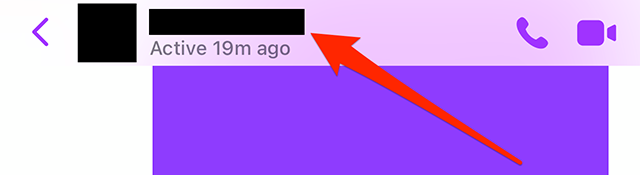
Step 1: Open the Messenger conversation with the pinned messages you want to view and tap the conversation name at the top of the screen.

image

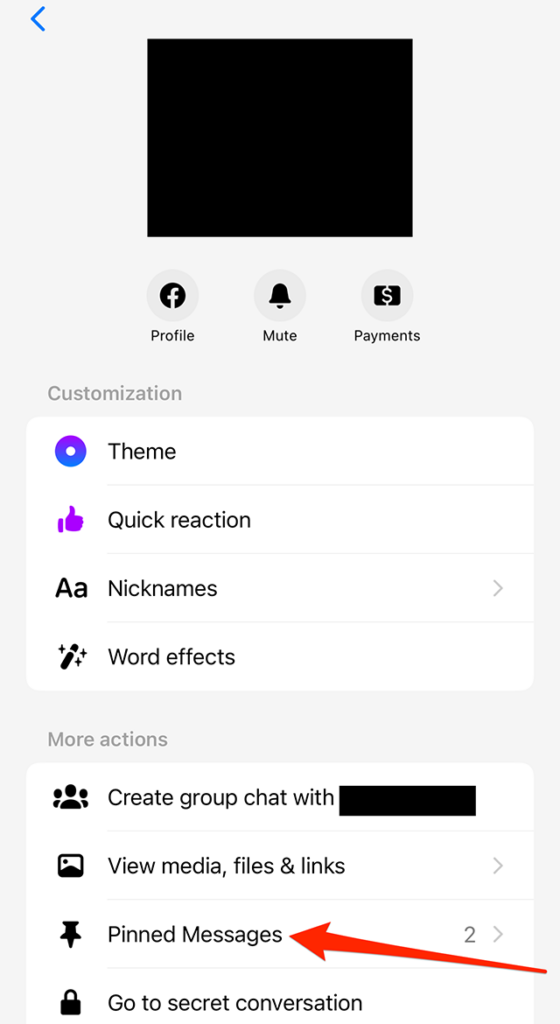
Step 2: Under the “More actions” section, tap “Pinned Messages.”

image

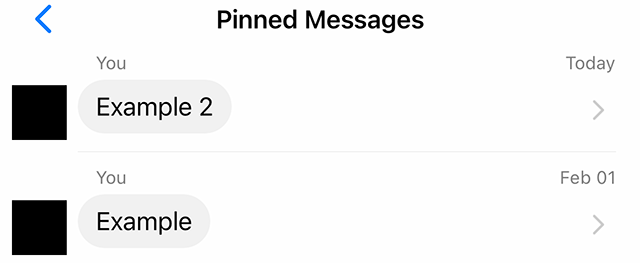
From there, you’ll see a list of the messages that have been pinned in the conversation. If you tap a message, the app will take you back to the conversation where you can view the message in its original context.

image
.font-primary { } .font-secondary { } #meter-count { position: fixed; z-index: 9999999; bottom: 0; width:96%; margin: 2%; -webkit-border-radius: 4px; -moz-border-radius: 4px; border-radius: 4px; -webkit-box-shadow: 0 0px 15px 4px rgba(0,0,0,.2); box-shadow:0 0px 15px 4px rgba(0,0,0,.2); padding: 15px 0; color:#fff; background-color:#343a40; } #meter-count .icon { width: auto; opacity:.8; } #meter-count .icon svg { height: 36px; width: auto; } #meter-count .btn-subscribe { font-size:14px; font-weight:bold; padding:7px 18px; color: #fff; background-color: #2eb3b2; border:none; text-transform: capitalize; margin-right:10px; } #meter-count .btn-subscribe:hover { color: #fff; opacity:.8; } #meter-count .btn-signin { font-size:14px; font-weight:bold; padding:7px 14px; color: #fff; background-color: #121212; border:none; text-transform: capitalize; } #meter-count .btn-signin:hover { color: #fff; opacity:.8; } #meter-count h3 { color:#fff!important; letter-spacing:0px!important; margin:0; padding:0; font-size:16px; line-height:1.5; font-weight:700; margin: 0!important; padding: 0!important; } #meter-count h3 span { color:#E50000!important; font-weight:900; } #meter-count p { font-size:14px; font-weight:500; line-height:1.4; color:#eee!important; margin: 0!important; padding: 0!important; } #meter-count .close { color:#fff; display:block; position:absolute; top: 4px; right:4px; z-index: 999999; } #meter-count .close svg { display:block; color:#fff; height:16px; width:auto; cursor:pointer; } #meter-count .close:hover svg { color:#E50000; } #meter-count .fw-600 { font-weight:600; } @media (max-width: 1079px) { #meter-count .icon { margin:0; padding:0; display:none; } } @media (max-width: 768px) { #meter-count { margin: 0; -webkit-border-radius: 0px; -moz-border-radius: 0px; border-radius: 0px; width:100%; -webkit-box-shadow: 0 -8px 10px -4px rgba(0,0,0,0.3); box-shadow: 0 -8px 10px -4px rgba(0,0,0,0.3); } #meter-count .icon { margin:0; padding:0; display:none; } #meter-count h3 { color:#fff!important; font-size:14px; } #meter-count p { color:#fff!important; font-size: 12px; font-weight: 500; } #meter-count .btn-subscribe, #meter-count .btn-signin { font-size:12px; padding:7px 12px; } #meter-count .btn-signin { display:none; } #meter-count .close svg { height:14px; } }

Enjoying Adweek’s Content? Register for More Access!
https://www.adweek.com/media/messenger-how-to-see-all-of-the-pinned-messages-in-a-chat/


TikTok: How to Receive Direct Messages From Everyone


.article-native-ad { border-bottom: 1px solid #ddd; margin: 0 45px; padding-bottom: 20px; margin-bottom: 20px; } .article-native-ad svg { color: #ddd; font-size: 34px; margin-top: 10px; } .article-native-ad p { line-height:1.5; padding:0!important; padding-left: 10px!important; } .article-native-ad strong { font-weight:500; color:rgb(46,179,178); }

Convergent TV Summit returns March 21-22. Hear timely insights from TV industry experts virtually or in person in NYC. Register now to secure your early bird pass.

TikTok now allows users to receive direct messages from every other user on the platform, even if they aren’t following them.

In order to receive direct messages from everyone, users will need to change a setting in the application’s Privacy menu.

Our guide will show you how to receive direct messages from everyone in the TikTok mobile app.

Note: These screenshots were captured in the TikTok app on iOS.

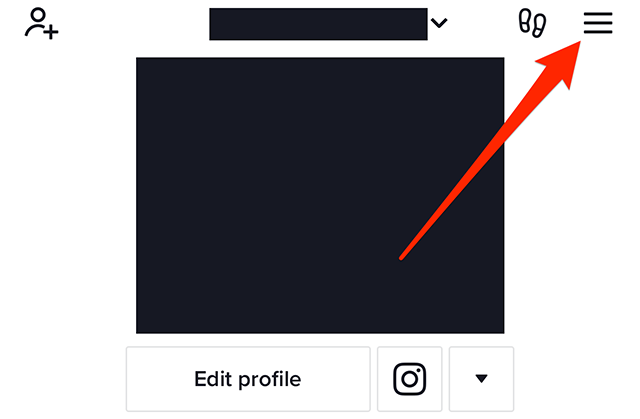
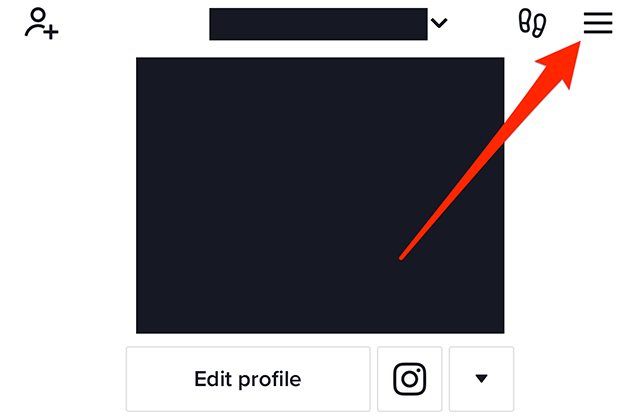
Step 1: On your TikTok profile, tap the three horizontal lines in the top-right corner of the screen.

image

Step 2: Tap “Settings and privacy.”

image

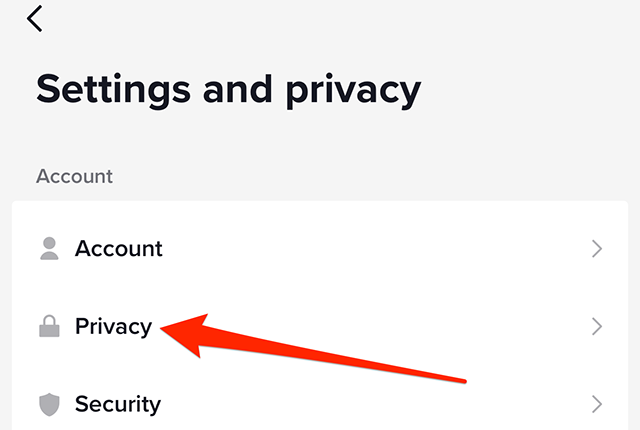
Step 3: Tap “Privacy.”

image

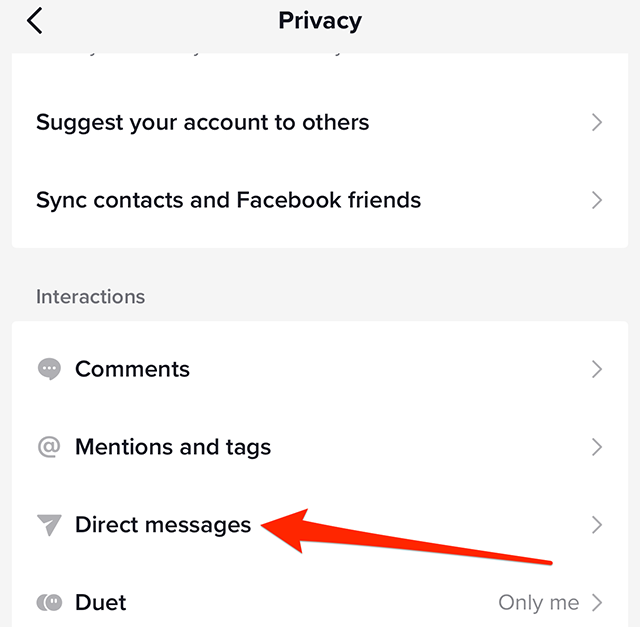
Step 4: Under the “Interactions” section, tap “Direct messages.”

image

Step 5: Tap “Direct messages” on the left side of the screen.

image

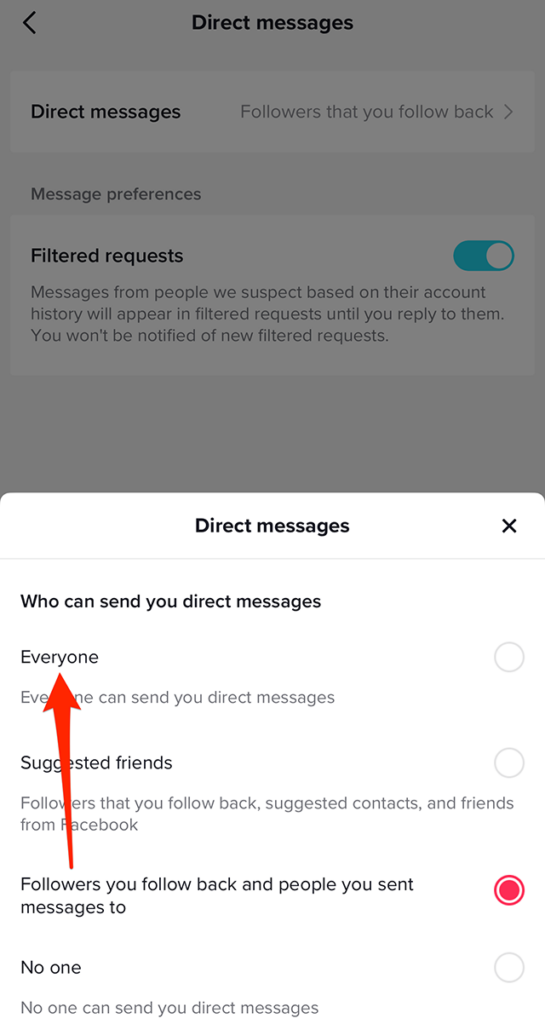
Step 6: Tap “Everyone” on the window that appears at the bottom of the screen.

image

Step 7: Tap the “x” icon in the top-right corner of the “Direct messages” window to close the window and continue using the TikTok app.

image
.font-primary { } .font-secondary { } #meter-count { position: fixed; z-index: 9999999; bottom: 0; width:96%; margin: 2%; -webkit-border-radius: 4px; -moz-border-radius: 4px; border-radius: 4px; -webkit-box-shadow: 0 0px 15px 4px rgba(0,0,0,.2); box-shadow:0 0px 15px 4px rgba(0,0,0,.2); padding: 15px 0; color:#fff; background-color:#343a40; } #meter-count .icon { width: auto; opacity:.8; } #meter-count .icon svg { height: 36px; width: auto; } #meter-count .btn-subscribe { font-size:14px; font-weight:bold; padding:7px 18px; color: #fff; background-color: #2eb3b2; border:none; text-transform: capitalize; margin-right:10px; } #meter-count .btn-subscribe:hover { color: #fff; opacity:.8; } #meter-count .btn-signin { font-size:14px; font-weight:bold; padding:7px 14px; color: #fff; background-color: #121212; border:none; text-transform: capitalize; } #meter-count .btn-signin:hover { color: #fff; opacity:.8; } #meter-count h3 { color:#fff!important; letter-spacing:0px!important; margin:0; padding:0; font-size:16px; line-height:1.5; font-weight:700; margin: 0!important; padding: 0!important; } #meter-count h3 span { color:#E50000!important; font-weight:900; } #meter-count p { font-size:14px; font-weight:500; line-height:1.4; color:#eee!important; margin: 0!important; padding: 0!important; } #meter-count .close { color:#fff; display:block; position:absolute; top: 4px; right:4px; z-index: 999999; } #meter-count .close svg { display:block; color:#fff; height:16px; width:auto; cursor:pointer; } #meter-count .close:hover svg { color:#E50000; } #meter-count .fw-600 { font-weight:600; } @media (max-width: 1079px) { #meter-count .icon { margin:0; padding:0; display:none; } } @media (max-width: 768px) { #meter-count { margin: 0; -webkit-border-radius: 0px; -moz-border-radius: 0px; border-radius: 0px; width:100%; -webkit-box-shadow: 0 -8px 10px -4px rgba(0,0,0,0.3); box-shadow: 0 -8px 10px -4px rgba(0,0,0,0.3); } #meter-count .icon { margin:0; padding:0; display:none; } #meter-count h3 { color:#fff!important; font-size:14px; } #meter-count p { color:#fff!important; font-size: 12px; font-weight: 500; } #meter-count .btn-subscribe, #meter-count .btn-signin { font-size:12px; padding:7px 12px; } #meter-count .btn-signin { display:none; } #meter-count .close svg { height:14px; } }

Enjoying Adweek’s Content? Register for More Access!
https://www.adweek.com/media/tiktok-how-to-receive-direct-messages-from-everyone/


TikTok: How to Change Your Push Notifications Settings


.article-native-ad { border-bottom: 1px solid #ddd; margin: 0 45px; padding-bottom: 20px; margin-bottom: 20px; } .article-native-ad svg { color: #ddd; font-size: 34px; margin-top: 10px; } .article-native-ad p { line-height:1.5; padding:0!important; padding-left: 10px!important; } .article-native-ad strong { font-weight:500; color:rgb(46,179,178); }

Convergent TV Summit returns March 21-22. Hear timely insights from TV industry experts virtually or in person in NYC. Register now to secure your early bird pass.

TikTok allows users to receive push notifications when certain actions take place in the photo- and video-sharing application. For instance, users can receive a notification when another user sends them a direct message.

The TikTok app allows users to change their push notifications settings so they’ll only receive the notifications they’re interested in.

Our guide will show you how to change your push notifications settings in the TikTok mobile app.

Note: These screenshots were captured in the TikTok app on iOS.

Step 1: On your TikTok profile, tap the three horizontal lines in the top-right corner of the screen.

image

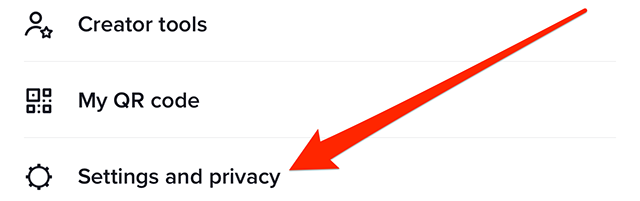
Step 2: Tap “Settings and privacy” at the bottom of the screen.

image

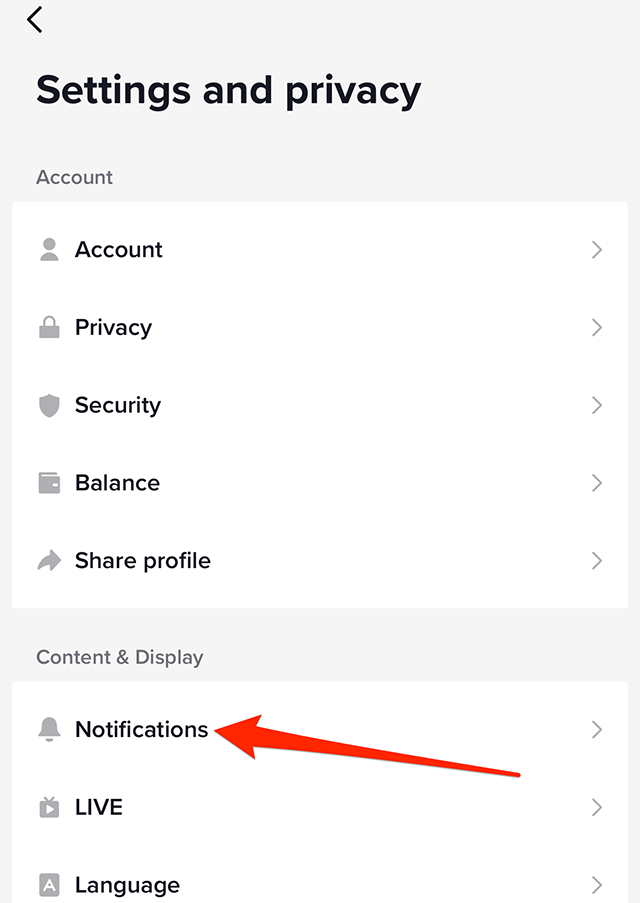
Step 3: Under the “Content & Display” section, tap “Notifications.”

image

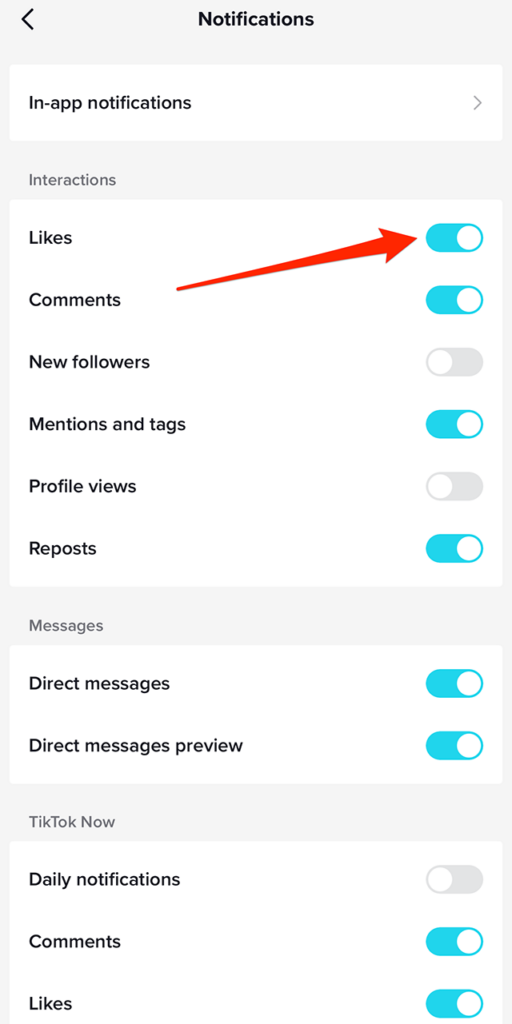
Step 4: You’ll see a list of the different notifications you can receive. If the toggle to the right of a notification setting is blue, the notification setting is turned “on.” If the toggle is gray, the notification setting is turned “off.” Tap the toggle to the right of each notification option to turn the notification on or off, depending on your preference.

image

This guide was first published in March 2019 and was updated in January 2023.

https://www.adweek.com/media/tiktok-heres-how-to-manage-the-apps-push-notifications/


Will Reports of TikTok’s ‘Heating’ Practice Turn Up the Heat Even More on the Platform?

.article-native-ad { border-bottom: 1px solid #ddd; margin: 0 45px; padding-bottom: 20px; margin-bottom: 20px; } .article-native-ad svg { color: #ddd; font-size: 34px; margin-top: 10px; } .article-native-ad p { line-height:1.5; padding:0!important; padding-left: 10px!important; } .article-native-ad strong { font-weight:500; color:rgb(46,179,178); }

Convergent TV Summit returns March 21-22. Hear timely insights from TV industry experts virtually or in person in NYC. Register now to secure your early bird pass.

The For You feed on TikTok is valuable real estate, and there are countless online posts featuring advice and best practices on how to stake a claim to part of that land, but the most foolproof method of doing so is apparently out of the control of brands and creators.

Emily Baker-White of Forbes spoke with six current and former employees of TikTok and parent company ByteDance and reviewed internal communications and documents confirming the existence of a practice referred to within the companies as “heating.”

#paywall-subscribe { margin:0; padding: 1rem 2.4rem; } #paywall-subscribe .holder { background-color:#eee; border:15px solid #f2f2f2; padding:30px; margin:0 auto!important; text-align:center; } #paywall-subscribe a.underline { color:#000; text-decoration:underline; } #paywall-subscribe img { margin-bottom:10px; width: 140px!important; height: auto!important; } #paywall-subscribe h3 { font-weight:bold; font-size:16px; text-transform:uppercase; width:80%; margin:0 auto; margin-bottom:20px; text-align:center; } #paywall-subscribe h3 span { display:block; font-size:14px; } #paywall-subscribe h2 { font-weight:800; font-size:24px; text-transform:uppercase; } #paywall-subscribe p { font-size: 16px; color:#000; padding: 0; } #paywall-subscribe .cta { margin-top:20px; margin-bottom:10px; font-size:14px; text-transform:capitalize; color: #fff; background-color: #E50000; border:none; padding:12px 28px; text-decoration:none; -webkit-transition: .3s ease; -moz-transition: .3s ease; -o-transition: .3s ease; -ms-transition: .3s ease; transition: .3s ease; } #paywall-subscribe .cta:hover { color: #fff; background-color: #181818; transform: scale(1.02); } #paywall-subscribe .already-a-member { font-size:14px; } @media (max-width: 1024px) { #paywall-subscribe .holder { border:12px solid #f2f2f2; padding:25px; } #paywall-subscribe img { width: 120px!important; } } @media (max-width: 768px) { #paywall-subscribe .holder { border:10px solid #f2f2f2; padding:20px; } #paywall-subscribe img { width: 100px!important; } #paywall-subscribe h3 { font-size:14px; } #paywall-subscribe h3 span { font-size:12px; } #paywall-subscribe h2 { font-size:18px; } #paywall-subscribe p { font-size:14px; } #paywall-subscribe .cta { font-size:12px; padding:10px 24px; } #paywall-subscribe .already-a-member { font-size:11px; } } AW+

WORK SMARTER – LEARN, GROW AND BE INSPIRED.

Subscribe today!

To Read the Full Story Become an Adweek+ Subscriber

View Subscription Options

Already a member? Sign in

https://www.adweek.com/media/will-reports-of-tiktoks-heating-practice-turn-up-the-heat-even-more-on-the-platform/


Twitter Introduces Pinned Lists

.article-native-ad { border-bottom: 1px solid #ddd; margin: 0 45px; padding-bottom: 20px; margin-bottom: 20px; } .article-native-ad svg { color: #ddd; font-size: 34px; margin-top: 10px; } .article-native-ad p { line-height:1.5; padding:0!important; padding-left: 10px!important; } .article-native-ad strong { font-weight:500; color:rgb(46,179,178); }

Convergent TV Summit returns March 21-22. Hear timely insights from TV industry experts virtually or in person in NYC. Register now to secure your early bird pass.

Twitter introduced a new pinned Lists feature and extended its Community Notes crowdsourced fact-checking initiative to more countries.

Owner Elon Musk said in a tweet Friday that users can tap Lists on their profile page, create Lists of accounts to follow and tap the pin icon, which will enable them to swipe left and right between Lists and the Following and For You feeds.

And the social network said in a tweet from its Community Notes account that contributors are now being admitted from Australia, Ireland, New Zealand and the U.K.,

#paywall-subscribe { margin:0; padding: 1rem 2.4rem; } #paywall-subscribe .holder { background-color:#eee; border:15px solid #f2f2f2; padding:30px; margin:0 auto!important; text-align:center; } #paywall-subscribe a.underline { color:#000; text-decoration:underline; } #paywall-subscribe img { margin-bottom:10px; width: 140px!important; height: auto!important; } #paywall-subscribe h3 { font-weight:bold; font-size:16px; text-transform:uppercase; width:80%; margin:0 auto; margin-bottom:20px; text-align:center; } #paywall-subscribe h3 span { display:block; font-size:14px; } #paywall-subscribe h2 { font-weight:800; font-size:24px; text-transform:uppercase; } #paywall-subscribe p { font-size: 16px; color:#000; padding: 0; } #paywall-subscribe .cta { margin-top:20px; margin-bottom:10px; font-size:14px; text-transform:capitalize; color: #fff; background-color: #E50000; border:none; padding:12px 28px; text-decoration:none; -webkit-transition: .3s ease; -moz-transition: .3s ease; -o-transition: .3s ease; -ms-transition: .3s ease; transition: .3s ease; } #paywall-subscribe .cta:hover { color: #fff; background-color: #181818; transform: scale(1.02); } #paywall-subscribe .already-a-member { font-size:14px; } @media (max-width: 1024px) { #paywall-subscribe .holder { border:12px solid #f2f2f2; padding:25px; } #paywall-subscribe img { width: 120px!important; } } @media (max-width: 768px) { #paywall-subscribe .holder { border:10px solid #f2f2f2; padding:20px; } #paywall-subscribe img { width: 100px!important; } #paywall-subscribe h3 { font-size:14px; } #paywall-subscribe h3 span { font-size:12px; } #paywall-subscribe h2 { font-size:18px; } #paywall-subscribe p { font-size:14px; } #paywall-subscribe .cta { font-size:12px; padding:10px 24px; } #paywall-subscribe .already-a-member { font-size:11px; } } AW+

WORK SMARTER – LEARN, GROW AND BE INSPIRED.

Subscribe today!

To Read the Full Story Become an Adweek+ Subscriber

View Subscription Options

Already a member? Sign in

https://www.adweek.com/media/twitter-introduces-pinned-lists/


Verizon Taps Eli Manning to Quarterback Social Campaign Backing ‘Welcome Unlimited’ Plan

Former New York Giants quarterback Eli Manning is coming off the bench for a social campaign backing Verizon’s “Welcome Unlimited” plan.

The wireless carrier is giving away 20 pairs of tickets to the next three Super Bowls, and Manning pitches ways to join one of the winners, including offering to coach their kid’s football team.

Other former NFL players will take part in the social campaign, including Reggie Bush, Mark Sanchez and Emmanuel Sanders.

The three years of Super Bowl tickets are a nod to the three-year price guarantee for the Welcome Unlimited Plan.

Fans can go to the local Verizon retail store by Feb. 15 to enter.

.font-primary { } .font-secondary { } #meter-count { position: fixed; z-index: 9999999; bottom: 0; width:96%; margin: 2%; -webkit-border-radius: 4px; -moz-border-radius: 4px; border-radius: 4px; -webkit-box-shadow: 0 0px 15px 4px rgba(0,0,0,.2); box-shadow:0 0px 15px 4px rgba(0,0,0,.2); padding: 15px 0; color:#fff; background-color:#343a40; } #meter-count .icon { width: auto; opacity:.8; } #meter-count .icon svg { height: 36px; width: auto; } #meter-count .btn-subscribe { font-size:14px; font-weight:bold; padding:7px 18px; color: #fff; background-color: #2eb3b2; border:none; text-transform: capitalize; margin-right:10px; } #meter-count .btn-subscribe:hover { color: #fff; opacity:.8; } #meter-count .btn-signin { font-size:14px; font-weight:bold; padding:7px 14px; color: #fff; background-color: #121212; border:none; text-transform: capitalize; } #meter-count .btn-signin:hover { color: #fff; opacity:.8; } #meter-count h3 { color:#fff!important; letter-spacing:0px!important; margin:0; padding:0; font-size:16px; line-height:1.5; font-weight:700; margin: 0!important; padding: 0!important; } #meter-count h3 span { color:#E50000!important; font-weight:900; } #meter-count p { font-size:14px; font-weight:500; line-height:1.4; color:#eee!important; margin: 0!important; padding: 0!important; } #meter-count .close { color:#fff; display:block; position:absolute; top: 4px; right:4px; z-index: 999999; } #meter-count .close svg { display:block; color:#fff; height:16px; width:auto; cursor:pointer; } #meter-count .close:hover svg { color:#E50000; } #meter-count .fw-600 { font-weight:600; } @media (max-width: 1079px) { #meter-count .icon { margin:0; padding:0; display:none; } } @media (max-width: 768px) { #meter-count { margin: 0; -webkit-border-radius: 0px; -moz-border-radius: 0px; border-radius: 0px; width:100%; -webkit-box-shadow: 0 -8px 10px -4px rgba(0,0,0,0.3); box-shadow: 0 -8px 10px -4px rgba(0,0,0,0.3); } #meter-count .icon { margin:0; padding:0; display:none; } #meter-count h3 { color:#fff!important; font-size:14px; } #meter-count p { color:#fff!important; font-size: 12px; font-weight: 500; } #meter-count .btn-subscribe, #meter-count .btn-signin { font-size:12px; padding:7px 12px; } #meter-count .btn-signin { display:none; } #meter-count .close svg { height:14px; } }

Enjoying Adweek’s Content? Register for More Access!
https://www.adweek.com/social-marketing/verizon-taps-eli-manning-to-quarterback-social-campaign-backing-welcome-unlimited-plan/


Ice on the Beach? Truly Hard Seltzer NHL All-Star Beach Festival Details Revealed

The National Hockey League shared all of the details on the Truly Hard Seltzer NHL All-Star Beach Festival Feb. 2 through 4 at Fort Lauderdale Beach Park in Fort Lauderdale, Fla.

The puck drops for the 2023 Honda NHL All-Star Game at 3 p.m. Saturday, Feb. 4, at FLA Live Arena, home of the Florida Panthers, and the game will air on ABC.

The free, non-ticketed fan festival will be open to the public Thursday, Feb. 2, from noon to 8 p.m. ET; and Friday and Saturday, Feb. 3 and 4, from 10 a.m. to 6 p.m., and festivities will include an official watch party for the game.

More than one-dozen of the league’s official licensees and partners will host activations during the weekend, with three new participants at the Truly Hard Seltzer NHL All-Star Beach Festival: BioSteel, Caterpillar and Extreme Networks.

The eighth NHL Mascot Showdown presented by Upper Deck will pit all 30 team mascots, including Buoy, the new mascot for the Seattle Kraken, against each other to showcase their hockey skills and athletic prowess. Not every club in the league has a mascot.

Private event the 2023 NHL All-Star Future Goals Kids Day Presented by SAP will enable 750 local South Florida students from Broward and Miami-Dade counties to experience the Truly Hard Seltzer NHL All-Star Beach Festival and learn from professionals in hockey who use STEM (science, technology, engineering and math) skills daily.

The panel includes: NHL director, social impact, growth and fan development Andrew Ference; SAP vice president of global sponsorships Dan Fleetwood; and Florida Panthers radio play-by-play announcer Doug Plagens.

Chaperones, students and teachers will also have an opportunity to meet a variety of NHL mascots and participate in activities including a STEM and sustainability-themed scavenger hunt.

A live taping of off-ice skill competition the Enterprise Splash Shot will feature four 2023 NHL All-Stars and special guest teammates going head-to-head in a target shooting tournament-style competition Thursday, Feb. 2, at 3:30 p.m. at the Upper Deck Rink.

And fans can see 2023 NHL All-Star Game players walk the NHL All-Star Red Carpet at the Truly Hard Seltzer NHL All-Star Beach Festival Friday, Feb. 3, from 3 p.m. to 4 p.m.

Other fan attractions include:

  • Autograph Cove: Guests will be able to meet and greet NHL All-Stars, Hall of Famers and NHL Alumni.
  • BioSteel: Fans can try their best trick shot, practice stick handling and rehydrate with BioSteel.
  • Caterpillar: Fans can shoot for prizes, check out Cat equipment and learn about Cat services.
  • Discover: Fans can challenge their friends on a giant air hockey table, and a Discover/All-Star beach hut will distribute premium items. They can also post for photos on Discover’s sand throne.
  • Everyday NHL: Fans can try their hand at beanbag toss, ping pong and more tailgate games from Victory Tailgate at the Everyday NHL Beach Tailgate, with the chance to win a daily physical $250 gift card to NHLShop.com.
  • Extreme Networks: Fans can test their shooting accuracy from 15, 30 and 40 feet from the goal to win prizes.
  • Fanatics: The NHL All-Star Official Merchandise Shop—A Fanatics Experience at Las Olas Oceanside Park, just north of the Truly Hard Seltzer NHL All-Star Beach Festival, lets fans shop for NHL All-Star apparel, headwear, jerseys and souvenirs, and the Fanatics Authentic shop-in-shop features autographed memorabilia and collectibles from the biggest names in the NHL
  • Fastenal/Ergodyne: Fans can visit the Ergodyne/Tenacious Work Gear tent, in partnership with Fastenal, and take part in the StepShot Challenge, get free gear and sign up for a chance to win a Tenacious Work Gear prize package.
  • Florida Panthers: Fans can meet the host Florida Panthers and the Panther Patrol Team for interactive activations and giveaways.
  • Geico: Fans have the chance to win a $500 gift card and enjoy multiple interactive experiences including a goalie reflex game, a hockey stick putting challenge and a locker room photo opportunity.
  • Great Clips: Fans can practice like the pros and test their stick skills by shooting pucks into a stacked washer and dryer unit.
  • Hockey Fights Cancer: Fans can learn about getting involved in the joint initiative of the NHL and the National Hockey League Players’ Association that supports official charity partners the American Cancer Society and the Canadian Cancer Society.
  • Hockey Hall of Fame: The exhibit features 19 of the most prestigious NHL trophies in the NHL Trophy Showcase presented by Discover, as well as NHL All-Star artifacts and the history and evolution of professional hockey in the state of Florida.
  • Honda: Vehicles will be displayed for fans to check out, and they can try their luck at the Honda Puck Drop game or show off their hockey skills with Goalie Power Play and the Precision Passing Challenge to win fun prizes.
  • Kids Zone: Younger fans can enjoy fun games and activities like Skee Puck, as well as two ball hockey rinks.
  • NHL Esports: The inaugural EA Sports NHL 23 All-Star Open will feature top NHL gamers and hockey superstars including Alex Carpenter, Emily Clark, Hilary Knight and NHL 23 cover athlete Sarah Nurse), and fans can test their skills and play against one another at gaming stations that will be set up and equipped with EA Sports NHL 23.
  • NHL Fan Access App: The official event application features the “Ask Stanley” virtual assistant for instant help with event questions, event maps, opportunities to win prizes through QR scavenger hunt and policies (including Stanley Cup appearances and autograph sessions).
  • NHL Network: Fans can compete against friends at the NHL Network Hardest Shot.
  • NHL Podcasts: Fans can see their favorite NHL podcasts record live all three days, and NHL alumni and special guests from around the league will stop by to join NHL @TheRink and go one-on-one with Nick Alberga.
  • NHL Street: The NHL’s new official youth street hockey league will celebrate its launch Saturday, Feb. 4 at noon on the Upper Deck Rink at the NHL Mascot Showdown presented by Upper Deck. NHL Street is a partnership with RCX Sports, and athletes are provided authentic uniforms and branded equipment exclusively created by NHL licensee Franklin Sports.
  • NHL United by Hockey Mobile Museum: The NHL, the Hockey Hall of Fame and ALXMOBILE will debut of the United by Hockey Mobile Museum, a traveling history museum aimed at raising awareness and education of diverse individuals within the game of hockey.
  • Stanley Cup Display: Fans can take a photo with the most iconic trophy in professional sports.
  • Ticketmaster: Fans can take part in Bullseye Battle and show off their wrist shot.
  • Topps: Fans can purchase 2022-23 NHL stickers and albums and play an interactive AR experience to win physical prizes and a special in-app digital pack in Topps SKATE.
  • Truly Hard Seltzer: Fans 21 and older can face off in Bubble Hockey Games to see which Truly pack reigns supreme, take a picture in the interactive photo booth, check out the views from the rooftop deck and have a chance to meet a 2023 NHL All-Star player.
  • Upper Deck: Fans can collect a Free Mascot Showdown trading card set exclusively on UpperDeckEpack.com and create their own free personalized trading card.
  • Verizon: Fans can learn about Verizon products and services for a chance to win prizes.
.font-primary { } .font-secondary { } #meter-count { position: fixed; z-index: 9999999; bottom: 0; width:96%; margin: 2%; -webkit-border-radius: 4px; -moz-border-radius: 4px; border-radius: 4px; -webkit-box-shadow: 0 0px 15px 4px rgba(0,0,0,.2); box-shadow:0 0px 15px 4px rgba(0,0,0,.2); padding: 15px 0; color:#fff; background-color:#343a40; } #meter-count .icon { width: auto; opacity:.8; } #meter-count .icon svg { height: 36px; width: auto; } #meter-count .btn-subscribe { font-size:14px; font-weight:bold; padding:7px 18px; color: #fff; background-color: #2eb3b2; border:none; text-transform: capitalize; margin-right:10px; } #meter-count .btn-subscribe:hover { color: #fff; opacity:.8; } #meter-count .btn-signin { font-size:14px; font-weight:bold; padding:7px 14px; color: #fff; background-color: #121212; border:none; text-transform: capitalize; } #meter-count .btn-signin:hover { color: #fff; opacity:.8; } #meter-count h3 { color:#fff!important; letter-spacing:0px!important; margin:0; padding:0; font-size:16px; line-height:1.5; font-weight:700; margin: 0!important; padding: 0!important; } #meter-count h3 span { color:#E50000!important; font-weight:900; } #meter-count p { font-size:14px; font-weight:500; line-height:1.4; color:#eee!important; margin: 0!important; padding: 0!important; } #meter-count .close { color:#fff; display:block; position:absolute; top: 4px; right:4px; z-index: 999999; } #meter-count .close svg { display:block; color:#fff; height:16px; width:auto; cursor:pointer; } #meter-count .close:hover svg { color:#E50000; } #meter-count .fw-600 { font-weight:600; } @media (max-width: 1079px) { #meter-count .icon { margin:0; padding:0; display:none; } } @media (max-width: 768px) { #meter-count { margin: 0; -webkit-border-radius: 0px; -moz-border-radius: 0px; border-radius: 0px; width:100%; -webkit-box-shadow: 0 -8px 10px -4px rgba(0,0,0,0.3); box-shadow: 0 -8px 10px -4px rgba(0,0,0,0.3); } #meter-count .icon { margin:0; padding:0; display:none; } #meter-count h3 { color:#fff!important; font-size:14px; } #meter-count p { color:#fff!important; font-size: 12px; font-weight: 500; } #meter-count .btn-subscribe, #meter-count .btn-signin { font-size:12px; padding:7px 12px; } #meter-count .btn-signin { display:none; } #meter-count .close svg { height:14px; } }

Enjoying Adweek’s Content? Register for More Access!
https://www.adweek.com/social-marketing/ice-on-the-beach-truly-hard-seltzer-nhl-all-star-beach-festival-details-revealed/


Instagram: How to Reschedule a Scheduled Post


.article-native-ad { border-bottom: 1px solid #ddd; margin: 0 45px; padding-bottom: 20px; margin-bottom: 20px; } .article-native-ad svg { color: #ddd; font-size: 34px; margin-top: 10px; } .article-native-ad p { line-height:1.5; padding:0!important; padding-left: 10px!important; } .article-native-ad strong { font-weight:500; color:rgb(46,179,178); }

Convergent TV Summit returns March 21-22. Hear timely insights from TV industry experts virtually or in person in NYC. Register now to secure your early bird pass.

Once an Instagram user schedules a post, they have the option to reschedule the post if they’d like it to be shared at a different date and/or time.

Our guide will show you how to reschedule a post in the Instagram mobile application.

Note: These screenshots were captured in the Instagram app on iOS.

Step 1: On your Instagram profile, tap the icon of three horizontal lines in the top-right corner of the screen.

image

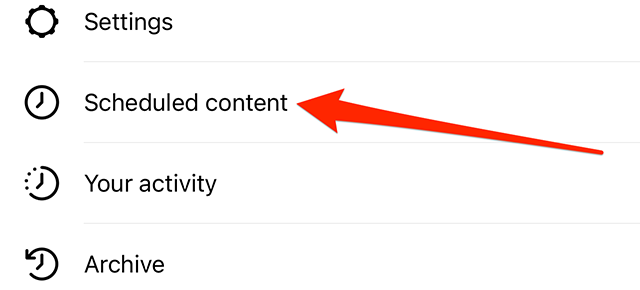
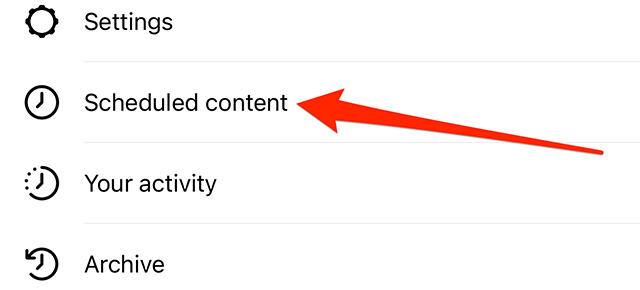
Step 2: Tap “Scheduled content.”

image

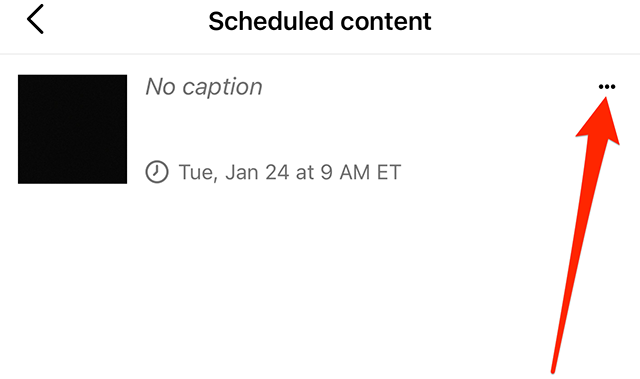
Step 3: Tap the three dots to the right of the post you want to reschedule.

image

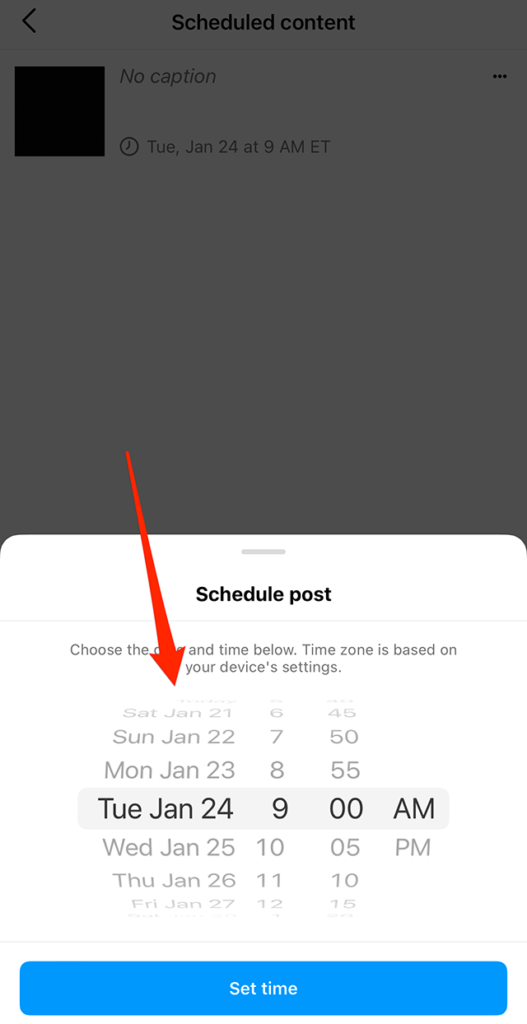
Step 4: Use the wheels on the “Schedule post” window that appears at the bottom of the screen to make changes to when the post will be shared.

image

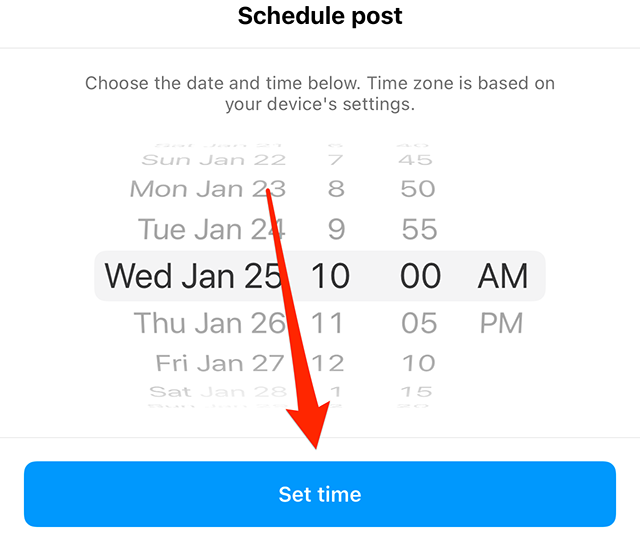
Step 5: Tap the “Set time” button at the bottom of the “Schedule post” window to save your changes.

image
.font-primary { } .font-secondary { } #meter-count { position: fixed; z-index: 9999999; bottom: 0; width:96%; margin: 2%; -webkit-border-radius: 4px; -moz-border-radius: 4px; border-radius: 4px; -webkit-box-shadow: 0 0px 15px 4px rgba(0,0,0,.2); box-shadow:0 0px 15px 4px rgba(0,0,0,.2); padding: 15px 0; color:#fff; background-color:#343a40; } #meter-count .icon { width: auto; opacity:.8; } #meter-count .icon svg { height: 36px; width: auto; } #meter-count .btn-subscribe { font-size:14px; font-weight:bold; padding:7px 18px; color: #fff; background-color: #2eb3b2; border:none; text-transform: capitalize; margin-right:10px; } #meter-count .btn-subscribe:hover { color: #fff; opacity:.8; } #meter-count .btn-signin { font-size:14px; font-weight:bold; padding:7px 14px; color: #fff; background-color: #121212; border:none; text-transform: capitalize; } #meter-count .btn-signin:hover { color: #fff; opacity:.8; } #meter-count h3 { color:#fff!important; letter-spacing:0px!important; margin:0; padding:0; font-size:16px; line-height:1.5; font-weight:700; margin: 0!important; padding: 0!important; } #meter-count h3 span { color:#E50000!important; font-weight:900; } #meter-count p { font-size:14px; font-weight:500; line-height:1.4; color:#eee!important; margin: 0!important; padding: 0!important; } #meter-count .close { color:#fff; display:block; position:absolute; top: 4px; right:4px; z-index: 999999; } #meter-count .close svg { display:block; color:#fff; height:16px; width:auto; cursor:pointer; } #meter-count .close:hover svg { color:#E50000; } #meter-count .fw-600 { font-weight:600; } @media (max-width: 1079px) { #meter-count .icon { margin:0; padding:0; display:none; } } @media (max-width: 768px) { #meter-count { margin: 0; -webkit-border-radius: 0px; -moz-border-radius: 0px; border-radius: 0px; width:100%; -webkit-box-shadow: 0 -8px 10px -4px rgba(0,0,0,0.3); box-shadow: 0 -8px 10px -4px rgba(0,0,0,0.3); } #meter-count .icon { margin:0; padding:0; display:none; } #meter-count h3 { color:#fff!important; font-size:14px; } #meter-count p { color:#fff!important; font-size: 12px; font-weight: 500; } #meter-count .btn-subscribe, #meter-count .btn-signin { font-size:12px; padding:7px 12px; } #meter-count .btn-signin { display:none; } #meter-count .close svg { height:14px; } }

Enjoying Adweek’s Content? Register for More Access!

https://www.adweek.com/media/instagram-how-to-reschedule-a-scheduled-post/


Instagram: How to Schedule a Post


.article-native-ad { border-bottom: 1px solid #ddd; margin: 0 45px; padding-bottom: 20px; margin-bottom: 20px; } .article-native-ad svg { color: #ddd; font-size: 34px; margin-top: 10px; } .article-native-ad p { line-height:1.5; padding:0!important; padding-left: 10px!important; } .article-native-ad strong { font-weight:500; color:rgb(46,179,178); }

Convergent TV Summit returns March 21-22. Hear timely insights from TV industry experts virtually or in person in NYC. Register now to secure your early bird pass.

Instagram now allows users to schedule posts on the photo- and video-sharing platform. Posts can be scheduled up to 75 days in advance.

Our guide will show you how to schedule a post in the Instagram mobile application.

Note: These screenshots were captured in the Instagram app on iOS.

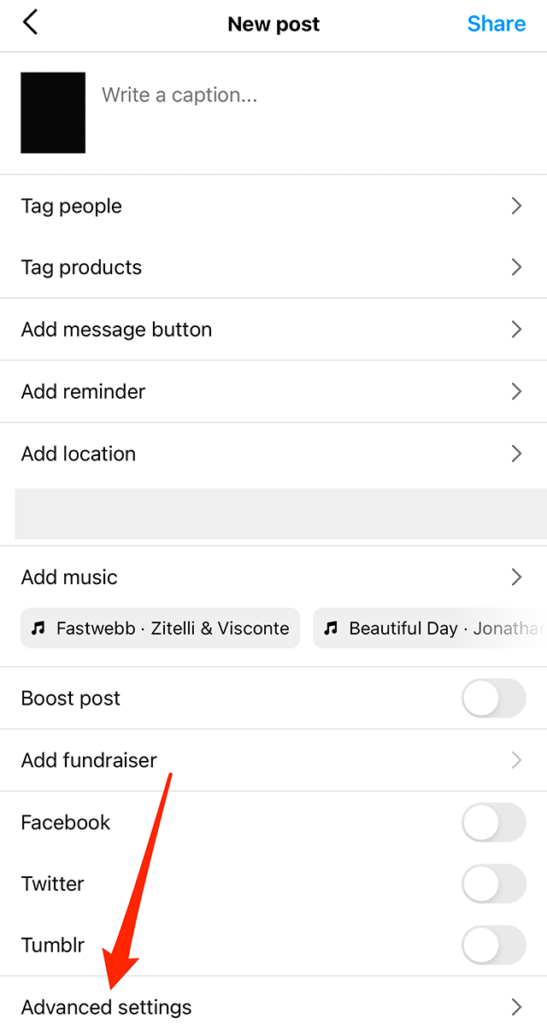
Step 1: Once you reach the “New post” screen while creating a post (the screen that allows you to add a caption to your post), tap “Advanced settings” at the bottom of the screen.

image

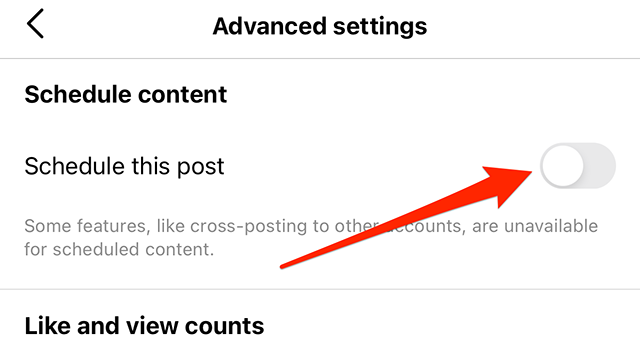
Step 2: Under the “Schedule content” section, tap the gray toggle to the right of “Schedule this post.”

image

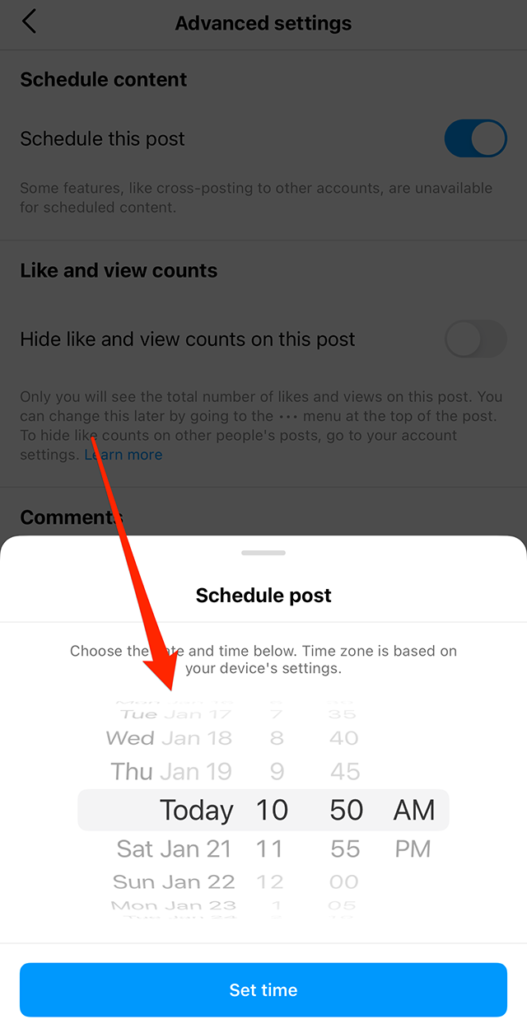
Step 3: Use the wheels on the “Schedule post” window to set your desired posting date and time.

image

Step 4: Once you’ve selected your desired posting date and time, tap the “Set time” button at the bottom of the screen.

image

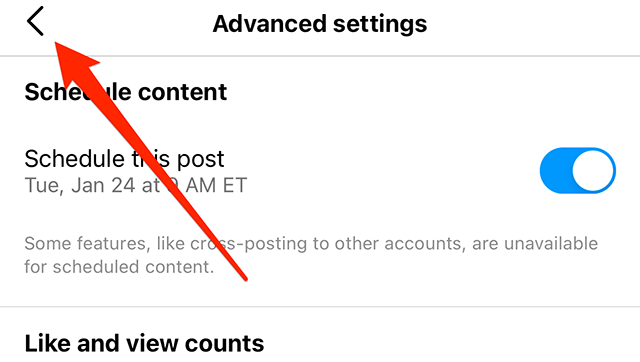
From there, you can tap the back arrow (the “<” symbol) in the top-left corner of the screen to continue editing your post as your normally would.

image

You can also schedule a post by going to your Instagram profile, tapping the menu icon and then tapping “Scheduled content” to view the scheduled content menu.

image
.font-primary { } .font-secondary { } #meter-count { position: fixed; z-index: 9999999; bottom: 0; width:96%; margin: 2%; -webkit-border-radius: 4px; -moz-border-radius: 4px; border-radius: 4px; -webkit-box-shadow: 0 0px 15px 4px rgba(0,0,0,.2); box-shadow:0 0px 15px 4px rgba(0,0,0,.2); padding: 15px 0; color:#fff; background-color:#343a40; } #meter-count .icon { width: auto; opacity:.8; } #meter-count .icon svg { height: 36px; width: auto; } #meter-count .btn-subscribe { font-size:14px; font-weight:bold; padding:7px 18px; color: #fff; background-color: #E50000; border:none; text-transform: capitalize; } #meter-count .btn-subscribe:hover { color: #fff; opacity:.8; } #meter-count .btn-signin { font-size:14px; font-weight:bold; padding:7px 14px; color: #fff; background-color: #121212; border:none; text-transform: capitalize; } #meter-count .btn-signin:hover { color: #fff; opacity:.8; } #meter-count h3 { color:#fff!important; letter-spacing:0px!important; margin:0; padding:0; font-size:16px; line-height:1.5; font-weight:700; margin: 0!important; padding: 0!important; } #meter-count h3 span { color:#E50000!important; font-weight:900; } #meter-count p { font-size:14px; font-weight:500; line-height:1.4; color:#eee!important; margin: 0!important; padding: 0!important; } #meter-count .close { color:#fff; display:block; position:absolute; top: 4px; right:4px; z-index: 999999; } #meter-count .close svg { display:block; color:#fff; height:16px; width:auto; cursor:pointer; } #meter-count .close:hover svg { color:#E50000; } #meter-count .fw-600 { font-weight:600; } @media (max-width: 1079px) { #meter-count .icon { margin:0; padding:0; display:none; } } @media (max-width: 768px) { #meter-count { margin: 0; -webkit-border-radius: 0px; -moz-border-radius: 0px; border-radius: 0px; width:100%; -webkit-box-shadow: 0 -8px 10px -4px rgba(0,0,0,0.3); box-shadow: 0 -8px 10px -4px rgba(0,0,0,0.3); } #meter-count .icon { margin:0; padding:0; display:none; } #meter-count h3 { color:#fff!important; font-size:14px; } #meter-count p { color:#fff!important; font-size: 12px; font-weight: 500; } #meter-count .btn-subscribe, #meter-count .btn-signin { font-size:12px; padding:7px 12px; } #meter-count .btn-signin { display:none; } #meter-count .close svg { height:14px; } }

Enjoying your content? You Have 1 Free Article Left.

Register to continue reading!

https://www.adweek.com/media/instagram-how-to-schedule-a-post/


YouTube Returns as Title Sponsor of VidCon Anaheim 2023

.article-native-ad { border-bottom: 1px solid #ddd; margin: 0 45px; padding-bottom: 20px; margin-bottom: 20px; } .article-native-ad svg { color: #ddd; font-size: 34px; margin-top: 10px; } .article-native-ad p { line-height:1.5; padding:0!important; padding-left: 10px!important; } .article-native-ad strong { font-weight:500; color:rgb(46,179,178); }

Introducing the Adweek Podcast Network. Access infinite inspiration in your pocket on everything from career advice and creativity to metaverse marketing and more. Browse all podcasts.

YouTube is back as the title sponsor of VidCon Anaheim 2023 after holding that role from 2013 through 2019.

The event was canceled in 2020 and 2021 due to the pandemic, and TikTok, which was slated to be the title sponsor in 2021, did so last year.

VidCon Anaheim 2023 will take place at the Anaheim Convention Center in Anaheim, Calif., June 21 through 24.

Featured creators schedule to attend the event along with VidCon co-founders Hank Green and John Green include AdamRayOkay, Drew Afualo, Aimsey, Ben Azelart, Billzo, Kat Blaque, Ian Boggs, BoomerNa, Eddy Burback, Aaron Burriss, CalebCity, CaptainPuffy, CelinaSpookyBoo, Claudipia, Courtreezy, Cuptoast, Charlie Curtis-Beard, DangMattSmith, Benjamin De Almeida (BENOFTHEWEEK), Sofie Dossi, Kyle Exum, GeorgeNotFound, Haminations, Infinite, Michelle Khare, Kiera, KREW, Sheena Melwani, The Merrell Twins, MissDarcei, MsMunchie, Jesus Nalgas, Niki Nihachu (Nihachu), The Odd 1s Out, Anthony Padilla, Rebecca Parham (Let Me Explain Studios), Ph1LzA, Ranboo, Renegade…

#paywall-subscribe { margin:0; padding: 1rem 2.4rem; } #paywall-subscribe .holder { background-color:#eee; border:15px solid #f2f2f2; padding:30px; margin:0 auto!important; text-align:center; } #paywall-subscribe a.underline { color:#000; text-decoration:underline; } #paywall-subscribe img { margin-bottom:10px; width: 140px!important; height: auto!important; } #paywall-subscribe h3 { font-weight:bold; font-size:16px; text-transform:uppercase; width:80%; margin:0 auto; margin-bottom:20px; text-align:center; } #paywall-subscribe h3 span { display:block; font-size:14px; } #paywall-subscribe h2 { font-weight:800; font-size:24px; text-transform:uppercase; } #paywall-subscribe p { font-size: 16px; color:#000; padding: 0; } #paywall-subscribe .cta { margin-top:20px; margin-bottom:10px; font-size:14px; text-transform:capitalize; color: #fff; background-color: #E50000; border:none; padding:12px 28px; text-decoration:none; -webkit-transition: .3s ease; -moz-transition: .3s ease; -o-transition: .3s ease; -ms-transition: .3s ease; transition: .3s ease; } #paywall-subscribe .cta:hover { color: #fff; background-color: #181818; transform: scale(1.02); } #paywall-subscribe .already-a-member { font-size:14px; } @media (max-width: 1024px) { #paywall-subscribe .holder { border:12px solid #f2f2f2; padding:25px; } #paywall-subscribe img { width: 120px!important; } } @media (max-width: 768px) { #paywall-subscribe .holder { border:10px solid #f2f2f2; padding:20px; } #paywall-subscribe img { width: 100px!important; } #paywall-subscribe h3 { font-size:14px; } #paywall-subscribe h3 span { font-size:12px; } #paywall-subscribe h2 { font-size:18px; } #paywall-subscribe p { font-size:14px; } #paywall-subscribe .cta { font-size:12px; padding:10px 24px; } #paywall-subscribe .already-a-member { font-size:11px; } } AW+

WORK SMARTER – LEARN, GROW AND BE INSPIRED.

Subscribe today!

To Read the Full Story Become an Adweek+ Subscriber

View Subscription Options

Already a member? Sign in

https://www.adweek.com/social-marketing/youtube-returns-as-title-sponsor-of-vidcon-anaheim-2023/