Pinterest, LiveRamp Data Hub Team Up on Clean Rooms

Pinterest detailed a new partnership with LiveRamp Data Hub at CES 2023 in Las Vegas Thursday, under which LiveRamp will pilot clean rooms for select Pinterest advertising partners, starting with grocery company Albertsons.

The integration enables a protected, third-party space where brands can combine their own first-party data and data from Pinterest in a secure environment, with the clean room keeping that data private and providing aggregated insight into ad performance.

Pinterest stressed that neither party’s personally identifiable sales and campaign data is visible to the other party.

The platform wrote in a blog post Thursday, “The digital advertising industry has relied on cookies as a measurement tool for years. But as consumer behavior evolves, marketers have to evolve with it. So as the industry migrates away from collecting third-party cookies, we’re looking for new ways to sustain our clients’ success while reducing reliance on identifiable data. We’ve routinely invested in forward-looking solutions that help marketers connect the dots between their first-party data and their customers’ actions on Pinterest. Now, we’re piloting our next big development for secure data solutions.”

The clean room for Albertsons will be an ongoing initiative to deliver closed-loop reporting for brands that participate in the grocer’s retail media network, Albertsons Media Collective, and it will kick off with a winter healthy eating campaign, with crucial metrics, such as return on ad spend, to be measured.

Albertsons Media Collective senior vice president of retail media Kristi Argyilan said in the Pinterest blog post, “Data privacy is a priority for Albertsons Media Collective, and we’re excited to pilot this new clean room initiative with a trusted partner. We believe using clean rooms can provide our clients with the data they expect to make informed decisions about their advertising in a privacy-preserving manner. While our initial test pilot focuses on enabling closed-loop measurement, this partnership will ultimately provide our team a more holistic view of our customers’ digital footprint to unlock more advanced measurement capabilities, like incrementality and MTA (multi-touch attribution), down the road.”

Pinterest and LiveRamp are starting off their partnership with retail media networks, saying that they often need custom option for reporting campaign effectiveness on a granular, brand-by-brand basis.

The platform said LiveRamp’s data collaboration environment offers additional, configurable privacy controls such as aggregation thresholds, enabling both parties to further limit how their data can be accessed, joined, queried or shared.

LiveRamp senior vp of product Kimberly Bloomston said in Pinterest’s blog post, “It’s an exciting opportunity to meet both the strict privacy requirements of media owners like Pinterest and the advanced analytics needs of retailers like Albertsons. LiveRamp’s interoperable data collaboration technology allows us to do just that by maximizing data utility without compromise. We look forward to continued innovation with thought leaders such as Pinterest and Albertsons to support the future of privacy-safe data collaboration and measurement.”

Pinterest said it will continue testing clean rooms with additional partners.

Chief revenue officer Bill Watkins said in a statement, “As the industry evolves, we will remain proactive with solutions that add value for marketers while maintaining trust with consumers. Together with LiveRamp, Pinterest is invested in expanding the possibilities for brands like Albertsons to help them better understand and measure the impact of their campaigns.”

.font-primary { } .font-secondary { } #meter-count { position: fixed; z-index: 9999999; bottom: 0; width:96%; margin: 2%; -webkit-border-radius: 4px; -moz-border-radius: 4px; border-radius: 4px; -webkit-box-shadow: 0 0px 15px 4px rgba(0,0,0,.2); box-shadow:0 0px 15px 4px rgba(0,0,0,.2); padding: 15px 0; color:#fff; background-color:#343a40; } #meter-count .icon { width: auto; opacity:.8; } #meter-count .icon svg { height: 36px; width: auto; } #meter-count .btn-subscribe { font-size:14px; font-weight:bold; padding:7px 18px; color: #fff; background-color: #E50000; border:none; text-transform: capitalize; } #meter-count .btn-subscribe:hover { color: #fff; opacity:.8; } #meter-count .btn-signin { font-size:14px; font-weight:bold; padding:7px 14px; color: #fff; background-color: #121212; border:none; text-transform: capitalize; } #meter-count .btn-signin:hover { color: #fff; opacity:.8; } #meter-count h3 { color:#fff!important; letter-spacing:0px!important; margin:0; padding:0; font-size:16px; line-height:1.5; font-weight:700; margin: 0!important; padding: 0!important; } #meter-count h3 span { color:#E50000!important; font-weight:900; } #meter-count p { font-size:14px; font-weight:500; line-height:1.4; color:#eee!important; margin: 0!important; padding: 0!important; } #meter-count .close { color:#fff; display:block; position:absolute; top: 4px; right:4px; z-index: 999999; } #meter-count .close svg { display:block; color:#fff; height:16px; width:auto; cursor:pointer; } #meter-count .close:hover svg { color:#E50000; } #meter-count .fw-600 { font-weight:600; } @media (max-width: 1079px) { #meter-count .icon { margin:0; padding:0; display:none; } } @media (max-width: 768px) { #meter-count { margin: 0; -webkit-border-radius: 0px; -moz-border-radius: 0px; border-radius: 0px; width:100%; -webkit-box-shadow: 0 -8px 10px -4px rgba(0,0,0,0.3); box-shadow: 0 -8px 10px -4px rgba(0,0,0,0.3); } #meter-count .icon { margin:0; padding:0; display:none; } #meter-count h3 { color:#fff!important; font-size:14px; } #meter-count p { color:#fff!important; font-size: 12px; font-weight: 500; } #meter-count .btn-subscribe, #meter-count .btn-signin { font-size:12px; padding:7px 12px; } #meter-count .btn-signin { display:none; } #meter-count .close svg { height:14px; } }

Enjoying your content? You Have 1 Free Article Left.

Register to continue reading!

https://www.adweek.com/programmatic/pinterest-liveramp-data-hub-team-up-on-clean-rooms/


WhatsApp: How to Create an Avatar


WhatsApp allows each user to create an avatar that can represent them throughout the messaging application. Users can customize the appearance of their in-app avatar by choosing from different outfits, hairstyles and other options.

Our guide will show you how to create an avatar in the WhatsApp app.

Note: These screenshots were captured in the WhatsApp app on iOS.

Step 1: Tap “Settings” in the bottom-right corner of the WhatsApp app.

image

Step 2: Tap “Avatar.”

image

Step 3: Tap “Create Your Avatar.”

image

Step 4: Tap the “Get started” button.

image

Step 5: Tap your desired skin tone for your avatar and then tap the “Next” button at the bottom of the screen.

image

Step 6: Once you choose your skin tone, you can browse a variety of categories that will allow you to customize your avatar’s appearance with different hairstyles, eye shapes, outfits and more. While viewing a category, you can tap the options within the category to preview them on your avatar. You can also tap the mirror icon near the top-right corner of the screen to open your device’s front-facing camera. This will allow you to reference your real-world appearance as you create your avatar.

image

Step 7: Once you’re done customizing the appearance of your avatar, tap “Done” in the top-right corner of the screen.

image

Step 8: Tap the “Save changes” button on the window that appears.

image

Step 9: Tap the “Next” button at the bottom of the screen to finish creating your avatar.

image
.font-primary { } .font-secondary { } #meter-count { position: fixed; z-index: 9999999; bottom: 0; width:96%; margin: 2%; -webkit-border-radius: 4px; -moz-border-radius: 4px; border-radius: 4px; -webkit-box-shadow: 0 0px 15px 4px rgba(0,0,0,.2); box-shadow:0 0px 15px 4px rgba(0,0,0,.2); padding: 15px 0; color:#fff; background-color:#343a40; } #meter-count .icon { width: auto; opacity:.8; } #meter-count .icon svg { height: 36px; width: auto; } #meter-count .btn-subscribe { font-size:14px; font-weight:bold; padding:7px 18px; color: #fff; background-color: #2eb3b2; border:none; text-transform: capitalize; margin-right:10px; } #meter-count .btn-subscribe:hover { color: #fff; opacity:.8; } #meter-count .btn-signin { font-size:14px; font-weight:bold; padding:7px 14px; color: #fff; background-color: #121212; border:none; text-transform: capitalize; } #meter-count .btn-signin:hover { color: #fff; opacity:.8; } #meter-count h3 { color:#fff!important; letter-spacing:0px!important; margin:0; padding:0; font-size:16px; line-height:1.5; font-weight:700; margin: 0!important; padding: 0!important; } #meter-count h3 span { color:#E50000!important; font-weight:900; } #meter-count p { font-size:14px; font-weight:500; line-height:1.4; color:#eee!important; margin: 0!important; padding: 0!important; } #meter-count .close { color:#fff; display:block; position:absolute; top: 4px; right:4px; z-index: 999999; } #meter-count .close svg { display:block; color:#fff; height:16px; width:auto; cursor:pointer; } #meter-count .close:hover svg { color:#E50000; } #meter-count .fw-600 { font-weight:600; } @media (max-width: 1079px) { #meter-count .icon { margin:0; padding:0; display:none; } } @media (max-width: 768px) { #meter-count { margin: 0; -webkit-border-radius: 0px; -moz-border-radius: 0px; border-radius: 0px; width:100%; -webkit-box-shadow: 0 -8px 10px -4px rgba(0,0,0,0.3); box-shadow: 0 -8px 10px -4px rgba(0,0,0,0.3); } #meter-count .icon { margin:0; padding:0; display:none; } #meter-count h3 { color:#fff!important; font-size:14px; } #meter-count p { color:#fff!important; font-size: 12px; font-weight: 500; } #meter-count .btn-subscribe, #meter-count .btn-signin { font-size:12px; padding:7px 12px; } #meter-count .btn-signin { display:none; } #meter-count .close svg { height:14px; } }

Enjoying Adweek’s Content? Register for More Access!

https://www.adweek.com/media/whatsapp-how-to-create-an-avatar/


TikTok Partners With IMDb on New Linking Option

TikTok teamed up with IMDb, a provider of information about celebrities, movies and television shows, on a new feature.

Users of the video creation platform will be able to link up to five titles of movies or TV shows within their videos, and clicking those links will bring viewers to an in-application page containing information such as director, genre, release date, rating, runtime, title and top cast members.

Other videos tagged with the same title will also appear.

#paywall-subscribe { margin:0; padding: 1rem 2.4rem; } #paywall-subscribe .holder { background-color:#eee; border:15px solid #f2f2f2; padding:30px; margin:0 auto!important; text-align:center; } #paywall-subscribe a.underline { color:#000; text-decoration:underline; } #paywall-subscribe img { margin-bottom:10px; width: 140px!important; height: auto!important; } #paywall-subscribe h3 { font-weight:bold; font-size:16px; text-transform:uppercase; width:80%; margin:0 auto; margin-bottom:20px; text-align:center; } #paywall-subscribe h3 span { display:block; font-size:14px; } #paywall-subscribe h2 { font-weight:800; font-size:24px; text-transform:uppercase; } #paywall-subscribe p { font-size: 16px; color:#000; padding: 0; } #paywall-subscribe .cta { margin-top:20px; margin-bottom:10px; font-size:14px; text-transform:capitalize; color: #fff; background-color: #E50000; border:none; padding:12px 28px; text-decoration:none; -webkit-transition: .3s ease; -moz-transition: .3s ease; -o-transition: .3s ease; -ms-transition: .3s ease; transition: .3s ease; } #paywall-subscribe .cta:hover { color: #fff; background-color: #181818; transform: scale(1.02); } #paywall-subscribe .already-a-member { font-size:14px; } @media (max-width: 1024px) { #paywall-subscribe .holder { border:12px solid #f2f2f2; padding:25px; } #paywall-subscribe img { width: 120px!important; } } @media (max-width: 768px) { #paywall-subscribe .holder { border:10px solid #f2f2f2; padding:20px; } #paywall-subscribe img { width: 100px!important; } #paywall-subscribe h3 { font-size:14px; } #paywall-subscribe h3 span { font-size:12px; } #paywall-subscribe h2 { font-size:18px; } #paywall-subscribe p { font-size:14px; } #paywall-subscribe .cta { font-size:12px; padding:10px 24px; } #paywall-subscribe .already-a-member { font-size:11px; } } AW+

WORK SMARTER – LEARN, GROW AND BE INSPIRED.

Subscribe today!

To Read the Full Story Become an Adweek+ Subscriber

View Subscription Options

Already a member? Sign in

https://www.adweek.com/media/tiktok-partners-with-imdb-on-new-linking-option/


Twitter Product Engineering Lead Behnam Rezaei Departs

While the revolving door has slowed at Twitter of late, as there aren’t that many people left to go through it, product engineering lead Behnam Rezaei took his turn Tuesday after roughly five-and-a-half years with the company.

Rezaei tweeted about his departure Wednesday, saying in the comments that it was a personal decision, and the company was not undergoing another round of layoffs.

He joined Twitter in August 2017 as senior director of engineering, and he was promoted to product engineering lead in November after Elon Musk took over the company.

Prior to Twitter, Rezaei spent more than 10 years as founder and chief technology officer of technology startup NetSeer, which provided concept-based advertisement targeting solutions for advertisers and publishers and was acquired by Inuvo in February 2017.

Rezaei said in his tweet that he plans to take some time off and go “back to being a full-time papa bear.”

He was also complimentary of Musk, writing in his series of tweets, “It started with managing a recommendation team, then building a data-informed growth org with some of the best people at Twitter, leading to consistent causal audience growth. Then working with machine learning experts across the company to accelerate personalization and artificial intelligence in the core product and, most recently, working with Elon Musk to transform the company toward his vision and texting about product ideas or bugs with him at 3 a.m.”

Rezaei added, “I also learned from up close Elon Musk’s framework to scale the efficiency of a startup to a midsize company to achieve the unachievable. Thank you, Elon.”

He tweeted, “My respect and gratitude to great tweeps and engineers of the past who built Twitter’s core product and infrastructure. This site being here despite all the odds is proof of your excellence. #lovewhereyouworked My kudos to all the amazing people currently at Twitter. Your hard work, brilliance and the heart you bring to work every day to push the mission forward are the most unappreciated stories of the year. Be good, do good work and support each other. I will be rooting for you.”

.font-primary { } .font-secondary { } #meter-count { position: fixed; z-index: 9999999; bottom: 0; width:96%; margin: 2%; -webkit-border-radius: 4px; -moz-border-radius: 4px; border-radius: 4px; -webkit-box-shadow: 0 0px 15px 4px rgba(0,0,0,.2); box-shadow:0 0px 15px 4px rgba(0,0,0,.2); padding: 15px 0; color:#fff; background-color:#343a40; } #meter-count .icon { width: auto; opacity:.8; } #meter-count .icon svg { height: 36px; width: auto; } #meter-count .btn-subscribe { font-size:14px; font-weight:bold; padding:7px 18px; color: #fff; background-color: #E50000; border:none; text-transform: capitalize; } #meter-count .btn-subscribe:hover { color: #fff; opacity:.8; } #meter-count .btn-signin { font-size:14px; font-weight:bold; padding:7px 14px; color: #fff; background-color: #121212; border:none; text-transform: capitalize; } #meter-count .btn-signin:hover { color: #fff; opacity:.8; } #meter-count h3 { color:#fff!important; letter-spacing:0px!important; margin:0; padding:0; font-size:16px; line-height:1.5; font-weight:700; margin: 0!important; padding: 0!important; } #meter-count h3 span { color:#E50000!important; font-weight:900; } #meter-count p { font-size:14px; font-weight:500; line-height:1.4; color:#eee!important; margin: 0!important; padding: 0!important; } #meter-count .close { color:#fff; display:block; position:absolute; top: 4px; right:4px; z-index: 999999; } #meter-count .close svg { display:block; color:#fff; height:16px; width:auto; cursor:pointer; } #meter-count .close:hover svg { color:#E50000; } #meter-count .fw-600 { font-weight:600; } @media (max-width: 1079px) { #meter-count .icon { margin:0; padding:0; display:none; } } @media (max-width: 768px) { #meter-count { margin: 0; -webkit-border-radius: 0px; -moz-border-radius: 0px; border-radius: 0px; width:100%; -webkit-box-shadow: 0 -8px 10px -4px rgba(0,0,0,0.3); box-shadow: 0 -8px 10px -4px rgba(0,0,0,0.3); } #meter-count .icon { margin:0; padding:0; display:none; } #meter-count h3 { color:#fff!important; font-size:14px; } #meter-count p { color:#fff!important; font-size: 12px; font-weight: 500; } #meter-count .btn-subscribe, #meter-count .btn-signin { font-size:12px; padding:7px 12px; } #meter-count .btn-signin { display:none; } #meter-count .close svg { height:14px; } }

Enjoying your content? You Have 1 Free Article Left.

Register to continue reading!

https://www.adweek.com/media/twitter-product-engineering-lead-behnam-rezaei-departs/


Clubhouse: How to Rename a House

Clubhouse’s “Houses” feature allows users to create private groups that they can invite other users to join. Once a user creates a House, they’ll have the option to rename the House in the future.

Our guide will show you how to rename a House in the Clubhouse mobile application.

Note: These screenshots were captured in the Clubhouse app on iOS.

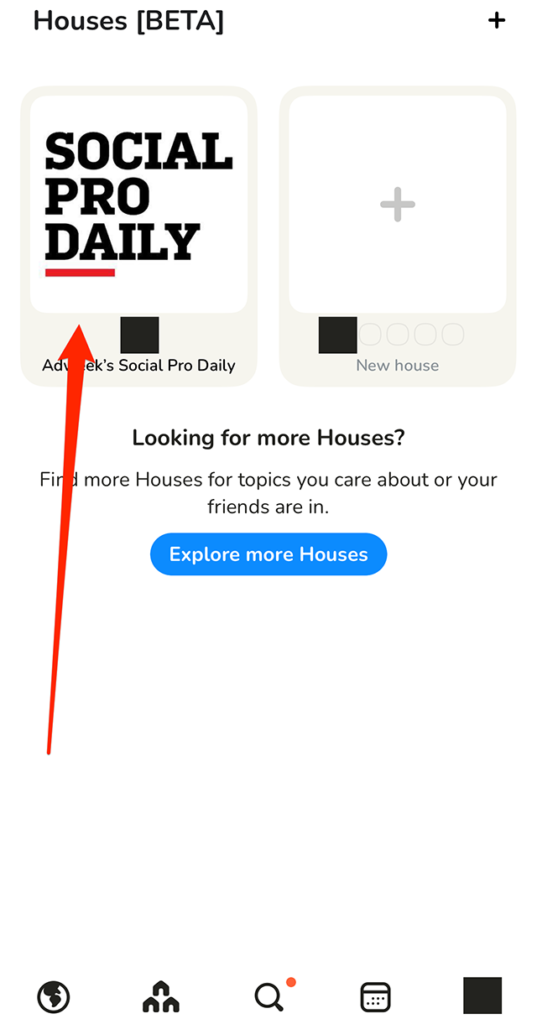
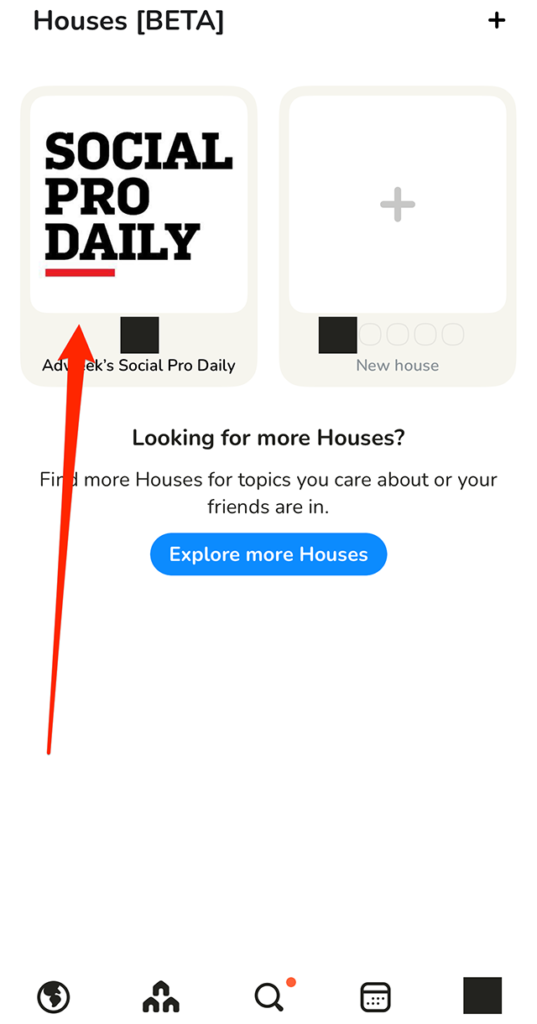
Step 1: On Clubhouse’s “Houses” screen, tap the House you want to rename.

image

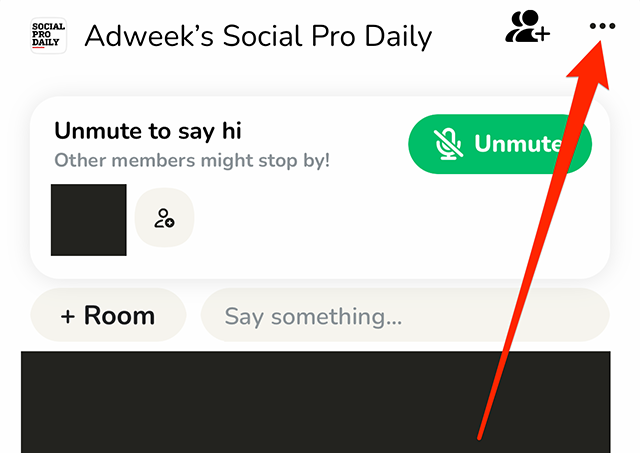
Step 2: Tap the three dots in the top-right corner of the screen.

image

Step 3: Tap the House’s current name.

image

Step 4: Type your desired changes to the House’s name.

image

Step 5: Tap “Save” to save your changes to the House’s name.

image
#paywall-subscribe { margin:0; padding: 1rem 2.4rem; } #paywall-subscribe .holder { background-color:#eee; border:15px solid #f2f2f2; padding:30px; margin:0 auto!important; text-align:center; } #paywall-subscribe a.underline { color:#000; text-decoration:underline; } #paywall-subscribe img { margin-bottom:10px; width: 140px!important; height: auto!important; } #paywall-subscribe h3 { font-weight:bold; font-size:16px; text-transform:uppercase; width:80%; margin:0 auto; margin-bottom:20px; text-align:center; } #paywall-subscribe h3 span { display:block; font-size:14px; } #paywall-subscribe h2 { font-weight:800; font-size:24px; text-transform:uppercase; } #paywall-subscribe p { font-size: 16px; color:#000; padding: 0; } #paywall-subscribe .cta { margin-top:20px; margin-bottom:10px; font-size:14px; text-transform:capitalize; color: #fff; background-color: #E50000; border:none; padding:12px 28px; text-decoration:none; -webkit-transition: .3s ease; -moz-transition: .3s ease; -o-transition: .3s ease; -ms-transition: .3s ease; transition: .3s ease; } #paywall-subscribe .cta:hover { color: #fff; background-color: #181818; transform: scale(1.02); } #paywall-subscribe .already-a-member { font-size:14px; } @media (max-width: 1024px) { #paywall-subscribe .holder { border:12px solid #f2f2f2; padding:25px; } #paywall-subscribe img { width: 120px!important; } } @media (max-width: 768px) { #paywall-subscribe .holder { border:10px solid #f2f2f2; padding:20px; } #paywall-subscribe img { width: 100px!important; } #paywall-subscribe h3 { font-size:14px; } #paywall-subscribe h3 span { font-size:12px; } #paywall-subscribe h2 { font-size:18px; } #paywall-subscribe p { font-size:14px; } #paywall-subscribe .cta { font-size:12px; padding:10px 24px; } #paywall-subscribe .already-a-member { font-size:11px; } } AW+

WORK SMARTER – LEARN, GROW AND BE INSPIRED.

Subscribe today!

To Read the Full Story Become an Adweek+ Subscriber

View Subscription Options

Already a member? Sign in

https://www.adweek.com/media/clubhouse-how-to-rename-a-house/


Clubhouse: How to Change Your Notification Settings for a House


Clubhouse is currently testing a “Houses” feature that allows users to create private Houses, or groups that can only be joined via invitation. Each House features its own notification settings, which are separate from the application’s regular notification settings. These House notification settings allow users to choose which alerts they want to receive that are related to the House.

Our guide will show you how to change your notification settings for a House in the Clubhouse mobile app.

Note: These screenshots were captured in the Clubhouse app on iOS.

Step 1: On Clubhouse’s House screen, tap the desired House.

image

Step 2: Tap the three dots in the top-right corner of the screen.

image

Step 3: Tap “Notification settings.”

image

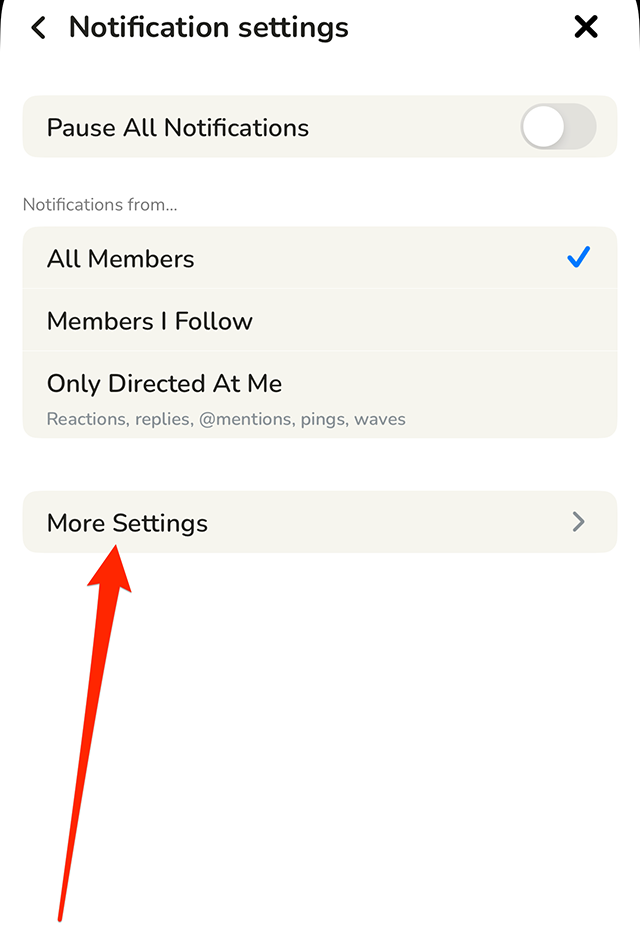
From there, you can pause all notifications from the House or tell Clubhouse to only send you notifications related to certain members in the House. You can also tap “More Settings” to view more notification settings you can manage.

image
.font-primary { } .font-secondary { } #meter-count { position: fixed; z-index: 9999999; bottom: 0; width:96%; margin: 2%; -webkit-border-radius: 4px; -moz-border-radius: 4px; border-radius: 4px; -webkit-box-shadow: 0 0px 15px 4px rgba(0,0,0,.2); box-shadow:0 0px 15px 4px rgba(0,0,0,.2); padding: 15px 0; color:#fff; background-color:#343a40; } #meter-count .icon { width: auto; opacity:.8; } #meter-count .icon svg { height: 36px; width: auto; } #meter-count .btn-subscribe { font-size:14px; font-weight:bold; padding:7px 18px; color: #fff; background-color: #2eb3b2; border:none; text-transform: capitalize; margin-right:10px; } #meter-count .btn-subscribe:hover { color: #fff; opacity:.8; } #meter-count .btn-signin { font-size:14px; font-weight:bold; padding:7px 14px; color: #fff; background-color: #121212; border:none; text-transform: capitalize; } #meter-count .btn-signin:hover { color: #fff; opacity:.8; } #meter-count h3 { color:#fff!important; letter-spacing:0px!important; margin:0; padding:0; font-size:16px; line-height:1.5; font-weight:700; margin: 0!important; padding: 0!important; } #meter-count h3 span { color:#E50000!important; font-weight:900; } #meter-count p { font-size:14px; font-weight:500; line-height:1.4; color:#eee!important; margin: 0!important; padding: 0!important; } #meter-count .close { color:#fff; display:block; position:absolute; top: 4px; right:4px; z-index: 999999; } #meter-count .close svg { display:block; color:#fff; height:16px; width:auto; cursor:pointer; } #meter-count .close:hover svg { color:#E50000; } #meter-count .fw-600 { font-weight:600; } @media (max-width: 1079px) { #meter-count .icon { margin:0; padding:0; display:none; } } @media (max-width: 768px) { #meter-count { margin: 0; -webkit-border-radius: 0px; -moz-border-radius: 0px; border-radius: 0px; width:100%; -webkit-box-shadow: 0 -8px 10px -4px rgba(0,0,0,0.3); box-shadow: 0 -8px 10px -4px rgba(0,0,0,0.3); } #meter-count .icon { margin:0; padding:0; display:none; } #meter-count h3 { color:#fff!important; font-size:14px; } #meter-count p { color:#fff!important; font-size: 12px; font-weight: 500; } #meter-count .btn-subscribe, #meter-count .btn-signin { font-size:12px; padding:7px 12px; } #meter-count .btn-signin { display:none; } #meter-count .close svg { height:14px; } }

Enjoying Adweek’s Content? Register for More Access!

https://www.adweek.com/media/clubhouse-how-to-change-your-notification-settings-for-a-house/


TikTok Begins Extending 18+ Age Gate to Creators of Short-Form Video

TikTok rolled out audience controls for live creators last year, enabling them to restrict their content to viewers 18 and older, and the video creation platform said last week that it was extending that option to creators of short-form video worldwide over the coming weeks.

The company said in a blog post, “To be clear: Our policies still fully apply to creators who use this feature, and we will remove content that contains nudity and other violations of our community guidelines. We regularly educate creators about our policies because it takes a village to create a space where everyone feels welcome and safe.”

TikTok also recently joined forces with Bumble and Meta, partnering with StopNCII.org to help stop the spread of non-consensual intimate imagery and prevent content identified through that partnership from being posted on its platform.

The platform began introducing Content Levels last July as a way to prevent users between the ages of 13 and 17 with teen accounts from seeing content containing adult innuendo, profanity or sexually suggestive fare, and TikTok said last week that the feature prevented teen accounts from viewing more than 1 million overtly sexually suggestive videos in the past 30 days alone.

TikTok wrote in its blog post, “Our goal has always been to make sure our community, especially teens on our platform, has a safe, positive and joyful experience when they come to TikTok. We’ve already taken significant strides to help ensure that their feeds are full of content that is appropriate for them, and these improvements mark an important next step to meet that goal.”

.font-primary { } .font-secondary { } #meter-count { position: fixed; z-index: 9999999; bottom: 0; width:96%; margin: 2%; -webkit-border-radius: 4px; -moz-border-radius: 4px; border-radius: 4px; -webkit-box-shadow: 0 0px 15px 4px rgba(0,0,0,.2); box-shadow:0 0px 15px 4px rgba(0,0,0,.2); padding: 15px 0; color:#fff; background-color:#343a40; } #meter-count .icon { width: auto; opacity:.8; } #meter-count .icon svg { height: 36px; width: auto; } #meter-count .btn-subscribe { font-size:14px; font-weight:bold; padding:7px 18px; color: #fff; background-color: #2eb3b2; border:none; text-transform: capitalize; margin-right:10px; } #meter-count .btn-subscribe:hover { color: #fff; opacity:.8; } #meter-count .btn-signin { font-size:14px; font-weight:bold; padding:7px 14px; color: #fff; background-color: #121212; border:none; text-transform: capitalize; } #meter-count .btn-signin:hover { color: #fff; opacity:.8; } #meter-count h3 { color:#fff!important; letter-spacing:0px!important; margin:0; padding:0; font-size:16px; line-height:1.5; font-weight:700; margin: 0!important; padding: 0!important; } #meter-count h3 span { color:#E50000!important; font-weight:900; } #meter-count p { font-size:14px; font-weight:500; line-height:1.4; color:#eee!important; margin: 0!important; padding: 0!important; } #meter-count .close { color:#fff; display:block; position:absolute; top: 4px; right:4px; z-index: 999999; } #meter-count .close svg { display:block; color:#fff; height:16px; width:auto; cursor:pointer; } #meter-count .close:hover svg { color:#E50000; } #meter-count .fw-600 { font-weight:600; } @media (max-width: 1079px) { #meter-count .icon { margin:0; padding:0; display:none; } } @media (max-width: 768px) { #meter-count { margin: 0; -webkit-border-radius: 0px; -moz-border-radius: 0px; border-radius: 0px; width:100%; -webkit-box-shadow: 0 -8px 10px -4px rgba(0,0,0,0.3); box-shadow: 0 -8px 10px -4px rgba(0,0,0,0.3); } #meter-count .icon { margin:0; padding:0; display:none; } #meter-count h3 { color:#fff!important; font-size:14px; } #meter-count p { color:#fff!important; font-size: 12px; font-weight: 500; } #meter-count .btn-subscribe, #meter-count .btn-signin { font-size:12px; padding:7px 12px; } #meter-count .btn-signin { display:none; } #meter-count .close svg { height:14px; } }

Enjoying Adweek’s Content? Register for More Access!

https://www.adweek.com/media/tiktok-begins-extending-18-age-gate-to-creators-of-short-form-video/


Clubhouse: How to Add a Description to a House

Clubhouse allows users to create “Houses,” private groups that are only accessible via an invitation. Once a user creates a House, they can add a description to the House to give other users more information about the group.

Our guide will show you how to add a description to a House in the Clubhouse mobile application.

Note: These screenshots were captured in the Clubhouse app on iOS.

Step 1: On Clubhouse’s “Houses” screen, tap the House you want to customize.

image

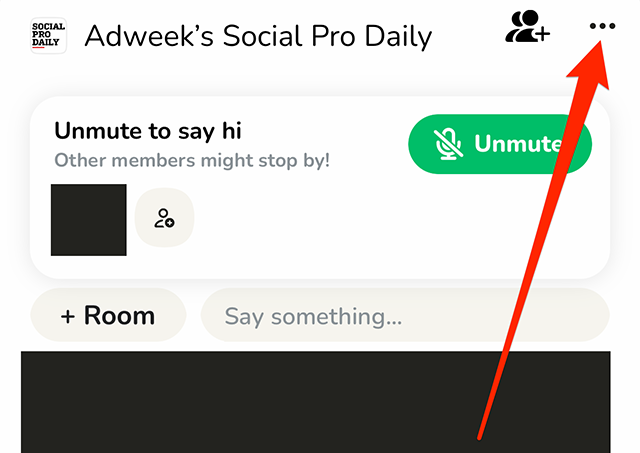
Step 2: Tap the three dots in the top-right corner of the screen.

image

Step 3: Tap “Description.”

image

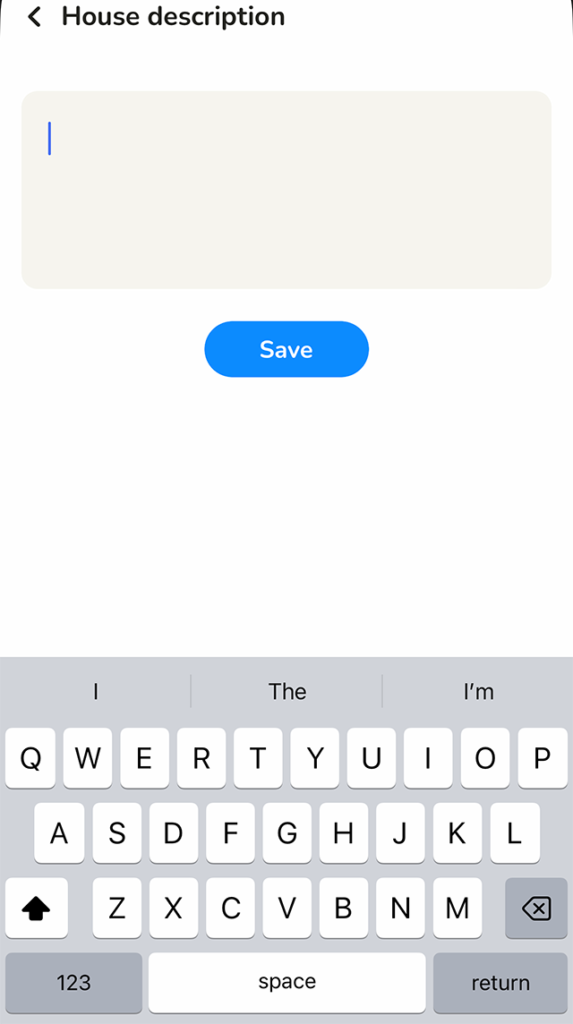
Step 4: Type your desired description for the House.

image

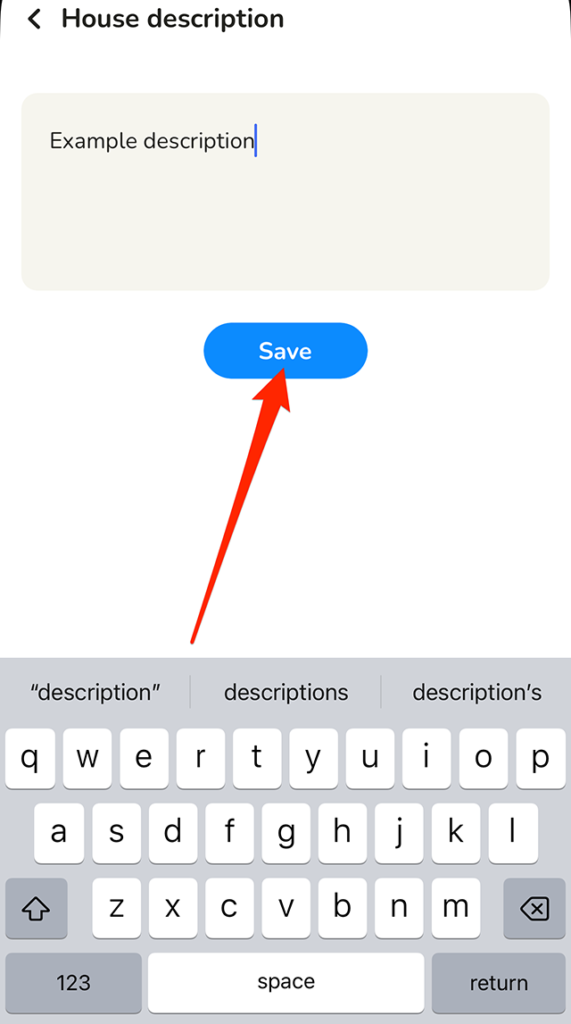
Step 5: Tap the “Save” button under the description text-entry field to save your changes.

image
#paywall-subscribe { margin:0; padding: 1rem 2.4rem; } #paywall-subscribe .holder { background-color:#eee; border:15px solid #f2f2f2; padding:30px; margin:0 auto!important; text-align:center; } #paywall-subscribe a.underline { color:#000; text-decoration:underline; } #paywall-subscribe img { margin-bottom:10px; width: 140px!important; height: auto!important; } #paywall-subscribe h3 { font-weight:bold; font-size:16px; text-transform:uppercase; width:80%; margin:0 auto; margin-bottom:20px; text-align:center; } #paywall-subscribe h3 span { display:block; font-size:14px; } #paywall-subscribe h2 { font-weight:800; font-size:24px; text-transform:uppercase; } #paywall-subscribe p { font-size: 16px; color:#000; padding: 0; } #paywall-subscribe .cta { margin-top:20px; margin-bottom:10px; font-size:14px; text-transform:capitalize; color: #fff; background-color: #E50000; border:none; padding:12px 28px; text-decoration:none; -webkit-transition: .3s ease; -moz-transition: .3s ease; -o-transition: .3s ease; -ms-transition: .3s ease; transition: .3s ease; } #paywall-subscribe .cta:hover { color: #fff; background-color: #181818; transform: scale(1.02); } #paywall-subscribe .already-a-member { font-size:14px; } @media (max-width: 1024px) { #paywall-subscribe .holder { border:12px solid #f2f2f2; padding:25px; } #paywall-subscribe img { width: 120px!important; } } @media (max-width: 768px) { #paywall-subscribe .holder { border:10px solid #f2f2f2; padding:20px; } #paywall-subscribe img { width: 100px!important; } #paywall-subscribe h3 { font-size:14px; } #paywall-subscribe h3 span { font-size:12px; } #paywall-subscribe h2 { font-size:18px; } #paywall-subscribe p { font-size:14px; } #paywall-subscribe .cta { font-size:12px; padding:10px 24px; } #paywall-subscribe .already-a-member { font-size:11px; } } AW+

WORK SMARTER – LEARN, GROW AND BE INSPIRED.

Subscribe today!

To Read the Full Story Become an Adweek+ Subscriber

View Subscription Options

Already a member? Sign in

https://www.adweek.com/media/clubhouse-how-to-add-a-description-to-a-house/


Facebook: How to Hide Your Friends List


By default, Facebook users may be able to see the people someone else has befriended on the social networking platform. However, users have the option to hide their friends list from other users if they’d rather keep this list private.

Our guide will show you how to stop others from being able to view your Facebook friends list.

Note: These screenshots were captured in the Facebook application on iOS.

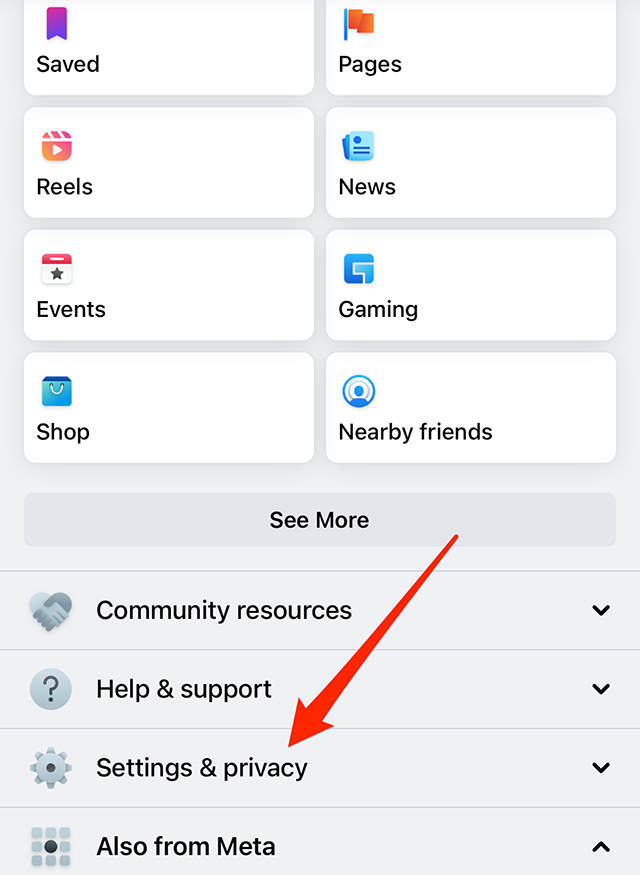
Step 1: Tap the “Menu” icon in Facebook’s bottom navigation bar.

image

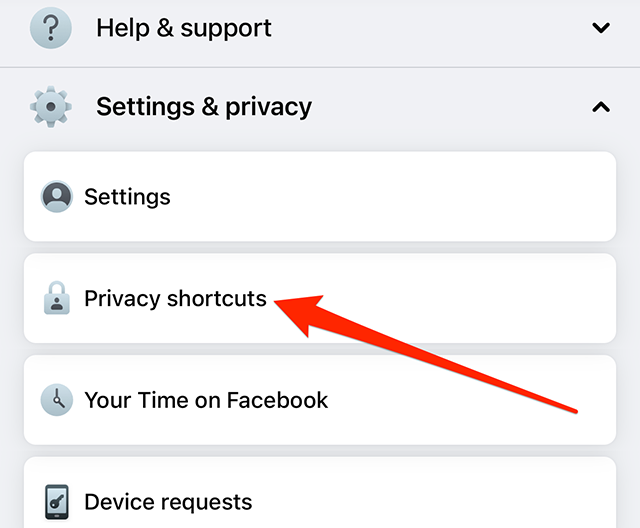
Step 2: Scroll down and tap “Settings & privacy.”

image

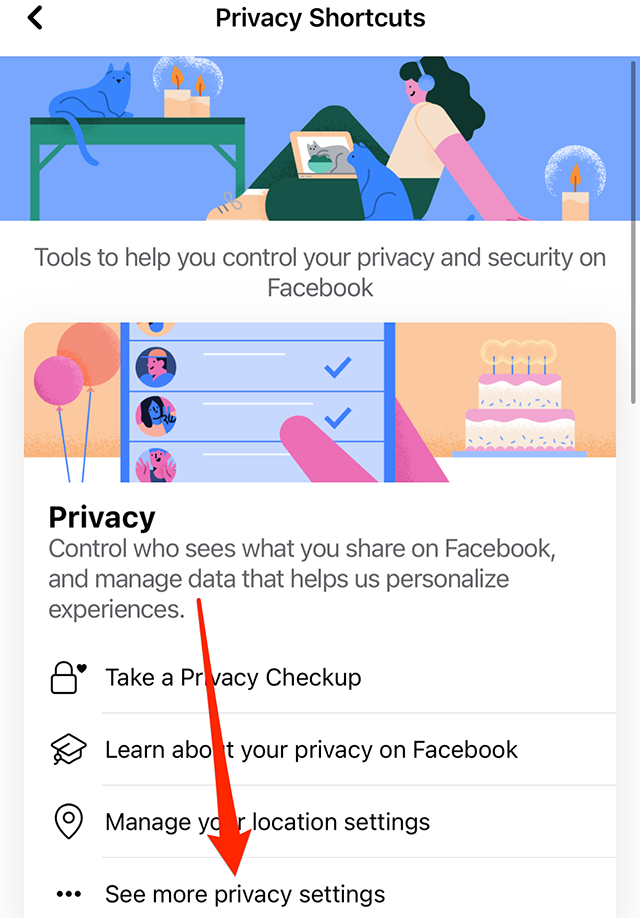
Step 3: Tap “Privacy shortcuts.”

image

Step 4: Tap “See more privacy settings.”

image

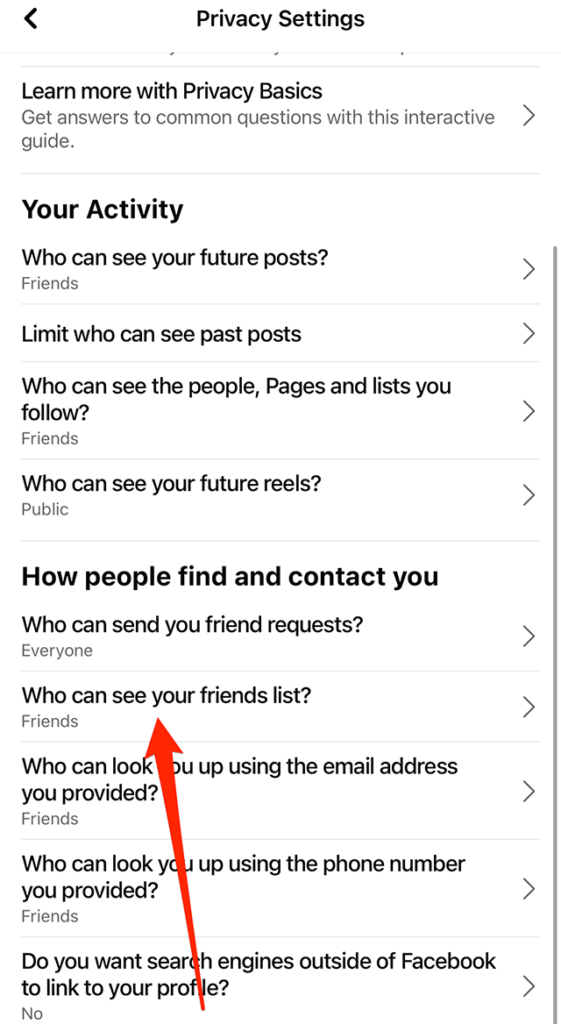
Step 5: Under the “How people find and contact you” section, tap “Who can see your friends list?”

image

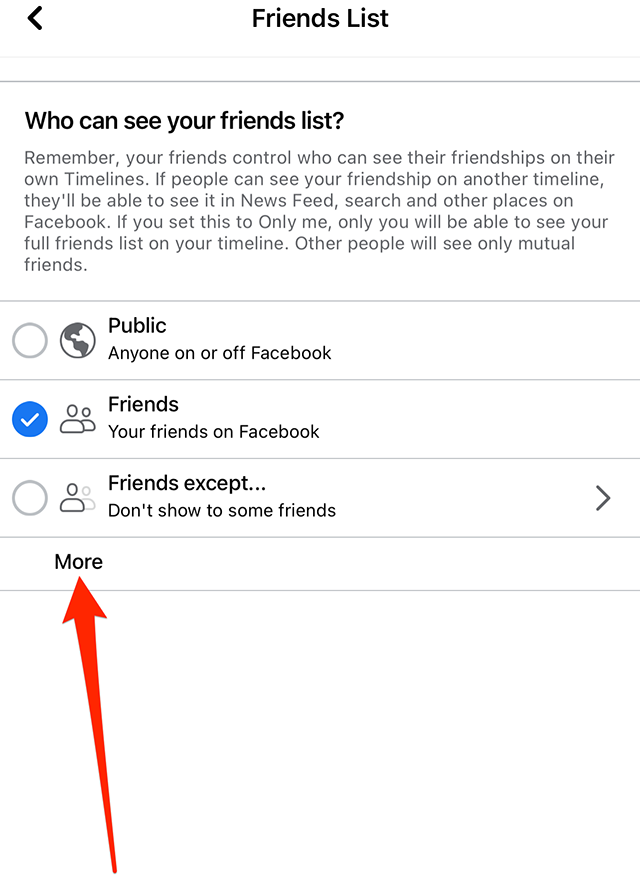
Step 6: Tap “Public,” “Friends,” or “Friends except…,” depending on your preference. You can also tap “More” to view two more options: “Specific friends” and “Only me.” Finally, if you tap “More,” you can tap “See All” to view one more option: “Close friends.”

image

This guide was first published in May 2017 and was updated in December 2022.

.font-primary { } .font-secondary { } #meter-count { position: fixed; z-index: 9999999; bottom: 0; width:96%; margin: 2%; -webkit-border-radius: 4px; -moz-border-radius: 4px; border-radius: 4px; -webkit-box-shadow: 0 0px 15px 4px rgba(0,0,0,.2); box-shadow:0 0px 15px 4px rgba(0,0,0,.2); padding: 15px 0; color:#fff; background-color:#343a40; } #meter-count .icon { width: auto; opacity:.8; } #meter-count .icon svg { height: 36px; width: auto; } #meter-count .btn-subscribe { font-size:14px; font-weight:bold; padding:7px 18px; color: #fff; background-color: #E50000; border:none; text-transform: capitalize; } #meter-count .btn-subscribe:hover { color: #fff; opacity:.8; } #meter-count .btn-signin { font-size:14px; font-weight:bold; padding:7px 14px; color: #fff; background-color: #121212; border:none; text-transform: capitalize; } #meter-count .btn-signin:hover { color: #fff; opacity:.8; } #meter-count h3 { color:#fff!important; letter-spacing:0px!important; margin:0; padding:0; font-size:16px; line-height:1.5; font-weight:700; margin: 0!important; padding: 0!important; } #meter-count h3 span { color:#E50000!important; font-weight:900; } #meter-count p { font-size:14px; font-weight:500; line-height:1.4; color:#eee!important; margin: 0!important; padding: 0!important; } #meter-count .close { color:#fff; display:block; position:absolute; top: 4px; right:4px; z-index: 999999; } #meter-count .close svg { display:block; color:#fff; height:16px; width:auto; cursor:pointer; } #meter-count .close:hover svg { color:#E50000; } #meter-count .fw-600 { font-weight:600; } @media (max-width: 1079px) { #meter-count .icon { margin:0; padding:0; display:none; } } @media (max-width: 768px) { #meter-count { margin: 0; -webkit-border-radius: 0px; -moz-border-radius: 0px; border-radius: 0px; width:100%; -webkit-box-shadow: 0 -8px 10px -4px rgba(0,0,0,0.3); box-shadow: 0 -8px 10px -4px rgba(0,0,0,0.3); } #meter-count .icon { margin:0; padding:0; display:none; } #meter-count h3 { color:#fff!important; font-size:14px; } #meter-count p { color:#fff!important; font-size: 12px; font-weight: 500; } #meter-count .btn-subscribe, #meter-count .btn-signin { font-size:12px; padding:7px 12px; } #meter-count .btn-signin { display:none; } #meter-count .close svg { height:14px; } }

Enjoying your content? You Have 1 Free Article Left.

Register to continue reading!

https://www.adweek.com/media/facebook-heres-how-to-prevent-other-users-from-viewing-your-friends-list/


NHL Partner MassMutual to Debut ‘On and Off the Ice’ Spot During Winter Classic

#paywall-subscribe { margin:0; padding: 1rem 2.4rem; } #paywall-subscribe .holder { background-color:#eee; border:15px solid #f2f2f2; padding:30px; margin:0 auto!important; text-align:center; } #paywall-subscribe a.underline { color:#000; text-decoration:underline; } #paywall-subscribe img { margin-bottom:10px; width: 140px!important; height: auto!important; } #paywall-subscribe h3 { font-weight:bold; font-size:16px; text-transform:uppercase; width:80%; margin:0 auto; margin-bottom:20px; text-align:center; } #paywall-subscribe h3 span { display:block; font-size:14px; } #paywall-subscribe h2 { font-weight:800; font-size:24px; text-transform:uppercase; } #paywall-subscribe p { font-size: 16px; color:#000; padding: 0; } #paywall-subscribe .cta { margin-top:20px; margin-bottom:10px; font-size:14px; text-transform:capitalize; color: #fff; background-color: #E50000; border:none; padding:12px 28px; text-decoration:none; -webkit-transition: .3s ease; -moz-transition: .3s ease; -o-transition: .3s ease; -ms-transition: .3s ease; transition: .3s ease; } #paywall-subscribe .cta:hover { color: #fff; background-color: #181818; transform: scale(1.02); } #paywall-subscribe .already-a-member { font-size:14px; } @media (max-width: 1024px) { #paywall-subscribe .holder { border:12px solid #f2f2f2; padding:25px; } #paywall-subscribe img { width: 120px!important; } } @media (max-width: 768px) { #paywall-subscribe .holder { border:10px solid #f2f2f2; padding:20px; } #paywall-subscribe img { width: 100px!important; } #paywall-subscribe h3 { font-size:14px; } #paywall-subscribe h3 span { font-size:12px; } #paywall-subscribe h2 { font-size:18px; } #paywall-subscribe p { font-size:14px; } #paywall-subscribe .cta { font-size:12px; padding:10px 24px; } #paywall-subscribe .already-a-member { font-size:11px; } } AW+

WORK SMARTER – LEARN, GROW AND BE INSPIRED.

Subscribe today!

New Year Offer: Use Promo Code “SAVE25NYE” on an Annual Subscription to Save 25%

View Subscription Options

Already a member? Sign in

https://www.adweek.com/social-marketing/nhl-partner-massmutual-to-debut-on-and-off-the-ice-spot-during-winter-classic/