Google’s new “Web Guide” will use AI to organize your search results

Web Guide is halfway between normal search and AI Mode.

Credit: Google

Web Guide is halfway between normal search and AI Mode. Credit: Google

Google suggests trying Web Guide with longer or open-ended queries, like “how to solo travel in Japan.” The video below uses that search as an example. It has many of the links you might expect, but there are also AI-generated headings with summaries and suggestions. It really looks halfway between standard search and AI Mode. Because it has to run additional searches and generate content, Web Guide takes a beat longer to produce results compared to a standard search. There’s no AI Overview at the top, though.

Web Guide is a Search Labs experiment, meaning you have to opt-in before you’ll see any AI organization in your search results. When enabled, this feature takes over the “Web” tab of Google search. Even if you turn it on, Google notes there will be a toggle that allows you to revert to the normal, non-AI-optimized page.

An example of the Web Guide test.

Eventually, the test will expand to encompass more parts of the search experience, like the “All” tab—that’s the default search experience when you input a query from a browser or phone search bar. Google says it’s approaching this as an opt-in feature to start. So that sounds like Web Guide might be another AI Mode situation in which the feature rolls out widely after a short testing period. It’s technically possible the test will not result in a new universal search feature, but Google hasn’t yet met a generative AI implementation that it hasn’t liked.

https://arstechnica.com/ai/2025/07/googles-new-web-guide-will-use-ai-to-organize-your-search-results/




Six lesser-known features to like in the macOS 26 Tahoe public beta

Your battery level, the time of day, connecting to a specific Wi-Fi network or Bluetooth device, or getting messages or mail from specific senders are among the list of possible triggers. Whether you’ve got existing Shortcuts or you want to try to build some new ones, it’s worth considering that automating them could save you even more time and effort.

Two-factor autofill in any browser

When it’s possible, you should move on from using SMS messages for two-factor authentication, either to codes generated by an app or to passkeys. But there are still plenty of times when you’ll run into authentication code texts, either because you’re trying to set up an account for the first time, or because the thing you’re trying to log in to doesn’t support anything else.

For those cases, Tahoe adds a handy feature: the ability to autofill these codes from the Messages and Mail apps into any browser, not just Safari. Just like when you use the equivalent feature in Safari or on iOS, you can also have macOS delete these codes for you automatically after using them.

A new disk image format

Not all Mac users interact with disk images regularly, aside from opening them up periodically to install an app or restore an old backup. But among other things, disk images are used by Apple’s Virtualization framework, which makes it relatively simple to run macOS and Linux virtual machines on the platform for testing and other things. But the RAW disk image format used by older macOS versions can come with quite severe performance penalties, even with today’s powerful chips and fast PCI Express-connected SSDs.

Enter the Apple Sparse Image Format, or ASIF. Apple’s developer documentation says that because ASIF images’ “intrinsic structure doesn’t depend on the host file system’s capabilities,” they “transfer more efficiently between hosts or disks.” The upshot is that reading files from and writing files to these images should be a bit closer to your SSD’s native performance (Howard Oakley at The Eclectic Light Company has some testing that suggests significant performance improvements in many cases, though it’s hard to make 1:1 comparisons because testing of the older image formats was also done on older hardware).

https://arstechnica.com/gadgets/2025/07/six-lesser-known-features-to-like-in-the-macos-26-tahoe-public-beta/


Surprising no one, new research says AI Overviews cause massive drop in search clicks

Google’s search results have undergone a seismic shift over the past year as AI fever has continued to escalate among the tech giants. Nowhere is this change more apparent than right at the top of Google’s storied results page, which is now home to AI Overviews. Google contends these Gemini-based answers don’t take traffic away from websites, but a new analysis from the Pew Research Center says otherwise. Its analysis shows that searches with AI summaries reduce clicks, and their prevalence is increasing.

Google began testing AI Overviews as the “search generative experience” in May 2023, and just a year later, they were an official part of the search engine results page (SERP). Many sites (including this one) have noticed changes to their traffic in the wake of this move, but Google has brushed off concerns about how this could affect the sites from which it collects all that data.

SEO experts have disagreed with Google’s stance on how AI affects web traffic, and the newly released Pew study backs them up. The Pew Research Center analyzed data from 900 users of the Ipsos KnowledgePanel collected in March 2025. The analysis shows that among the test group, users were much less likely to click on search results when the page included an AI Overview.

Pew AI Overviews stats

Credit: Pre Research Center

Pew reports that searches without an AI answer resulted in a click rate of 15 percent. On SERPs with AI Overviews, the rate of clicks to other sites drops by almost half, to 8 percent. Google has also, on several occasions, claimed that people click on the links cited in AI Overviews, but Pew found that just 1 percent of AI Overviews produced a click on a source. These sources are most frequently Wikipedia, YouTube, and Reddit, which collectively account for 15 percent of all AI sources.

https://arstechnica.com/ai/2025/07/research-shows-google-ai-overviews-reduce-website-clicks-by-almost-half/


“Surface Laptop 5G” for businesses shows Microsoft isn’t done with Intel yet

Microsoft has gone all-in on Arm-based Qualcomm Snapdragon X-series chips for its Surface PCs, including the less-expensive-but-more-compromised 13-inch Surface Laptop and 12-inch Surface Pro from this spring. But the company still hasn’t quite given up on businesses and individuals who still want or require a traditional Intel or AMD-based x86 PC.

The latest addition to the lineup is the “Surface Laptop 5G,” an updated version of the Intel-based 13.8-inch Surface Laptop with built-in 5G cellular connectivity. The system looks largely identical to the non-5G version, but Microsoft says it has been redesigned internally with “a dynamic antenna system” and “a custom multi-layered laminate,” which improve signal strength.

The Surface Laptop 5G uses the same Core Ultra Series 2 chips (codenamed Lunar Lake) as the PCs Microsoft released in January. These chips include respectable Intel Arc integrated GPUs, as well as neural processing units (NPUs) fast enough to qualify for Windows 11’s extra Copilot+ PC features.

Like the Surface Laptop 5G, those models are aimed primarily at businesses running software that requires a traditional x86 PC—many x86 apps work just fine under Prism, Windows 11’s x86-to-Arm app translation layer, but device drivers and custom apps may still have compatibility issues that make Arm PCs impossible to use.

https://arstechnica.com/gadgets/2025/07/surface-laptop-5g-for-businesses-shows-microsoft-isnt-done-with-intel-yet/


Google gets ahead of the leaks and reveals the Pixel 10 early

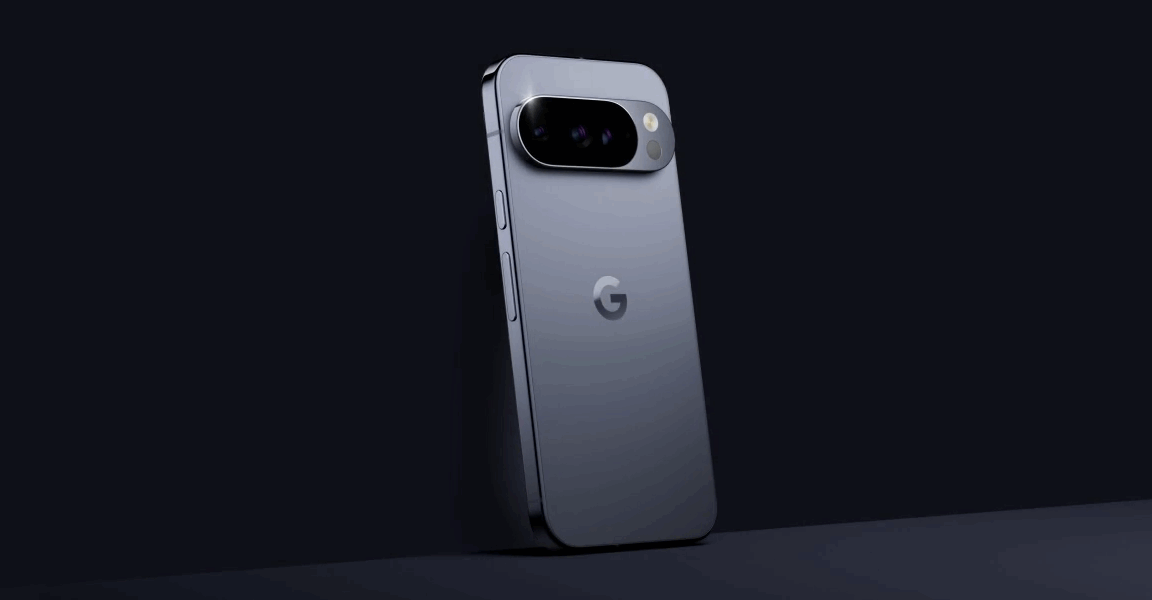
Google has an event next month to officially launch the Pixel 10 series, but the leaks have been coming fast and furious beforehand. There won’t be much left to learn on August 20, particularly now that Google has revealed the phone. Over on the Google Store, there’s a video revealing the Pixel 10’s design, and it looks just a little familiar.

The video (which you can also see below) isn’t very long, but it offers an unobscured look at the phone’s physical design. The 13-second clip opens with the numeral “10” emerging from the shadows. The zero elongates and morphs into the trademark camera window on the back of the phone. The video zooms out to reveal the full phone from the back. The device is a muted blue-gray, which is probably the “frost” color listed in recent leaks.

The video is not accompanied by specs, pricing, or any other details; however, Google’s new Tensor G5 processor is expected to be a marked improvement over past iterations. While the first four Tensor chips were manufactured in Samsung fabs, Tensor G5 is from TSMC. The dominant Taiwanese chip maker touts better semiconductor packaging technology, and the chip itself is believed to have more custom components that further separate it from the Samsung Exynos lineage.

https://arstechnica.com/gadgets/2025/07/google-reveals-the-pixel-10-and-yep-it-looks-like-the-pixel-9/


Dictionary.com “devastated” paid users by abruptly deleting saved words lists

Logophiles are “devastated” after Dictionary.com deleted their logs of favorited words that they carefully crafted for years. The company deleted all accounts, as well as the only ways to use Dictionary.com without seeing ads —even if you previously paid for an ad-free experience.

Dictionary.com offers a free dictionary through its website and free Android and iOS apps. It used to offer paid-for mobile apps, called Dictionary.com Pro, that let users set up accounts, use the app without ads, and enabled other features (like grammar tips and science and rhyming dictionaries) that are gone now. Dictionary.com’s premium apps also let people download an offline dictionary (its free apps used to let you buy a downloadable dictionary as a one-time purchase), but offline the dictionaries aren’t available anymore.

Accounts axed abruptly

About a year ago, claims of Dictionary.com’s apps being buggy surfaced online. We also found at least one person claiming that they were unable to buy an ad-free upgrade at that time.

Reports of Dictionary.com accounts being deleted and the apps not working as expected, and with much of its content removed, started appearing online about two months ago. Users reported being unable to log in and access premium features, like saved words. Soon after, Dictionary.com’s premium apps were removed from Google Play and Apple’s App Store. The premium version was available for download for $6 as recently as March 23, per the Internet Archive’s Wayback Machine.

A Reddit user who described themselves as a premium customer said they reached out to Dictionary.com’s support email and received a response saying, in part:

After careful consideration, user accounts within the Dictionary.com app have been discontinued. As a result, users are no longer able to sign in to their accounts, and any saved word lists are no longer available.

Unfortunately, since the coding technology that was used in the previous app version is different from what is used in the new app, it is not possible to recover word lists.

This change was part of our recent app update to improve the design, speed, and functionality of the Dictionary.com app. While we understand that this changes how you use Dictionary.com, we are hopeful that you will find the overall improvements provide faster search, additional content, and a better design.

Another person online supposedly received a similar message. Some people said they were unable to get in contact with Dictionary.com. Ars Technica tried contacting Dictionary.com through multiple messages to its support team, the press office of parent company IXL Learning, and The Dictionary Media Group, which IXL launched after acquiring Dictionary.com in 2024 and includes websites like Vocabulary.com, Multiplication.com, and HomeschoolMath.net. We didn’t receive any response.

https://arstechnica.com/gadgets/2025/07/dictionary-com-devastated-paid-users-by-abruptly-deleting-saved-words-lists/


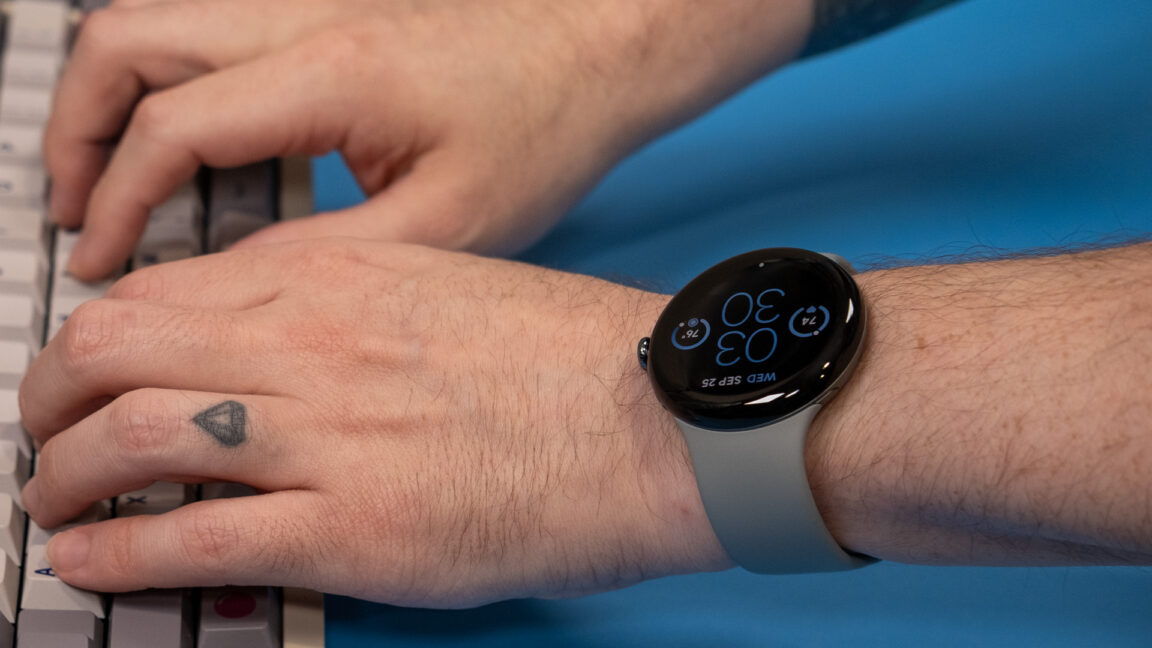
The Pixel Watch 4 might not become e-waste if you damage it

This would be an important upgrade, even if it’s not flashy. That glass dome on Google’s watches is just begging to get cracked or scratched—it’s standard Gorilla Glass rather than the sapphire glass you see on Apple and Samsung watches. For the first three models, a cracked screen or dissolving glue on the bottom has meant that the watch was effectively e-waste. Even if you were willing to pay Google to repair it, that was not an option.

Google never had a satisfactory answer for this approach to wearables. In lieu of repairs, it offered a protection plan, which guaranteed you a replacement watch if yours was damaged. For $4 per month and $49 per incident, Google would simply send a new watch. And it would actually be new; there are no officially refurbished Pixel Watches because Google doesn’t repair them.

Not supporting repairs was a bizarre decision for a company that so often promotes its commitment to sustainability. Google has, at times, fallen short of those ideals, perhaps most notably with the defective batteries in its A-series Pixel phones. But that’s at least theoretically an unforeseeable outcome. Google intentionally designed the Pixel Watches such that they could not be repaired.

Google should never have released a single watch that couldn’t be repaired, let alone three of them. Hopefully, this report is accurate, and Google will right this wrong with the Pixel Watch 4.

https://arstechnica.com/gadgets/2025/07/the-pixel-watch-4-might-not-become-e-waste-if-you-damage-it/


YouTuber faces jail time for showing off Android-based gaming handhelds

There are countless Android-powered gaming handhelds, but they go beyond the usual slate of Android games by offering console emulation support. The problem is the game ROMs on these devices, which are not entirely legal. Italian YouTuber Once Were Nerd is learning how seriously some rightsholders are taking game piracy after agents from the country’s Guardia di Finanza showed up to confiscate his consoles. He now says the investigation could lead to criminal charges and the end of his channel.

Once Were Nerd has produced YouTube content covering a plethora of gaming topics, including Android-based handheld game machines from the likes of Powkiddy and TrimUI. These devices usually run an older version of Android that has been heavily modified for gaming, featuring built-in emulation support for retro consoles like SNES, Nintendo 64, PlayStation Portable, GameCube, and more. They’ve become quite popular as the cost of mobile hardware has come down, making it possible to buy what is essentially an updated PSP or Game Boy Advance for $100 or less.

Recently, Once Were Nerd attracted the attention of Italy’s Ministry of Economy and Finance, which is tasked with policing copyright in the country. In the video first spotted by Android Authority (which has an AI-generated English language track), the YouTuber explains that Guardia di Finanza appeared at his door in April with a search warrant.

[embedded content]

Once Were Nerd explains his legal woes.

Agents accused the creator of promoting pirated copyrighted materials stemming from his coverage of Anbernic handheld game consoles. While emulation software is not illegal, a surprising number of these devices ship chock-full of pre-loaded ROMs—the channel showed multiple Sony and Nintendo games running on the device. Once Were Nerd is far from the only channel posting about these devices, though.

https://arstechnica.com/gadgets/2025/07/youtuber-faces-jail-time-for-showing-off-android-based-gaming-handhelds/


Pebblebee tracker’s new SOS alert reminds us that updates can be good for gadgets

Pebblebee is adding a free, helpful feature to already-purchased devices.

Today, it announced that its Clip Universal Bluetooth trackers, which are compatible with iOS and Android devices, are being updated to include an Alert feature that sets off a siren and strobing light when a user wants help.

Pebblebee started selling Android trackers in May 2024 in three different form factors: an AirTag-like Clip version, a credit card-shaped Card SKU, and the smallest version, Tag. In October 2024, Pebblebee announced Universal versions of those trackers that can use both Google’s Find My Device and Apple’s Find My networks (although not simultaneously).

Pebblebee’s update makes it so that Clip Universals can show a strobing light and make a siren sound when users press the device quickly and repeatedly. Previously, the Clip’s light was primarily for helping people find their things in the dark. Clip owners can add the Alert feature through an update in the Pebblebee companion app.

Clip owners now have the option to set up a Safety Circle for Alert; members of the Circle will receive “instant emergency notifications” when the Clip’s panic alarm is triggered, Pebble’s announcement said. Alert notifications are sent “via the Pebblebee app and backend services … as long as your phone is nearby,” per Pebblebee.

Using updates for good

Pebblebee’s Alert update reminds us that gadget companies are capable of issuing software updates that benefit users and aren’t centered on corporate interests. It’s a standout from many other gadget updates that lock features behind a paywall, remove features, and/or completely brick people’s devices.

https://arstechnica.com/gadgets/2025/07/bluetooth-tracker-pebblebee-adds-free-sos-alarm-to-already-purchased-devices/


Office problems on Windows 10? Microsoft’s response will soon be “upgrade to 11.”

Microsoft’s advertised end-of-support date for Windows 10 is October 14, 2025. But in reality, the company will gradually wind down support for the enduring popular operating system over the next three years. Microsoft would really like you to upgrade to Windows 11, especially if it also means upgrading to a new PC, but it also doesn’t want to leave hundreds of millions of home and business PCs totally unprotected.

Those competing goals have led to lots of announcements and re-announcements and clarifications about updates for both Windows 10 itself and the Office/Microsoft 365 productivity apps that many Windows users run on their PCs.

Today’s addition to the pile comes via The Verge, which noticed an update to a support document that outlined when Windows 10 PCs would stop receiving new features for the continuously updated Microsoft 365 apps. Most home users will stop getting new features in August 2026, while business users running the Enterprise versions can expect to stop seeing new features in either October 2026 or January 2027, depending on the product they’re using.

Microsoft had previously committed to supporting its Office apps through October 2028—both the Microsoft 365 versions and perpetually licensed versions like Office 2021 and Office 2024 that don’t get continuous feature updates. That timeline isn’t changing, but it will apparently only cover security and bug-fixing updates rather than updates that add new features.

And while the apps will still be getting updates, Microsoft’s support document makes it clear that users won’t always be able to get fixes for bugs that are unique to Windows 10. If an Office issue exists solely on Windows 10 but not on Windows 11, the official guidance from Microsoft support is that users should upgrade to Windows 11; any support for Windows 10 will be limited to “troubleshooting assistance only,” and “technical workarounds might be limited or unavailable.”

https://arstechnica.com/gadgets/2025/07/windows-10-will-stop-getting-new-office-features-in-august-of-2026/