Report: Apple will take another crack at iPad multitasking in iPadOS 19
Apple is taking another crack at iPad multitasking, according to a report from Bloomberg’s Mark Gurman. This year’s iPadOS 19 release, due to be unveiled at Apple’s Worldwide Developers Conference on June 9, will apparently include an “overhaul that will make the tablet’s software more like macOS.”

The report is light on details about what’s actually changing, aside from a broad “focus on productivity, multitasking, and app window management.” But Apple will apparently continue to stop short of allowing users of newer iPads to run macOS on their tablets, despite the fact that modern iPad Airs and Pros use the same processors as Macs.

If this is giving you déjà vu, you’re probably thinking about iPadOS 16, the last time Apple tried making significant upgrades to the iPad’s multitasking model. Gurman’s reporting at the time even used similar language, saying that iPads running the new software would work “more like a laptop and less like a phone.”

The result of those efforts was Stage Manager. It had steep hardware requirements and launched in pretty rough shape, even though Apple delayed the release of the update by a month to keep polishing it. Stage Manager did allow for more flexible multitasking, and on newer models, it enabled true multi-monitor support for the first time. But early versions were buggy and frustrating in ways that still haven’t fully been addressed by subsequent updates (MacStories’ Federico Viticci keeps the Internet’s most comprehensive record of the issues with the software.)

https://arstechnica.com/gadgets/2025/04/report-apple-will-take-another-crack-at-ipad-multitasking-in-ipados-19/

Chrome’s new dynamic bottom bar gives websites a little more room to breathe

The Internet might look a bit different on Android soon. Last month, Google announced its intent to make Chrome for Android a more immersive experience by hiding the navigation bar background. The promised edge-to-edge update is now rolling out to devices on Chrome version 135, giving you a touch more screen real estate. However, some websites may also be a bit harder to use.

Moving from button to gesture navigation reduced the amount of screen real estate devoted to the system UI, which leaves more room for apps. Google’s move to a “dynamic bottom bar” in Chrome creates even more space for web content. When this feature shows up, the pages you visit will be able to draw all the way to the bottom of the screen instead of stopping at the navigation area, which Google calls the “chin.”

Chrome edge-to-edge

Credit: Google

As you scroll down a page, Chrome hides the address bar. With the addition of the dynamic bottom bar, the chin also vanishes. The gesture handle itself remains visible, shifting between white and black based on what is immediately behind it to maintain visibility. Unfortunately, this feature will not work if you have chosen to stick with the classic three-button navigation option.

https://arstechnica.com/gadgets/2025/04/chrome-for-android-gets-edge-to-edge-ui-update/


Powerful programming: BBC-controlled electric meters are coming to an end

Two rare tungsten-centered, hand-crafted cooled anode modulators (CAM) are needed to keep the signal going, and while the BBC bought up the global supply of them, they are running out. The service is seemingly on its last two valves and has been telling the public about Long Wave radio’s end for nearly 15 years. Trying to remanufacture the valves is hazardous, as any flaws could cause a catastrophic failure in the transmitters.

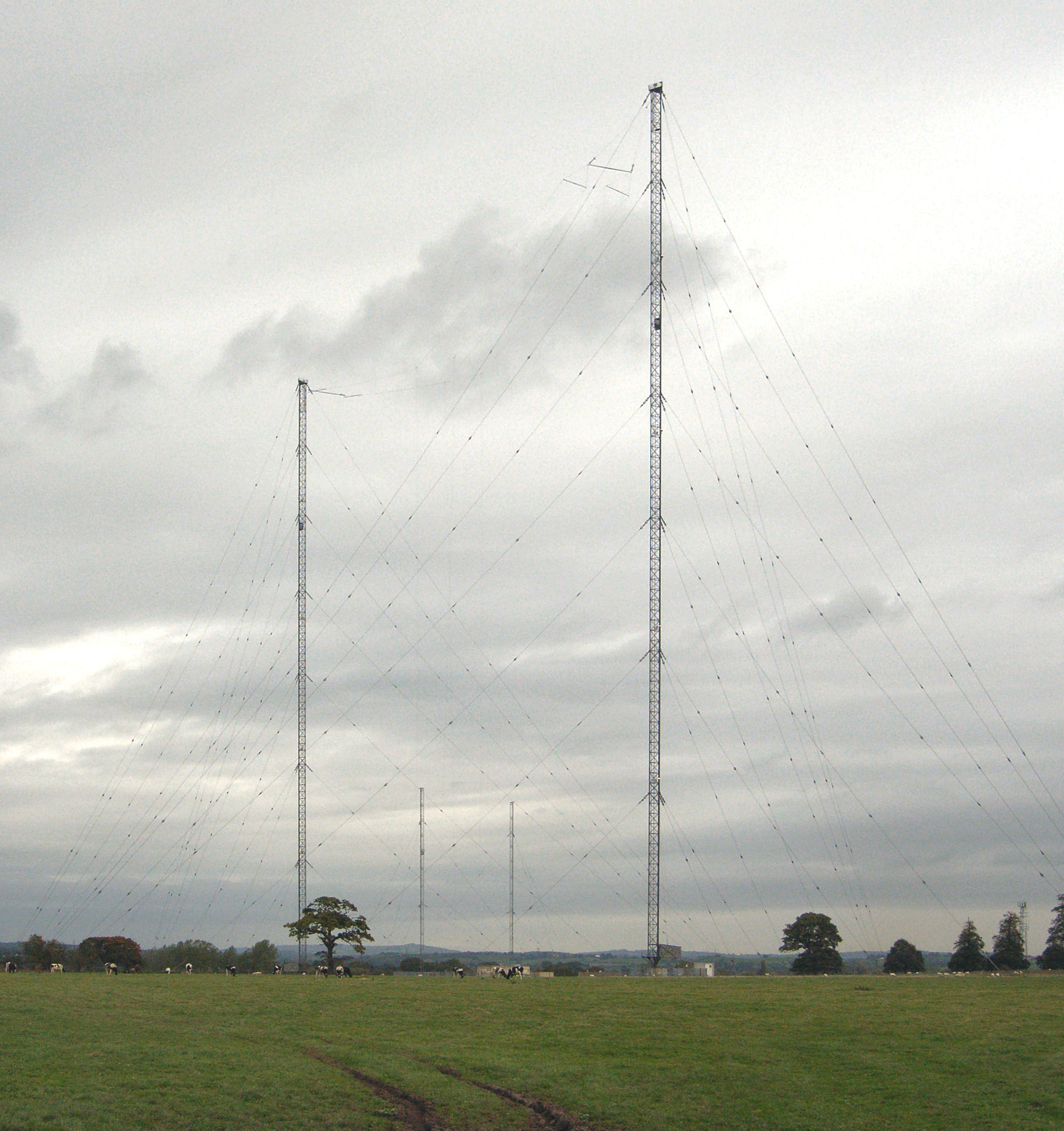
BBC Radio 4’s 198 kHz transmitting towers at Droitwich.

BBC Radio 4’s 198 kHz transmitting towers at Droitwich. Credit: Bob Nienhuis (Public domain)

Rebuilding the transmitter, or moving to different, higher frequencies, is not feasible for the very few homes that cannot get other kinds of lower-power radio, or internet versions, the BBC told The Guardian in 2011. What’s more, keeping Droitwich powered such that it can reach the whole of the UK, including Wales and lower Scotland, requires some 500 kilowatts of power, more than most other BBC transmission types.

As of January 2025, roughly 600,000 UK customers still use RTS meters to manage their power switching, after 300,000 were switched away in 2024. Utilities and the BBC have agreed that the service will stop working on June 30, 2025, and have pushed to upgrade RTS customers to smart meters.

In a combination of sad reality and rich irony, more than 4 million smart meters in the UK are not working properly. Some have delivered eye-popping charges to their customers, based on estimated bills instead of real readings, like Sir Grayson Perry‘s 39,000 pounds due on 15 simultaneous bills. But many have failed because the UK, like other countries, phased out the 2G and 3G networks older meters relied upon without coordinated transition efforts.

https://arstechnica.com/gadgets/2025/04/powerful-programming-bbc-controlled-electric-meters-are-coming-to-an-end/


Google takes advantage of federal cost-cutting with steep Workspace discount

Google has long been on the lookout for ways to break Microsoft’s stranglehold on US government office software, and the current drive to cut costs may be it. Google and the federal government have announced an agreement that makes Google Workspace available to all agencies at a significant discount, trimming 71 percent from the service’s subscription price tag.

Since Donald Trump returned to the White House, the government has engaged in a campaign of unbridled staffing reductions and program cancellations, all with the alleged aim of reducing federal spending. It would appear Google recognized this opportunity, negotiating with the General Services Administration (GSA) to offer Workspace at a lower price. Google claims the deal could yield up to $2 billion in savings.

Google has previously offered discounts for federal agencies interested in migrating to Workspace, but it saw little success displacing Microsoft. The Windows maker has enjoyed decades as an entrenched tech giant, leading the 365 productivity tools to proliferate throughout the government. While Google has gotten some agencies on board, Microsoft has traditionally won the lion’s share of contracts, including the $8 billion Defense Enterprise Office Solutions contract that pushed Microsoft 365 to all corners of the Pentagon beginning in 2020.

https://arstechnica.com/gadgets/2025/04/google-slashes-workspace-pricing-for-feds-to-capitalize-on-cost-cutting/


Hands-on: Handwriting recognition app brings sticky notes into the 21st century

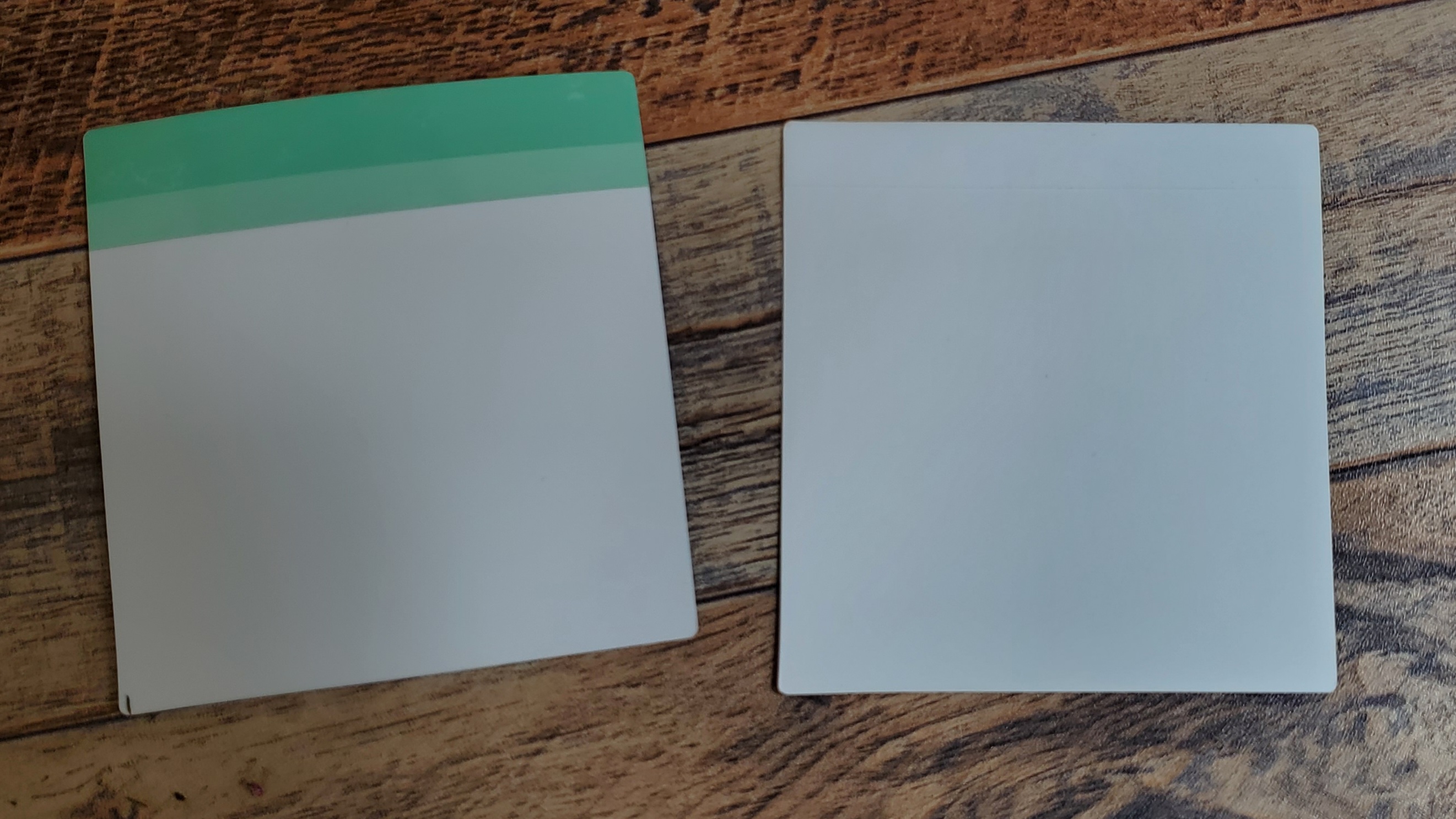
A picture of the back of an unsued Reusable Sticky Note (left) and used one with the adhesive covering removed (right).

A picture of the back of an unused Reusable Sticky Note (left) and the back of a used one with the adhesive covering removed (right).

Credit: Scharon Harding

A picture of the back of an unused Reusable Sticky Note (left) and the back of a used one with the adhesive covering removed (right). Credit: Scharon Harding

Sticky note software

The Reusable Sticky Notes are among the most technologically advanced scraps of paper you can find. In my experience, the technology, including the optical character recognition, worked reliably.

For example, scanning a sticky note was seamless. The camera in the iOS app quickly identified any sticky notes in the shot and snapped an image (or images) without me having to do much aligning or pressing more buttons.

Afterward, it was easy to share the image. I could send it to frequently used emails I saved in the app or send it to other apps, like AirDrop, Google Drive, ToDoist, or a search engine. The app can read the sticky note images as text, but it doesn’t convert the images to text. So, while Google could interpret an image of a sticky note as text via Google Lens, for example, ToDoist only saw a JPEG.

The app uses optical character recognition to convert handwriting into machine-readable text. This enables you to use the app to search uploaded sticky notes for specific words or phrases. I initially feared that the app wouldn’t be able to read my cursive, but even when I scribbled quickly and deviated from writing in a straight line, the app understood my writing. Don’t expect it to pick up chicken scratch, though. My handwriting didn’t need to be perfect for the app to understand it, but the app couldn’t comprehend my sloppiest notes—the type that only I could read, or ones that are common when someone is quickly jotting something on a sticky note.

Further, I didn’t always notice which notes I wrote neatly enough for the app to read. That made it confusing when I searched for terms that I knew I wrote on scanned notes but that were scrawled, per the app, illegibly.

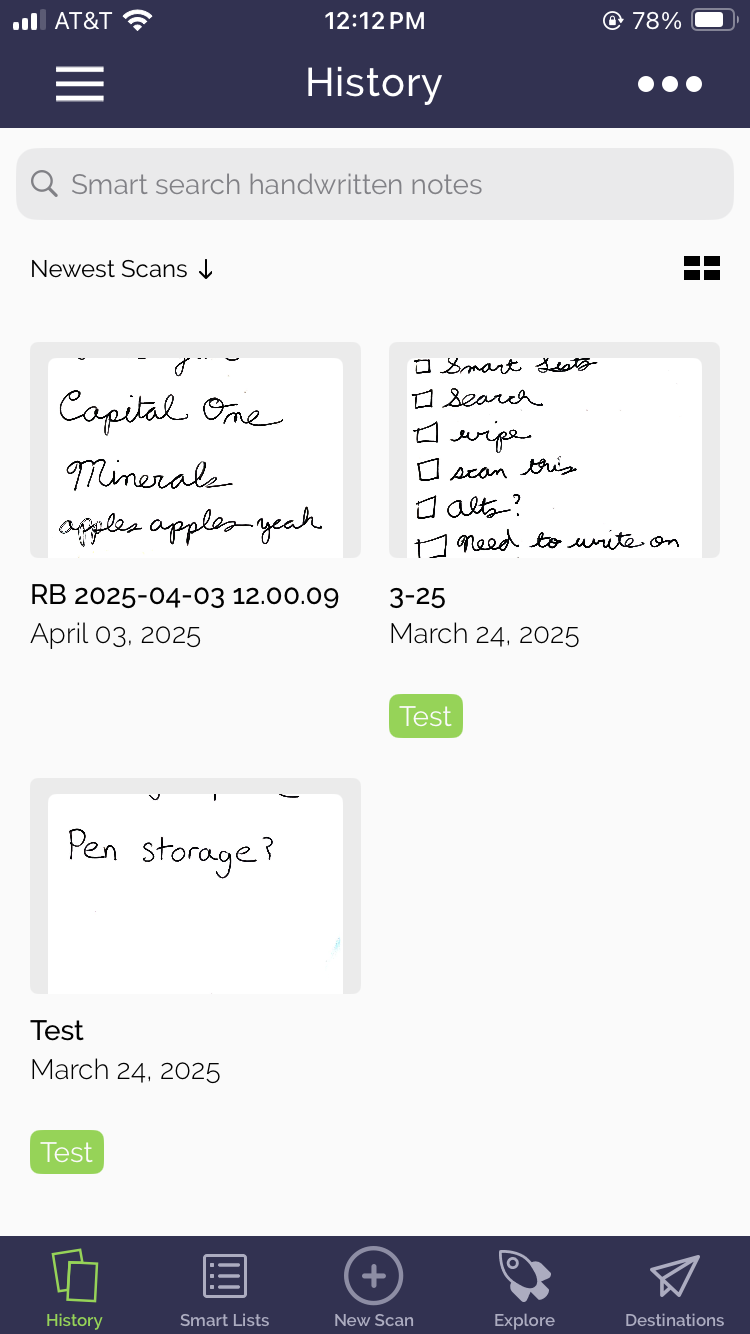
A screenshot of the Rocketbook app.

A screenshot of the Rocketbook app. Credit: Scharon Harding/Rocketbook

Perhaps most useful for sticky note aficionados is the app’s ability to quickly group sticky notes. Sure, you could put sticky notes with to-do list items on the left side of your computer monitor and place notes with appointments to remember on the right side of your monitor. However, the app offers superior organization by letting you add tags to each scanned note. Then, it’s easy to look at all notes with the same tag on one page. But because each scanned note shown on a tag page is shown as a thumbnail, you can’t read everything written on all notes with the same tag simultaneously. That’s a con for people who prefer seeing all relevant notes and their contents at once.

https://arstechnica.com/gadgets/2025/04/hands-on-handwriting-recognition-app-brings-sticky-notes-into-the-21st-century/


Framework’s cheaper, colorful Laptop 12 up for preorder, starts at $549 bare-bones

Framework is opening US preorders for its new Laptop 12 today, a couple of months after announcing the system at an event in February. Framework’s DIY edition of the laptop, which is missing RAM, an SSD, a USB-C charger, and an OS and requires some assembly, will start at $549. A fully assembled pre-built version with 8GB of RAM, a 500GB SSD, a 60 W charger, and Windows 11 Home starts at $799.

All preorders placed on Framework’s site require a $100 deposit, and almost all configurations begin shipping in July. A first batch of systems is slated to ship in June, but this requires a $250 donation to Hack Club; Framework says the donation will be used to buy Framework 12 laptops for high school students.

The Laptop 12 was built to be a more budget-friendly system, which is reflected in its specs, screen size, and its mostly plastic construction. But like the Laptop 13, the Laptop 12 prioritizes upgradeability and repairability and retains the USB-C-based Expansion Card system that was the Laptop 13’s biggest innovation when it was introduced. Each Laptop 12 has four Expansion Card bays plus a headphone jack, allowing the installation of USB-C, USB-A, DisplayPort, and HDMI ports, as well as the other Expansion Cards Framework offers.

The Laptop 12’s specs fall far short of what is available for the Framework Laptop 13. You have a choice of 2-year-old 13th-generation Intel Core processors, either a Core i3-1315U (2 P-cores, 4 E-cores) or a Core i5-1334U (2 P-cores, 8 E-cores). This is a totally different motherboard than the Laptop 13 uses, so they won’t be interchangeable, and you’ll need to wait for a Laptop 12-specific upgrade if you’re looking to freshen up your laptop a couple of years from now.

https://arstechnica.com/gadgets/2025/04/frameworks-cheaper-colorful-laptop-12-up-for-preorder-starts-at-549-bare-bones/


Japanese railway shelter replaced in less than 6 hours by 3D-printed model

Hatsushima is not a particularly busy station, relative to Japanese rail commuting as a whole. It serves a town (Arida) of about 25,000, known for mandarin oranges and scabbardfish, that is shrinking in population, like most of Japan. Its station sees between one to three trains per hour at its stop, helping about 530 riders find their way. Its wooden station was due for replacement, and the replacement could be smaller.

The replacement, it turned out, could also be a trial for industrial-scale 3D-printing of custom rail shelters. Serendix, a construction firm that previously 3D-printed 538-square-foot homes for about $38,000, built a shelter for Hatsushima in about seven days, as shown at The New York Times. The fabricated shelter was shipped in four parts by rail, then pieced together in a span that the site Futurism says is “just under three hours,” but which the Times, seemingly present at the scene, pegs at six. It was in place by the first train’s arrival at 5:45 am.

Either number of hours is a marked decrease from the days or weeks you might expect for a new rail station to be constructed. In one overnight, teams assembled a shelter that is 2.6 meters (8.5 feet) tall and 10 square meters (32 square feet) in area. It’s not actually in use yet, as it needs ticket machines and finishing, but is expected to operate by July, according to the Japan Times.

https://arstechnica.com/gadgets/2025/04/japanese-railway-shelter-replaced-in-less-than-6-hours-by-3d-printed-model/


Back to basics: Microsoft tests overhauled Start menu in Windows 11 beta builds

Microsoft continues to tweak the Windows 11 UI in other ways as well. A beta build released to Windows Insider testers earlier this month enables “taskbar icon scaling,” which can shrink your taskbar icons to a smaller size to make more of them if you have enough apps pinned or opened at the same time (currently, the taskbar reclaims space first by shrinking the size of the search box and widget areas and then by tucking extra icons behind an ellipsis icon in an overflow area). Users can also choose to preserve the current taskbar behavior or use smaller icons all the time to gain some extra space.

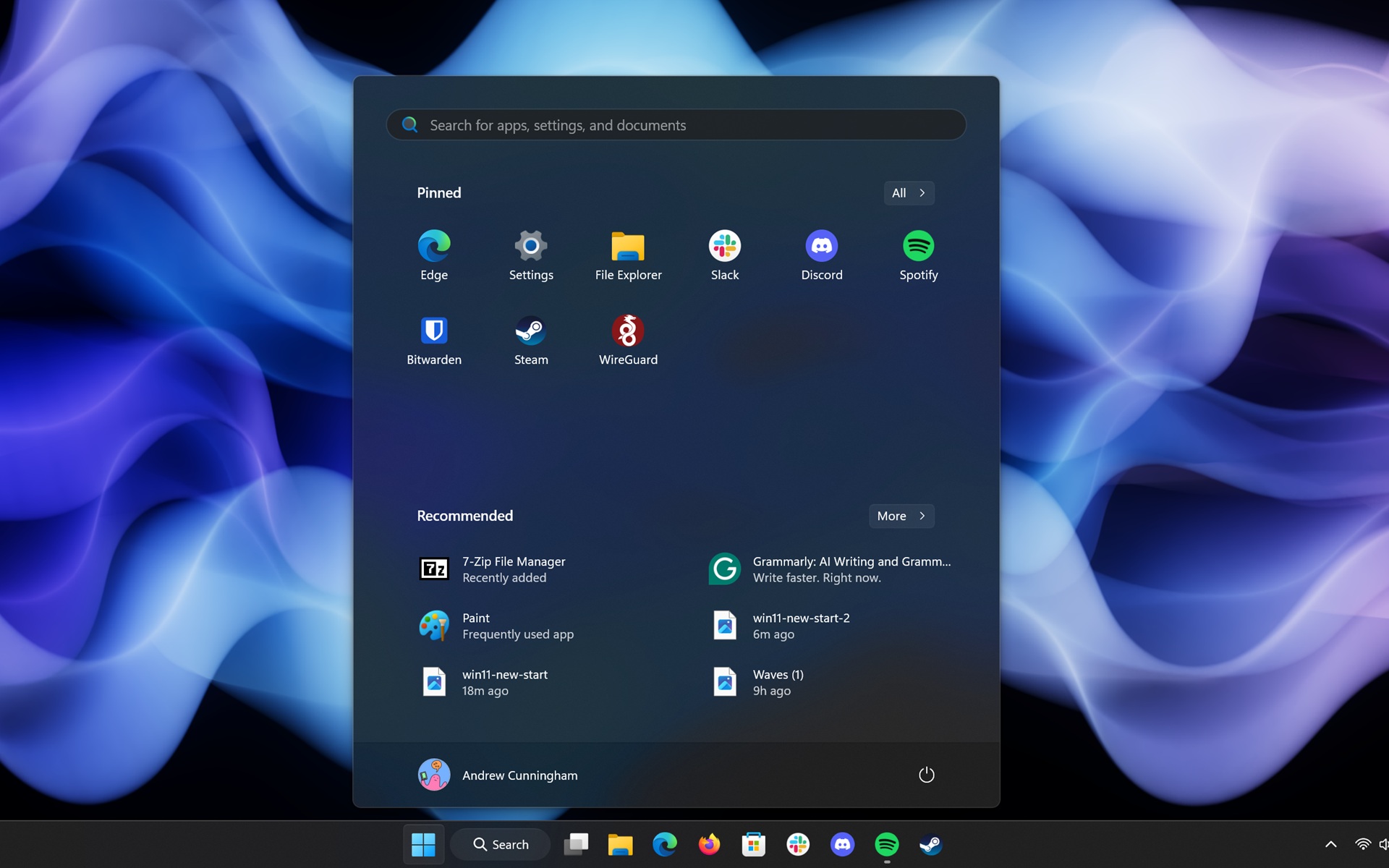
The current version of the Start menu in public builds of Windows 11 24H2. Credit: Andrew Cunningham

The taskbar changes are likely to come to the standard public version of Windows 11 sooner rather than later, since Microsoft is testing them in its Windows Insider Beta channel—that’s the second-most-stable channel for new Windows 11 builds, in between the near-final Release Preview channel and the experimental Dev channel.

The Start menu changes could be officially announced in a future Windows 11 preview build, or they could never actually be enabled at all. These hidden Windows 11 changes often end up rolling out to the public—things like the Windows version of the Sudo command were initially discovered this way—but Microsoft occasionally tests things internally that don’t end up becoming part of the public version of Windows in the end.

https://arstechnica.com/gadgets/2025/04/back-to-basics-microsoft-tests-overhauled-start-menu-in-windows-11-beta-builds/


The 2025 Moto G Stylus has a sharper display and “enhanced” stylus for $400

There aren’t many phones these days that come with a stylus, and those that do tend to be very expensive. If you can’t swing a Galaxy S25 Ultra, Motorola’s G Stylus lineup could be just what you need. The new 2025 Moto G Stylus is now official, featuring several key upgrades while maintaining the same $400 price tag.

The Moto G Stylus 2025 sticks with the style Motorola has cultivated over recent years, with a contoured vegan leather back. It comes in two Pantone colors called Gibraltar Sea and Surf the Web—one is dark blue and the other is a lighter, more vibrant blue. They look like fun colors. Moto’s language makes it sound like there could be more colors down the road, too.

The spec sheet paints a picture of a solid mobile device, but it won’t exceed expectations. Motorola moved to a Snapdragon 6 Gen 3 processor, which runs at a slightly higher clock speed than the Gen 1 it used in the 2024 model. It also has 8GB of RAM and 128GB of storage in the base model. An upgraded version with 256GB of storage and the same 8GB of RAM will be available, too.

Specs at a glance: Moto G Stylus 2025
SoC Snapdragon 6 Gen 3
Memory 8GB
Storage 128GB, 256GB
Display 2,712 x 1,220 6.7″ pOLED, 120 Hz
Cameras 50 MP primary, f/1.8, OIS; 13 MP ultrawide, f/2.2; 32 MP selfie, f/2.2
Software Android 15 (Hello UX)
Battery 5,000 mAh, 68 W wired charging, 15W wireless charging
Connectivity Wi-Fi 6e, NFC, Bluetooth 5.4, sub-6 GHz 5G
Measurements 162.15 x 74.78 x 8.29mm; 191 g

With the modest mid-range chipset, the 2025 Moto G Stylus should have excellent battery life. The company promises more than 40 hours of average usage from the 5,000 mAh cell, and it recharges at an impressive 68 W with a USB-PD cable. It also has speedy 15 W wireless charging. You often don’t even get charging that fast on flagship phones, including the Pixel 9 series.

Making mid-range a little less mid

Motorola opted to upgrade the screen on this device, moving to a 6.7-inch pOLED at an impressive 2,712 x 1,220 resolution. It retains the 120 Hz refresh rate of its predecessor and jumps to 3,000 nits of peak brightness (more than double that of last year’s phone). We haven’t seen this display in real life, but on paper, it checks all the boxes you’d expect from a much more expensive phone.

The phone’s raison d’être has been upgraded, as well. Motorola says the stylus for the new phone is 6.4 times more responsive. Moto is vague about how this was achieved—the stylus itself is still just a capacitive nub rather than an active stylus like you’d see on an expensive Samsung phone. The 2025 G Stylus display reportedly has lower latency, making the stylus input less laggy.

https://arstechnica.com/gadgets/2025/04/the-2025-moto-g-stylus-has-a-sharper-display-and-enhanced-stylus-for-400/


Don’t call it a drone: Zipline’s uncrewed aircraft wants to reinvent retail

But the folks at Zipline don’t seem to like that term. Everyone I spoke with referred to the various craft hovering, buzzing, or gliding overhead as aircraft. That’s for good reason.

Not your average UAV

Go buy a drone at an electronics retailer, something from DJI perhaps, and you’ll have to abide by a series of regulations about how high and how far to fly it. Two of the most important rules: Never fly near an airport, and never let the thing out of your sight.

Zipline’s aircraft are much more comprehensive machines, able to fly for miles and miles. By necessity, they must fly well beyond the range of any human operator, or what’s called “beyond visual line of sight,” or BVLOS. In 2023, Zipline was the first commercial operator to get clearance for BVLOS flights.

Zipline’s aircraft operate under a series of FAA classifications—specifically, part 107, part 135, and the upcoming part 108, which will formalize BVLOS operation. The uncrewed aircraft, which are able to operate as such, navigate through controlled airspace, and even near airports, with the help of FAA-mandated transponder data as well as onboard sensors that can detect the presence of an approaching aircraft and automatically avoid it.

A tree-like tower houses a drone with rolling hills as the backdrop

A Zipline drone testing facility. Seen on the right is one of the “trees.” Credit: Tim Stevens

In fact, just about everything about Zipline’s aircraft is automatic. Onboard sensors sample the air through pitot tubes, detecting bad weather. The craft use this data to reroute themselves around the problem, then report back to save subsequent flights the hassle.

Wind speed and direction are also calculated, ensuring that deliveries are dropped with accuracy. Once the things are in the air, even the Zipline operators aren’t sure which way they’ll fly, only that they’ll figure out the right way to get the package there and return safely.

Zipline actually operates two separate aircraft that are suited for different mission types. The aircraft clinging to the aluminum trees, the type that will be exploring the skies over Dallas soon, are internally called Platform 2, or P2, and they’re actually two aircraft in one.

https://arstechnica.com/gadgets/2025/04/dont-call-it-a-drone-ziplines-uncrewed-aircraft-wants-to-reinvent-retail/