TSMC’s $100 billion pledge won’t resurrect US chipmaking, says Intel’s ex-CEO

“I wasn’t done with the five-plus years when the board made a directional change,” he said.

TSMC has said that the only development work it plans to carry out it in the US will be on the process technology it already has in production, and that its core research and development will remain in Taiwan.

“Unless you’re designing the next-generation transistor technology in the US, you do not have leadership in the US,” said Gelsinger.

He was speaking in an interview this week after becoming a partner at Playground Global, a Silicon Valley venture capital firm that specializes in “deep tech” investments, including in fields like quantum computing and new chip making technologies.

Despite losing out in the cutting-edge process technology used in chip manufacturing, Gelsinger said the US still had a global edge in many advanced technologies that are likely to determine future leadership in artificial intelligence.

He also brushed off suggestions that Chinese AI company DeepSeek, which shocked US technology experts and investors with its low-cost technology earlier this year, had posed a serious challenge to American companies.

“DeepSeek was good engineering, it wasn’t core innovations. It wasn’t major breakthroughs,” he said.

Start-ups backed by Playground include xLight, whose advanced lasers could play a part in future generations of lithography needed to make chips. Other investments include PsiQuantum, the first quantum computing company that has embarked on building a large-scale quantum machine, and d-Matrix, one of a number of start-ups trying to leapfrog Nvidia in making the chips needed to run AI systems, a task known as inference.

While at Intel, Gelsinger failed to make up ground against Nvidia in AI chips, though he said this week that new technologies were needed to bring AI into the mainstream.

“AI, as exciting as it is, is much too expensive,” he said. “We have to have dramatic reductions in the cost of inference for it to be truly deployed in every aspect of humanity.”

© 2025 The Financial Times Ltd. All rights reserved. Not to be redistributed, copied, or modified in any way.

https://arstechnica.com/gadgets/2025/03/tsmcs-100-billion-pledge-wont-resurrect-us-chipmaking-says-intels-ex-ceo/


Newer Kindles get a work-around for touchscreen page-turning in new software update

All Kindles that get the 5.18.1 update also gain access to new book summaries for “thousands of bestselling English language Kindle books,” aiming to make it easier to pick up a new book in an ongoing series.

When a recap is available, it will be accessible from your Kindle’s home page, or by opening the book and selecting “Recaps In This Series” from the menu. Opening a recap will show you a spoiler warning before you tap through. Based on the handful of recaps I could find and skim, there’s a pretty good chance these summaries are mostly AI-generated, but Amazon’s release notes and the Kindle interface don’t say one way or the other.

The 5.18.1 update also includes the typical non-specific “performance improvements, bug fixes, and other general enhancements” for all models. This is the first update to get the Colorsoft and the other Kindles running on the same software version—before now, the other Kindles were all on version 5.17, and the Colorsoft ran a version of 5.18 that wasn’t available for manual download from Amazon’s software update page.

https://arstechnica.com/gadgets/2025/03/newer-kindles-get-a-work-around-for-touchscreen-page-turning-in-new-software-update/


After borking my Pixel 4a battery, Google borks me, too

Within the space of three days, I went from 1) being mildly annoyed at the prospect of having my phone messed with remotely to 2) accepting that Google was (probably) doing it for my own safety and was committed to making things right to 3) berating Google for ruining my device and then using a hostile, data collecting “appeasement” program to act like it cared. This was probably not the impression Google hoped to leave in people’s minds when issuing the Pixel 4a update.

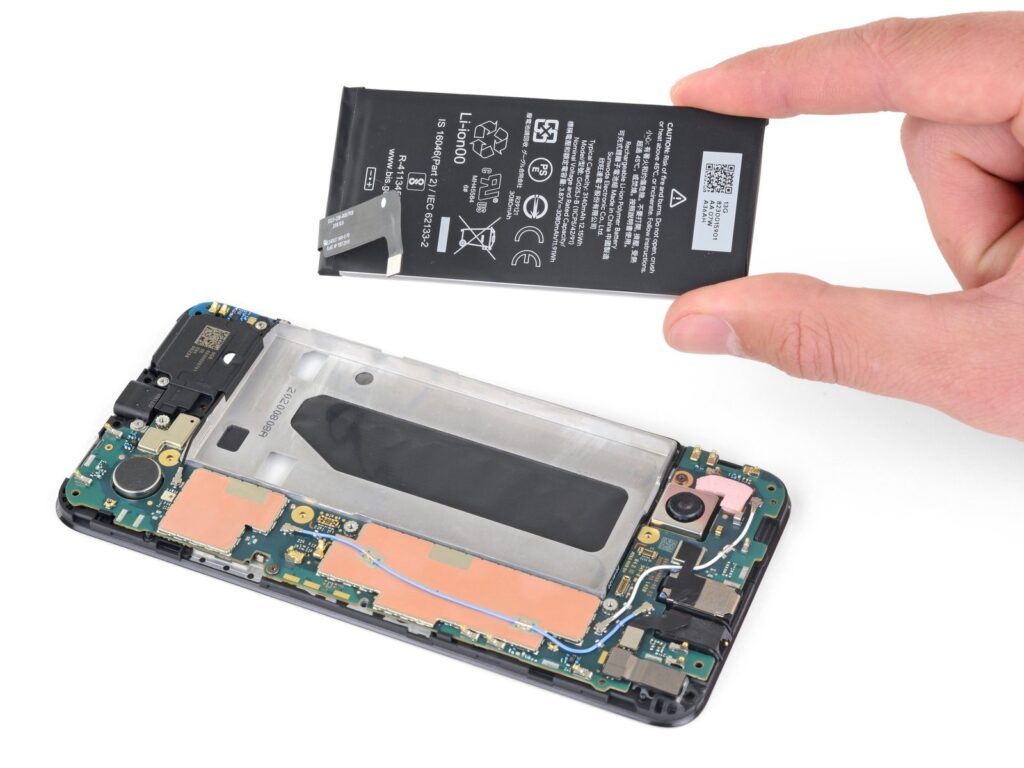
Pixel 4a, disassembled, with two fingers holding its battery above the front half.
Removing the Pixel 4a’s battery can be painful, but not as painful as catching fire. Credit: iFixit

Cheap can be quite expensive

The update itself does not appear to be part of some plan to spy on us or to extract revenue but rather to keep people safe. The company tried to remedy the pain with options that, on the surface, felt reasonable, especially given the fact that batteries are well-known as consumable objects that degrade over time. And I’ve had three solid years of service with the 4a, which wasn’t especially expensive to begin with.

That said, I do blame Google in general for the situation. The inflexibility of the approach, the options that aren’t tailored for ease of use in specific countries, the outsourced tech support—these are all hallmarks of today’s global tech behemoths.

It is more efficient, from an algorithmic, employ-as-few-humans-as-possible perspective, to operate “at scale” by choosing global technical solutions over better local options, by choosing outsourced email support, by trying to avoid fraud (and employee time) through preventing program changes, by asking the users to jump through your hoops, by gobbling up ultra-sensitive information because it makes things easier on your end.

While this makes a certain kind of sense, it’s not fun to receive this kind of “efficiency.” When everything goes smoothly, it’s fine—but whenever there’s a problem, or questions arise, these kinds of “efficient, scalable” approaches usually just mean “you’re about to get screwed.”

In the end, Google is willing to pay me $50, but that money comes with its own cost. I’m not willing to pay with my time nor with the risk of my financial information, and I will increasingly turn to companies that offer a better experience, that care more about data privacy, that build with higher-quality components, and that take good care of customers.

No company is perfect, of course, and this approach costs a bit more, which butts up against my powerful urge to get a great deal on everything. I have to keep relearning the old lesson—as I am once again with this Pixel 4a fiasco—that cheap gear is not always the best value in the long run.

https://arstechnica.com/gadgets/2025/03/how-google-nerfed-my-pixel-4a-then-stuck-it-to-me-too/


HP avoids monetary damages over bricked printers in class-action settlement

HP also now provides disclaimers on the product pages for most of the printers that it sells, stating that the device “is intended to work only with cartridges that have a new or reused HP chip” and uses Dynamic Security “to block cartridges using a non-HP chip.”

“Periodic firmware updates will maintain the effectiveness of these measures and block cartridges that previously worked. A reused HP chip enables the use of reused, remanufactured, and refilled cartridges,” the disclaimer says, adding a link to a support page about Dynamic Security. The support page notes that “most HP printers can be configured to receive updates either automatically or with a notification that allows you to choose whether to update or not.” However, some HP programs, like Instant Ink, require users to enable automatic firmware updates on HP printers.

All this means that, despite the recently approved settlement, Dynamic Security remains a critical part of most HP printers, and HP will continue to feel entitled to use firmware updates to suddenly block printers made after December 1, 2016, from using non-HP ink and toner. Owners of HP printers made after that date that allow automatic updates and still work with third-party accessories shouldn’t be surprised if that ability is suddenly bricked one day.

Dynamic litigation

While HP isn’t paying a sum to class-action members this time, it has previously agreed to pay millions in relation to bricking printers: In 2022, it agreed to pay $1.35 million to European customers, and in 2020, the Italian Antitrust Authority fined HP for 10 million euros. In 2019, HP said it would pay $1.5 million to settle a similar class-action case in California, and it paid approximately AUD$50 each to Australian customers impacted by Dynamic Security in 2018.

There’s also an open case against HP regarding its ink practices, a class-action complaint filed in the US District Court for the Northern District of Illinois in January 2024. The lawsuit centers on Dynamic Security firmware updates pushed “in late 2022 and early 2023″ and accuses HP of creating a “monopoly in the aftermarket for replacement cartridges” [PDF]. The plaintiffs seek an order declaring that HP broke the law, an injunction against Dynamic Security, and monetary and punitive damages.

Another lawsuit, filed in mid-2022 about some HP all-in-one printers failing to scan or fax without ink, was dismissed.

HP’s printer arm has other pressing matters to address, though. Earlier this month, a firmware update broke specific HP printer models, preventing them from printing, even when using HP-brand ink. HP told Ars last week that it’s “actively working on a solution.”

https://arstechnica.com/gadgets/2025/03/hp-avoids-monetary-damages-over-bricked-printers-in-class-action-settlement/


Apple and Google in the hot seat as European regulators ignore Trump warnings

The European Commission is not backing down from efforts to rein in Big Tech. In a series of press releases today, the European Union’s executive arm has announced actions against both Apple and Google. Regulators have announced that Apple will be required to open up support for non-Apple accessories on the iPhone, but it may be too late for Google to make changes. The commission says the search giant has violated the Digital Markets Act, which could lead to a hefty fine.

Since returning to power, Donald Trump has railed against European regulations that target US tech firms. In spite of rising tensions and tough talk, the European Commission seems unfazed and is continuing to follow its more stringent laws, like the Digital Markets Act (DMA). This landmark piece of EU legislation aims to make the digital economy more fair. Upon coming into force last year, the act labeled certain large tech companies, including Apple and Google, as “gatekeepers” that are subject to additional scrutiny.

Europe’s more aggressive regulation of Big Tech is why iPhone users on the continent can install apps from third-party app markets while the rest of us are stuck with the Apple App Store. As for Google, the European Commission has paid special attention to search, Android, and Chrome, all of which dominate their respective markets.

Apple’s mobile platform plays second fiddle to Android in Europe, but it’s large enough to make the company subject to the DMA. The EU has now decreed that Apple is not doing enough to support interoperability on its platform. As a result, it will be required to make several notable changes. Apple will have to provide other companies and developers with improved access to iOS for devices like smartwatches, headphones, and TVs. This could include integration with notifications, faster data transfers, and streamlined setup.

The commission is also forcing Apple to release additional technical documentation, communication, and notifications for upcoming features for third parties. The EU believes this change will encourage more companies to build products that integrate with the iPhone, giving everyone more options aside from Apple’s.

Regulators say both sets of measures are the result of a public comment period that began late last year. We’ve asked Apple for comment on this development but have not heard back as of publication time. Apple is required to make these changes, and failing to do so could lead to fines. However, Google is already there.

https://arstechnica.com/apple/2025/03/eu-accuses-google-and-apple-of-stifling-competition-under-digital-markets-act/


Old Bolt, new tricks: Making an EV into a backup power station with an inverter

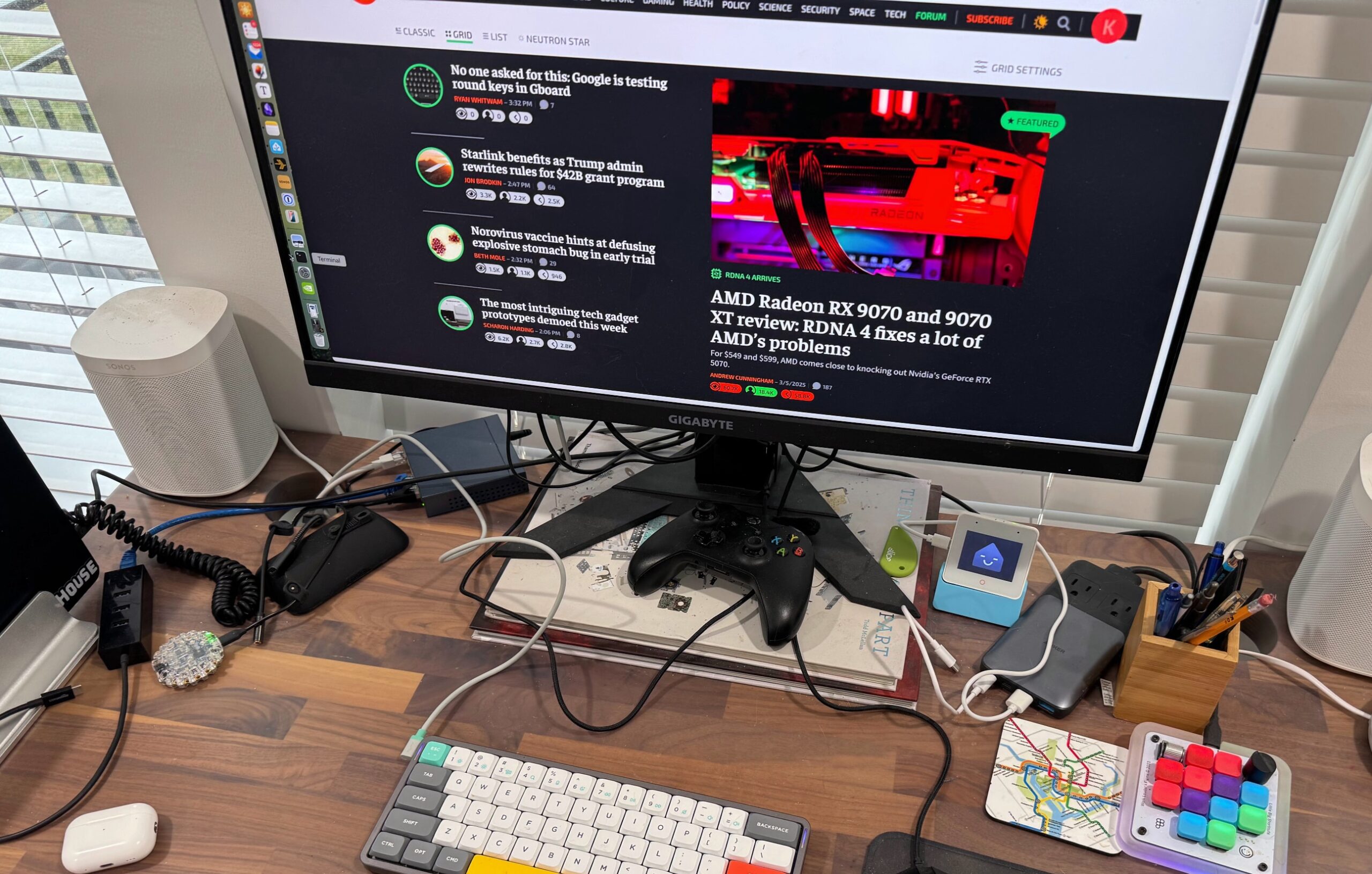
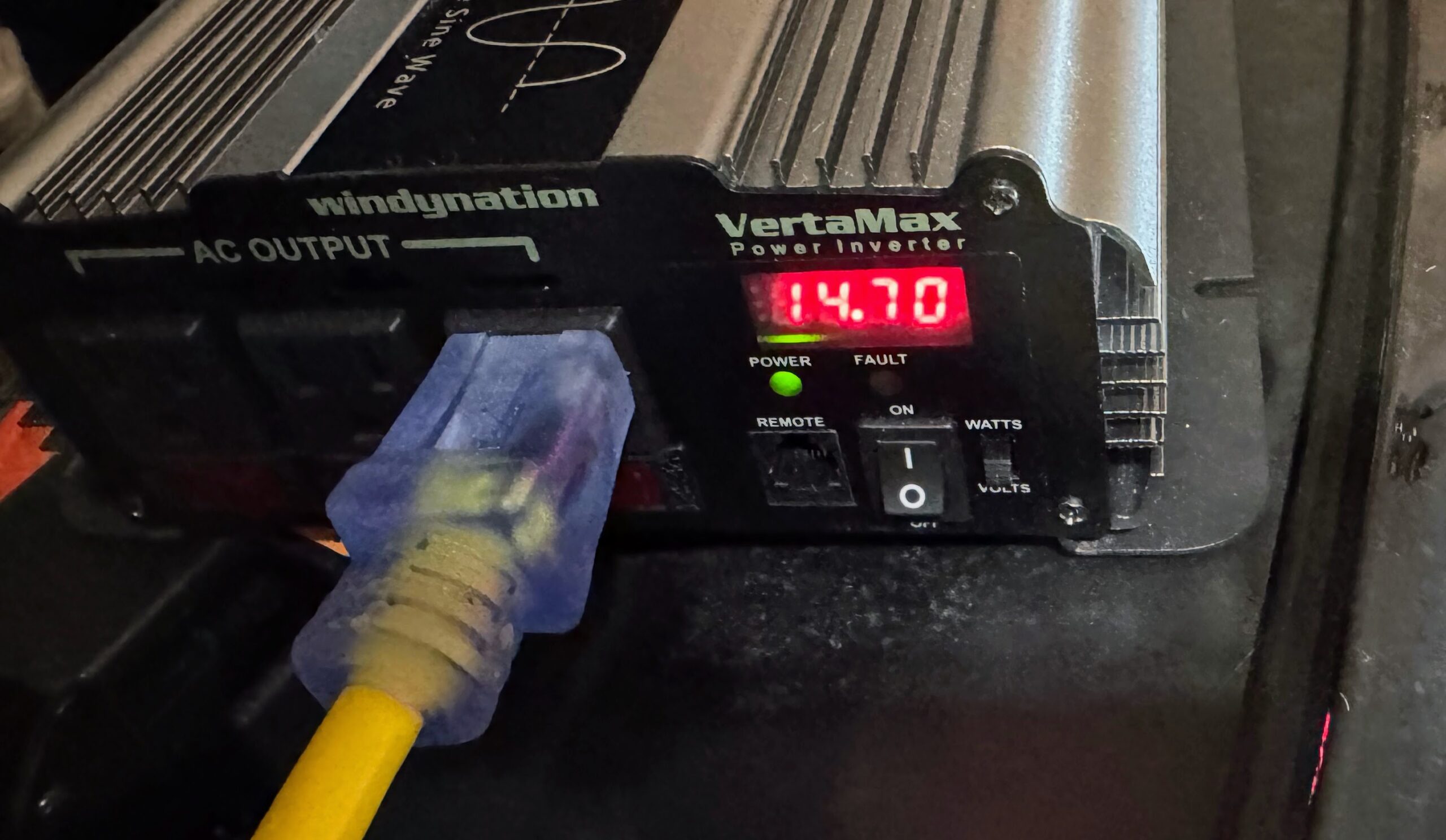
I first plugged in my desk and all its accompaniments, then nudged and woke up my laptop and monitor: 14.7 watts. That seemed a bit low, given that monitors are typically more than 20 watts, but the inverter is perhaps slow to report the full draw. Still, there was lots of headroom remaining.

One extension cord, one desk full of gadgets, 14.7 watts (but probably not accurate yet).

Kevin Purdy

Wooden desk with a monitor opened to Ars Technica homepage, a keyboard, mouse, small ESP32 Home Asssistant voice device, Anker multi-charger, Figma keypad device, a MacBook, and too many cables.

The author’s desk, powered by his car. Please forgive the cable spaghetti; it’s always this messy, but that’s not the focus of this post.

Kevin Purdy

Adding in the fiber-optic modem, the Dream Machine Pro router (specified at a 50 W maximum power draw), and its PoE-based devices boosted the number to 90 watts. That left 910 watts, which felt like a lot until I plugged in the big space heater and set it to its lowest setting. Once the heater had been on for a bit, I was at 850–860 watts, combined with the other gear. I knew space heaters were inefficient in a broad sense, but now that fact is burned into my brain in little red digits.

All three plugs in—desk, networking gear, space heater—and the 850 watts the inverter eventually settled at once the heater ran a while.

Credit: Kevin Purdy

All three plugs in—desk, networking gear, space heater—and the 850 watts the inverter eventually settled at once the heater ran a while. Credit: Kevin Purdy

All these things ran off the inverter for about 30 minutes (I wrote the previous two paragraphs with mostly inverter power), floating between 810 and 920 watts, and I saw the car’s projected mileage dip one mile when I checked on it. If I had the Bolt fully charged, I might get a maximum of 60 hours of this, or 48 hours at my typical 80 percent charge, give or take some resistance and use variables. Given what I learned, I would need to use a smaller space heater or very light air conditioning if I also wanted to keep the fridge running without nervous monitoring (and make up for some loss to an extension cord). That, or hope the power only goes out during comfortable temperatures.

But I’m using the Bolt and inverter as a just-in-case option, not something I would lean on if regular multi-day outages were occurring. It would also be quite useful for car camping, though I can’t speak to that personally. The process has, like most DIY projects, taught me some things: about power draw, EVs, and my priorities. If you have a similarly nifty but not exactly new EV, consider checking out your inversion options for it—after you fully understand the limits and know-how required.

This post was updated at 10:30 a.m. Eastern on March 17 to clean up references to inversion, which the non-engineer author regrets for their initial fuzziness. “Plugs” and “receptacles” were also better distinguished.

https://arstechnica.com/gadgets/2025/03/old-bolt-new-tricks-making-an-ev-into-a-backup-power-station-with-an-inverter/


2025 iPad Air hands-on: Why mess with a good thing?

There’s not much new in Apple’s latest refresh of the iPad Air, so there’s not much to say about it, but it’s worth taking a brief look regardless.

In almost every way, this is identical to the previous generation. There are only two differences to go over: the bump from the M2 chip to the slightly faster M3, and a redesign of the Magic Keyboard peripheral.

If you want more details about this tablet, refer to our M2 iPad Air review from last year. Everything we said then applies now.

From M2 to M3

The M3 chip has an 8-core CPU with four performance cores and four efficiency cores. On the GPU side, there are nine cores. There’s also a 16-core Neural Engine, which is what Apple calls its NPU.

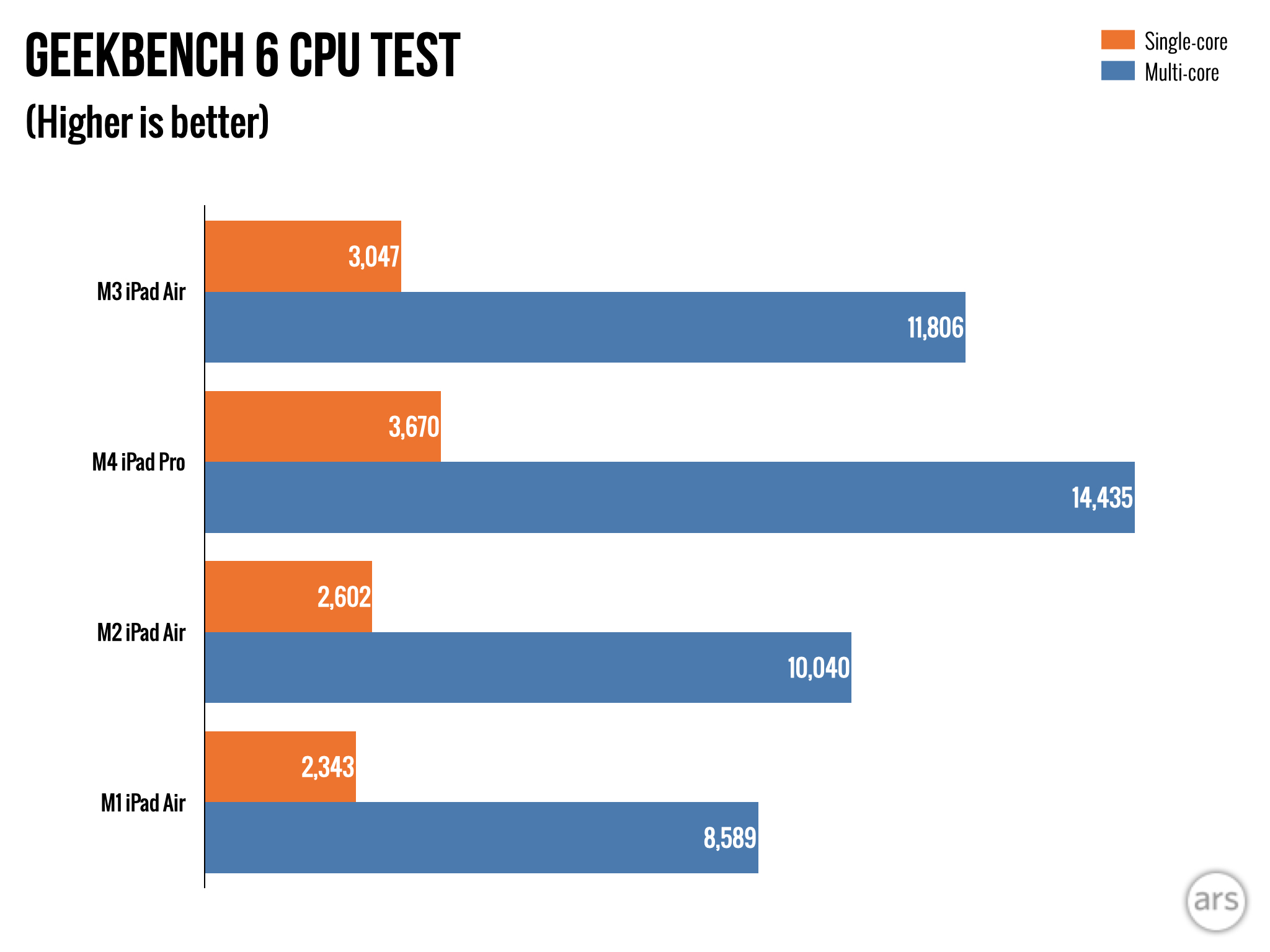
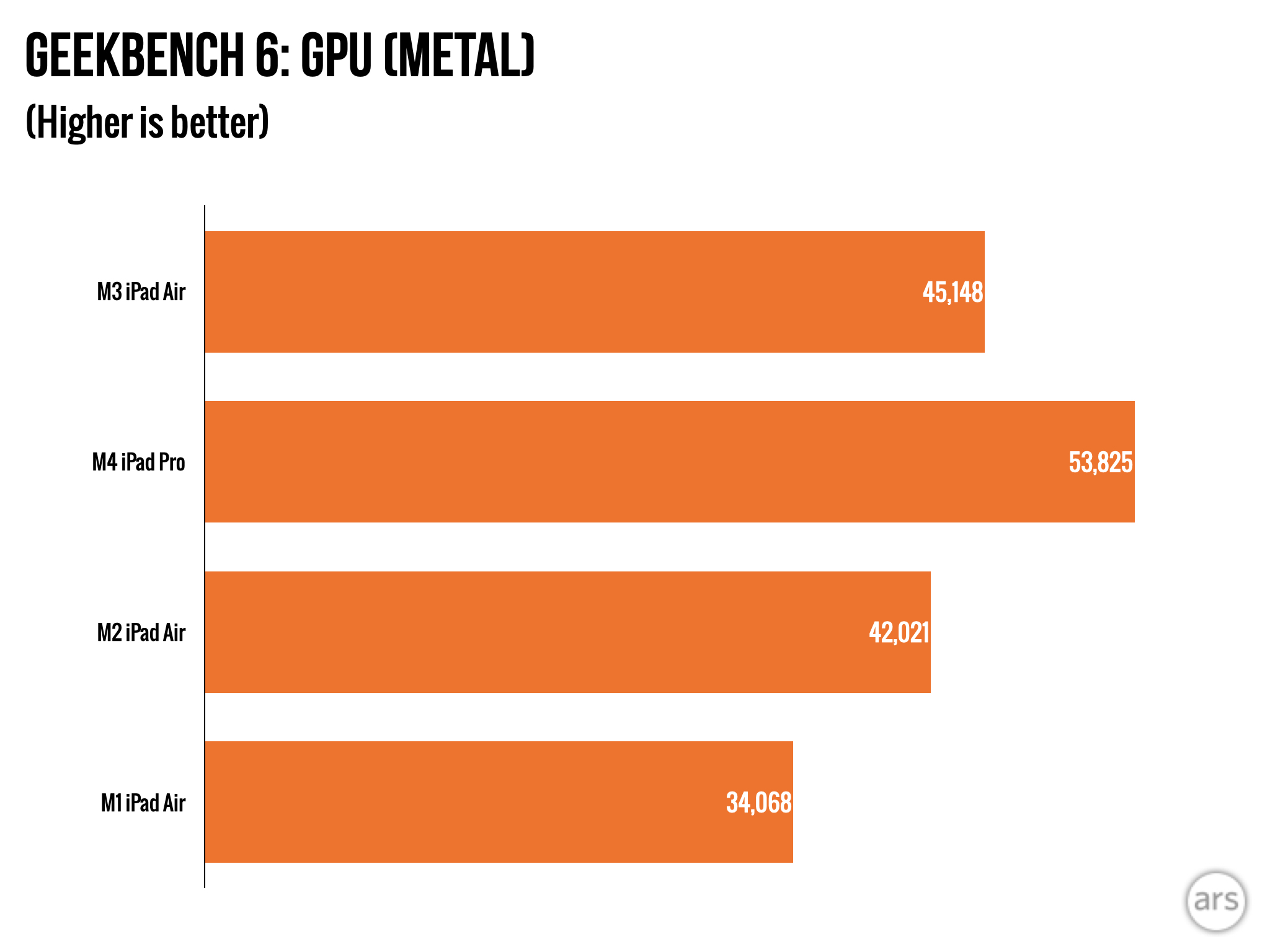
We’ve seen the M3 in other devices before, and it performs comparably here in the iPad Air in Geekbench benchmarks. Those coming from the M1 or older A-series chips will see some big gains, but it’s a subtle step up over the M2 in last year’s iPad Air.

That will be a noticeable boost primarily for a handful of particularly demanding 3D games (the likes of Assassin’s Creed Mirage, Resident Evil Village, Infinity Nikki, and Genshin Impact) and some heavy-duty applications only a few people use, like CAD or video editing programs.

Most of the iPad Air’s target audience would never know the difference, though, and the main benefit here isn’t necessarily real-world performance. Rather, the upside of this upgrade is the addition of a few specific features, namely hardware-accelerated ray tracing and hardware-accelerated AV1 video codec support.

This isn’t new, but this chip supports Apple Intelligence, the much-ballyhooed suite of generative AI features Apple recently introduced. At this point there aren’t many devices left in Apple’s lineup that don’t support Apple Intelligence (it’s basically just the cheapest, entry-level iPad that doesn’t have it) and that’s good news for Apple, as it helps the company simplify its marketing messaging around the features.

https://arstechnica.com/gadgets/2025/03/hands-on-with-the-2024-ipad-air-slightly-better-slightly-faster/


Everything you say to your Echo will be sent to Amazon starting on March 28

If that’s not enough to deter you from sharing voice recordings with Amazon, note that the company allowed employees to listen to Alexa voice recordings. In 2019, Bloomberg reported that Amazon employees listened to as many as 1,000 audio samples during their nine-hour shifts. Amazon says it allows employees to listen to Alexa voice recordings to train its speech recognition and natural language understanding systems.

Other reasons why people may be hesitant to trust Amazon with personal voice samples include the previous usage of Alexa voice recordings in criminal trials and Amazon paying a settlement in 2023 in relation to allegations that it allowed “thousands of employees and contractors to watch video recordings of customers’ private spaces” taken from Ring cameras, per the Federal Trade Commission.

Save recordings or lose functionality

Likely looking to get ahead of these concerns, Amazon said in its email today that by default, it will delete recordings of users’ Alexa requests after processing. However, anyone with their Echo device set to “Don’t save recordings” will see their already-purchased devices’ Voice ID feature bricked. Voice ID enables Alexa to do things like share user-specified calendar events, reminders, music, and more. Previously, Amazon has said that “if you choose not to save any voice recordings, Voice ID may not work.” As of March 28, broken Voice ID is a guarantee for people who don’t let Amazon store their voice recordings.

Amazon’s email says:

Alexa voice requests are always encrypted in transit to Amazon’s secure cloud, which was designed with layers of security protections to keep customer information safe. Customers can continue to choose from a robust set of controls by visiting the Alexa Privacy dashboard online or navigating to More > Alexa Privacy in the Alexa app.

Amazon is forcing Echo users to make a couple of tough decisions: Grant Amazon access to recordings of everything you say to Alexa or stop using an Echo; let Amazon save voice recordings and have employees listen to them or lose a feature set to become more advanced and central to the next generation of Alexa.

However, Amazon is betting big that Alexa+ can dig the voice assistant out of a financial pit. Amazon has publicly committed to keeping the free version of Alexa around, but Alexa+ is viewed as Amazon’s last hope for keeping Alexa alive and making it profitable. Anything Amazon can do to get people to pay for Alexa takes precedence over other Alexa user demands, including, it seems, privacy.

https://arstechnica.com/gadgets/2025/03/everything-you-say-to-your-echo-will-be-sent-to-amazon-starting-on-march-28/


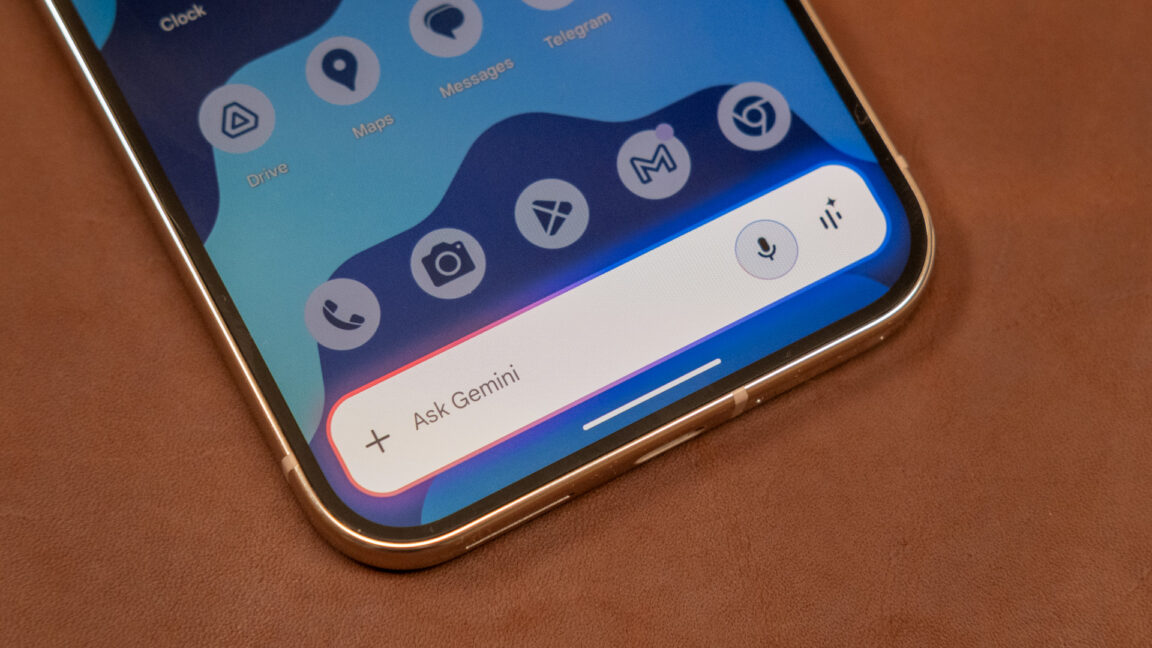
End of Life: Gemini will completely replace Google Assistant later this year

Not all devices can simply download an updated app—after almost a decade, Assistant is baked into many Google products. The company says Google-powered cars, watches, headphones, and other devices that use Assistant will receive updates that transition them to Gemini. It’s unclear if all Assistant-powered gadgets will be part of the migration. Most of these devices connect to your phone, so the update should be relatively straightforward, even for accessories that launched early in the Assistant era.

There are also plenty of standalone devices that run Assistant, like TVs and smart speakers. Google says it’s working on updated Gemini experiences for those devices. For example, there’s a Gemini preview program for select Google Nest speakers. It’s unclear if all these devices will get updates. Google says there will be more details on this in the coming months.

Meanwhile, Gemini still has some ground to make up. There are basic features that work fine in Assistant, like setting timers and alarms, that can go sideways with Gemini. On the other hand, Assistant had its fair share of problems and didn’t exactly win a lot of fans. Regardless, this transition could be fraught with danger for Google as it upends how people interact with their devices.

https://arstechnica.com/google/2025/03/end-of-life-gemini-will-completely-replace-google-assistant-later-this-year/


I threw away Audible’s app, and now I self-host my audiobooks

We’re an audiobook family at House Hutchinson, and at any given moment my wife or I are probably listening to one while puttering around. We’ve collected a bit over 300 of the things—mostly titles from web sources (including Amazon’s Audible) and from older physical “books on tape” (most of which are actually on CDs). I don’t mind doing the extra legwork of getting everything into files and then dragging-n-dropping those files into the Books app on my Mac, but my wife prefers to simply use Audible’s app to play things directly—it’s (sometimes) quick, it’s (generally) easy, and it (occasionally) works.

But a while back, the Audible app stopped working for her. Tapping the app’s “Library” button would just show a spinning loading icon, forever. All the usual troubleshooting (logging in and out in various ways, removing and reinstalling the app, other familiar rituals) yielded no results; some searching around on Google and DuckDuckGo led me to nothing except a lot of other people having the same problem and a whole lot of silence from Audible and Amazon.

So, having put in the effort to do things the “right” way and having that way fail, I changed tacks and fixed the problem, permanently, with Audiobookshelf.

Screenshot of Lee's library

Audiobookshelf! Behold, the unholy melding together of my wife’s and my audiobooks.

Credit: Lee Hutchinson

Audiobookshelf! Behold, the unholy melding together of my wife’s and my audiobooks. Credit: Lee Hutchinson

Audiobookshelf

Audiobookshelf is a self-hosted audiobook and podcast server, and after two weeks of use, so far it works vastly better than trying to stream within Audible’s app. My wife can now actually listen to audiobooks instead of staring at a spinning loading icon forever.

To get Audiobookshelf running, you need something to run it on—a spare desktop or other computer you’re not using should fit the bill, as Audiobookshelf’s requirements are relatively meager. You can either install it via a Docker image, or on bare metal on Windows or several different Linux distros. (The Linux distro installations include a repository for handling updates via your system’s update method, so you won’t have to be manually installing releases willy-nilly.)

https://arstechnica.com/gadgets/2025/03/i-threw-away-audibles-app-and-now-i-self-host-my-audiobooks/