Qualcomm and Google team up to offer 8 years of Android updates
Qualcomm and Google have joined forces to extend software updates on Android devices. With Google’s assistance, the chipmaker has committed to providing extended vendor support to any OEM building on its most powerful chips, pushing the theoretical lifespan of Android devices to eight years. There are plenty of caveats, but this move could make your next phone more useful for longer.

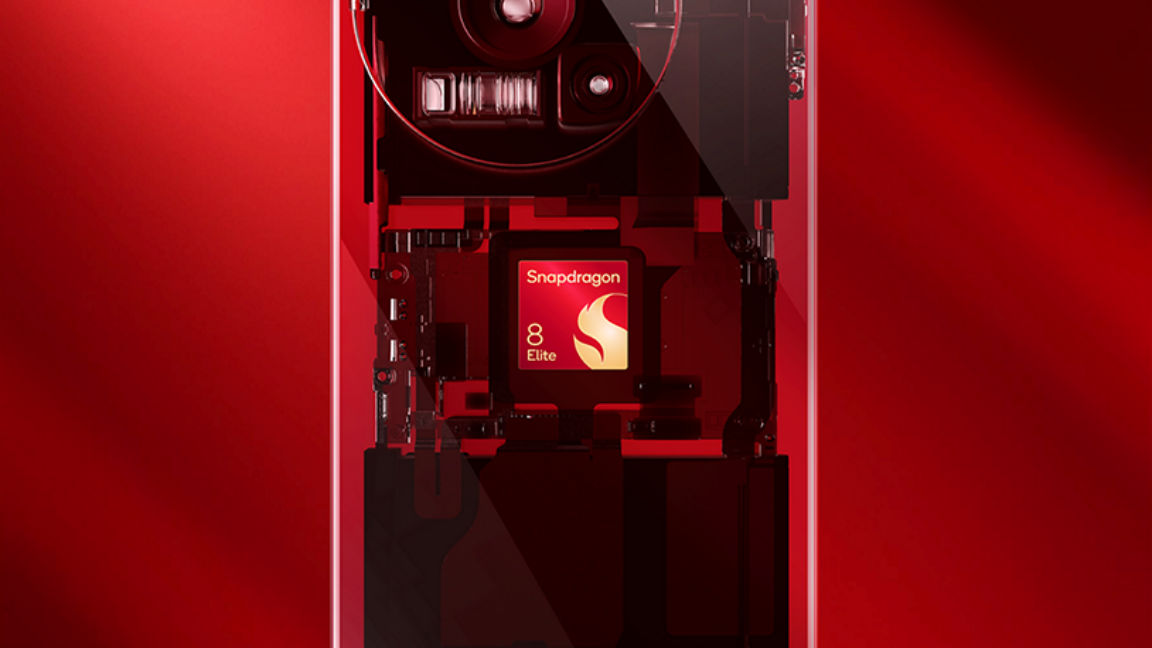
The extended support window only applies to Android devices with the latest Qualcomm chipsets. To start, the eight-year support timeline will be extended to devices running the new Snapdragon 8 Elite mobile platform, which has powered devices like the OnePlus 13 and Galaxy S25. Later this year, the same policy will be applied to the company’s new Snapdragon 8 and Snapdragon 7-series chips, and you can expect the same deal for at least the next five generations of Qualcomm silicon.

“Through this collaboration, OEMs can more seamlessly update the software and security on their devices, ensuring a more secure and long-lasting Android experience for our users,” said Google’s Android Platform manager Seang Chau.

Snapdragon 8 and 7 chips are used in flagship and almost-flagship phones, so don’t expect a new Qualcomm-based budget phone to get anywhere near the same update commitment. There’s nothing stopping Qualcomm from offering the same deal with cheaper components, but people tend to expect phones that cost more to last longer. A cheap phone might not even make it eight years before something breaks or you get tired of how slow it is, and OEMs aren’t incentivized to spend the money supporting cheap hardware.

Currently, Samsung and Google lead the market with seven years of guaranteed security patches and OS updates. With Qualcomm’s help, other companies could reach similar heights. With Qualcomm’s support, OEMs will be able to provide eight years of security patches, and there will also be at least two updates to the vendor’s Android Common Kernel during that time. This will make it easier for OEMs to release full Android OS updates even toward the end of a device’s lifespan.

https://arstechnica.com/gadgets/2025/02/qualcomm-and-google-team-up-to-offer-8-years-of-android-updates/


Hands-on: This 3.5-inch smart display makes my digital calendars more digestible

My preferred methods of organizing my schedule could be considered dated, so when I got a chance to try out a gadget meant to streamline my various digital calendars, I took it.

While I do use digital calendars and to-do lists, my go-to method for organizing my day’s tasks, goals, and upcoming events is pen and paper. I use paper calendars in agendas for a visual layout of events, including those as far away as next month. They give me a sense of control, as I’m able to highlight, circle, draw arrows, underline, erase, and so on. I also write more to-do lists than might be considered efficient (as evidenced by “make to-do list” being a frequent line on my to-do lists).

But there are many benefits to using tech for staying organized, too. With digital options, I can easily check my availability on the go with my phone and get alerts to remind me of events.

But it’s hard to find a simple, stripped-down tech solution to put my work calendar, work goals, personal calendar, and personal to-do lists in one place while minimizing distraction. When checking what time I set aside to work out, for example, I typically don’t want to think about whether the event is recurring, who else knows about it, what “type” of event it is, or how many minutes before, during, and after the event I’ll get phone alerts about it. Those details are often valuable for creating a highly informative digital calendar, but they can also be distracting and result in information overload.

Enter a smart display called DeskBuddy. The 3.5-inch touchscreen device has essentially one capability: showing today’s events from your synced digital calendars. Blueberry Consultants, a custom software development firm headquartered in Birmingham, England, crowdfunded the desktop accessory via Kickstarter in December 2023 and currently sells it online, including on Etsy.

https://arstechnica.com/gadgets/2025/02/streamlining-and-oversimplifying-my-online-calendars-with-a-3-5-inch-smart-screen/


Nothing on Phone 3a Pro design: “Some people will hate it”

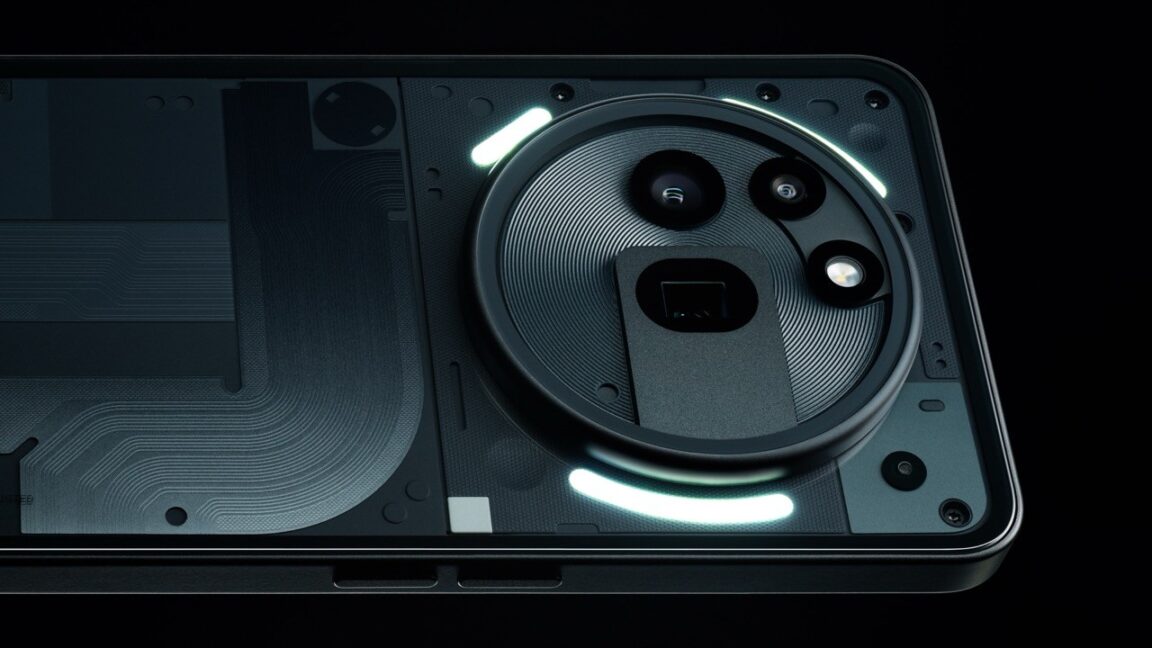
Nothing, the smartphone venture from OnePlus co-founder Carl Pei, is on its third generation of Android smartphones. The Nothing Phone 3a and 3a Pro will be officially announced on March 4, but there won’t be much left to reveal. Not only has Nothing teased the phones a few times, there’s also a new video highlighting the Nothing Phone 3a Pro’s design. In it, Nothing’s design team speaks at length about how they tried to incorporate the chunky camera module, but what they came up with is going to be divisive.

As we approach 20 years since the iPhone made touchscreen smartphones the default, the form factor is very fleshed out. Some of today’s most popular smartphones have almost reached the point of anti-design—flat, unremarkable bodies that are intended to be covered up with a case. There’s something to be said for that when most people slap a sheet of plastic on their phone and only remove it once in a blue moon. Nothing, however, designs phones with transparent panels and glowing “Glyphs” that are intended to be seen. In the case of the 3a Pro, there’s also a camera module so big it’s sure to stand out.

People generally want big screens and big batteries that don’t make phones too thick or heavy. Some components have shrunk or been dropped entirely to free up space (a moment of silence for the dearly departed headphone jack). Camera modules, however, can’t shrink infinitely. Smaller lenses and sensors have an impact on image quality, so expensive phones often have gargantuan camera arrays that can make phones top-heavy. For example, look at the Google Pixel 9 series, which features a camera bump that towers above the rest of the back.

The Nothing Phone 3a Pro isn’t a flagship device, but it’ll have more cameras than the Nothing Phone 3a that will release at the same time. The new design video shows off the phone’s three rear-facing sensors: a 50MP primary, an 8MP ultrawide, and a 50MP periscope telephoto (focal length unknown). The Nothing Phone 3a Pro has three of those glowing Glyphs on the back, framing the enormous camera module. The phone’s PCB also needed some tweaks to make room for the folded periscope assembly, which is much thicker than the other sensors.

https://arstechnica.com/gadgets/2025/02/nothing-explains-why-the-phone-3a-pro-ended-up-with-a-giant-camera/


PSA: Amazon kills “download & transfer via USB” option for Kindles this week

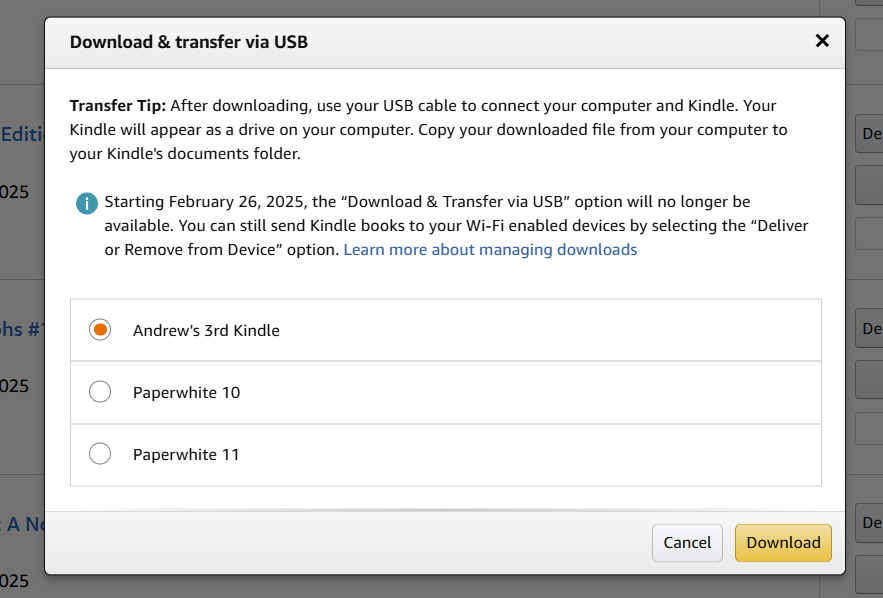
Later this week, Amazon is closing a small loophole that allowed purchasers of Kindle books to download those files to a computer and transfer them via USB. Originally intended to extend e-book access to owners of very old Kindles without Wi-Fi connectivity, the feature has also made it easier for people to download and store copies of the e-books they’ve bought, reducing the risk that Amazon might make changes to their text or remove them from the Kindle store entirely.

The “Download & transfer via USB” option on Amazon’s site is going away this Wednesday, February 26. People who want to download their libraries to their PC easily should do so within the next two days. This change only affects the ability to download these files directly to a computer from Amazon’s website—if you’ve downloaded the books beforehand, you’ll still be able to load them on your Kindles via USB, and you’ll still be able to use third-party software as well as the Send to Kindle service to get EPUB files and other books loaded onto a Kindle.

Downloading files to your PC through Amazon’s site is still possible, but it’s going away later this week. Credit: Andrew Cunningham

For typical Kindle owners who buy their books via Amazon’s store and seamlessly download them to modern or modern-ish Kindle devices over Wi-Fi, you likely won’t notice any change. The effects will be noticed most by those who use third-party software like Calibre to manage a local e-book library and people who have hopped to other e-reader platforms who want to be able to download their Kindle purchases and strip them of their DRM so they can be read elsewhere.

The download-and-transfer option was useful for DRM haters partly because the files are delivered in the older AZW3 file format rather than the newer KFX format. AZW3 is the file format used by those older, pre-Wi-Fi Kindles, and its DRM is generally easier to remove.

Getting your files

If you’re trying to download your Kindle purchases to your PC and Mac before the deadline, you’ll need to have a somewhat older Kindle or Fire device attached to your account. If you only have one of the 2024 Kindles associated with your Amazon account (the newest Paperwhite, the second-generation Scribe, or the Colorsoft), you won’t be offered the download option. Amazon’s site will also only allow you to download a single book at a time, which could take quite a while, depending on the size of your library.

https://arstechnica.com/gadgets/2025/02/psa-amazon-kills-download-transfer-via-usb-option-for-kindles-this-week/


Google plans to stop using insecure SMS verification in Gmail

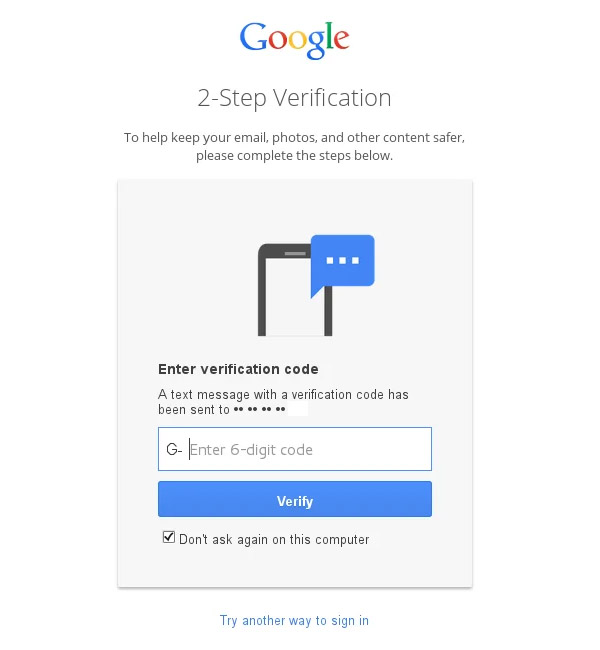
A username and password just won’t cut it anymore. Users around the world logging into Gmail have often relied on Google SMS pings to securely access their accounts, but that’s changing. Google now hopes to move beyond SMS, which has become so frequently abused that it negates any supposed security benefit. Instead of using SMS, the company will reportedly switch to using QR codes.

Currently, Google sends SMS codes for two reasons: to confirm that a new login is legitimate and to block spammers from opening Gmail accounts in bulk. You type in your credentials, and a moment later, Google texts a six-digit code for you to enter as well. It’s not a terribly arduous process, and it can help protect your account, but SMS is not very secure.

SMS messages are delivered by mobile carriers without encryption, and they often go through intermediaries that can be compromised without your knowledge. Even if the line is secure, phone numbers have very little in the way of security.

SIM swap attacks are depressingly common today, with carrier reps tricked or paid off to transfer a phone number to a fraudster’s device. At that point, the two-factor codes from Google go right to the attacker, allowing them to log in. This same attack has been used to access crypto wallets and make off with valuable digital currency. Gaining control of the target’s email is often a necessary step to unlock other accounts.

According to Forbes, Google plans to patch this vulnerability soon. The company will stop using SMS codes for verification, moving to a QR code that the user has to scan with their phone. 

“Just like we want to move past passwords with the use of things like passkeys, we want to move away from sending SMS messages for authentication,” Google spokesperson Ross Richendrfer told Forbes.

This dialog will soon be replaced with a QR code.

This dialog will soon be replaced with a QR code.

Moving to QR codes takes SMS out of the equation, which also means you don’t have to worry about your carrier’s security practices or lack thereof. Google also points out that QR-code scanning makes phishing scams harder. It’s relatively easy to trick someone into providing an SMS code. Scammers often do this by pretending to be associated with Google, but you can’t share what you don’t have.

Google has not offered much in the way of specifics here. Richendrfer says the change will roll out in “the next few months,” but it’s unclear if all markets will see this change simultaneously. If you already use two-factor on your account, for example with a code generator app or a security key, you’ll continue using that to verify your account. We’ve reached out to Google and will update with anything else we learn about this impending change.

https://arstechnica.com/gadgets/2025/02/google-plans-to-stop-using-insecure-sms-verification-in-gmail/


Robot with 1,000 muscles twitches like human while dangling from ceiling

Plans for 279 robots to start

While the Protoclone is a twitching, dangling robotic prototype right now, there’s a lot of tech packed into its body. Protoclone’s sensory system includes four depth cameras in its skull for vision, 70 inertial sensors to track joint positions, and 320 pressure sensors that provide force feedback. This system lets the robot react to visual input and learn by watching humans perform tasks.

As you can probably tell by the video, the current Protoclone prototype is still in an early developmental stage, requiring ceiling suspension for stability. Clone Robotics previously demonstrated components of this technology in 2022 with the release of its robotic hand, which used the same Myofiber muscle system.

[embedded content]

Artificial Muscles Robotic Arm Full Range of Motion + Static Strength Test (V11).

A few months ago, Clone Robotics also showed off a robotic torso powered by the same technology.

[embedded content]

Torso 2 by Clone with Actuated Abdomen.

Other companies’ robots typically use other types of actuators, such as solenoids and electric motors. Clone’s pressure-based muscle system is an interesting approach, though getting Protoclone to stand and balance without the need for suspension or umbilicals may still prove a challenge.

Clone Robotics plans to start its production with 279 units called Clone Alpha, with plans to open preorders later in 2025. The company has not announced pricing for these initial units, but given the engineering challenges still ahead, a functional release any time soon seems optimistic.

https://arstechnica.com/gadgets/2025/02/dangling-twitching-human-robot-with-synthetic-muscles-makes-its-debut/


Asus’ new “Fragrance Mouse” is a wireless mouse that also smells

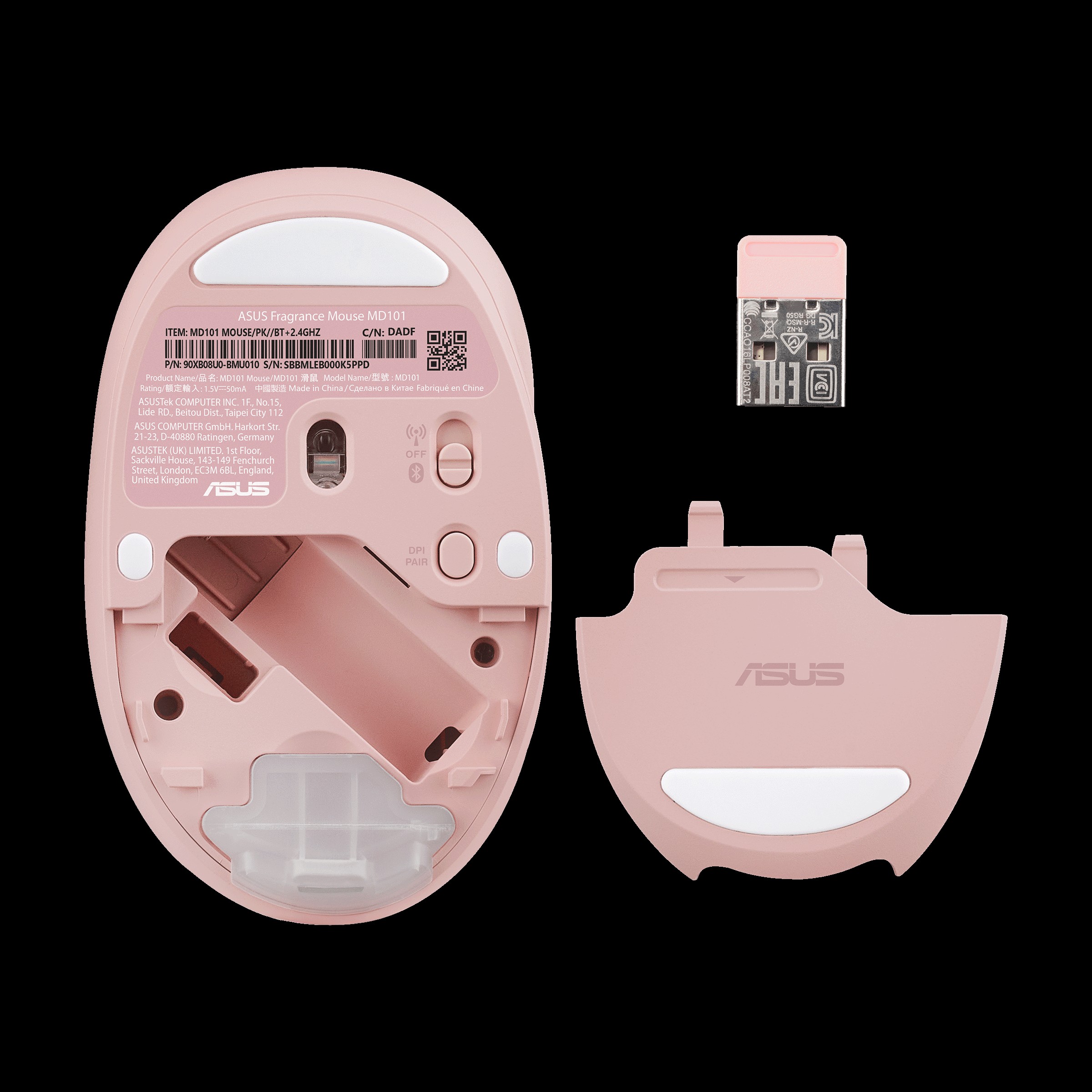
Aside from the customizable stink, the Fragrance Mouse is a reasonably full-featured functional PC accessory. It supports Bluetooth as well as the USB wireless dongle, three DPI levels (1,200, 1,600, and 2,400) for customizing responsiveness, and understated white and pink color options. Asus says the mouse’s switches are rated for 10 million clicks, ensuring that you will be able to smell your mouse for years to come.

We’ve emailed Asus to ask about pricing and availability and will update the article if we get a response.

A shadowy arm threatens to add a scent to the Asus Fragrance Mouse.

Asus

You can see the refillable vial on the bottom of the mouse’s underside.

Asus

Strange as it is, the Fragrance Mouse isn’t totally without precedent; in the summer of 2024, Asus released a laptop called the Adol 14 Air that included a compartment in the lid that could hold a switchable “fragrance pack.” But this laptop was only released in China, so laptop buyers in the US and other countries weren’t given an opportunity to smell it firsthand.

The Fragrance Mouse doesn’t feel like a thing that anyone was asking for, but it’s also probably something that no one thought not to ask for. And that, my friends, is the place where imagination and innovation thrive.

https://arstechnica.com/gadgets/2025/02/asus-new-fragrance-mouse-is-a-wireless-mouse-that-also-smells/


As the Kernel Turns: Rust in Linux saga reaches the “Linus in all-caps” phase

“Put another way: the ‘nobody is forced to deal with Rust’ does not imply ‘everybody is allowed to veto any Rust code.'” Maintainers might also find space in the middle, being aware of Rust bindings and working with Rust developers, but not actively involved, Torvalds writes.

“Why wouldn’t we do this?”

In an earlier response to the “Rust kernel policy” topic, Kroah-Hartman suggests that, “As someone who has seen almost EVERY kernel bugfix and security issue for the past 15+ years … I think I can speak on this topic.”

As the majority of bugs are due to “stupid little corner cases in C that are totally gone in Rust,” Koah-Hartman is “wanting to see Rust get into the kernel,” so focus can shift to more important bugs. While there are “30 million lines of C code that isn’t going anywhere any year soon,” new code and drivers written in Rust are “a win for all of us, why wouldn’t we do this?” After casting doubt on C++ as a viable long-term codebase, Kroah-Hartman clarifies the obvious point that Rust, while not a “silver bullet,” does a lot of things right, especially for developers trying to deal with the kernel’s tricky APIs.

“Yes, mixed language codebases are rough, and hard to maintain, but we are kernel developers dammit, we’ve been maintaining and strengthening Linux for longer than anyone ever thought was going to be possible,” Kroah-Hartman writes. “We’ve turned our development model into a well-oiled engineering marvel creating something that no one else has ever been able to accomplish. Adding another language really shouldn’t be a problem, we’ve handled much worse things in the past and we shouldn’t give up now on wanting to ensure that our project succeeds for the next 20+ years.”

Rust may or may not become an ascendant language in the kernel. But maintaining C as the dominant language, to the point of actively tamping down even non-direct interaction with any C code, did not seem like a viable long-term strategy. Many discussions on the topic have noted the existence of Redox, a Rust-centered microkernel, or the theoretical but technically possible forking of Linux into a C-only project. But they are both just a smidge dismissive of how important the active development of Linux, the dominant infrastructure OS, is to the world.

https://arstechnica.com/gadgets/2025/02/linux-leaders-pave-a-path-for-rust-in-kernel-while-supporting-c-veterans/


Nvidia GeForce RTX 5070 Ti review: An RTX 4080 for $749, at least in theory

Though we’ve tested and re-tested multiple cards with recent drivers in our updated testbed, we don’t have a 4070 Ti Super, 4070 Ti, or 3070 Ti available to test with. We’ve provided some numbers for those GPUs from past reviews; these are from a PC running older drivers and a Ryzen 7 7800X3D instead of a 9800X3D, and we’ve put asterisks next to them in our charts. They should still paint a reasonably accurate picture of the older GPUs’ relative performance, but take them with that small grain of salt.

Performance and power

Despite including fewer CUDA cores than either version of the 4080, some combination of architectural improvements and memory bandwidth increases help the card keep pace with both 4080 cards almost perfectly. In most of our tests, it landed in the narrow strip right in between the 4080 and the 4080 Super, and its power consumption under load was also almost identical.

In every way that matters, the 5070 Ti is essentially an RTX 4080 that also supports DLSS Multi-Frame Generation. You can see why we’d be mildly enthusiastic about it at $749 but less and less impressed the closer the price creeps to $1,000.

Being close to a 4080 also means that the performance gap between the 5070 Ti and the 5080 is usually pretty small. In most of the games we tested, the 5070 Ti hovers right around 90 percent of the 5080’s performance.

The 5070 Ti is also around 60 percent as fast as an RTX 5090. The performance is a lot lower, but the price-to-performance ratio is a lot higher, possibly reflecting the fact that the 5070 Ti actually has other GPUs it has to compete with (in non-ray-traced games, the Radeon RX 7900 XTX generally keeps pace with the 5070 Ti, though at this late date it is mostly out of stock unless you’re willing to pay way more than you ought to for one).

https://arstechnica.com/gadgets/2025/02/nvidia-geforce-rtx-5070-ti-review-an-rtx-4080-for-749-at-least-in-theory/


Small study suggests dark mode doesn’t save much power for very human reasons

If you know how OLED displays work, you know about one of their greatest strengths: Individual pixels can be shut off, offering deeper blacks and power savings. Dark modes, now available on most operating systems, aim to save power by making most backgrounds very dark or black, while also gratifying those who just prefer the look.

But what about on the older but still dominant screen technology, LCDs? The BBC is out with a small, interesting study comparing the light and dark modes of one of its website pages on an older laptop. Faced with a dark mode version, most people turned up the brightness a notable amount, sometimes drawing more power than on light mode.

It’s not a surprise that dark modes don’t do anything to reduce LCD power draw. However, the study—not peer-reviewed but published as part of the International Workshop on Low Carbon Computing—suggests that claims about dark mode’s efficiency may be overstated in real-world scenarios, with non-cutting-edge hardware and humans at the controls.

A 2017 MacBook Pro, a power monitor, and the brightness keys

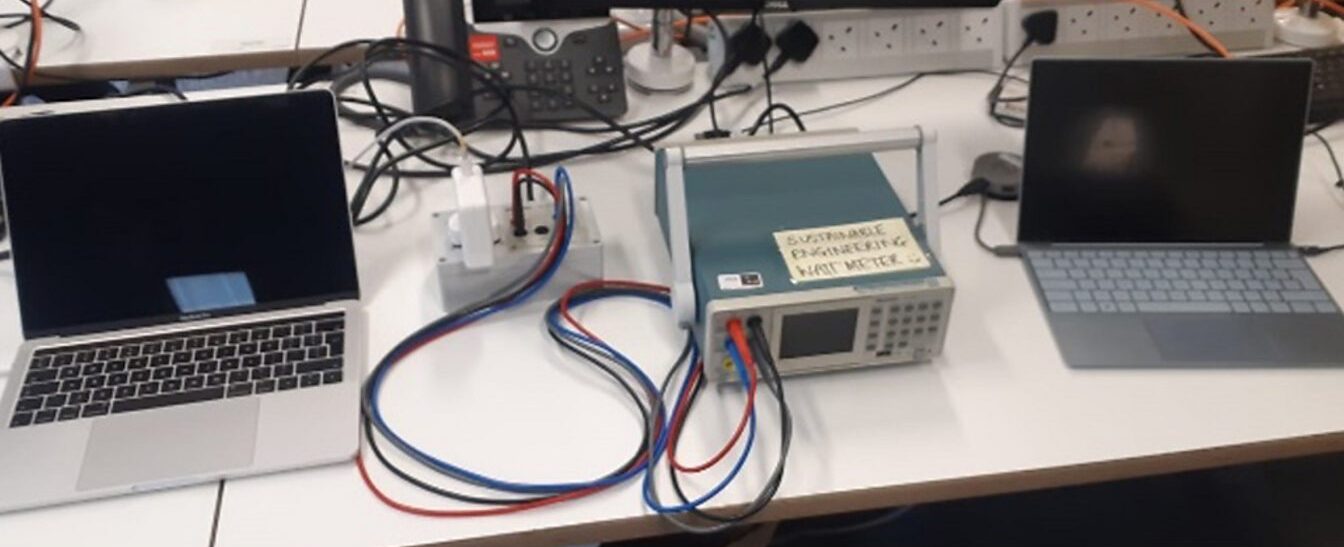
The BBC R&D team’s small-scale brightness testing setup: a power monitor, a testing laptop (with LCD screen), and a monitoring laptop.

Credit: BBC

The BBC R&D team’s small-scale brightness testing setup: a power monitor, a testing laptop (with LCD screen), and a monitoring laptop. Credit: BBC

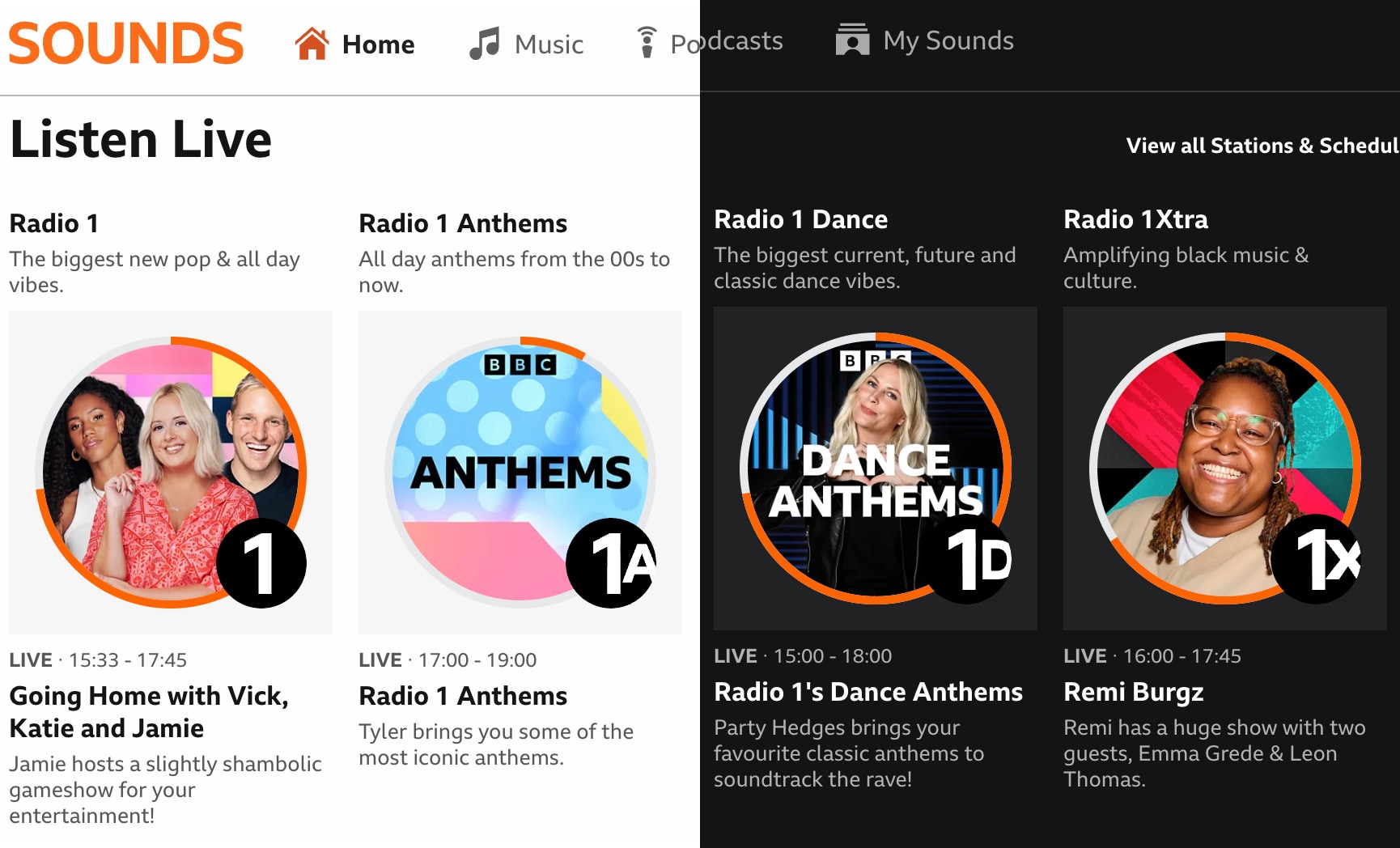
The R&D arm of the British Broadcasting Corporation got to wondering just how useful a dark mode was in lowering broader power consumption. So the team “sat participants in front of the BBC Sounds homepage and asked them to turn up the device brightness until they were comfortable with it,” using both the light and dark mode versions of the BBC Sounds website.

BBC website, split in half (somewhat crudely) to show its light and dark modes.

The BBC Sounds website responds to user preferences for light or dark mode. Light mode is shown here on the left, dark on the right.

Credit: Kevin Purdy/BBC

The BBC Sounds website responds to user preferences for light or dark mode. Light mode is shown here on the left, dark on the right. Credit: Kevin Purdy/BBC

Faced with the dark mode version of the site, 80 percent of participants turned the brightness up “significantly higher” than in light mode, the BBC writes in its blog post. In the study, the Beeb posits something broader:

Our findings suggest that the energy efficiency benefits of dark mode are not as straightforward as commonly believed for display energy, and the interplay between content colourscheme and user behaviour must be carefully considered in sustainability guidelines and interventions.

The study used a physical power monitor (a Tektronix PA1000) and two laptops, one for testing—a 2017 MacBook Pro with a 13.3-inch LCD display—and another for monitoring. The LCD laptop seems like a curious choice, given that dark mode’s savings are largely tied to OLED pixel technology. The BBC study suggests that, “given that most devices still use LCDs, where power consumption may not be reduced by displaying darker colours” (British spelling theirs), broad claims about energy savings may not be appropriately scaled.

https://arstechnica.com/gadgets/2025/02/small-study-suggests-dark-mode-doesnt-save-much-power-for-very-human-reasons/