Google halts its 4-plus-year plan to turn off tracking cookies by default in Chrome

A woman in a white knit sweater, holding a Linzer cookie (with jam inside a heart cut-out) in her crossed palms.
Enlarge / Google, like most of us, has a hard time letting go of cookies. Most of us just haven’t created a complex set of APIs and brokered deals across regulation and industry to hold onto the essential essence of cookies.
Getty Images

Google has an announcement today: It’s not going to do something it has thought about, and tinkered with, for quite some time.

Most people who just use the Chrome browser, rather than develop for it or try to serve ads to it, are not going to know what “A new path for Privacy Sandbox on the web” could possibly mean. The very short version is that Google had a “path,” first announced in January 2020, to turn off third-party (i.e., tracking) cookies in the most-used browser on Earth, bringing it in line with Safari, Firefox, and many other browsers. Google has proposed several alternatives to the cookies that follow you from page to page, constantly pitching you on that space heater you looked at three days ago. Each of these alternatives has met varying amounts of resistance from privacy and open web advocates, trade regulators, and the advertising industry.

So rather than turn off third-party cookies by default and implement new solutions inside the Privacy Sandbox, Chrome will “introduce a new experience” that lets users choose their tracking preferences when they update or first use Chrome. Google will also keep working on its Privacy Sandbox APIs but in a way that recognizes the “impact on publishers, advertisers, and everyone involved in online advertising.” Google also did not fail to mention it was “discussing this new path with regulators.”

Why today? What does it really mean? Let’s journey through more than four and a half years of Google’s moves to replace third-party cookies, without deeply endangering its standing as the world’s largest advertising provider.

2017–2022: FLoC or “What if machines tracked you, not cookies?”

Google’s big moves toward a standstill likely started at Apple headquarters. Its operating system updates in the fall of 2017 implemented a 24-hour time limit on ad-targeting cookies in Safari, the default browser on Macs and iOS devices. A “Coalition of Major Advertising Trade Associations” issued a sternly worded letter opposing this change, stating it would “drive a wedge between brands and their customers” and make advertising “more generic and less timely and useful.”

By the summer of 2019, Firefox was ready to simply block tracking cookies by default. Google, which makes the vast majority of its money through online advertising, made a different, broader argument against dropping third-party cookies. To paraphrase: Trackers will track, and if we don’t give them a proper way to do it, they’ll do it the dirty way by fingerprinting browsers based on version numbers, fonts, screen size, and other identifiers. Google said it had some machine learning that could figure out when it was good to share your browsing habits. For example:

New technologies like Federated Learning show that it’s possible for your browser to avoid revealing that you are a member of a group that likes Beyoncé and sweater vests until it can be sure that group contains thousands of other people.

In January 2020, Google shifted its argument from “along with” to “instead of” third-party cookies. Chrome Engineering Director Justin Schuh wrote, “Building a more private Web: A path towards making third party cookies obsolete,” suggesting that broad support for Chrome’s privacy sandbox tools would allow for dropping third-party cookies entirely. Privacy advocate Ben Adida described the move as “delivering teeth” and “a big deal.” Feedback from the W3C and other parties, Schuh wrote at that time, “gives us confidence that solutions in this space can work.”
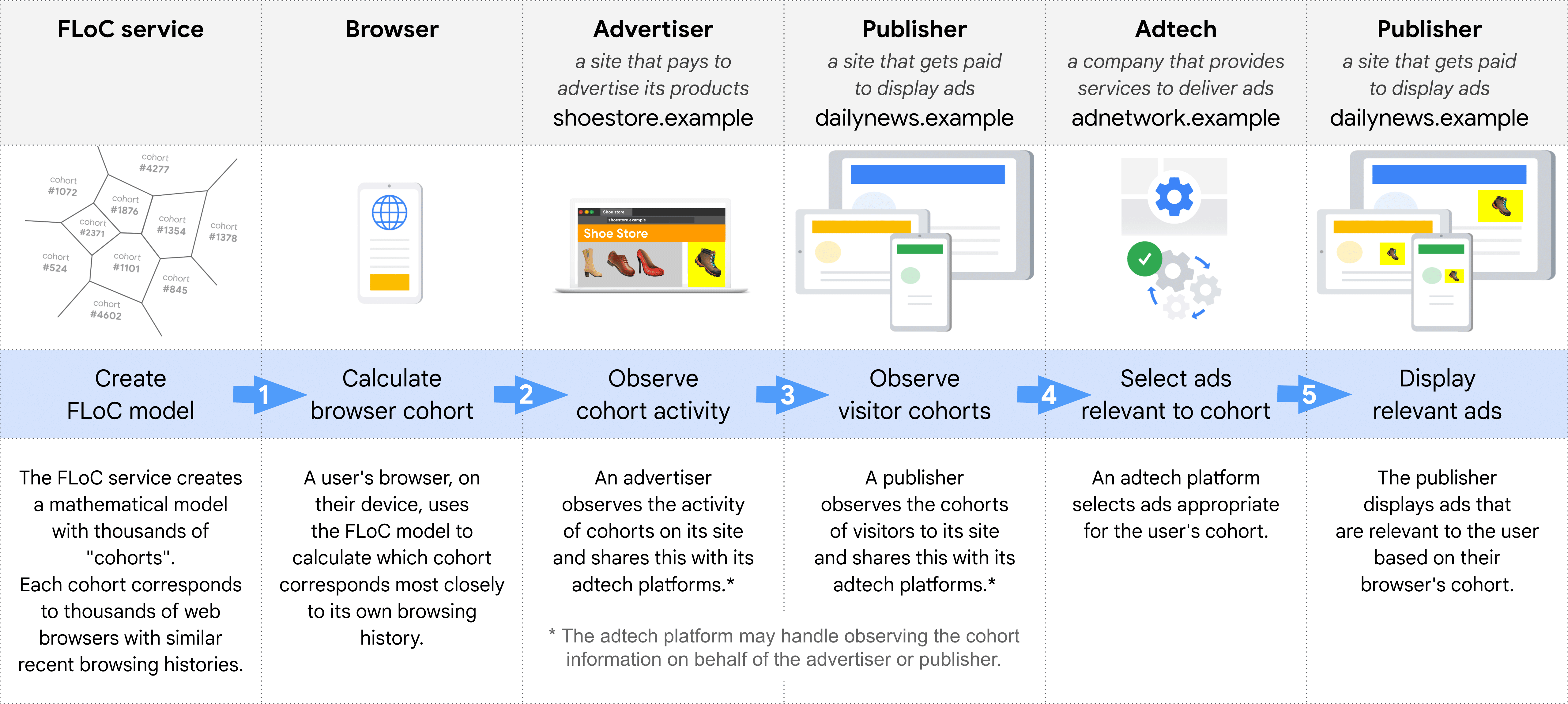
Google's explanatory graphic for FLoC, or Federated Learning of Cohorts.
Google’s explanatory graphic for FLoC, or Federated Learning of Cohorts.

As Google developed its replacement for third-party cookies, the path grew trickier and the space more perilous. The Electronic Frontier Foundation described Google’s FLoC, or the “Federated Learning of Cohorts” that would let Chrome machine-learn your profile for sites and ads, as “A Terrible Idea.” The EFF was joined by Mozilla, Apple, WordPress, DuckDuckGo, and lots of browsers based on Chrome’s core Chromium code in being either opposed or non-committal to FLoC. Google pushed back testing FLOC until late 2022 and third-party cookie removal (and thereby FLoC implementation) until mid-2023.

By early 2022, FLoC didn’t have a path forward. Google pivoted to a Topics API, which would give users a bit more control over which topics (“Rock Music,” “Auto & Vehicles”) would be transmitted to potential advertisers. It would certainly improve over third-party cookies, which are largely inscrutable in naming and offer the user only one privacy policy: block them, or delete them all and lose lots of logins.

https://arstechnica.com/?p=2038576
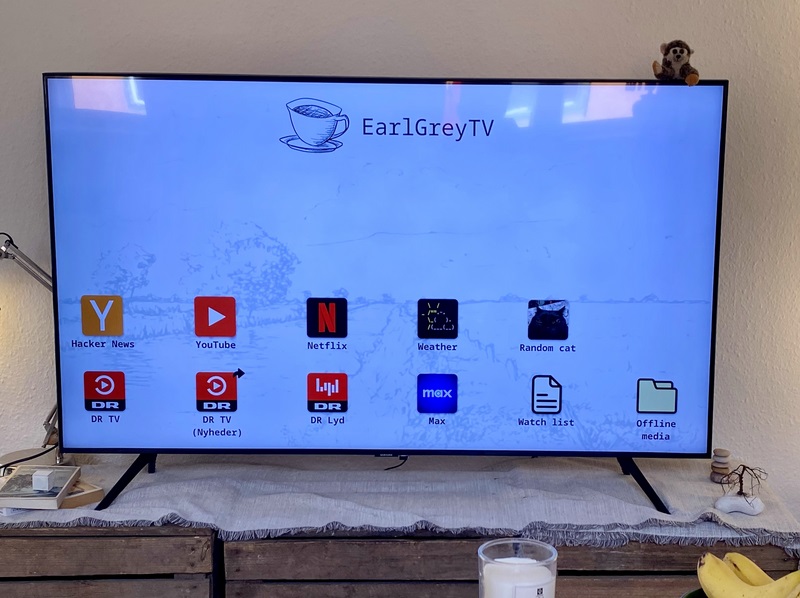


Imperfect, Linux-powered, DIY smart TV is the embodiment of ad fatigue

earlgreytv DIY smart TV homescreen

Smart TV owners have been subjected to a growing amount of ads and tracking. Ad fatigue, only worsened by a trend that sees streaming providers trying to force customers into subscriptions with commercials, is understandable. We’re at the point where someone would rather use a broken laptop dangling off a TV than be subjected to the watchful eye of the TV’s native operating system.

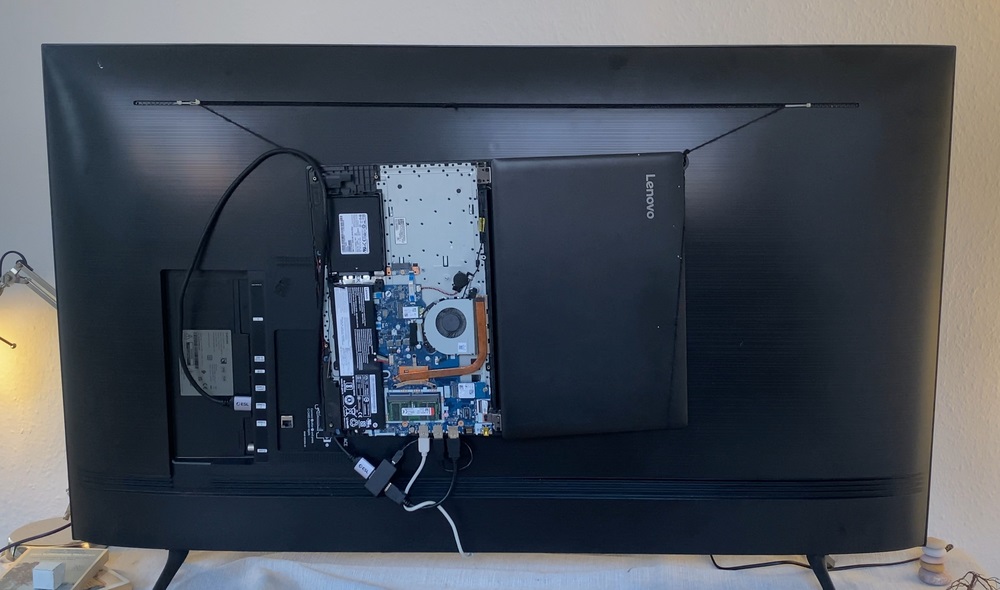
Earlier this month, as spotted by Tom’s Hardware, a blogger named Carl Riis, who says he’s a software engineer, shared his DIY project, a Linux-based “smart TV.” Riis’ project doesn’t stand out because it’s the most unique, clever, or clean. In fact, if you’re the type of person willing to pay a lot for TVs with strong aesthetic appeal, like TVs that can look like artwork or appear transparent, you’ll be put off by the EarlGreyTV. The system uses an old Lenovo laptop that has a broken keyboard and is attached to a TV by a string. As Riis wrote: “This may look a little insane, but it has been a great way to keep things neat while retaining access to the laptop.”

The backside of the DIY smart TV.
Enlarge / The backside of the DIY smart TV.

The laptop is broken because Riis spilled tea onto the keyboard years ago. The keyboard stopped working, making it hard to turn the laptop on and off. “I have to short two specific pins where the keyboard connects to the motherboard. For this reason, I have the back removed, which probably also helps it run less hot,” Riis wrote.

Riis put some extra work in so that this project is more than just simply using a laptop of a smart TV to stream and using a TV as a monitor. His computer views its HDMI connection as an app and uses Debian Linux and, due to its simplicity, Sway as a desktop environment. Riis set Sway to open the Firefox browser full-screen upon login. He made Firefox’s homepage, which has shortcuts to streaming services and whatever else Riis wants with a custom HTML file. He also customized Firefox using a userChrome.css file to give the browser a more traditional TV appearance, including no visible address bar and an on-screen pop-up that appears when the volume is adjusted.

Riis knows that his TV setup isn’t the simplest and has flaws but says it “works for my needs.” The EarlGreyTV is far from the prettiest answer to the drawbacks of smart TVs but still has appeal as an alternative to the ads and tracking that have become prominent in smart TV software.

Beyond a faulty laptop, Riis says his project uses a 55-inch Samsung smart TV bought at a discount during Black Friday. Per Riis’ blog, even the display isn’t perfect for the project:

Ideally, I would have wanted a dumber TV screen—simply showing display output. But this one was on sale, and I bought it. I’ve seen people do really cool stuff, like triggering the TV’s hidden service menu to dumb it down completely. I might do that at some point, but for now, the regular settings could get the Tizen OS out of the way enough for me.

Riis also got a USB-powered CEC adapter so that the air mouse could turn the TV and laptop on and off simultaneously, and since his 5-year-old computer’s HDMI port didn’t support the optional feature on its own. Riis even shared ways to perform iPhone casting with his design.

The package also includes an air mouse serving as a remote control that Riis says has a learning curve and feels a little “flimsy.”

Smart TV alternative

Riis would rather use a tea-dipped laptop dependent on a string and adaptor for entertainment than the smart TV OSes already packaged in brand-name TVs. “I’m not here to bash other smart TV interfaces, but the short version of why I don’t like them is: tracking, ads, and lack of control,” Riis wrote.

TV OS operators, which include Roku, Vizio, Amazon, and LG, have a strong interest in building their ad businesses and abilities for ad tracking. Combined with the incessant push from streaming providers to get viewers to watch ads, it can be nearly impossible to get from your TV’s home screen to the show or movie you came to watch without enduring an advertisement first. Roku, for example, recently started showing video ads on the Roku OS home screen, while Amazon has also been creating more types of Fire TV ads, including ads tied to the upcoming generative AI version of Alexa.

Someone like Riis deciding to spend hours crafting this imperfect alternative is the embodiment of how much ad fatigue smart TV users are facing. Of course, Riis isn’t the only one sharing ways to watch TV online without using a smart TV OS or who’s looking for smart TV alternatives due to privacy concerns.

Beyond ad fatigue, Riis is pleased with his ability to tweak his web-based TV and movie-watching experience with browser extensions “like ad/sponsor blockers or set site-blocking schedules.”

Riis’ project is on GitHub, and he also shared a video about his work on YouTube, which is below:

[embedded content]
Showing my custom smart TV – EarlGreyTV

https://arstechnica.com/?p=2038479


Microsoft says 8.5M systems hit by CrowdStrike BSOD, releases USB recovery tool

A bad update to CrowdStrike's Falcon security software crashed millions of Windows PCs last week.
Enlarge / A bad update to CrowdStrike’s Falcon security software crashed millions of Windows PCs last week.
CrowdStrike

By Monday morning, many of the major disruptions from the flawed CrowdStrike security update late last week had cleared up. Flight delays and cancellations were no longer front-page news, and multiple Starbucks locations near me are taking orders through the app once again.

But the cleanup effort continues. Microsoft estimates that around 8.5 million Windows systems were affected by the issue, which involved a buggy .sys file that was automatically pushed to Windows PCs running the CrowdStrike Falcon security software. Once downloaded, that update caused Windows systems to display the dreaded Blue Screen of Death and enter a boot loop.

“While software updates may occasionally cause disturbances, significant incidents like the CrowdStrike event are infrequent,” wrote Microsoft VP of Enterprise and OS Security David Weston in a blog post. “We currently estimate that CrowdStrike’s update affected 8.5 million Windows devices, or less than one percent of all Windows machines. While the percentage was small, the broad economic and societal impacts reflect the use of CrowdStrike by enterprises that run many critical services.”

The “easy” fix documented by both CrowdStrike (whose direct fault this is) and Microsoft (which has taken a lot of the blame for it in mainstream reporting, partly because of an unrelated July 18 Azure outage that had hit shortly before) was to reboot affected systems over and over again in the hopes that they would pull down a new update file before they could crash. For systems where that method hasn’t worked—and Microsoft has recommended customers reboot as many as 15 times to give computers a chance to download the update—the recommended fix has been to delete the bad .sys file manually. This allows the system to boot and download a fixed file, resolving the crashes without leaving machines unprotected.

To help ease the pain of that process, Microsoft over the weekend released a recovery tool that helps to automate the repair process on some affected systems; it involves creating bootable media using a 1GB-to-32GB USB drive, booting from that USB drive, and using one of two options to repair your system. For devices that can’t boot via USB—sometimes this is disabled on corporate systems for security reasons—Microsoft also documents a PXE boot option for booting over a network.

WinPE to the rescue

The bootable drive uses the WinPE environment, a lightweight, command-line-driven version of Windows typically used by IT administrators to apply Windows images and perform recovery and maintenance operations.

One repair option boots directly into WinPE and deletes the affected file without requiring administrator privileges. But if your drive is protected by BitLocker or another disk-encryption product, you’ll need to manually enter your recovery key so that WinPE can read data on the drive and delete the file. According to Microsoft’s documentation, the tool should automatically delete the bad CrowdStrike update without user intervention once it can read the disk.

If you are using BitLocker, the second recovery option attempts to boot Windows into Safe Mode using the recovery key stored in your device’s TPM to automatically unlock the disk, as happens during a normal boot. Safe Mode loads the minimum set of drivers that Windows needs to boot, allowing you to locate and delete the CrowdStrike driver file without running into the BSOD issue. The file is located at Windows/System32/Drivers/CrowdStrike/C-00000291*.sys on affected systems, or users can run “repair.cmd” from the USB drive to automate the fix.

For its part, CrowdStrike has set up a “remediation and guidance hub” for affected customers. As of Sunday, the company said it was “test[ing] a new technique to accelerate impacted system remediation,” but it hasn’t shared more details as of this writing. The other fixes outlined on that page include rebooting multiple times, manually deleting the affected file, or using Microsoft’s boot media to help automate the fix.

The CrowdStrike outage didn’t just delay flights and make it harder to order coffee. It also affected doctor’s offices and hospitals, 911 emergency services, hotel check-in and key card systems, and work-issued computers that were online and grabbing updates when the flawed update was sent out. In addition to providing fixes for client PCs and virtual machines hosted in its Azure cloud, Microsoft says it has been working with Google Cloud Platform, Amazon Web Services, and “other cloud providers and stakeholders” to provide fixes to Windows VMs running in its competitors’ clouds.

https://arstechnica.com/?p=2038277


Samsung delays Galaxy Buds3 Pro release over quality concerns

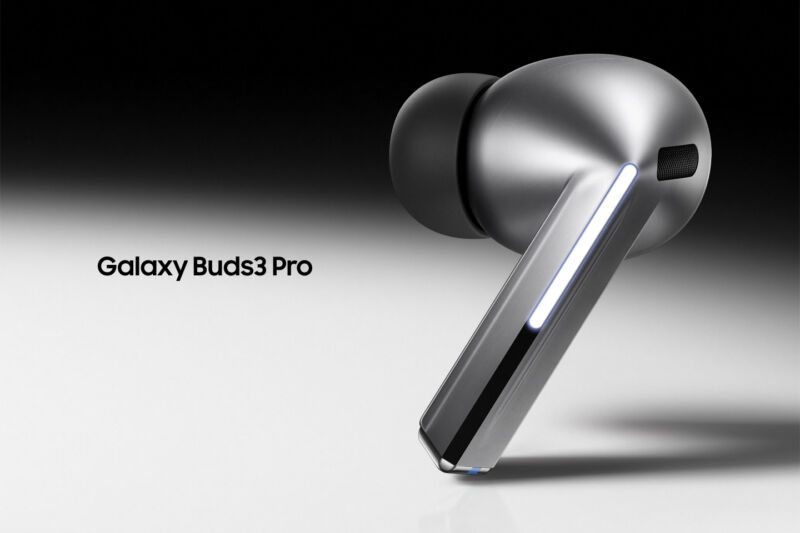
Samsung Galaxy Buds3 Pro
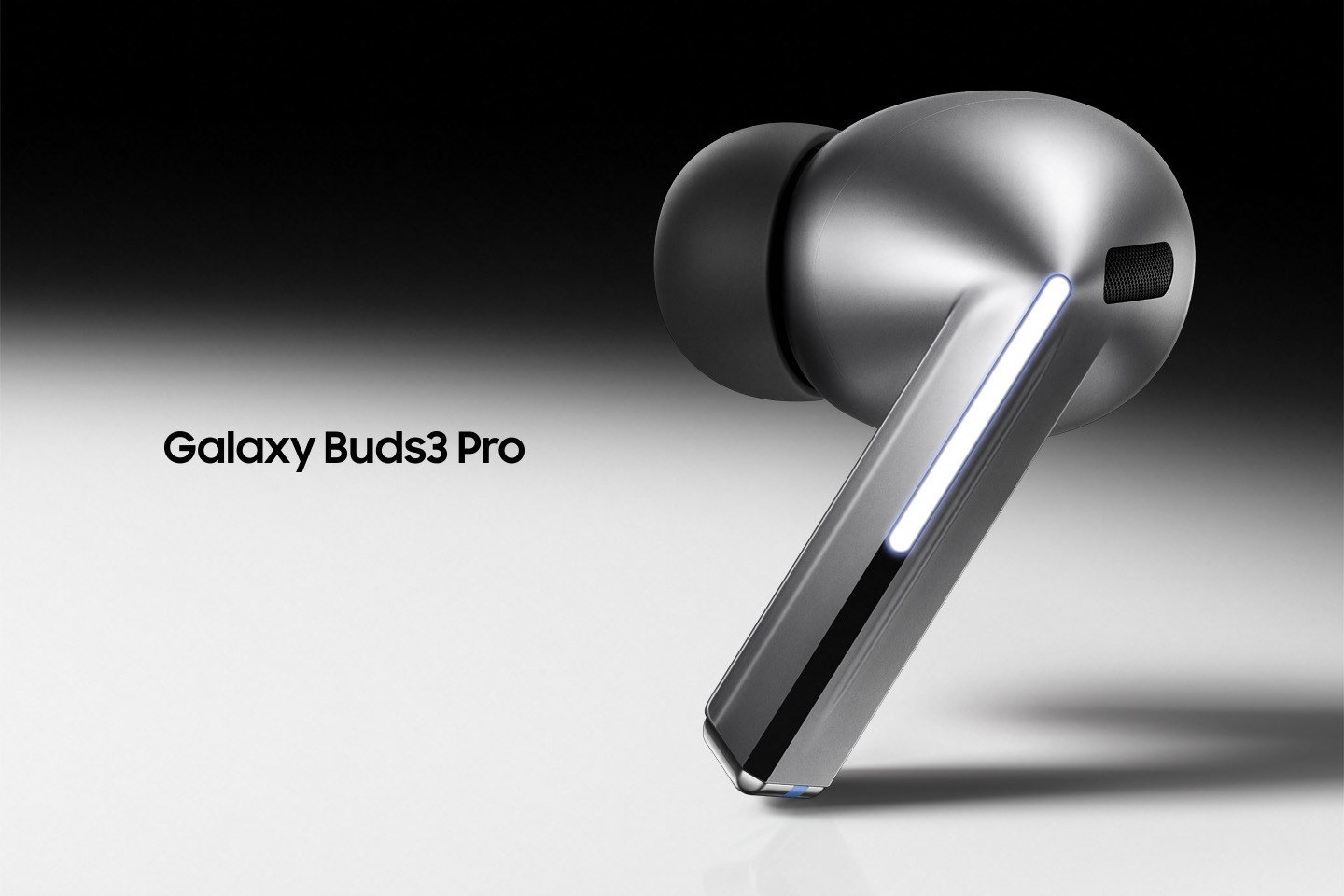
Enlarge / A marketing image for the Galaxy Buds3 Pro.

Samsung is delaying the release of the $250 Galaxy Buds3 Pro in the US from July 24 to August 28, per its website. The third-generation earbuds have Samsung moving from a bean-like shape to an Apple AirPods Pro-like design, including silicone ear tips. But some users have claimed that the new tips rip too easily.

Samsung confirmed to Android Authority today that it has temporarily stopped shipping units to stores. The devices were no longer available for preorder on Amazon or Best Buy as of this writing.

Samsung’s statement to Android Authority noted “reports relating to a limited number of early production devices” and asserted that it’s taking the problem “very seriously.” The statement continues:

We are urgently assessing and enhancing our quality control processes. To ensure all products meet our quality standards, we have temporarily suspended deliveries of Galaxy Buds 3 Pro devices to distribution channels to conduct a full quality control evaluation before shipments to consumers take place. We sincerely apologize for any inconvenience this may cause.

Samsung also advised people who already have a pair to contact Samsung or go to a Samsung Service Center. Android Authority reported that some customers also received an email from Samsung informing them of the quality control concerns and offering a link where customers can find contact information to ask Samsung representatives about canceling their orders for a refund.

Samsung’s website says the earbuds have a one-year warranty that does not cover defects or damage “caused by accident, misuse, abnormal use, abnormal conditions, improper storage, neglect, or unusual physical, electrical or electromechanical stress.”

“It tore from the inside instantly”

Although the Galaxy Buds3 Pro were originally going to be available in the US on July 24, they have already been available for purchase in South Korea, per Android Police. Other people who already have the earbuds include reviewers, employees, and those who made their preorders early. (Some people also claimed that they were able to buy the earbuds at US Walmarts before Samsung announced them).

Some who reportedly had the earbuds claimed it was hard to remove their silicone tips without tearing them. Like AirPods Pros, Galaxy Buds3 Pros have a silicone tip that latches onto a plastic ring on the earbuds’ chassis. Various people reported trying to remove the tip and the tip ripping, with a piece of silicone remaining stuck on the plastic ring.

Some, including reviewers at The Verge and Android Authority, said they hadn’t experienced the problem yet. But others, including TechRadar, found it challenging to remove the ear tips without damaging them.

One Reddit user claimed that they pulled on an ear tip to remove it, and “it tore from the inside instantly.” They noted that because the silicone is clipped into the plastic ring, “you have to pull it strongly.” Similarly, another user said the “left ear tip ripped right off” when they tried to remove it.

Samsung has even published a support page on its Korean website explaining how to remove the ear tips to avoid damage. It notes various ways in which the silicone could tear, including, per a Google translation, if you hold them with your fingernails while inserting or removing, if you press or twist the ear tips hard, or if you pull the ear tips out quickly.

After numerous complaints online, including on Reddit (examples here, here, and here) and YouTube (examples here and here), Samsung has pushed back general availability. Complicating potential quick fixes, Samsung doesn’t yet offer replacement tips for the earbuds. People usually don’t have to frequently change their earbuds’ tips, but not offering replacement when Apple has for years seems like an oversight.

Samsung’s Galaxy Buds3 Pro look like the AirPods Pro that originally debuted almost five years ago, and it doesn’t care. What it definitely should care about, though, is a new design appearing weak and inferior before it’s even fully released. Samsung has at least taken the initiative in addressing early complaints rather than ignoring them and is instead offering refunds and delaying the release to limit the number of impacted customers. We’ll see if the earbuds are more sturdy by August.

https://arstechnica.com/?p=2038166


CrowdStrike fixes start at “reboot up to 15 times” and get more complex from there

CrowdStrike fixes start at “reboot up to 15 times” and get more complex from there

Airlines, payment processors, 911 call centers, TV networks, and other businesses have been scrambling this morning after a buggy update to CrowdStrike’s Falcon security software caused Windows-based systems to crash with a dreaded blue screen of death (BSOD) error message.

We’re updating our story about the outage with new details as we have them. Microsoft and CrowdStrike both say that “the affected update has been pulled,” so what’s most important for IT admins in the short term is getting their systems back up and running again. According to guidance from Microsoft, fixes range from annoying but easy to incredibly time-consuming and complex, depending on the number of systems you have to fix and the way your systems are configured.

Microsoft’s Azure status page outlines several fixes. The first and easiest is simply to try to reboot affected machines over and over, which gives affected machines multiple chances to try to grab CrowdStrike’s non-broken update before the bad driver can cause the BSOD. Microsoft says that some of its customers have had to reboot their systems as many as 15 times to pull down the update.

Early guidance for fixing the CrowdStrike bug is simply to reboot systems over and over again so that they can try to grab a non-broken update.
Enlarge / Early guidance for fixing the CrowdStrike bug is simply to reboot systems over and over again so that they can try to grab a non-broken update.

If rebooting doesn’t work

If rebooting multiple times isn’t fixing your problem, Microsoft recommends restoring your systems using a backup from before 4:09 UTC on July 18 (just after midnight on Friday, Eastern time), when CrowdStrike began pushing out the buggy update. Crowdstrike says a reverted version of the file was deployed at 5:27 UTC.

If these simpler fixes don’t work, you may need to boot your machines into Safe Mode so you can manually delete the file that’s causing the BSOD errors. For virtual machines, Microsoft recommends attaching the virtual disk to a known-working repair VM so the file can be deleted, then reattaching the virtual disk to its original VM.

The file in question is a CrowdStrike driver located at Windows/System32/Drivers/CrowdStrike/C-00000291*.sys. Once it’s gone, the machine should boot normally and grab a non-broken version of the driver.

Deleting that file on each and every one of your affected systems individually is time-consuming enough, but it’s even more time-consuming for customers using Microsoft’s BitLocker drive encryption to protect data at rest. Before you can delete the file on those systems, you’ll need the recovery key that unlocks those encrypted disks and makes them readable (normally, this process is invisible, because the system can just read the key stored in a physical or virtual TPM module).

This can cause problems for admins who aren’t using key management to store their recovery keys, since (by design!) you can’t access a drive without its recovery key. If you don’t have that key, Cryptography and infrastructure engineer Tony Arcieri on Mastodon compared this to a “self-inflicted ransomware attack,” where an attacker encrypts the disks on your systems and withholds the key until they get paid.

And even if you do have a recovery key, your key management server might also be affected by the CrowdStrike bug.

We’ll continue to track recommendations from Microsoft and CrowdStrike about fixes as each company’s respective status pages are updated.

“We understand the gravity of the situation and are deeply sorry for the inconvenience and disruption,” wrote CrowdStrike CEO George Kurtz on X, formerly Twitter. “We are working with all impacted customers to ensure that systems are back up and they can deliver the services their customers are counting on.”

https://arstechnica.com/?p=2038144


Apple Vision Pro’s content drought improves with new 3D videos

Today, Apple announced a slate of more than a dozen upcoming Immersive Videos for its Vision Pro spatial reality headset. The first, titled Boundless, launches tonight at 9 pm ET. More will follow in the coming weeks and months.

The announcement follows a long, slow period for new Vision Pro-specific video content from Apple. The headset launched in early February with a handful of Immersive Video episodes ranging from five to 15 minutes each. Since then, only three new videos have been added.

On March 28, Apple released a highlight reel of Major League Soccer plays from the season that had ended months prior. A second episode of Prehistoric Planet, Apple’s Immersive Video dinosaur nature documentary, went live on April 19. Likewise, a new episode of the Adventure series titled “Parkour” landed on May 24.

The MLS video played more like a short ad for Apple’s MLS programming than anything else, but other Immersive Videos have impressed with their quality if not their creative ambition. They’re all short videos that put the viewer inside a moment in space and time with either animals or people doing their thing. The videos are high-resolution, and the 3D is generally well done. The production values are high, even if the narratives are light. They come across as tech demos, as much as anything, but they are impressive.

Tonight’s Boundless episode will allow viewers to see what it’s like to ride in a hot air balloon over sweeping vistas. Another episode titled “Arctic Surfing” will arrive this fall, Apple says. Sometime next month, Apple will publish the second episode of its real wildlife documentary, simply titled Wild Life. The episode will focus on elephants in Kenya’s Sheldrick Wildlife Trust. Another episode is in the works, too. “Later this year,” Apple writes in its newsroom post, “viewers will brave the deep with a bold group of divers in the Bahamas, who come face-to-face with apex predators and discover creatures much more complex than often portrayed.”

More on the way

In September, we’ll see the debut of a new Immersive Video series titled Elevated. Apple describes it as an “aerial travel series” in which viewers will fly over places of interest. The first episode will take viewers to Hawaii, while another planned for later this year will go to New England.

Apple is additionally partnering with Red Bull for a look at surfing called Red Bull: Big-Wave Surfing.

In addition to those documentary episodes, there will be three short films by year’s end. One will be a musical experience featuring The Weeknd, and another will take basketball fans inside the 2024 NBA All-Star Weekend. There will also be Submerged, the first narrative fictional Immersive Video on the platform. It’s an action short film depicting struggles on a submarine during World War II.

It’s good to see Apple finally making some movement here; the drought of content after the launch didn’t inspire confidence in the platform. Many people with mixed reality headsets use them a bunch for a few weeks but either fail to find ways to fit them into their daily habits or run out of compelling content and taper off before long. To keep people invested in visionOS, Apple needs to keep a rapid cadence of new content that users look forward to at least every week. Otherwise, some users will see their headsets sit on shelves, forgotten.

When I reviewed the Vision Pro, I assumed that the Immersive Video episodes would roll out weekly. That hasn’t proven the case, and it still doesn’t look like it will. Apple is going to have to invest more in content (and take more risks with that content, moving beyond short tech demo documentaries) to make the Vision Pro stick with customers.

Listing image by Apple

https://arstechnica.com/?p=2037983


Netflix is kicking US subscribers off its cheapest ad-free plan soon

cobra kai
Enlarge / Ad-free Basic subscribers will be crane-kicked off the plan soon.
Netflix/YouTube

Netflix today confirmed suspicions that it will stop letting people pay $12 per month to stream without commercials.

The ad-free Basic plan was the cheapest way to watch Netflix without commercials. The plan limits users to 720p resolution and one device and lets people download content. Netflix stopped offering the Basic plan to new subscribers in January. In June, Netflix started booting subscribers in the UK and Canada off the plan and automatically put them onto a cheaper subscription plan with ads.

In a letter to shareholders today [PDF], Netflix confirmed publicly for the first time that it “will now start” to phase out the ad-free Basic plan in the US and France. This will make the cheapest commercial-free Netflix plan $15.49/month in the US. That Standard plan supports up to two devices, downloads, and 1080p resolution.

Netflix thinks killing the Basic plan will help it gain more subscribers who watch commercials, which, on average, generates more revenue for the company.

As expected from a streaming company these days, Netflix touted its ad tier to shareholders, noting that the $7 tier now represents “over 45 percent” of new sign-ups in areas where it’s sold. Per Netflix’s letter, ads will only be an increasingly larger part of its strategy, as Netflix aims to “achieve critical ad subscriber scale for advertisers in our ad countries in 2025, creating a strong base from which we can further increase our ad membership in 2026 and beyond.”

The news comes as streamers grapple with increasing streaming subscription costs. Netflix most recently hiked pricing in October. In January, the company suggested to shareholders that more price hikes were possible, saying that it would “occasionally ask our members to pay a little extra to reflect” platform improvements.

Not cozying up with competition

If today’s news makes you hope for a convenient streaming-only deal that lets you subscribe to Netflix and another video streaming service for cheaper, you’re out of luck. Netflix today said it’s not interested in streaming-only bundles.

Bundle deals, which combine streaming and other services for a cheaper subscription rate, have become the streaming industry’s answer to high cancellation rates among subscribers, including those who quickly cancel and resubscribe depending on what’s available to stream that month.

In its letter, Netflix noted that although cable or mobile providers or device-makers may offer deals combining Netflix and another streaming service, Netflix does not make deals that bundle it with another rival streamer, like Disney+ or Max. The company claimed that Netflix is already “a go-to destination,” which “limits the benefit to Netflix of bundling directly with other streamers.”

That means if you’re hoping to save money on your Netflix subscription, which keeps getting more expensive, the only options are to watch Netflix with commercials or get a cable-reminiscent bundle that includes a different kind of service, like Comcast or Verizon Wireless.

We know which option Netflix would like you to pick. But for frustrated streamers, finding a reasonable way to watch all the stuff you want online the way you want keeps getting harder.

Netflix added 8 million subscribers in Q2 2024, it said today. It’s still the biggest video streaming service by subscriber count at 278 million. Amazon Prime Video, which claimed “over 200 million” users in April, follows.

https://arstechnica.com/?p=2038032


Apple releases public betas of all next-gen OS updates, except for VisionOS

Apple releases public betas of all next-gen OS updates, except for VisionOS

Apple’s next-generation operating systems are taking their next step toward release today: Apple is issuing the first public beta builds of iOS 18, iPadOS 18, macOS 15 Sequoia, tvOS 18, and HomePod Software 18 today. Sign up for Apple’s public beta program with your Apple ID, and you’ll be able to select the public beta builds from Software Update in the Settings app.

We covered the highlights of most of these releases when they were announced during Apple’s Worldwide Developers Conference in June, including more home screen customization in iOS and iPadOS, window tiling and iPhone mirroring in macOS, RCS text messaging support across all of Apple’s platforms, and more. But Apple still isn’t ready to show off a preview of its Apple Intelligence AI features, including the text and image generation features and a revamped Siri. Many of these features are still slated for “later this summer” and will presumably be available in some form in the final releases this fall.

Most devices that can run iOS 17, iPadOS 17, and macOS 14 Sonoma will be able to update to the new versions, including owners of the last couple generations of Intel Macs. But a handful of older phones and tablets and the 2018 MacBook Air are being dropped by the new releases. The watchOS 11 update is also dropping the Series 4 and Series 5 models as well as the first-generation Apple Watch SE.

Apple is also not releasing a public beta build of VisionOS 2, the first major update to the Apple Vision Pro’s operating system. Users who want to try out new Vision Pro features ahead of time will still need to opt in to the developer beta, at least for now.

Beta best practices

The first public betas are similar—if not identical—to the third developer beta builds that were released last week. Apple usually releases new developer betas of next-gen OS releases every two weeks, so we’d expect to see a fourth developer beta early next week and a second near-identical public beta build released shortly after.

Apple’s developer and public beta builds used to be more clearly delineated, with a $99-per-year developer account paywall put up between general users and the earliest, roughest preview builds. That changed last year when Apple made basic developer accounts (and beta software access) free for anyone who wanted to sign up.

Apple still issues separate developer/public beta builds, but these days it’s more of a statement about who the betas are ready for than an actual technical barrier. Developer betas are rougher and visibly unfinished, but developers likely have the extra patience and technical chops needed to deal with these issues; public betas are still unfinished and unstable, but you can at least expect most basic functionality to work fine.

Regardless of how stable these betas may or may not be, the standard warnings apply: Make a good backup of your device before updating in case you need to restore the older, more stable operating system, and don’t install beta software on mission-critical hardware that you absolutely need to work correctly in your day-to-day life. For iPhones and iPads that connect to iCloud, connecting the devices to a PC or Mac and performing a local backup (preferably an encrypted one) can be a more surefire way to make sure you keep a pre-upgrade backup around than relying on continuous iCloud backups.

https://arstechnica.com/?p=2037128


German Navy still uses 8-inch floppy disks, working on emulating a replacement

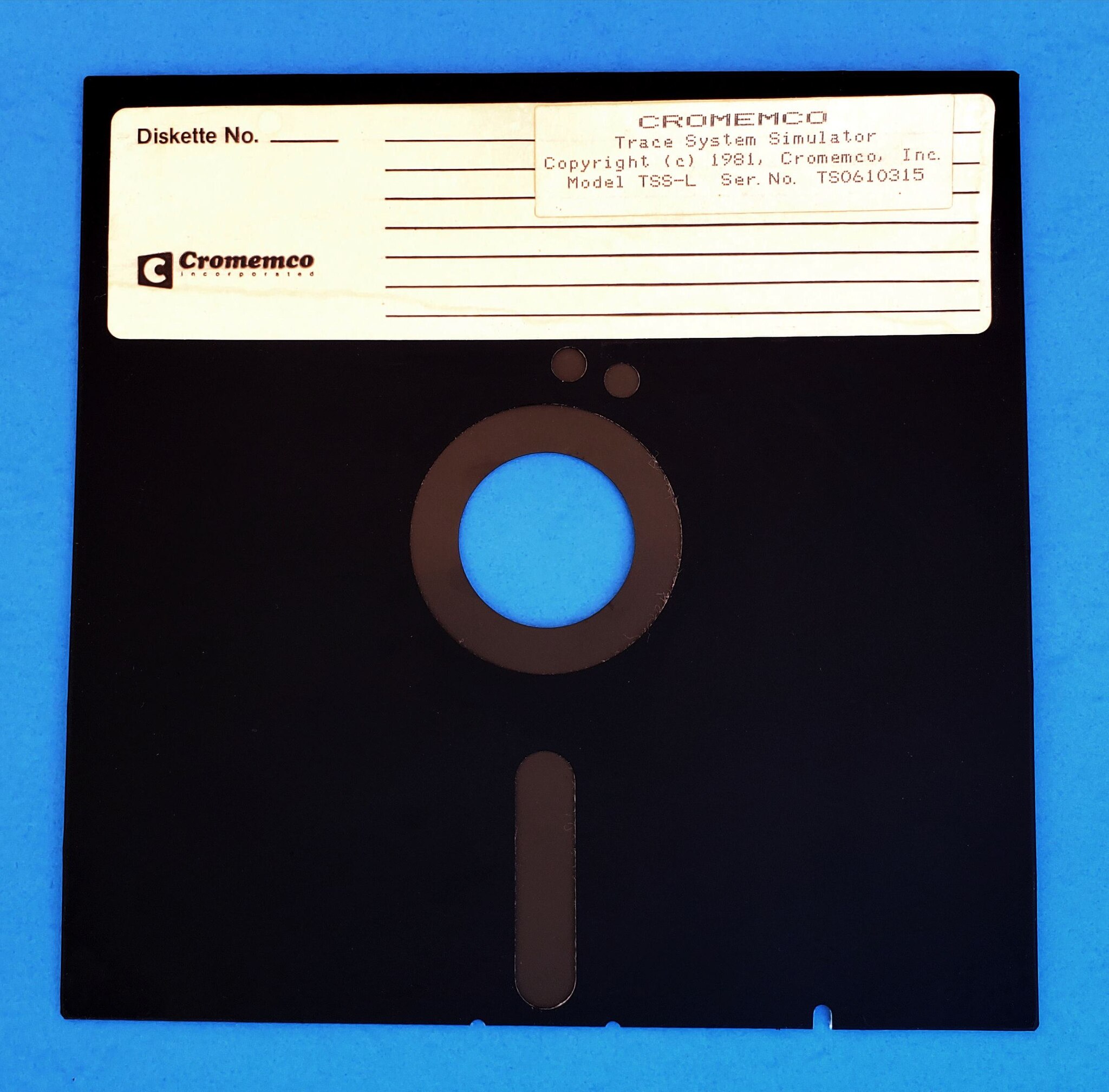
An example of an 8-inch floppy disk. It's unclear which brand disks the German Navy uses.
Enlarge / An example of an 8-inch floppy disk. It’s unclear which brand disks the German Navy uses.
Cromemco, CC BY-SA 4.0

The German Navy is working on modernizing its Brandenburg-class F123 frigates, which means ending their reliance on 8-inch floppy disks.

The F123 frigates use floppy disks for their onboard data acquisition (DAQ) systems, as noted by Tom’s Hardware on Thursday. Augen geradeaus!, a German defense and security policy blog by journalist Thomas Wiegold, notes that DAQs are important for controlling frigates, including power generation, “because the operating parameters have to be recorded,” per a Google translation. The ships themselves specialize in anti-submarine warfare and air defense.

Earlier this month, Augen geradeaus! spotted a tender for service published June 21 by Germany’s Federal Office of Bundeswehr Equipment, Information Technology, and In-Service Support (BAAINBw) to modernize the German Navy’s four F123 frigates. The ships were commissioned from October 1994 to December 1996. As noted by German IT news outlet Heise, the continued use of 8-inch floppies despite modern alternatives being available for years “has to do with the fact that established systems are considered more reliable.”

An F123 frigate.
Enlarge / An F123 frigate.

Rather than overhauling the entire DAQ, the government plans to develop and integrate an onboard emulation system to replace the floppy disks. This differs from the approach the US Air Force took. In 2019, the US military branch replaced the 8-inch floppies for storing data used for operating its intercontinental ballistic missile command, control, and communications network with SSDs.

The BAAINBw hired Saab for F123 updates. In July 2021, Saab announced winning a contract to “deliver and integrate new naval radars and fire control directors for and in the German Navy’s” F123s, with the work entailing “a new combat management system in order to completely overhaul the system currently in use on the F123, allowing a low risk integration of the new naval radars and fire control capabilities.” The Swedish company said the deal was worth about 4.6 billion SEK (about $436,748,840).

Per the BAAINBw’s tender, the replacement of the floppy disks is expected to start on October 1 and end July 31, 2025. F123 frigates are supposed to stay in service until F126s are available, which is expected to be between 2028 and 2031.

Further details, like how exactly Saab will replace the floppies, are confidential. As pointed out by Tom’s Hardware, there are various options for floppy disk emulation, such as devices from brands like Gotek that are popular among enthusiasts.

Floppies keep floppin’

For the typical person, floppy disks are obsolete, but government bodies with already established and successfully running systems in place have been much slower to abandon the old storage medium. Besides the German Navy and US Air Force, Japan only last month officially stopped using floppy disks in governmental systems. The San Francisco Municipal Transportation Agency plans to use 5¼-inch floppies to help run San Francisco’s Muni Metro light rail system until 2030.

Various industries also continue using floppy disks to help run machines that have long been used, as Chuck E. Cheese did for animatronics as recently as 2023 and professional embroiderers do with embroidery machines.

https://arstechnica.com/?p=2036848


$500 aluminum version of the Analogue Pocket looks like the Game Boy’s final form

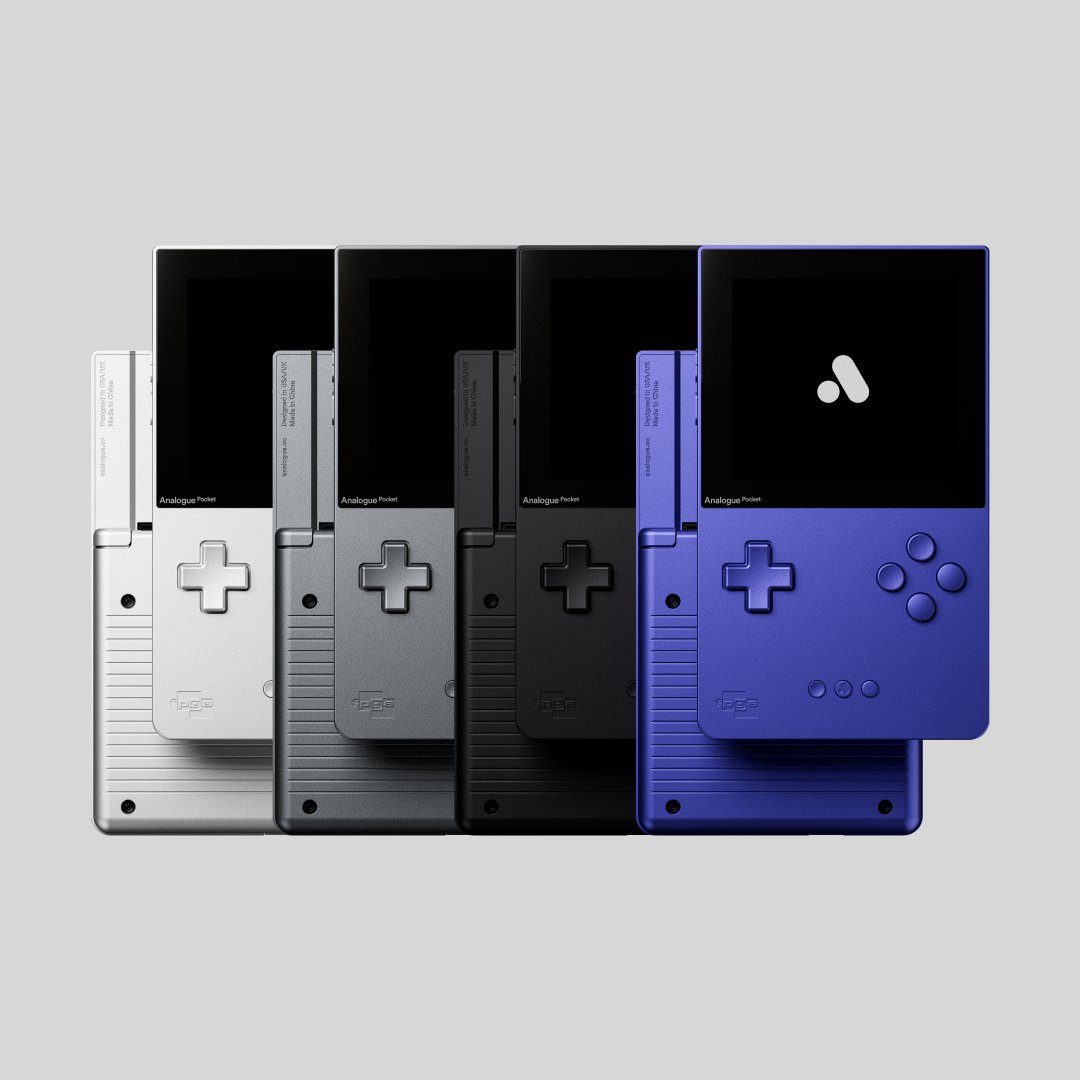
Analogue is launching another limited-edition version of its Pocket console, this time with an anodized aluminum body and buttons.
Enlarge / Analogue is launching another limited-edition version of its Pocket console, this time with an anodized aluminum body and buttons.

Analogue has released multiple variations of the Analogue Pocket, its Game Boy-style handheld console that can play old cartridges and game ROMs using its FPGA chip. But until now, all of those designs have been riffs on the regular Pocket’s black (or white) plastic shell.

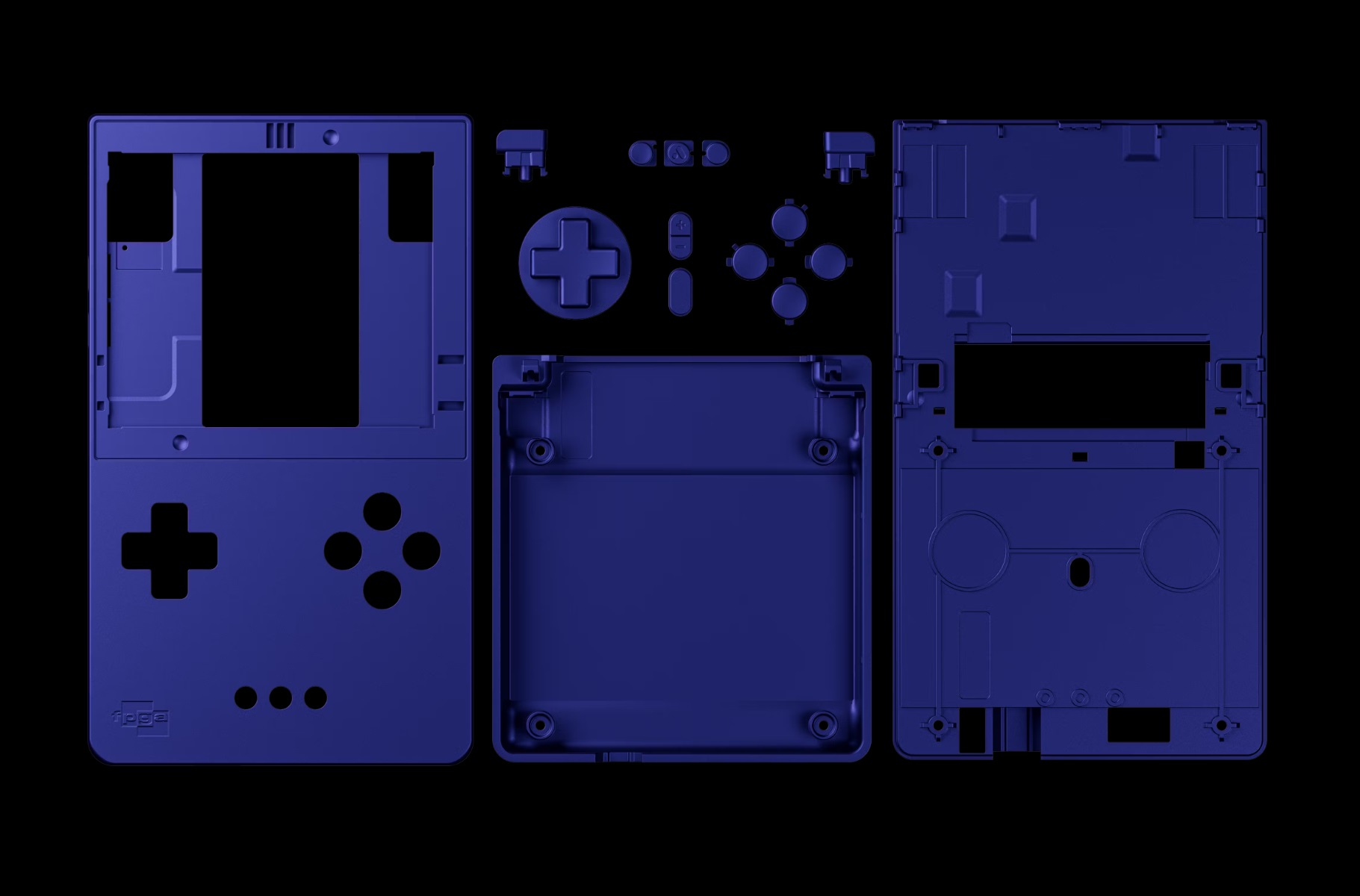
The company’s latest Pocket iteration might appeal more to people who prefer the solidity and durability of anodized aluminum to the cheap practicality of plastic. On July 15, the company will release a limited run of all-aluminum Analogue Pocket consoles in four different colors: white, gray, black, and a Game Boy Advance-esque indigo. The company says that “every single piece” of these consoles is “entirely CNC’d from aluminum,” including not just the frame but also all of the buttons.

The new material will cost you, though: Each aluminum Pocket sells for $500, over twice as much as the $220 price of a regular plastic Pocket.

The aluminum versions of the Pocket will run the exact same software as the standard plastic ones and will be compatible with all the same cartridges and accessories. Analogue’s site doesn’t compare the weight of the aluminum and plastic Pocket consoles, though intuitively we’d expect the metal one to be heavier. The aluminum consoles begin shipping on July 17.

An exploded version of the new Pocket; even the buttons are aluminum.
Enlarge / An exploded version of the new Pocket; even the buttons are aluminum.

When the Pocket first launched in late 2021, ongoing supply chain disruptions and high demand led to monthslong wait times for the initial models. Things have gotten slightly better since then—you can’t simply open Analogue’s store on any given day and just buy one, but the basic black and white plastic models restock with some regularity. Analogue has also released multiple special edition runs of the handheld, including one made of glow-in-the-dark plastic and a colorful series of models that recall Nintendo’s mid-’90s “Play It Loud!” hardware refresh for the original Game Boy.

As much as we liked the Pocket in our original review, the hardware has gotten much more capable thanks to a series of post-launch firmware updates. In the summer of 2022, Analogue added OpenFPGA support to the pocket, allowing its FPGA chip to emulate consoles like the NES, SNES, Sega Genesis, and others aside from the portable systems that the Pocket was designed to emulate. Updates toward the end of 2023 allowed those third-party emulation cores to use their own display filters, replicating the look of classic CRT TVs and other displays.

The updates have also fixed multiple bugs in the system. The latest update is version 2.2, released back in March, which primarily adds support for the Analogue Pocket Adapter Set that allows other kinds of vintage game cartridges to plug in to the Pocket’s cartridge slot.

https://arstechnica.com/?p=2036791