I use these 2 apps for universal AirDrop rather than pushing people to Apple
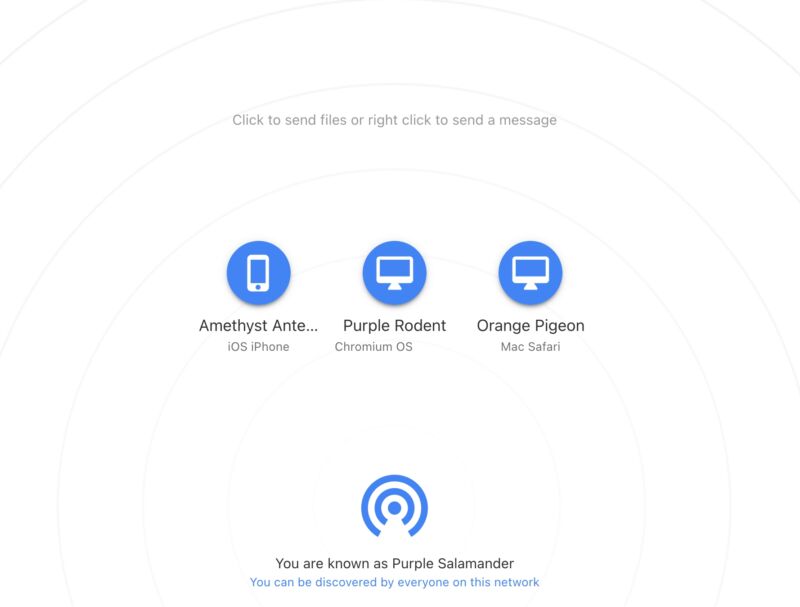
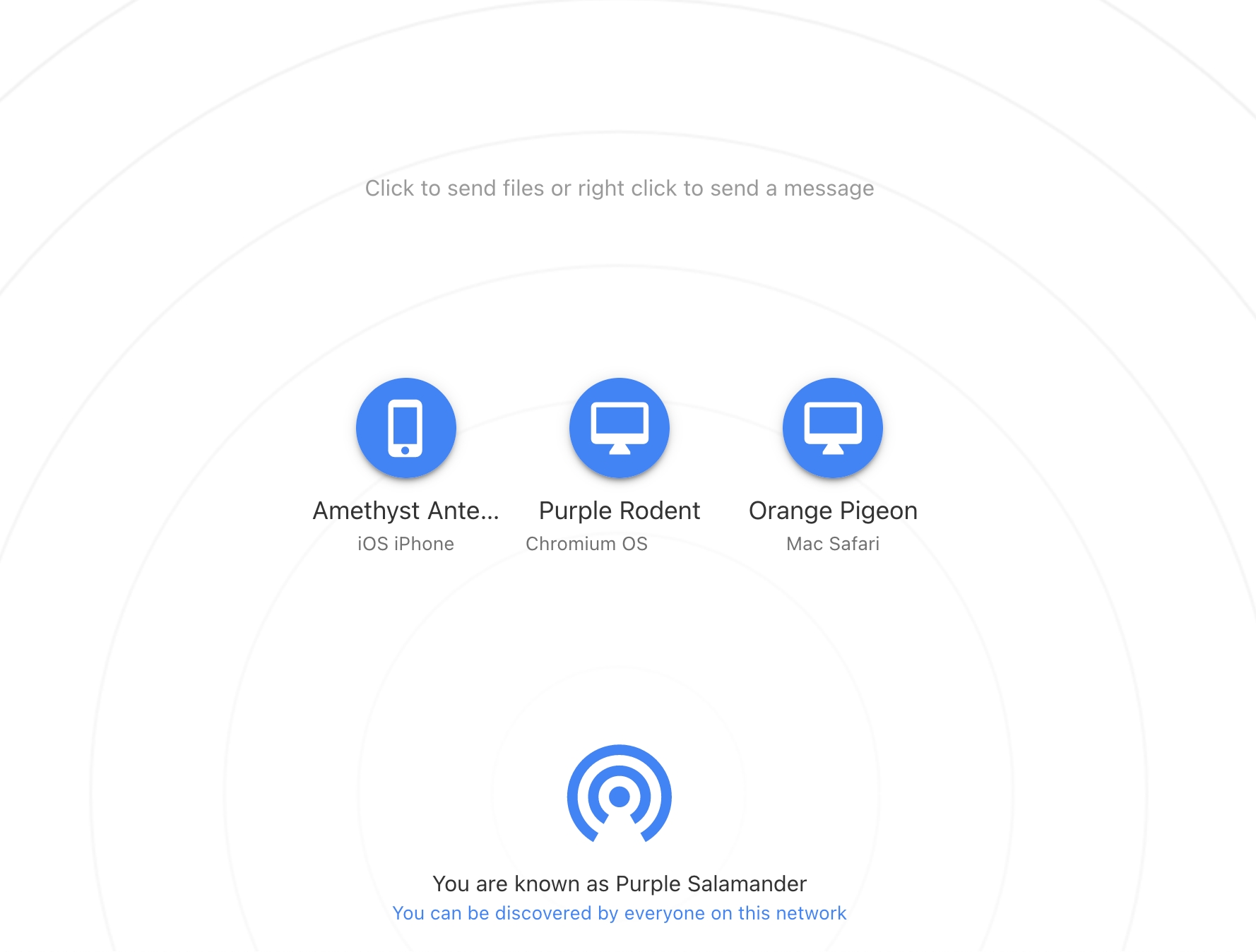
These kinds of sharing names are fun to shout across the house (I have first-hand knowledge of this).
Enlarge / These kinds of sharing names are fun to shout across the house (I have first-hand knowledge of this).
Kevin Purdy

I like AirDrop just fine for sending files between devices, but I’m the only one of two humans in my household that regularly uses Apple devices. I cannot, to paraphrase the Apple CEO’s litigation-influencing quip, simply buy my spouse an iPhone. And a MacBook. And sell our household Chromebook. And give up entirely on Windows-based PC gaming.

Instead, I’ve come to use two apps to send files between operating systems on the same Wi-Fi, whether they’re systems from Cupertino, Redmond, Mountain View, or elsewhere. One is LocalSend, a cross-platform app with an open source client and protocol that I install wherever I can. The other lower-friction tool that’s especially handy for guests and rarely used devices is SnapDrop, a website or web app you open on both devices and then send files through, entirely on your local network. It, too, has its code out there for anybody to view.

Neither of these apps is new, which is good. They’ve been around long enough to garner good reviews and trust from their users. Beyond sharing files between two humans, I’ve also leaned on them when setting up headless systems or other quirky devices.

Snapdrop, for one-off transfers or quirky systems
Kevin Purdy

I don’t always have the patience to install the Flatpak or App Store version of LocalSend on every Raspberry Pi, Linux partition, or tablet in my house. If I need to send an image, a torrent file, or even just a long text string or web address across my home, and if both systems are technically capable of opening a browser, I use Snapdrop.

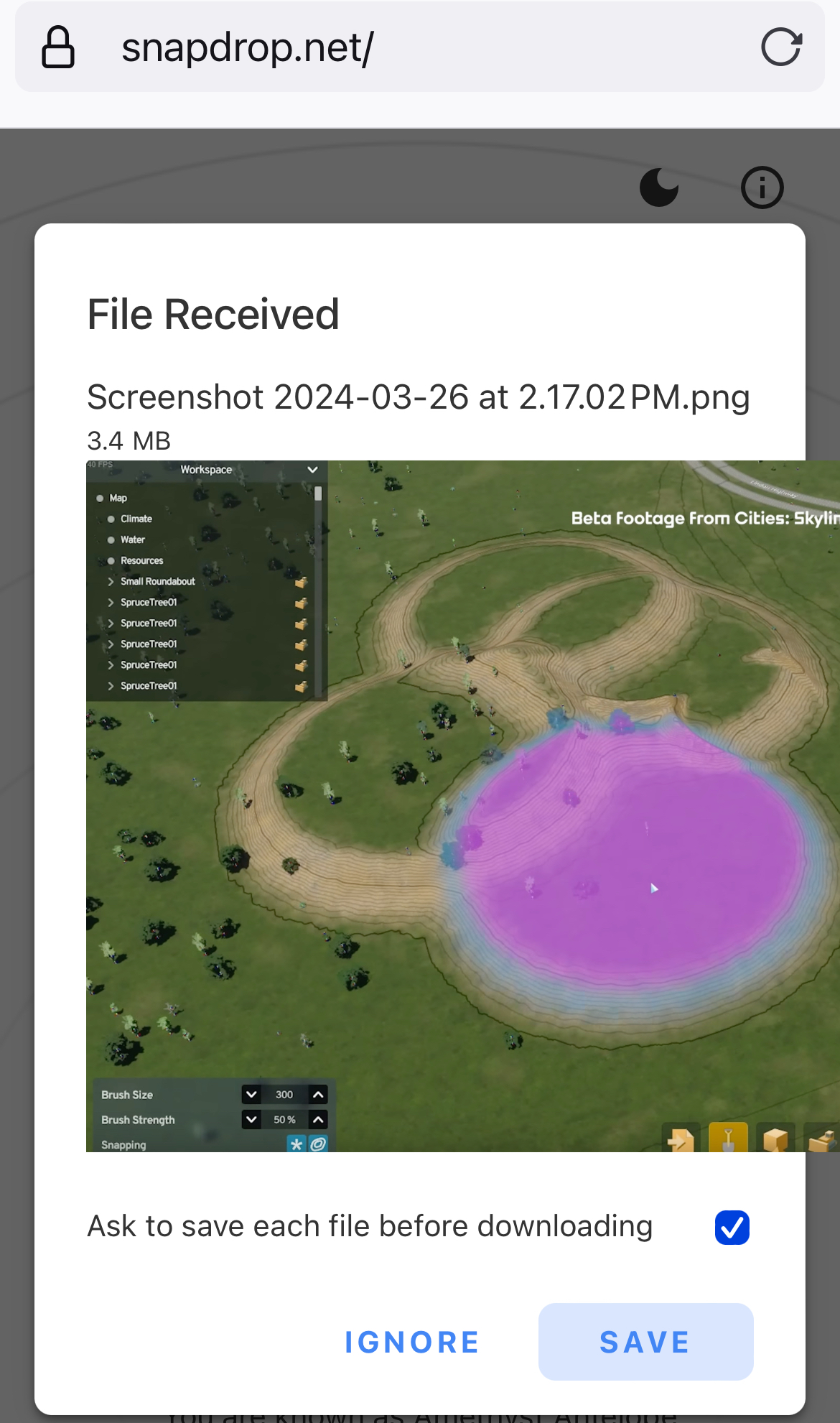
You open the browser on each device, head to Snapdrop.net, and then, almost always, you see both computers on your network. Each gets an icon and a quirky but memorable name, like “Purple Salamander” or “Green Rodent.” Click on the other computer’s icon to then pick a file and send it. Right-click (or tap-and-hold on mobile) to send a text message. There are icons in the upper-right corner if you want to install Snapdrop as a PWA (web app), switch between light and dark modes, or get links to the app’s GitHub repo or social channels.

That’s it—that’s the app. You could host your own instance on Docker if you want. And you can and should donate if you find it useful. A few key things from the FAQ:

  • Snapdrop is peer-to-peer through WebRTC and only uses SnapDrop’s hosting for a Signaling Server.
  • Because it’s using WebRTC, files and messages are encrypted on transit. Snapdrop doesn’t see the files; “Snapdrop doesn’t even use a database,” the author writes.
  • The developer only ever intends to keep this project as a way to send files instantly over local networks and willfully rejects new feature ideas.

Once in a while, the Snapdrop site has failed to load on a device, but I’m not the kind of person who can confidently blame that on the device, local network, ISP, regional network, global DNS quirks, sunspots, or whatever else. I’m glad when it works. If it doesn’t work, I can fall back to LocalSend.
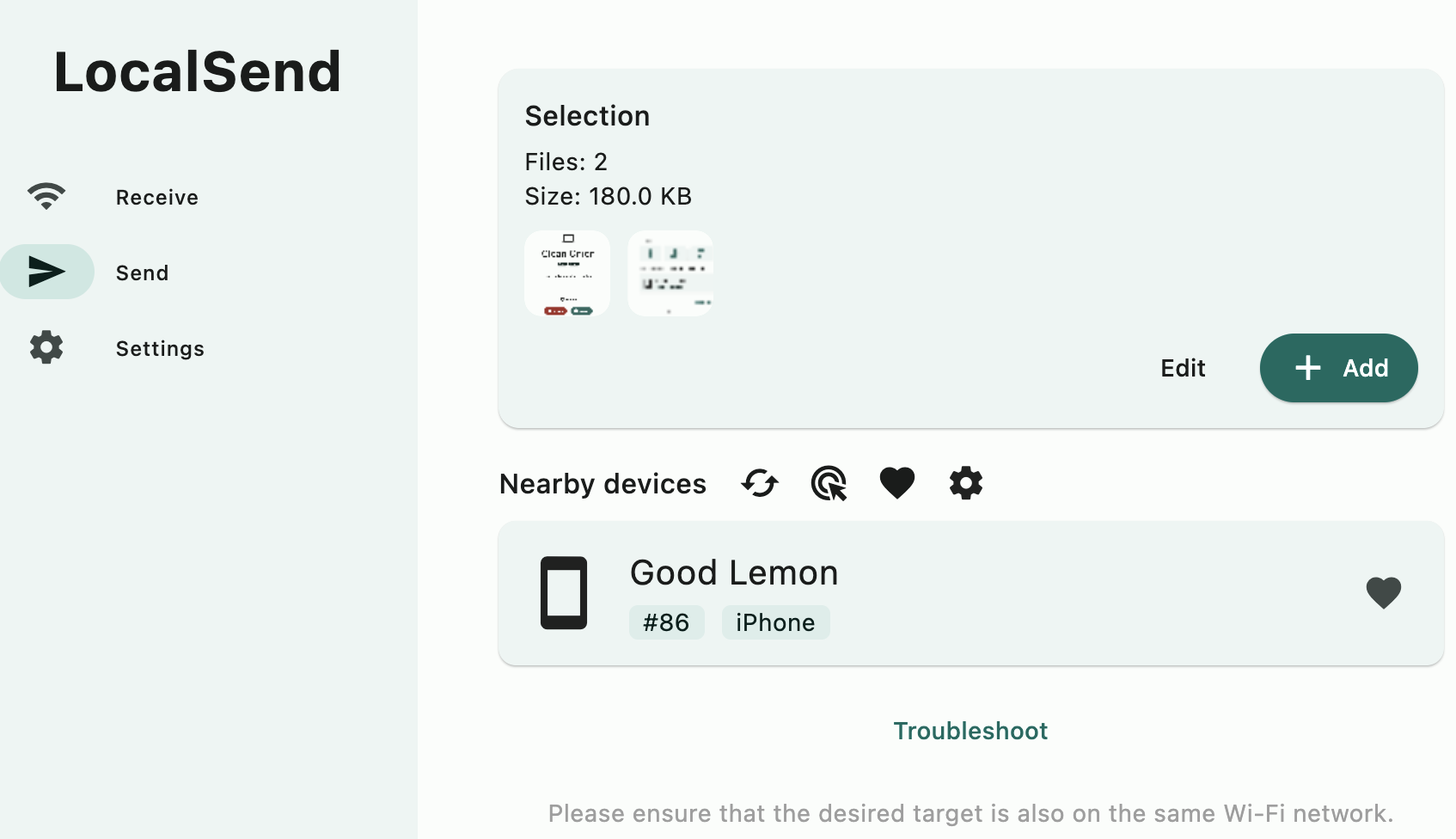
LocalSend, the belt-and-suspenders local transfer system

LocalSend is nearly as simple and focused as SnapDrop, but it doesn’t rely on the wider global web for anything and can more ably get around the occasional can’t-see-you quirks.

The client is available for just about all the major systems, usually in both app store and unofficial channels (Homebrew, Android side-loading, Flathub, etc.). You can send more kinds of things with one click than on Snapdrop, including folders and photos from a phone’s library. If a device doesn’t show up, you can manually enter its local IP address to find it (which has worked for me a few times). You can favorite a device, send to multiple devices, send multiple files, send via link, choose to have files automatically accepted and saved to a folder of your choice, and otherwise set up things to your liking. And because it’s a locally installed app, you can send files to it through your system’s share/send dialogues.

LocalSend says it relies on HTTPS connections and a REST API to send between devices, with a TLS/SSL certificate generated on the fly on each device. As with Snapdrop, you can compile and run LocalSend yourself.

I’ll welcome any other suggestions for same-network file sharing in the comments. Both of these apps save me from having to log into web-based file-sharing systems every time I just want to show a funny photo or share a PDF, and for that, I thank them.

https://arstechnica.com/?p=2013441


Apple’s first new 3D Vision Pro video since launch is only a few minutes long

Tonight, Apple will debut some new Immersive Video content for the Vision Pro headset—the first sports content for the device. It doesn’t seem like much after two months of no new content, though.

Starting at 6 pm PT/9 pm ET, Vision Pro users will be able to watch a sports film captured for the platform’s Immersive Video format. The video will be a series of highlights from last year’s Major League Soccer (MLS) playoffs, and according to Six Colors, it will run just five minutes. It will be free for all Vision Pro users.

On February 2, Apple released what appeared to be the first episodes of three Immersive Video series: Adventure, Prehistoric Planet, and Wildlife. Each debuted alongside the Vision Pro’s launch with one episode labeled “Episode 1” of “Season 1.”

However, it’s been almost two months, and none of those series have received new episodes. The only other piece of Immersive Video content available is an Alicia Keyes performance video that also debuted on February 2. Most of these videos were only a few minutes long.

That means that this short soccer video depicting sports moments from 2023 will be the only new piece of Immersive Video content Apple has put out since the device launched at the beginning of February.

When I reviewed the Vision Pro as an entertainment device, I lauded its capabilities for viewing 2D films and videos, but I also talked a bit about its 3D video capabilities. I said the first pieces of original 3D content from Apple seemed promising and that I looked forward to future episodes. Given that they were labeled just like Apple TV+ series in the TV app, I assumed they would arrive at a weekly cadence. Further episodes haven’t come.

Notably, Apple didn’t include a first-party app for playing 3D videos downloaded from the web with the Vision Pro, though an independent developer filled that gap with an app called Reality Player. There are a few 3D video streaming or downloading services in the visionOS App Store, but the selection is very anemic compared to what you have access to with other headsets.

Apple hasn’t been calling the Vision Pro a VR headset, opting instead for the term “spatial computing”—and that’s understandable because it does a lot more than most VR headsets.

But if you’re looking for new examples of the sorts of passive viewing content you can enjoy on other headsets, the Vision Pro is still far behind the competition two months in.

The device can display a wealth of 2D video content, but this drives home the initial impression that the Vision Pro is meant for viewing flat, 2D content as windows in 3D space. The situation isn’t quite as dire with apps and games, with a handful of new spatial apps in those categories rolling out in recent weeks.

Most apps behave just like iPad apps, with 2D viewports at the content; you can position those viewports wherever you want in the room around you. Most video content is also 2D.

There are situations where that’s neat to have, but it’s surprising Apple hasn’t invested more in actual 3D content yet. In terms of new stuff, this short soccer video debuting tonight is all we have right now.

Listing image by Samuel Axon

https://arstechnica.com/?p=2013280


Facebook let Netflix see user DMs, quit streaming to keep Netflix happy: Lawsuit

A promotional image for Sorry for Your Loss, with Elizabeth Olsen
Enlarge / A promotional image for Sorry for Your Loss, which was a Facebook Watch original scripted series.

Last April, Meta revealed that it would no longer support original shows, like Jada Pinkett Smith’s Red Table Talk talk show, on Facebook Watch. Meta’s streaming business that was once viewed as competition for the likes of YouTube and Netflix is effectively dead now; Facebook doesn’t produce original series, and Facebook Watch is no longer available as a video-streaming app.

The streaming business’ demise has seemed related to cost cuts at Meta that have also included layoffs. However, recently unsealed court documents in an antitrust suit against Meta [PDF] claim that Meta has squashed its streaming dreams in order to appease one of its biggest ad customers: Netflix.

Facebook allegedly gave Netflix creepy privileges

As spotted via Gizmodo, a letter was filed on April 14 in relation to a class-action antitrust suit that was filed by Meta customers, accusing Meta of anti-competitive practices that harm social media competition and consumers. The letter, made public Saturday, asks a court to have Reed Hastings, Netflix’s founder and former CEO, respond to a subpoena for documents that plaintiffs claim are relevant to the case. The original complaint filed in December 2020 [PDF] doesn’t mention Netflix beyond stating that Facebook “secretly signed Whitelist and Data sharing agreements” with Netflix, along with “dozens” of other third-party app developers. The case is still ongoing.

The letter alleges that Netflix’s relationship with Facebook was remarkably strong due to the former’s ad spend with the latter and that Hastings directed “negotiations to end competition in streaming video” from Facebook.

One of the first questions that may come to mind is why a company like Facebook would allow Netflix to influence such a major business decision. The litigation claims the companies formed a lucrative business relationship that included Facebook allegedly giving Netflix access to Facebook users’ private messages:

By 2013, Netflix had begun entering into a series of “Facebook Extended API” agreements, including a so-called “Inbox API” agreement that allowed Netflix programmatic access to Facebook’s users’ private message inboxes, in exchange for which Netflix would “provide to FB a written report every two weeks that shows daily counts of recommendation sends and recipient clicks by interface, initiation surface, and/or implementation variant (e.g., Facebook vs. non-Facebook recommendation recipients). … In August 2013, Facebook provided Netflix with access to its so-called “Titan API,” a private API that allowed a whitelisted partner to access, among other things, Facebook users’ “messaging app and non-app friends.”

Meta said it rolled out end-to-end encryption “for all personal chats and calls on Messenger and Facebook” in December. And in 2018, Facebook told Vox that it doesn’t use private messages for ad targeting. But a few months later, The New York Times, citing “hundreds of pages of Facebook documents,” reported that Facebook “gave Netflix and Spotify the ability to read Facebook users’ private messages.”

Meta didn’t respond to Ars Technica’s request for comment. The company told Gizmodo that it has standard agreements with Netflix currently but didn’t answer the publication’s specific questions.

https://arstechnica.com/?p=2013174


Oregon governor signs nation’s first right-to-repair bill that bans parts pairing

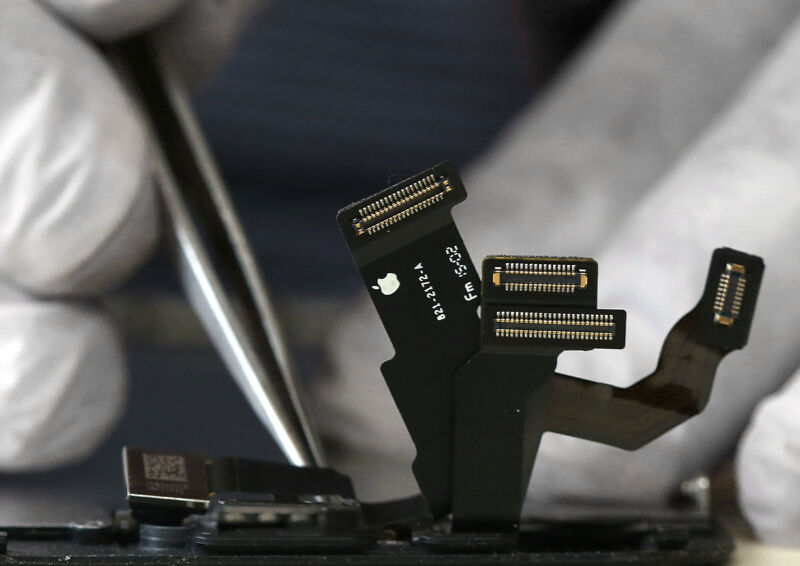
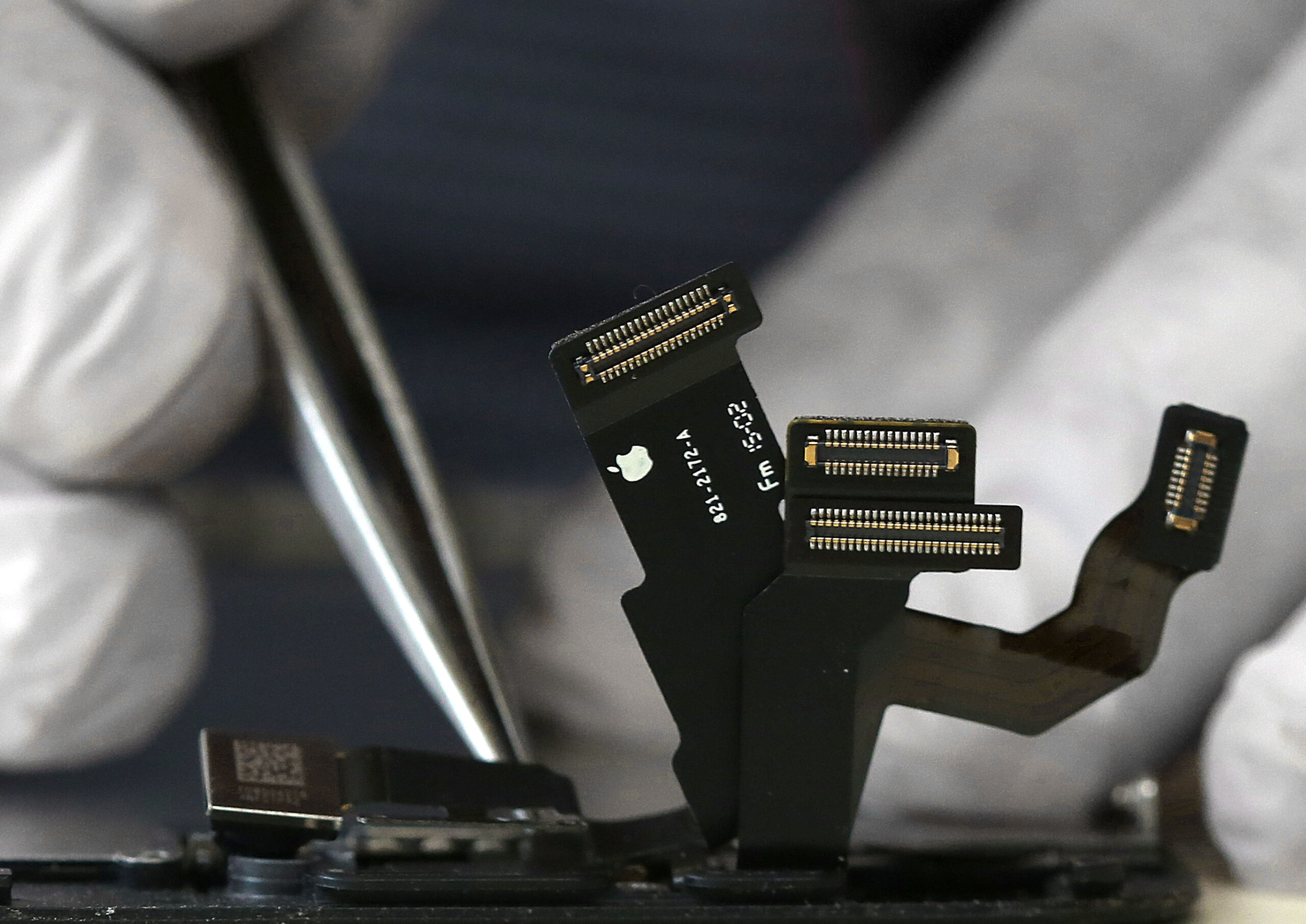
Cables emanating from an iPhone under repair, with gloves hands holding a tweezer over the phone
Enlarge / Oregon’s repair bill prohibits companies from implementing software locks that prohibit aftermarket or used parts from being installed in their devices.

Oregon Governor Tina Kotek today signed the state’s Right to Repair Act, which will push manufacturers to provide more repair options for their products than any other state so far.

The law, like those passed in New York, California, and Minnesota, will require many manufacturers to provide the same parts, tools, and documentation to individuals and repair shops that they provide to their own repair teams.

But Oregon’s bill goes further, preventing companies from implementing schemes that require parts to be verified through encrypted software checks before they will function. Known as parts pairing or serialization, Oregon’s bill, SB 1596, is the first in the nation to target that practice. Oregon State Senator Janeen Sollman (D) and Representative Courtney Neron (D) sponsored and pushed the bill in the state senate and legislature.

“By eliminating manufacturer restrictions, the Right to Repair will make it easier for Oregonians to keep their personal electronics running,” said Charlie Fisher, director of Oregon’s chapter of the Public Interest Research Group (PIRG), in a statement. “That will conserve precious natural resources and prevent waste. It’s a refreshing alternative to a ‘throwaway’ system that treats everything as disposable.”

Oregon’s bill isn’t stronger in every regard. For one, there is no set number of years for a manufacturer to support a device with repair support. Parts pairing is prohibited only on devices sold in 2025 and later. And there are carve-outs for certain kinds of electronics and devices, including video game consoles, medical devices, HVAC systems, motor vehicles, and—as with other states—”electric toothbrushes.”

Apple opposed the Oregon repair bill for its parts-pairing ban. John Perry, a senior manager for secure design at Apple, testified at a February hearing in Oregon that the pairing restriction would “undermine the security, safety, and privacy of Oregonians by forcing device manufacturers to allow the use of parts of unknown origin in consumer devices.”

Apple surprised many observers with its support for California’s repair bill in 2023, though it did so after pressing for repair providers to mention when they use “non-genuine or used” components, and to bar repair providers from disabling security features.

According to Consumer Reports, which lobbied and testified in support of Oregon’s bill, the repair laws passed in four states now cover nearly 70 million people.

https://arstechnica.com/?p=2013030


Intel, Microsoft discuss plans to run Copilot locally on PCs instead of in the cloud

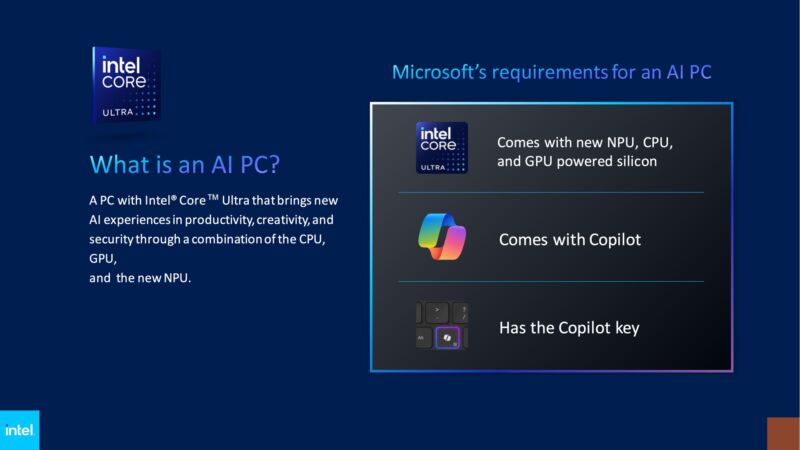
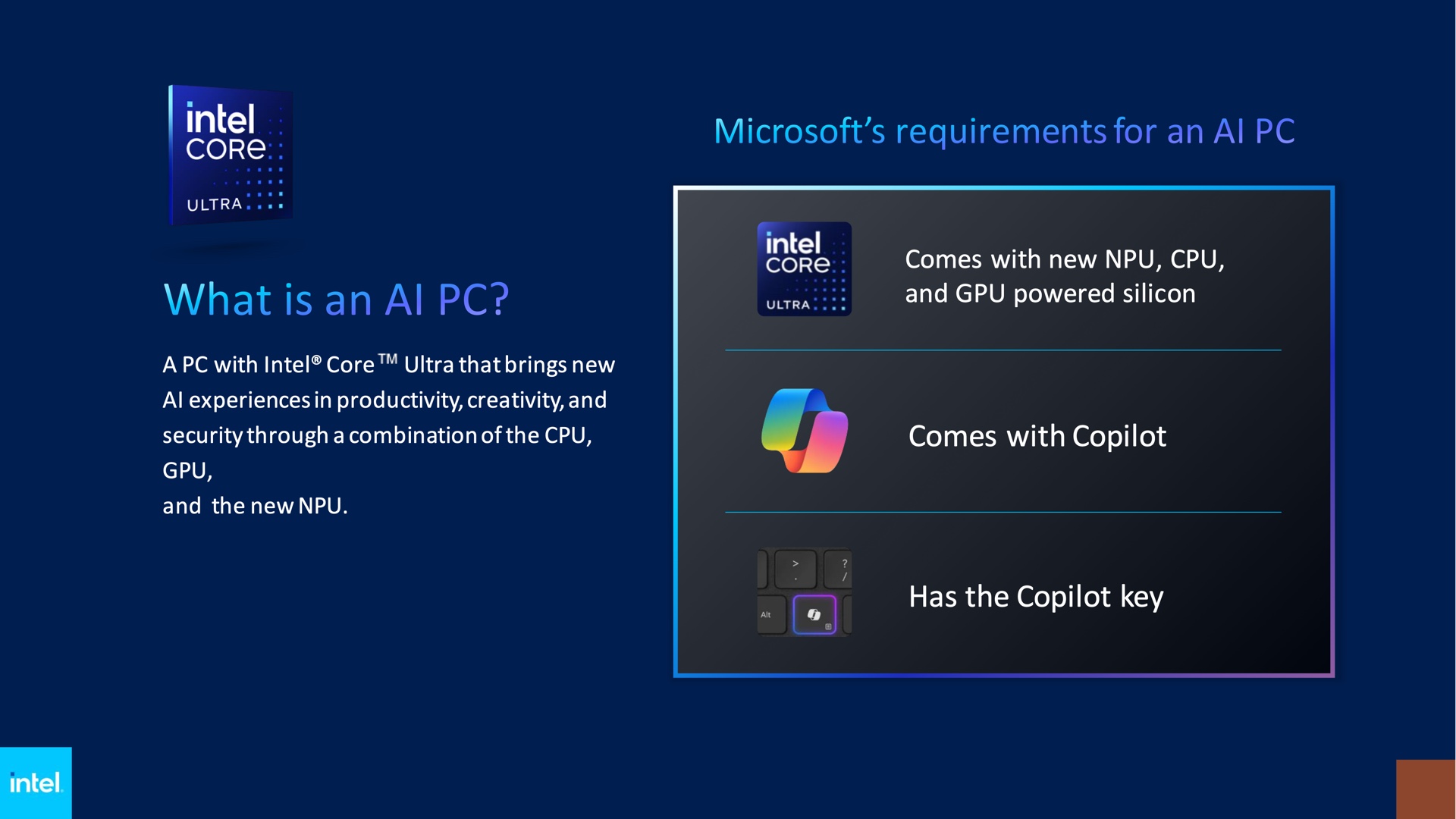
The basic requirements for an AI PC, at least when it's running Windows.
Enlarge / The basic requirements for an AI PC, at least when it’s running Windows.

Microsoft said in January that 2024 would be the year of the “AI PC,” and we know that AI PCs will include a few hardware components that most Windows systems currently do not include—namely, a built-in neural processing unit (NPU) and Microsoft’s new Copilot key for keyboards. But so far we haven’t heard a whole lot about what a so-called AI PC will actually do for users.

Microsoft and Intel are starting to talk about a few details as part of an announcement from Intel about a new AI PC developer program that will encourage software developers to leverage local hardware to build AI features into their apps.

The main news comes from Tom’s Hardware, confirming that AI PCs would be able to run “more elements of Copilot,” Microsoft’s AI chatbot assistant, “locally on the client.” Currently, Copilot relies on server-side processing even for small requests, introducing lag that is tolerable if you’re making a broad request for information but less so if all you want to do is change a setting or get basic answers. Running generative AI models locally could also improve user privacy, making it possible to take advantage of AI-infused software without automatically sending information to a company that will use it for further model training.

Right now, Windows doesn’t use local NPUs for much, since most current PCs don’t have them. The Surface Studio webcam features can use NPUs for power-efficient video effects and background replacement, but as of this writing that’s pretty much it. Apple’s and Google’s operating systems both use NPUs for a wider swatch of image and audio processing features, including facial recognition and object recognition, OCR, live transcription and translation, and more.

Intel also said that Microsoft would require NPUs in “next-gen AI PCs” to hit speeds of 40 trillion operations per second (TOPS) to meet its requirements. Intel, AMD, Qualcomm, and others sometimes use TOPS as a high-level performance metric when comparing their NPUs; Intel’s Meteor Lake laptop chips can run 10 TOPS, while AMD’s Ryzen 7040 and 8040 laptop chips hit 10 TOPS and 16 TOPS, respectively.

Unfortunately for Intel, the first company to put out an NPU suitable for powering Copilot locally may come from Qualcomm. The company’s upcoming Snapdragon X processors, long seen as the Windows ecosystem’s answer to Apple’s M-series Mac chips, promise up to 45 TOPS. Rumors suggest that Microsoft will shift the consumer version of its Surface tablet to Qualcomm’s chips after a few years of offering both Intel and Qualcomm options; Microsoft announced a Surface Pro update with Intel’s Meteor Lake chips last week but is only selling it to businesses.

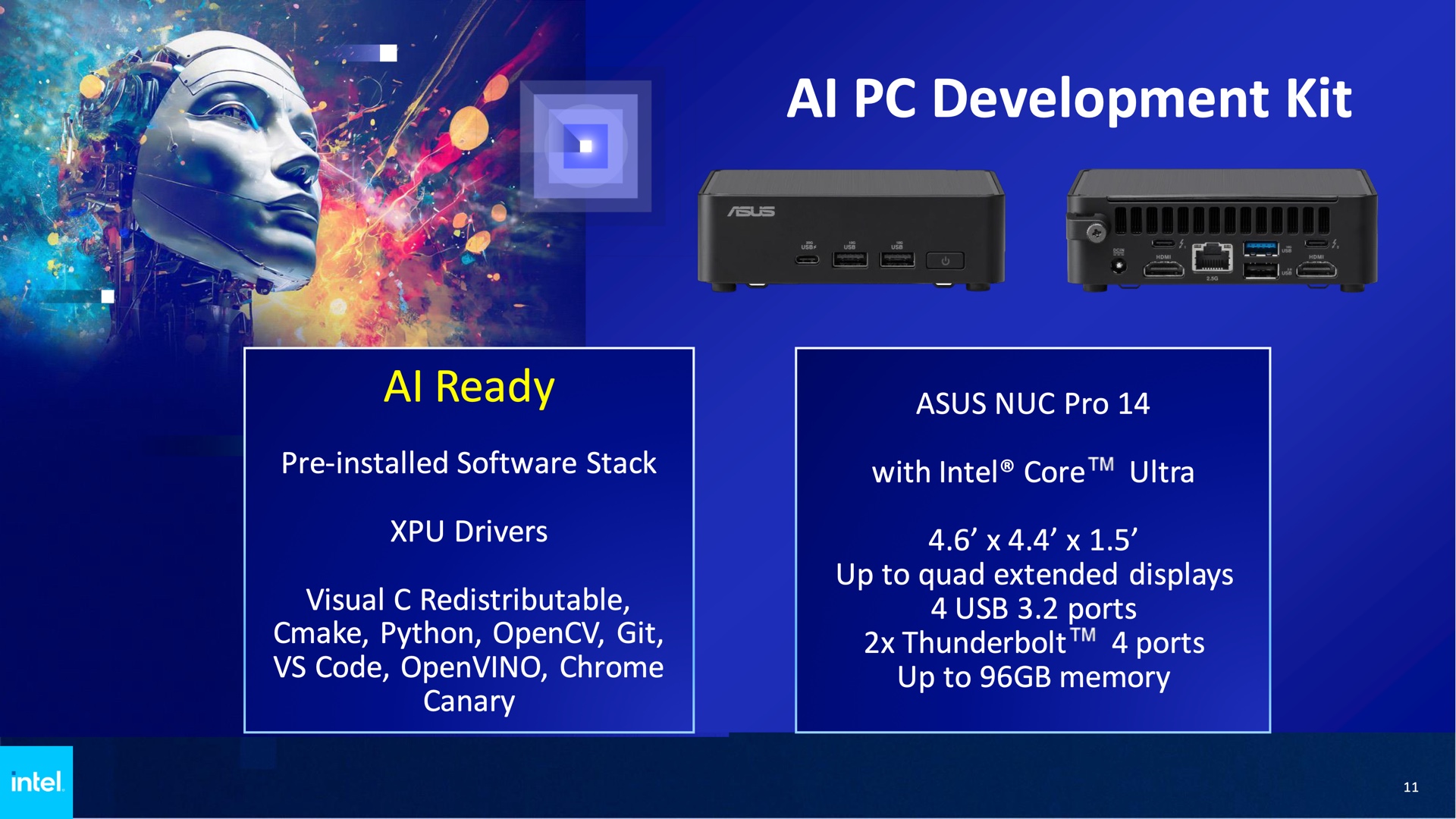
Asus and Intel are offering a NUC with a Meteor Lake CPU and its built-in NPU as an AI development platform.
Enlarge / Asus and Intel are offering a NUC with a Meteor Lake CPU and its built-in NPU as an AI development platform.

All of that said, TOPS are just one simplified performance metric. As when using FLOPS to compare graphics performance, it’s imprecise and won’t capture variations in how each NPU handles different tasks. And the Arm version of Windows still has software and hardware compatibility issues that could continue to hold it back.

As part of its developer program, Intel is also offering an “AI PC development kit” centered on an Asus NUC Pro 14, a mini PC built around Intel’s Meteor Lake silicon. Intel formally stopped making its NUC mini PCs last year, passing the brand and all of its designs off to Asus. Asus is also handling all remaining warranty service and software support for older NUCs designed and sold by Intel. The NUC Pro 14 is one of the first new NUCs announced since the transition, along with the ROG NUC mini gaming PC.

https://arstechnica.com/?p=2012793


WWDC 2024 starts on June 10 with announcements about iOS 18 and beyond

A colorful logo that says
Enlarge / The logo for WWDC24.

Apple has announced dates for this year’s Worldwide Developers Conference (WWDC). WWDC24 will run from June 10 through June 14 at the company’s Cupertino, California, headquarters, but everything will be streamed online.

Apple posted about the event with the following generic copy:

Join us online for the biggest developer event of the year. Be there for the unveiling of the latest Apple platforms, technologies, and tools. Learn how to create and elevate your apps and games. Engage with Apple designers and engineers and connect with the worldwide developer community. All online and at no cost.

As always, the conference will kick off with a keynote presentation on the first day, which is Monday, June 10. You can be sure Apple will use that event to at least announce the key features of its next round of annual software updates for iOS, iPadOS, macOS, watchOS, visionOS, and tvOS.

We could also see new hardware—it doesn’t happen every year, but it has of late. We don’t yet know exactly what that hardware might be, though.

Much of the speculation among analysts and commentators concerns Apple’s first move into generative AI. There have been reports that Apple may work with a partner like Google to include a chatbot in its operating system, that it has been considering designing its own AI tools, or that it could offer an AI App Store, giving users a choice between many chatbots.

Whatever the case, Apple is playing catch-up with some of its competitors in generative AI and large language models even though it has been using other applications of AI across its products for a couple of years now. The company’s leadership will probably talk about it during the keynote.

After the keynote, Apple usually hosts a “Platforms State of the Union” talk that delves deeper into its upcoming software updates, followed by hours of developer-focused sessions detailing how to take advantage of newly planned features in third-party apps.

https://arstechnica.com/?p=2012651


Chrome launches native build for Arm-powered Windows laptops

Extreme close-up photograph of finger above Chrome icon on smartphone.

We are quickly barreling toward an age of viable Arm-powered Windows laptops with the upcoming launch of Qualcomm’s Snapdragon X Elite CPU. Hardware options are great, but getting useful computers out of them will require a lot of new software, and a big one has just launched: Chrome for Windows on Arm.

Google has had a nightly “canary” build running since January, but now it has a blog post up touting a production-ready version of Chrome for “Arm-compatible Windows PCs powered by Snapdragon.” That’s right, Qualcomm has a big hand in this release, too, with its own press announcement touting Google’s browser release for its upcoming chip. Google promises a native version of Chrome will be “fully optimized for your PC’s [Arm] hardware and operating system to make browsing the web faster and smoother.”

Apple upended laptop CPU architecture when it dumped Intel and launched the Arm-based Apple Silicon M1. A few years later and Qualcomm is ready to answer—mostly by buying a company full of Apple Silicon veterans—with the upcoming launch of the Snapdragon X Elite chip. Qualcomm claims the X Elite will bring Apple Silicon-class hardware to Windows, but the chip isn’t out yet—it’s due for a “mid-2024” release. Most of the software you’ll be running will still be written in x86 and need to go through a translation layer, which will slow things down, but at least it won’t have to be your primary browser.

Google says the release will be out this week. Assuming you don’t have an Arm laptop yet, you can visit “google.com/chrome,” scroll all the way down to the footer, and click “other platforms,” which will eventually show the new release.

https://arstechnica.com/?p=2012585


Flying coach? At least you’ll be able to watch movies on an in-seat OLED TV soon

Flying on commercial airlines today might be a lot more of a pain than it used to be, but new tech is going to bring some improvement to one part of the experience—in-flight entertainment. Panasonic Avionics’ brand Astrova in-flight entertainment systems are starting to roll out on commercial flights on certain airlines, promising 4K HDR TVs and other features to the backs of seats that should be a huge upgrade over the abysmal screens we normally watch in-flight movies on.

Look at most commercial airlines today, and you’ll find a tiny, terrible LCD TV embedded in the seat in front of you. These HD, standard dynamic range screens have terrible contrast and poor viewing angles, and they aren’t bright enough to achieve a good viewing experience when the overhead lights are on.

They’re bad enough that I always bring my own hardware for flights—most recently, I took three flights with Apple’s Vision Pro headset, which I plan to write about later this week. But most people just bring a tablet.

Astrova is Panasonic’s name for an in-flight entertainment system that aims to improve things dramatically. The OLED screens have 4K resolution and support HDR+. They also have two USB-C charging ports built in that can charge at up to 100 W, and they support Bluetooth, so you can use AirPods or Sony’s popular WH-1000 over-ear headphones.

With current systems, you have to bring an adapter to make that happen, if it’s possible.

Panasonic has paired the screens with new colored LED lighting systems that aim to make it so the bright overhead cabin lights don’t have to come on, washing out the image.

The screens come in 13-, 16-, 19-, 22-, 27-, 32-, and 42-inch variants. “How would you fit a 42-inch screen in an airplane seat?” you might ask. Well, that size is likely for ultra-high-end international flights where people can pay thousands and thousands of dollars for private cabins. Those aren’t the only types of seats that will get some kind of Astrova OLED system, though.

The rollout begins this year with Icelandair and Qantas planning to install Astrova systems in 2025 and late 2024. Icelandair will be first; new Airbus A321neo LR craft will see 16-inch screens in business class and 13-inch ones in economy. Qantas will install Astrova as part of its retrofit of its A330-200 fleet of planes and in newly ordered A350-1000 craft. The emphasis for Qantas is on long-haul flights, specifically those between Australia and Europe or the United States.

Last summer, US-based United Airlines announced many of its longer international flights would see these systems installed in 2025, with some domestic flights to follow, so it won’t be limited to intercontinental flights.

It’s doubtful that these screens will hold a candle to the latest high-end OLED TVs from LG and Samsung, and it looks like it will be a few years before they’re widespread in domestic flights. But any improvement is welcome on the terrible in-flight entertainment systems we’re using now. Now, if only another company could invent some way to use new tech to make the seats 20 percent bigger—I can dream, anyway.

Listing image by Panasonic

https://arstechnica.com/?p=2012437


Mozilla’s privacy service drops a provider with ties to people-search sites

Mozilla Monitor Plus dashboard

Mozilla’s Monitor Plus, a service launched by the privacy-minded tech firm in February, notes on its pitch page that there is “a $240 billion industry of data brokers selling your private information for profit” and that its offering can “take back your privacy.”

Mozilla’s most recent move to protect privacy has been to cut out one of the key providers of Monitor Plus’ people-search protections, Onerep. That comes after reporting from security reporter Brian Krebs, who uncovered Onerep CEO and founder Dimitri Shelest as the founder of “dozens of people-search services since 2010,” including one, Nuwber, that still sells the very kind of “background reports” that Monitor Plus seeks to curb.

Shelest told Krebs in a statement (PDF) that he did have an ownership stake in Nuwber, but that Nuwber has “zero cross-over or information-sharing with Onerep” and that he no longer operates any other people-search sites. Shelest admitted the bad look but said that his experience with people search gave Onerep “the best tech and team in the space.”

Brandon Borrman, vice president of communications at Mozilla, said in a statement that while “customer data was never at risk, the outside financial interests and activities of Onerep’s CEO do not align with our values.” Mozilla is “working now to solidify a transition plan,” Borrman said. A Mozilla spokesperson confirmed to Ars today that Mozilla is continuing to offer Monitor Plus, suggesting no pause in subscriptions, at least for the moment.

Monitor Plus also kept track of a user’s potential data breach exposures in partnership with HaveIBeenPwned. Troy Hunt, founder of HaveIBeenPwned, told Krebs that aside from Onerep’s potential conflict of interest, broker removal services tend to be inherently fraught. “[R]emoving your data from legally operating services has minimal impact, and you can’t remove it from the outright illegal ones who are doing the genuine damage.”

Still, every bit—including removing yourself from the first page of search results—likely counts. Beyond sites that scrape public records and court documents for your information, there are the other data brokers selling barely anonymized data from web browsing, app sign-ups, and other activity. A recent FTC settlement with antivirus and security firm Avast highlighted the depth of identifying information that often is available for sale to both commercial and government entities.

https://arstechnica.com/?p=2012417


macOS Sonoma 14.4.1 released to fix the stuff that the 14.4 update broke

An M3 MacBook Air running macOS Sonoma.
Enlarge / An M3 MacBook Air running macOS Sonoma.
Andrew Cunningham

Apple has just released version 14.4.1 for macOS Sonoma, a small-but-significant patch that claims to fix several issues with third-party software and accessories that cropped up in the 14.4 update. The 14.4.1 release also includes a pair of security fixes.

Apple’s release notes highlight fixes for three major problems:

  • USB hubs connected to external displays may not be recognized
  • Copy protected Audio Unit plug-ins designed for professional music apps may not open or pass validation
  • Apps that include Java may quit unexpectedly

Users and companies began noticing problems shortly after the macOS 14.4 update was released earlier this month. Reports of broken USB hubs cropped up on Reddit, the Apple Support Communities forums, and elsewhere within the first couple of days, and issues with Java and iLok audio software DRM devices were reported later on. Some users also reported broken printer drivers and deleted file revisions in iCloud Drive, though Apple’s release notes don’t mention those problems.

At least some of these bugs reportedly weren’t present in preview builds of the 14.4 update, which could explain why they weren’t discovered during the public beta period.

Both of the security patches are for so-called “clickless” exploits that can allow remote code execution after a system displays a compromised image. Apple has also released macOS Ventura 13.6.6 to patch the security vulnerabilities for Macs that haven’t upgraded to Sonoma (or can’t upgrade to Sonoma).

Apple released other minor updates to iOS, iPadOS, and visionOS last week to patch the same security vulnerabilities. None of those updates listed any specific non-security bug fixes in their release notes beyond the broad “important bug fixes and security updates” boilerplate that accompanies most minor OS updates from Apple.

https://arstechnica.com/?p=2012440