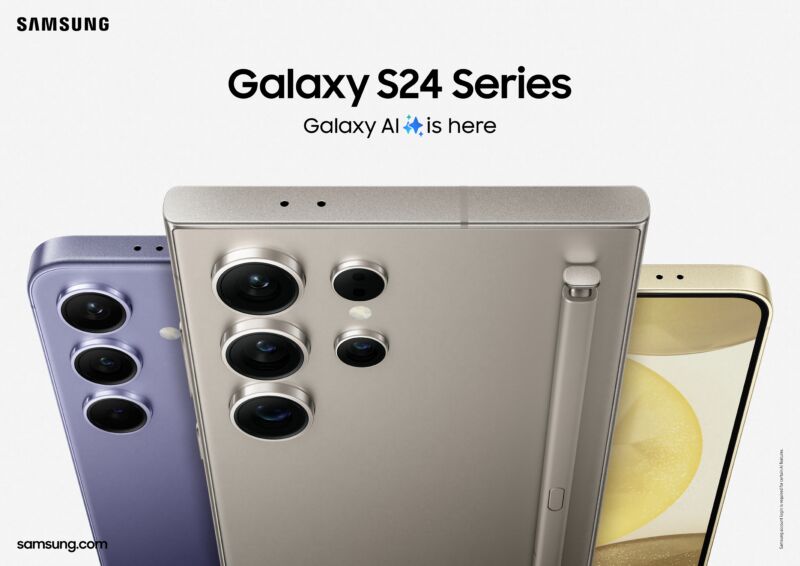

Electric design is a field full of varying opinions and trade-offs. Companies agonize over the physical shapes of their devices and the materials used, all trying to create a high-quality, premium-feeling device that fits with the constraints of mass production. Material choices usually center around cost, feeling, and durability, but how often do manufacturers take into account smell? Samsung users are finding that if you pop out the Galaxy S24 Ultra’s “S-Pen” stylus and give it a whiff like you’re huffing a marker, you’ll find that it… smells bad?
9to5Google found the following incredible post from Reddit user “LatifYil” titled, “Why does my s pen smell so bad?” The post has almost 250 comments of users all mostly agreeing with the post’s sentiment that “the S-Pen in my Galaxy S24 Ultra absolutely reeks. Either I have a sensitive nose or this thing is being barbequed by the internals while it’s unsheathed.” The top-rated, very-online comment is, “Op got me to smell my pen. Can confirm it’s a stinky boi.”
Those describing the smell all seem to agree Samsung’s stylus often smells like an electrical fire. One user writes that it’s “a very burnt and plastics smell.” Another says the S23 Ultra stylus “smells like new tech with a hint of burning.” A more descriptive commenter says it smells like “an electric mixer that’s turned on, but the beaters are jammed up and can’t turn, so the motor is overheating.” The S-Pen is mostly plastic but has a soft rubber tip, and a lot of users identify that soft bit as the smelly part.
One user baselessly suggested that the bad smell was due to a bitterant added to the S-Pen, similar to what is used on Nintendo Switch cartridges to make them taste bad, so babies don’t put a potential choking hazard in their mouths. But then another user admits to licking the S-Pen and reports that it tastes fine! Don’t you just love the Internet?
The issue of the smelly S-Pen was recently raised on the Samsung community forums, too, and Samsung employee “AndrewL” gave a statement on the issue:
This isn’t anything to be concerned about. While the S Pen is in its holster, it is close to the internal components of the phone, which will generate heat while in use, and cause the plastic to heat up. This can smell like burning, but it is similar to the smell you might experience after leaving your car in the sun for a few hours. The seats and plastic fittings in the vehicle might smell hot, but this will diminish after it cools.
If you don’t like the smell of the S-Pen, you can always just not smell it. It’s not like the pen has a room-clearing stench—most users didn’t notice until someone pointed it out.
https://arstechnica.com/?p=2012171
Windows Notepad’s midlife renaissance continues with spellcheck and autocorrect
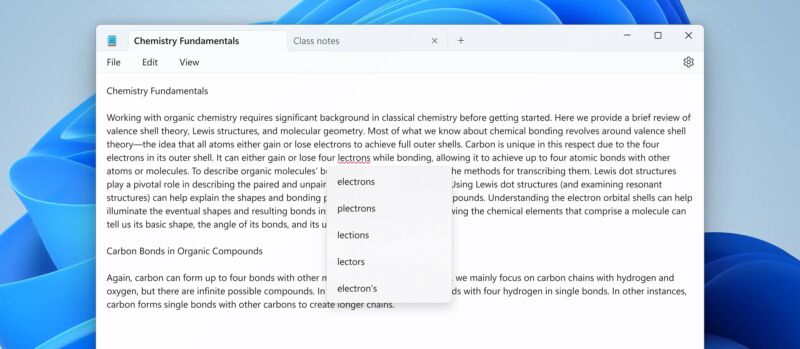
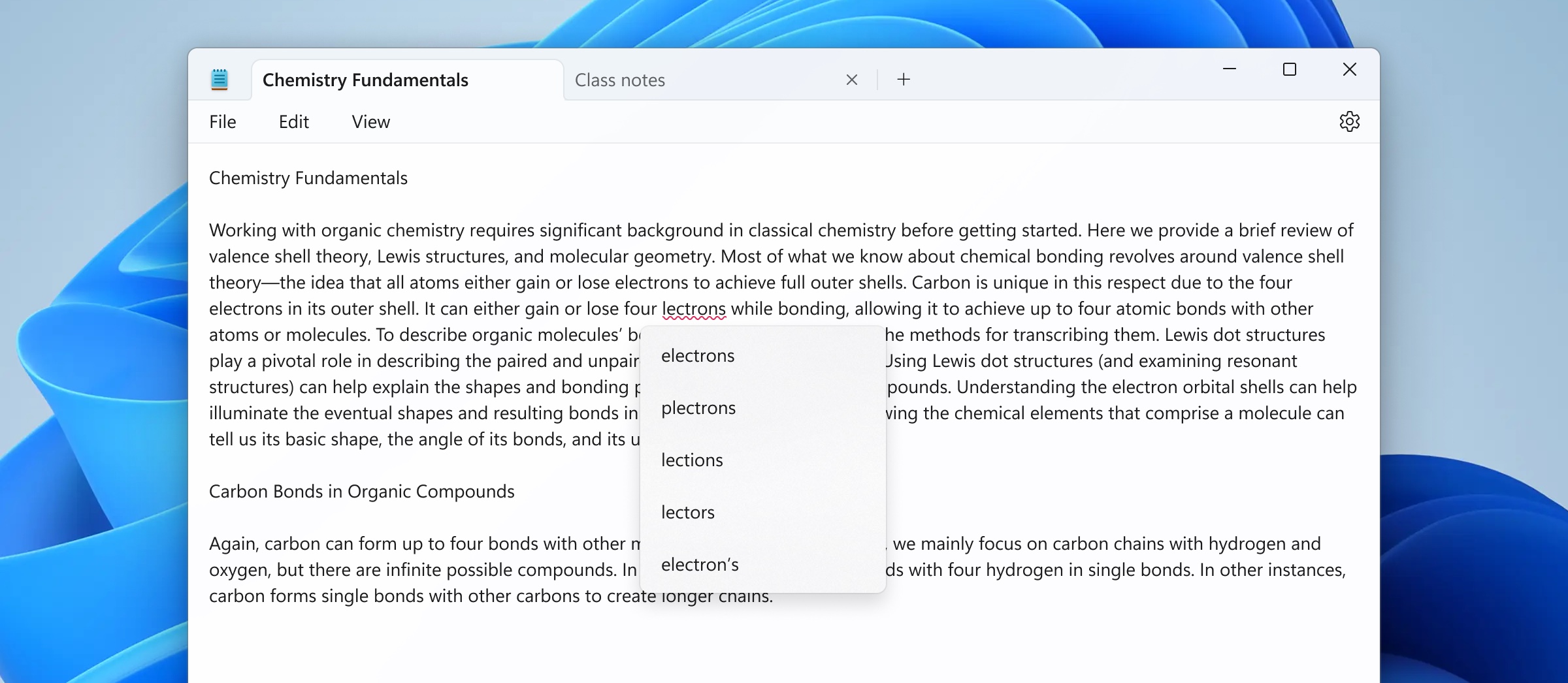
Enlarge/ “Notepad.exe but with spellcheck” looks pretty much exactly like you’d expect it to.
Whatever else you can say about Windows 11—and whatever you think about its pushy tendencies and the Copilot feature that has been rolled out to pretty much everyone despite being labeled a “preview”—the operating system has ushered in a bit of a renaissance for decades-old built-in apps like Paint and Notepad.
Notepad’s development in particular has been striking; it had gotten small under-the-hood updates over the years, but in many ways, the version that was still in Windows 11 at launch in 2021 was the same app that Microsoft shipped with Windows XP, Windows 95, Windows 3.1, or even Windows 1.0.
An updated version of Notepad currently rolling out to Windows Insiders in the Canary and Dev channels is adding two more modern features to the old app: spellcheck and autocorrect. Per usual, spellcheck in Notepad highlights misspellings with red squiggly underlines, and right-clicking the word or pressing Shift + F10 will pop up a short menu of suggested fixes.
Recognizing that Notepad is often used to view or edit log or config files, Microsoft says that spellcheck “is off by default in log files and other file types typically associated with coding.” Spellcheck can be enabled or disabled for any given file type (or for individual files) in Notepad’s settings. Individual words can also be ignored in that document or added to your dictionary so they’ll always be ignored in every document you open.
If you’re upgrading from the Windows 10 version of Notepad, the spellcheck and autocorrect features join the tabbed interface, redesigned Settings screen, an auto-resume feature, and a handful of other tricks that the app has learned throughout Windows 11’s development.
Notepad is still well short of becoming a rich text editor, but there’s room for it to pick up a few more basic text and document editing features since Microsoft formally killed off WordPad in a recent Windows 11 update. Unlike Notepad, WordPad had been mostly left alone since a Windows 7-era refresh that added a user interface ribbon like the one in the (then-current) Office 2007 update. For free-of-charge rich text editing, Microsoft pushes users toward the online version of Microsoft Word instead.
Microsoft is currently testing Windows 11 24H2 in the Canary and Dev Windows Insider channels, a preview of this fall’s major update that will mark the operating system’s third anniversary. Updates to Notepad and other apps could roll out before then, though, in keeping with Microsoft’s “release them when they’re ready” approach to feature additions in the Windows 11 era.
Windows Insiders also got some new Paint features earlier this month; Microsoft tweaked the way the brush size selector works and has added the option to designate one of your image layers as the background layer. Wonders never cease.
https://arstechnica.com/?p=2012109
Entirely accurate 3D-printed Mac Plus built in these 29 painstaking steps
Kevin Noki
Have you ever worked on a hobby project where modifying and compiling the source code for a Linux-based emulator was possibly the easiest and most straightforward part of the whole thing?
Kevin Noki really, really wanted a functioning Macintosh Plus, complete with a functioning, auto-ejecting disk drive that it could boot from. The German maker already had a Mac Plus (1Mb) from eBay, but it had both a busted power supply and floppy drive. Rather than carve out the busted Plus’ one-of-a-kind internals and slap a Raspberry Pi in there like some DIY slacker, Noki went … a different path.
[embedded content]
47 minutes and 25 seconds of a tour-de-force of modern maker technology.
Noki 3D-printed his own Macintosh, the “Brewintosh.” I would like you to consider what you think that last sentence means and then wipe your expectations clean. I have watched the entire 48-minute journey of Noki’s Brewintosh, which is both very soothing on some ASMR-adjacent gut level and also low-key maddening for the way it plays down all the individual accomplishments along the way. Any one of the Brewintosh’s pieces would be my entire weekend, and my spouse would not enjoy my mood while I was sunk into it.
The design part of the Brewintosh, which you only see in super-fast time-lapse summary, but which is pretty, pretty notable.
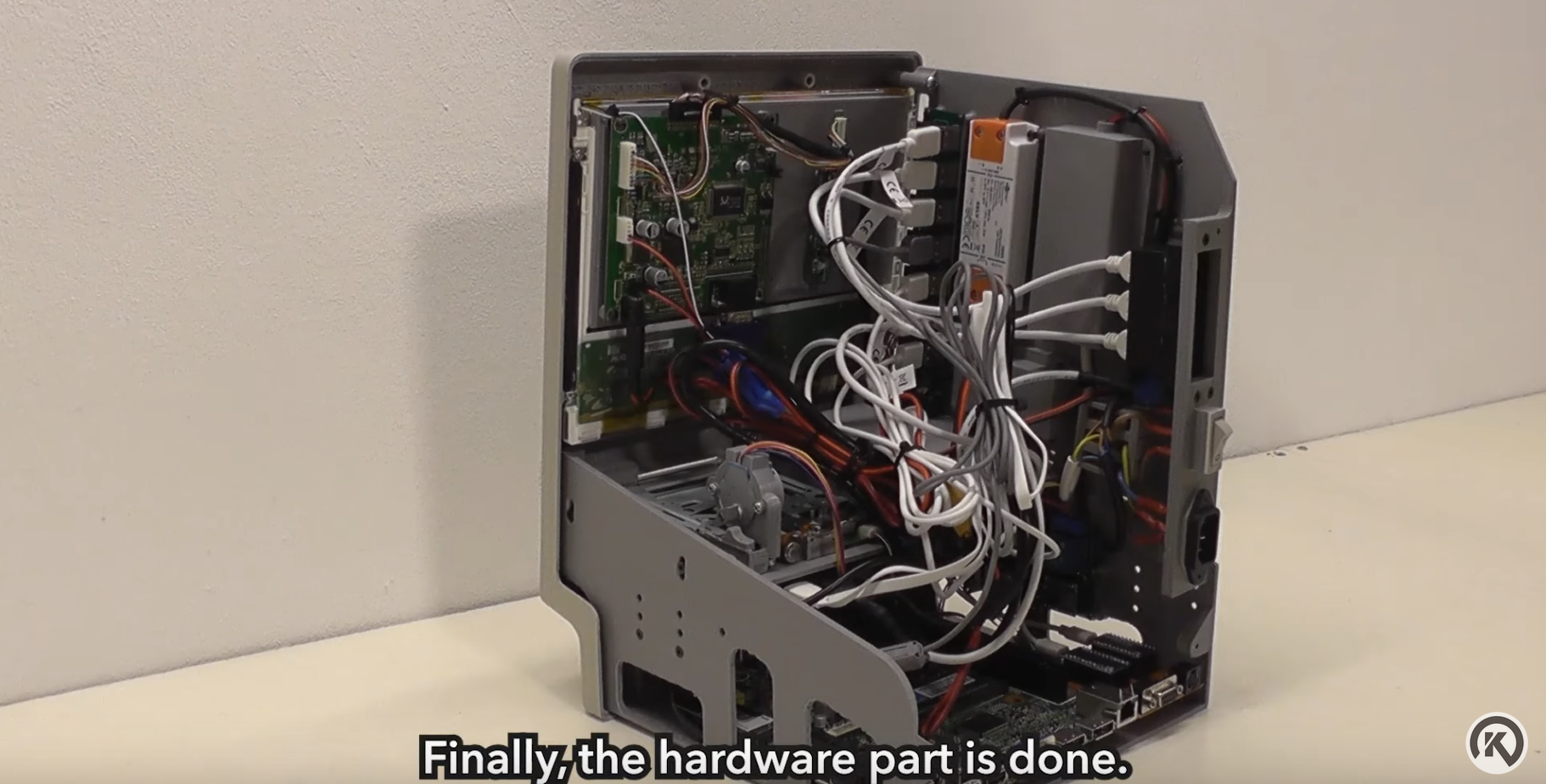
Now the custom board-building, circuit design, and internal space configuration can begin!
The tiny two-part board Noki built to rework serial and ADB input to USB is pretty much its own project (and video).
Detail on the Brewintosh sticker and corner of the finished project.
But Noki, over what he reports as “months,” essentially works backward from 2024, using every kind of maker tool and skill to get back to a working 1986 Mac. Not just “classic Mac OS on a properly sized AliExpress monitor,” mind you. We are talking a properly sized, colored, and textured box, which takes wall power, swallows 3.5-inch disks, works with both telephone-cord and ADB Apple keyboards and mice, has a screen dimmer, and makes the startup sound (the beep, not the chord). It’s not a “loving” tribute, it’s uncanny and potentially unnerving.
If you wanted a non-historic but ultra-authentic Mac like Noki’s, this is the somehow-not-exhaustive list of 29 things for which you would have to have the tools, skills, and patience:
Meticulously measuring every single surface and angle of a Macintosh Plus
Design your own Brewintosh raised-text stereotype and apply foil to it with a laminator
Create custom-designed Brewintosh multicolor stickers, print them, apply UV resin for a glossy finish, and cure them
Design and print a replica sticker of the original Mac’s back panel
Record yourself doing all these things and edit them into an engaging video.
I didn’t include the smaller (“smaller”) things Noki 3D-printed in that list because I respect your scroll fingers. You also have to design and accurately print at least 12 other components. That list includes the feet in resin, a screen board holder, an inner frame, power assembly cover, power cabling routing box, audio jack holder, USB port and SD card holder, internal speaker chassis, disk drive stepper motor attachment, manual disk eject, the brightness control dial, and probably a dozen tiny things Noki doesn’t even mention.
I am not actually suggesting anybody with a biologically limited lifespan attempt what Noki has done here. If you tackled each component and 3D-printed part as individual weekend projects, it adds up to more than 40 weeks. Mind you, printing the 3D parts alone took 48 hours, according to Noki. But even that spread presumes that you’re starting from the obvious familiarity Noki has with all his printers, cutters, and tools. He doesn’t include any mistakes or missteps in his video, but you just know in your heart that you would reach a certain point in the assembly and realize that something just doesn’t fit at all, so you must go back and do it, and possibly two or three other whole things, again.
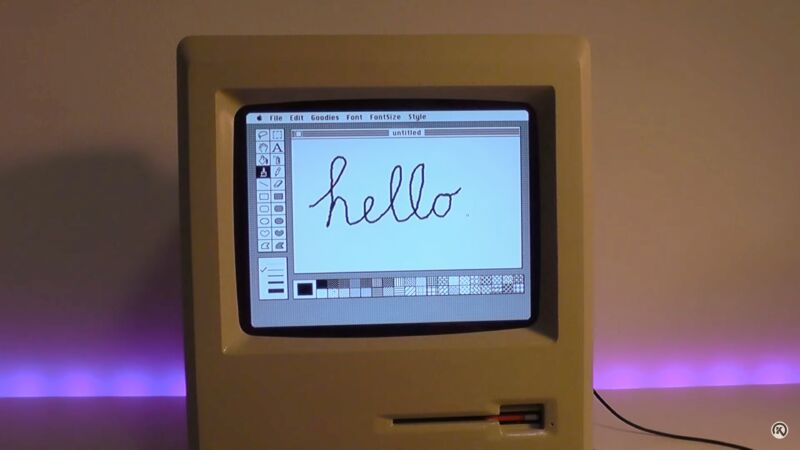
Watching this video did a number on me. Seeing the astounding number of skills on display, paired with the Steven Jobs-like attention to detail, can be overwhelmingly intimidating or simply affirming and wonderful, depending on how you take it in. Someone in the YouTube comments points out a little bit that Noki himself doesn’t even mention in his subtitle text: that the monitor stays off until the vMac emulator has started and produced the tiny smiling Mac icon. All of that, just to get to the point where you can play 3D chess or use MacPaint in a little beige time machine.
https://arstechnica.com/?p=2011150
YouTube will require disclosure of AI-manipulated videos from creators
Future Publishing | Getty Images
YouTube is rolling out a new requirement for content creators: You must disclose when you’re using AI-generated content in your videos. The disclosure appears in the video upload UI and will be used to power an “altered content” warning on videos.
Google previewed the “misleading AI content” policy in November, but the questionnaire is now going live. Google is mostly concerned about altered depictions of real people or events, which sounds like more election-season concerns about how AI can mislead people. Just last week, Google disabled election questions for its “Gemini” chatbot.
As always, the exact rules on YouTube are up for interpretation. Google says it’s “requiring creators to disclose to viewers when realistic content—content a viewer could easily mistake for a real person, place, or event—is made with altered or synthetic media, including generative AI,” but doesn’t require creators to disclose manipulated content that is “clearly unrealistic, animated, includes special effects, or has used generative AI for production assistance.”
Google gives examples of when a disclosure is necessary, and the new video upload questionnaire walks content creators through these requirements:
Using the likeness of a realistic person: Digitally altering content to replace the face of one individual with another’s or synthetically generating a person’s voice to narrate a video.
Altering footage of real events or places: Such as making it appear as if a real building caught fire, or altering a real cityscape to make it appear different from reality.
Generating realistic scenes: Showing a realistic depiction of fictional major events, like a tornado moving toward a real town.
Google’s video upload questionnaire.
Take note of the super-tiny message at the bottom, denoting “altered or synthetic content.”
You can expand the description for slightly more info.
Google says the labels will start rolling out “across all YouTube surfaces and formats in the weeks ahead, beginning with the YouTube app on your phone, and soon on your desktop and TV.” The company says it’s also working on a process for people who are the subject of an AI-manipulated video to request its removal, but it doesn’t have details on that yet.
https://arstechnica.com/?p=2011206
Google’s phone app no longer searches Google Maps
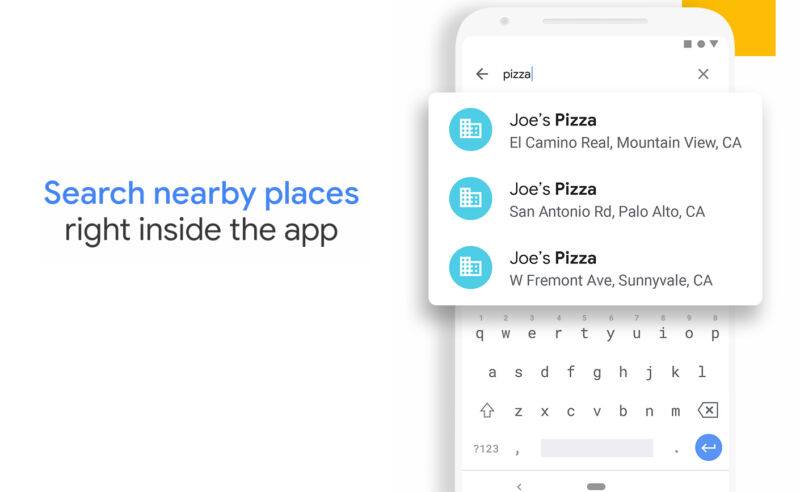
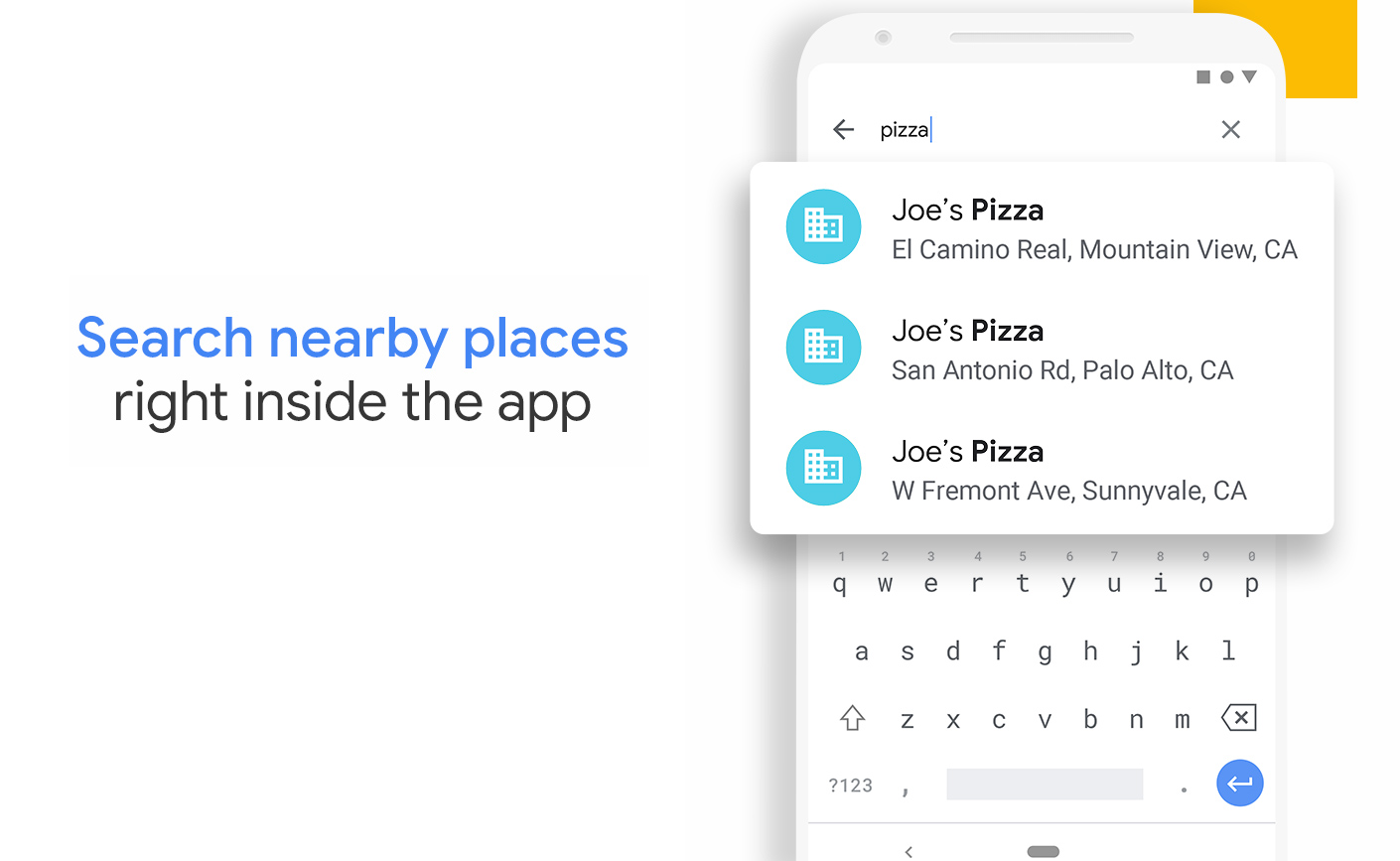
Enlarge/ The Google Phone’s Play Store listing still touts Nearby Places as a major feature.
9to5Google reports that Google has killed off the Google Phone app’s “nearby places” feature. Google announced the impending death of the feature in February, saying: “We’ve found only a very small number of people use this feature, and the vast majority of users go to Google Search or Maps when seeking business-related phone numbers.” Now it’s really dead.
The “Nearby Places” feature in the Google Phone app seemed like a useful and common-sense feature. It connected the power of Google Maps to the phone app, allowing the phone search bar to not only look through your contacts but also businesses listed in Google Maps. When you want to call the local pizza place, just type in the name, rather than some arcane string of numbers, and hit “dial.”
The feature has been around on Pixel phones since at least the Pixel 2 and has been generally available to anyone who downloaded the “Phone by Google” app in the Play Store for the past few years. It was a perfect “Google” feature, combining the company’s OS, breadth of online data, and search into a useful function. Google has made its AI-infused phone app a primary selling point of Pixel phones over the years, so stripping it of features is weird.
Google claims that the feature is being killed because it was used by a “very small number of people,” but it also might be shutting it down because it hasn’t worked reliably for a while now. It looks like Google broke the Nearby Places search around August 2023. Here’s a bug report from around that time with 100 comments, and there are several Reddit and Google forum posts out there. Even new phones were shipping with the feature disabled. One reason for Google’s apparent disinterest in the feature is that the phone app’s Nearby Places searches took traffic away from Google Maps. Maps shows ads in the search results, and the phone app didn’t.
https://arstechnica.com/?p=2010954
USB hubs, printers, Java, and more seemingly broken by macOS 14.4 update
A couple of weeks ago, Apple released macOS Sonoma 14.4 with the usual list of bug fixes, security patches, and a couple of minor new features. Since then, users and companies have been complaining of a long list of incompatibilities, mostly concerning broken external accessories like USB hubs and printers but also extending to software like Java.
MacRumors has a good rundown of the list of issues, which has been steadily getting longer as people have run into more problems. It started with reports of malfunctioning USB hubs, sourced from users on Reddit, the Apple Support Communities forums, and elsewhere—USB hubs built into various displays stopped functioning for Mac users after the 14.4 update.
Other issues surfaced in the days after people started reporting problems with their USB hubs, including some instances of broken printer drivers, unexpected app crashes for some Java users, and problems launching apps that rely on the PACE anti-piracy software (and iLok hardware dongles) to authenticate.
At least some of the problems seem localized to Apple Silicon Macs. In fact, iLok recommends running digital audio software in Rosetta mode as a temporary stopgap while Apple works on a fix. According to iLok, Apple has acknowledged this particular bug and is working on an update, but “[has] not indicated a timeline.”
The USB hub issue may be related to the USB security prompts that Apple introduced in macOS 13 Ventura, asking users to confirm whether they wanted to connect to USB-C accessories that they were connecting to their Mac for the first time. Some users have been able to get their USB hubs working again after the 14.4 update by making macOS request permission to connect to the accessory every time the accessory is plugged in; the default behavior is supposed to recognize USB devices that you’ve already connected to once.
Scanning Apple’s release notes or security update disclosures for the update doesn’t reveal any smoking guns, but many of the security bugs were addressed with “improved checks” and “improved access permissions,” and it’s certainly possible that some legitimate accessories and software were broken by one or more of these changes. The Oracle blog post about the Java problems refers to memory access issues that seem to be causing the crashes, though that may or may not explain the problems people are having with external accessories. The blog post also indicates that these bugs weren’t present in the public developer betas of macOS 14.4.
My desktop M2 Mac Studio setup, which is connected to a 4K Gigabyte M28U with a built-in USB hub, hasn’t exhibited any unusual behavior since the update, so it’s also possible that these issues aren’t affecting every user of every Mac. If you haven’t updated yet, it may be worth waiting until Apple releases fixes for some or all of these issues, even if you don’t think you’ll be affected.
https://arstechnica.com/?p=2010801
Once “too scary” to release, GPT-2 gets squeezed into an Excel spreadsheet
Getty Images
It seems like AI large language models (LLMs) are everywhere these days due to the rise of ChatGPT. Now, a software developer named Ishan Anand has managed to cram a precursor to ChatGPT called GPT-2—originally released in 2019 after some trepidation from OpenAI—into a working Microsoft Excel spreadsheet. It’s freely available and is designed to educate people about how LLMs work.
“By using a spreadsheet anyone (even non-developers) can explore and play directly with how a ‘real’ transformer works under the hood with minimal abstractions to get in the way,” writes Anand on the official website for the sheet, which he calls “Spreadsheets-are-all-you-need.” It’s a nod to the 2017 research paper “Attention is All You Need” that first described the Transformer architecture that has been foundational to how LLMs work.
Anand packed GPT-2 into an XLSB Microsoft Excel binary file format, and it requires the latest version of Excel to run (but won’t work on the web version). It’s completely local and doesn’t do any API calls to cloud AI services.
Even though the spreadsheet contains a complete AI language model, you can’t chat with it like ChatGPT. Instead, users input words in other cells and see the predictive results displayed in different cells almost instantly. Recall that language models like GPT-2 were designed to do next-token prediction, which means they try to complete an input (called a prompt, which is encoded into chunks called tokens) with the most likely text. The prediction could be the continuation of a sentence or any other text-based task, such as software code. Different sheets in Anand’s Excel file allow users to get a sense of what is going on under the hood while these predictions are taking place.
Spreadsheets-are-all-you-need only supports 10 tokens of input. That’s tiny compared to the 128,000-token context window of GPT-4 Turbo, but it’s enough to demonstrate some basic principles of how LLMs work, which Anand has detailed in a series of free tutorial videos he has uploaded to YouTube.
[embedded content]
A video of Iman Anand demonstrating “Spreadsheets-are-all-you-need” in a YouTube tutorial.
In an interview with Ars Technica, Anand says he started the project so he could satisfy his own curiosity and understand the Transformer in detail. “Modern AI is so different from the AI I learned when I was getting my CS degree that I felt I needed to go back to the fundamentals to truly have a mental model for how it worked.”
He says he was originally going to re-create GPT-2 in JavaScript, but he loves spreadsheets—he calls himself “a spreadsheet addict.” He pulled inspiration from data scientist Jeremy Howard’s fast.ai and former OpenAI engineer Andrej Karpathy’s AI tutorials on YouTube.
“I walked away from Karpathy’s videos realizing GPT is mostly just a big computational graph (like a spreadsheet),” he says, “And [I] loved how Jeremy often uses spreadsheets in his course to make the material more approachable. After watching those two, it suddenly clicked that it might be possible to do the whole GPT-2 model in a spreadsheet.”
We asked: Did he have any difficulty implementing a LLM in a spreadsheet? “The actual algorithm for GPT2 is mostly a lot of math operations which is perfect for a spreadsheet,” he says. “In fact, the hardest piece is where the words are converted into numbers (a process called tokenization) because it’s text processing and the only part that isn’t math. It would have been easier to do that part in a traditional programming language than in a spreadsheet.”
When Anand needed assistance, he naturally got a little help from GPT-2’s descendant: “Notably ChatGPT itself was very helpful in the process in terms helping me solve thorny issues I would come across or understanding various stages of the algorithm, but it would also hallucinate so I had to double-check it a lot.”
GPT-2 rides again
This whole feat is possible because OpenAI released the neural network weights and source code for GPT-2 in November 2019. It’s particularly interesting to see that particular model baked into an educational spreadsheet because when it was announced in February 2019, OpenAI was afraid to release it—the company saw the potential that GPT-2 might be “used to generate deceptive, biased, or abusive language at scale.”
Still, the company released the full GPT-2 model (including weights files needed to run it locally) in November 2019, but the company’s next major model, GPT-3, which launched in 2020, has not received an open-weights release. A variation of GPT-3 later formed the basis for the initial version of ChatGPT, launched in 2022.
[embedded content]
A video of Anand demonstrating “Spreadsheets-are-all-you-need” at AI Tinkerers Seattle, October 2023.
Anand’s spreadsheet implementation runs “GPT-2 Small,” which unlike the full 1.5-billion-parameter version of GPT-2 clocks in at 124 million parameters. (Parameters are numerical values in AI models that store patterns learned from training data.) Compared to the 175 billion parameters in GPT-3 (and even larger models), it probably would not qualify as a “large” language model if released today. But in 2019, GPT-2 was considered state-of-the-art.
You can download the GPT-2-infused spreadsheet on GitHub, though be aware that it’s about 1.2GB. Because of its complexity, Anand said it can frequently lock up or crash Excel, especially on a Mac; he recommends running the sheet on Windows. “It is highly recommended to use the manual calculation mode in Excel and the Windows version of Excel (either on a Windows directory or via Parallels on a Mac),” he writes on his website.
And before you ask, Google Sheets is currently out of the question: “This project actually started on Google Sheets, but the full 124M model was too big and switched to Excel,” Anand writes. “I’m still exploring ways to make this work in Google Sheets, but it is unlikely to fit into a single file as it can with Excel.”
https://arstechnica.com/?p=2010453
Google says Chrome’s new real-time URL scanner won’t invade your privacy
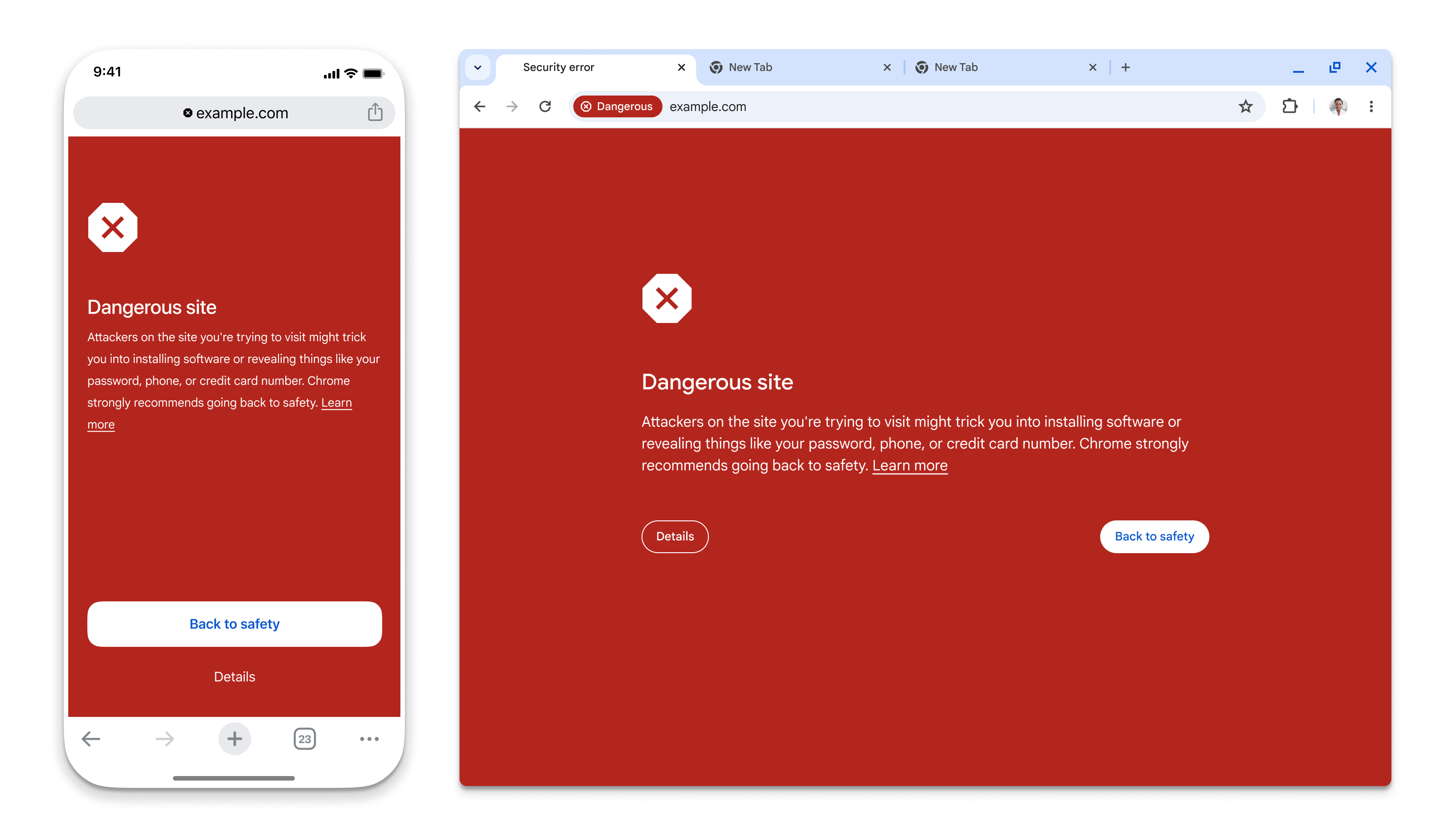
Enlarge/ Google’s safe browsing warning is not subtle.
Google Chrome’s “Safe Browsing” feature—the thing that pops up a giant red screen when you try to visit a malicious website—is getting real-time updates for all users. Google announced the change on the Google Security Blog. Real-time protection naturally means sending URL data to some far-off server, but Google says it will use “privacy-preserving URL protection” so it won’t get a list of your entire browsing history. (Not that Chrome doesn’t already have features that log your history or track you.)
Safe Browsing basically boils down to checking your current website against a list of known bad sites. Google’s old implementation happened locally, which had the benefit of not sending your entire browsing history to Google, but that meant downloading the list of bad sites at 30- to 60-minute intervals. There are a few problems with local downloads. First, Google says the majority of bad sites exist for “less than 10 minutes,” so a 30-minute update time isn’t going to catch them. Second, the list of all bad websites on the entire Internet is going to be very large and constantly growing, and Google already says that “not all devices have the resources necessary to maintain this growing list.”
If you really want to shut down malicious sites, what you want is real-time checking against a remote server. There are a lot of bad ways you could do this. One way would be to just send every URL to the remote server, and you’d basically double Internet website traffic for all of Chrome’s 5 billion users. To cut down on those server requests, Chrome is instead going to download a list of known good sites, and that will cover the vast majority of web traffic. Only the small, unheard-of sites will be subject to a server check, and even then, Chrome will keep a cache of your recent small site checks, so you’ll only check against the server the first time.
When you’re not on the known-safe-site list or recent cache, info about your web URL will be headed to some remote server, but Google says it won’t be able to see your web history. Google does all of its URL checking against hashes, rather than the plain-text URL. Previously, Google offered an opt-in “enhanced protection” mode for safe browsing, which offered more up-to-date malicious site blocking in exchange for “sharing more security-related data” with Google, but the company thinks this new real-time mode is privacy-preserving enough to roll out to everyone by default. The “Enhanced” mode is still sticking around since that allows for “deep scans for suspicious files and extra protection from suspicious Chrome extensions.”
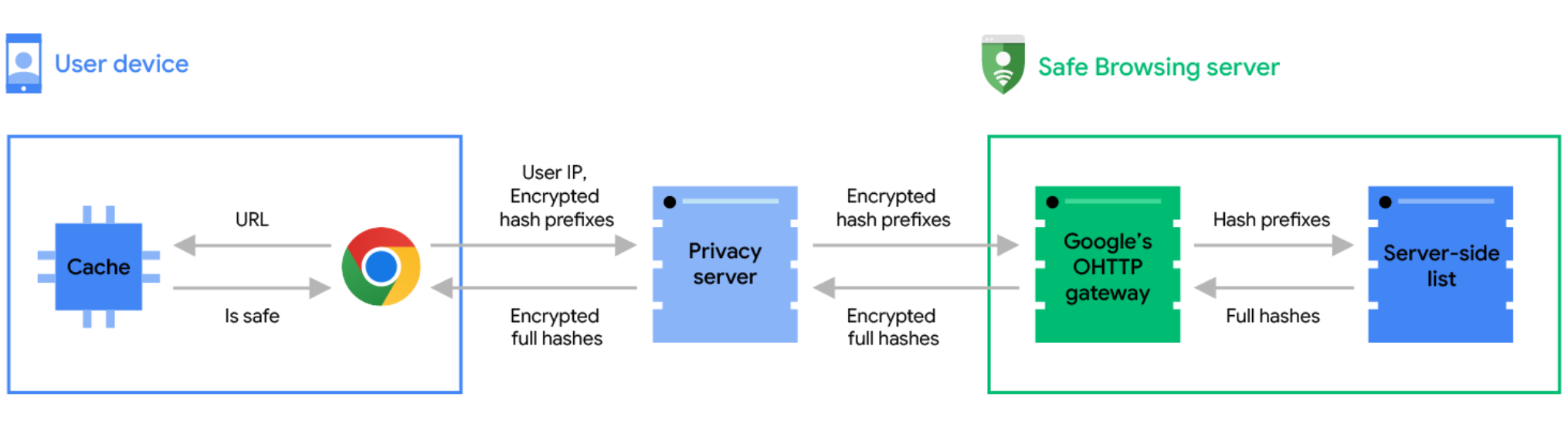
Enlarge/ Google’s diagram of how the whole process works.
Interestingly, the privacy scheme involves a relay server that will be run by a third party. Google says, “In order to preserve user privacy, we have partnered with Fastly, an edge cloud platform that provides content delivery, edge compute, security, and observability services, to operate an Oblivious HTTP (OHTTP) privacy server between Chrome and Safe Browsing.”
For now, Google’s remote checks, when they happen, will mean some latency while your safety check completes, but Google says it’s “in the process of introducing an asynchronous mechanism, which will allow the site to load while the real-time check is in progress. This will improve the user experience, as the real-time check won’t block page load.”
The feature should be live in the latest Chrome release for desktop, Android, and iOS. If you don’t want it, you can turn it off in the “Privacy and security” section of the Chrome settings.
Walmart resurrects the M1 MacBook Air as an entry-level $699 laptop
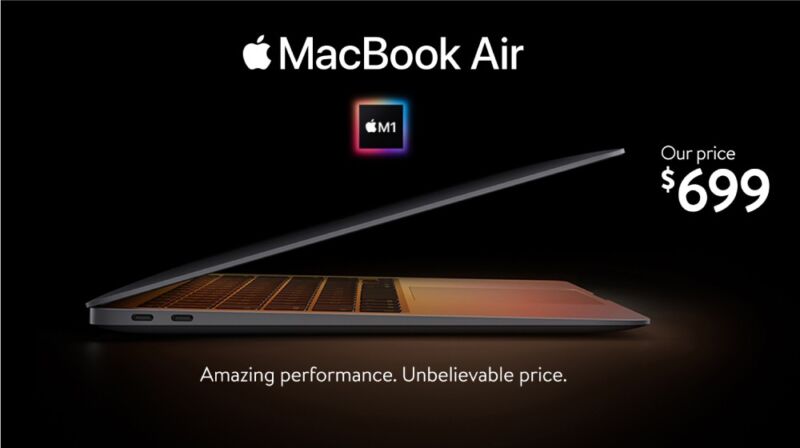
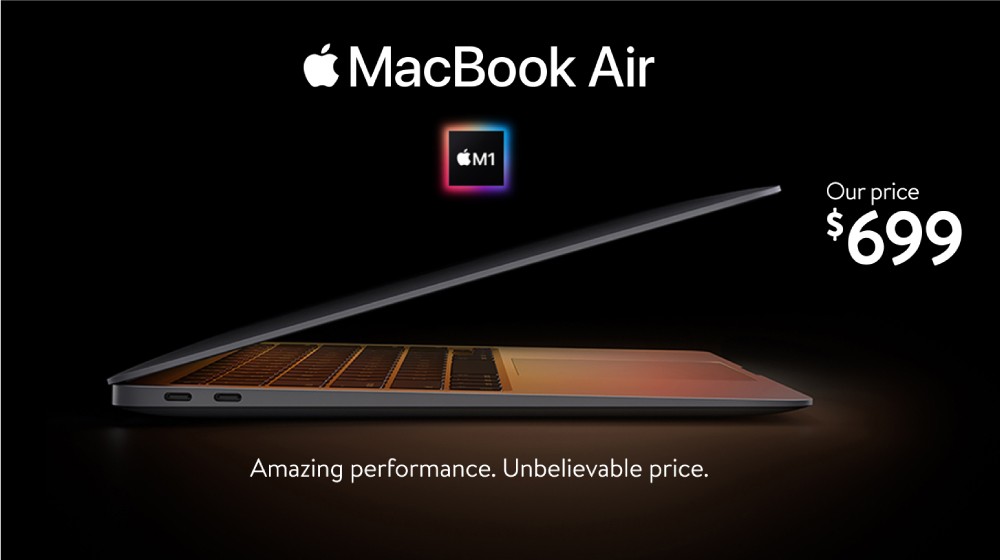
Enlarge/ The M1 MacBook Air returns as a Walmart budget laptop.
Apple no longer sells the M1 MacBook Air as of earlier this month, discontinuing it and offering the M2 version of the Air as its entry-level model instead. But it looks like the M1 Air may live on, at least for a while—US retailer Walmart made a point of announcing today that it would carry and sell the M1 Air in its online store and at “select” retail locations for a much-lowered price of $699.
This is lower than the $999 that Apple was asking for the laptop just a few weeks ago, and it’s lower than the $759 that the M1 Air goes for in Apple’s refurbished store. These prices are all for the base configuration of the M1 Air, with 8GB of memory and 256GB of storage. Walmart offers all three color finishes for the M1 Air—silver, gold, and space gray—but doesn’t directly sell any versions with more RAM or storage.
This isn’t the Air config we’d recommend to most enthusiasts—for them, an M3 Air or a refurbished M2 model with more RAM and storage come with enough benefits to be worth the extra cost. But it is a surprisingly low price for what remains a solid entry-level laptop, especially given that Walmart doesn’t offer any other Macs in its stores (other Macs on Walmart’s website are available from third-party sellers).
The strongest argument against buying an M1 Air in 2024 is software support. Historically, Apple has provided new macOS versions and security updates based on the date that new Macs were introduced, which for the M1 Air is November of 2020. Apple could change its approach to software updates in the Apple Silicon era, but it has been fairly consistent on this point throughout the PowerPC and Intel eras.
This means that an M1 MacBook Air purchased today could end up receiving two or three fewer years of software update support than an M3 Air purchased on the same day.
Still, this is unlikely to be a problem in the near future. Apple is still supporting the last couple of model years of Intel Macs, so we’re almost certainly at least a few years out from any Apple Silicon models losing support. But it is something to keep in mind as you consider long-term use, handing the laptop down to other family members or friends, or future resale and trade-in value.
https://arstechnica.com/?p=2010465
Unreleased preview of Microsoft’s OS/2 2.0 is a glimpse down a road not taken
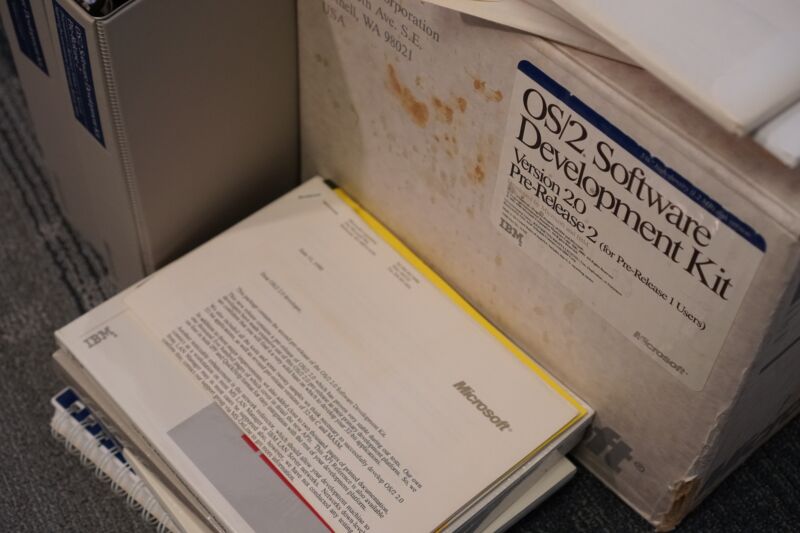
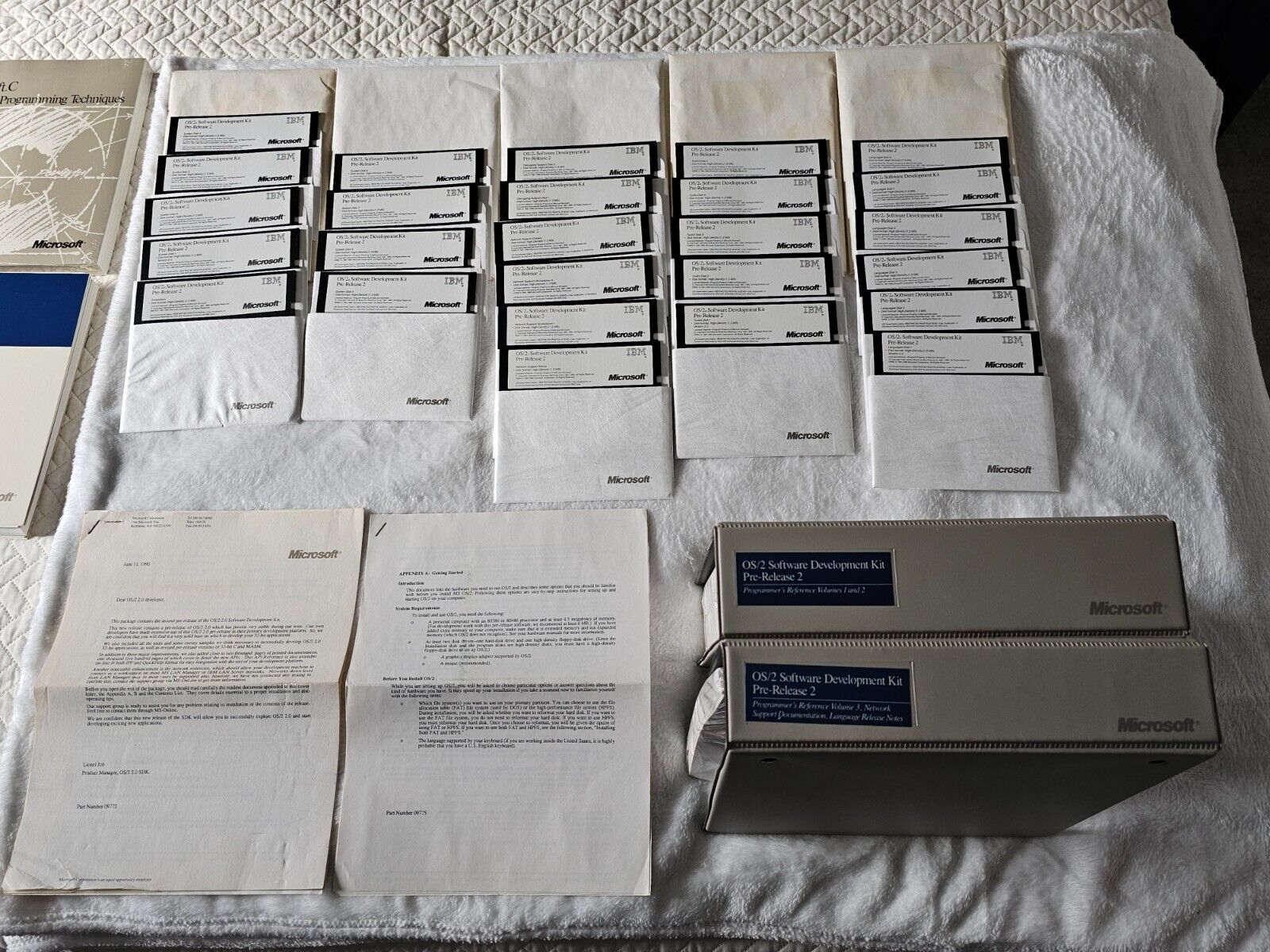
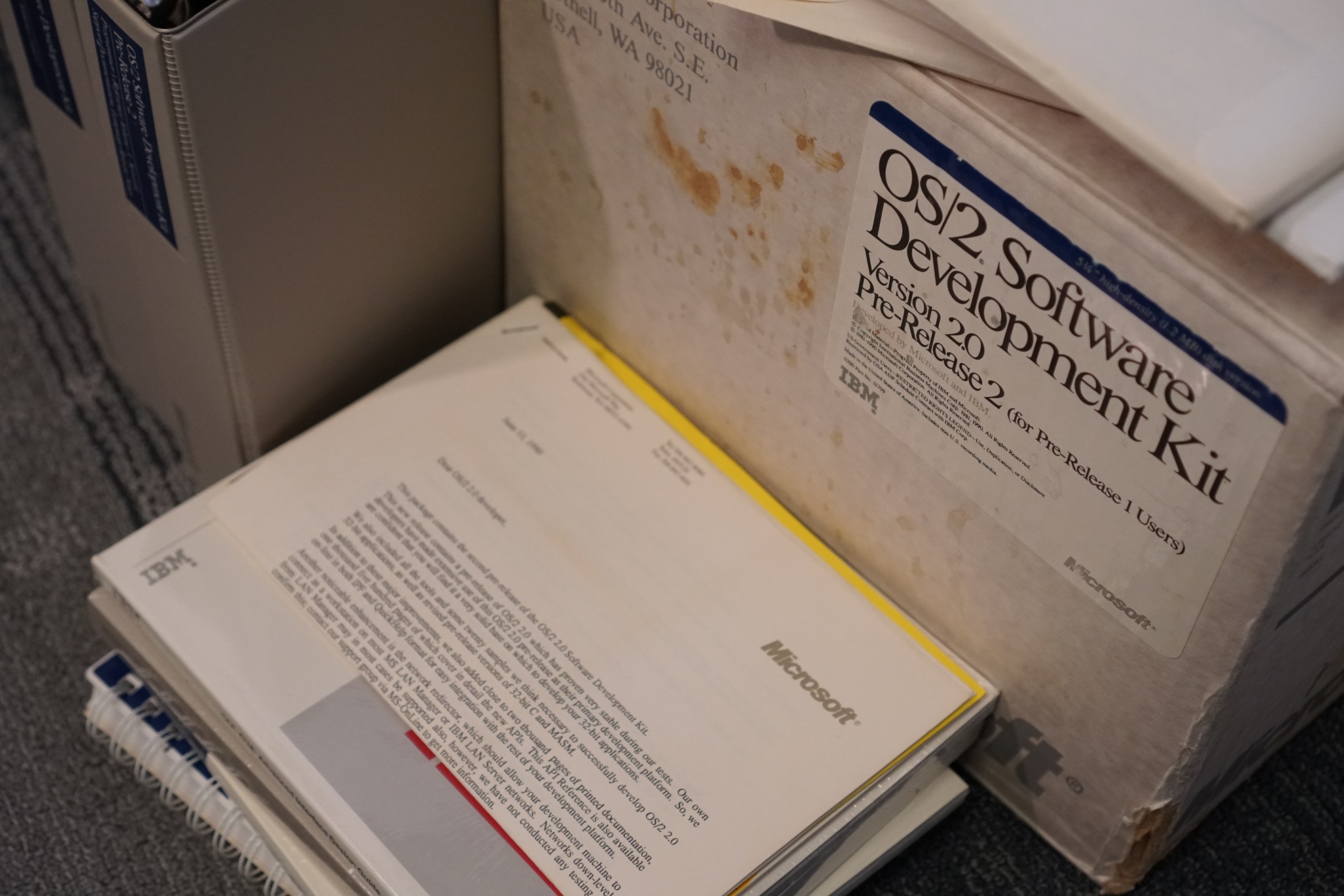
Enlarge/ This big, weathered box contains an oddball piece of PC history: one of the last builds of IBM’s OS/2 that Microsoft worked on before pivoting all of its attention to Windows.
In the annals of PC history, IBM’s OS/2 represents a road not taken. Developed in the waning days of IBM’s partnership with Microsoft—the same partnership that had given us a decade or so of MS-DOS and PC-DOS—OS/2 was meant to improve on areas where DOS was falling short on modern systems. Better memory management, multitasking capabilities, and a usable GUI were all among the features introduced in version 1.x.
But Microsoft was frustrated with some of IBM’s goals and demands, and the company continued to develop an operating system called Windows on its own. Where IBM wanted OS/2 to be used mainly to boost IBM-made PCs and designed it around the limitations of Intel’s 80286 CPU, Windows was being created with the booming market for PC-compatible clones in mind. Windows 1.x and 2.x failed to make much of a dent, but 1990’s Windows 3.0 was a hit, and it came preinstalled on many consumer PCs; Microsoft and IBM broke off their partnership shortly afterward, making OS/2 version 1.2 the last one publicly released and sold with Microsoft’s involvement.
But Microsoft had done a lot of work on version 2.0 of OS/2 at the same time as it was developing Windows. It was far enough along that preview screenshots appeared in PC Magazine, and early builds were shipped to developers who could pay for them, but it was never formally released to the public.
But software archaeologist Neozeed recently published a stable internal preview of Microsoft’s OS/2 2.0 to the Internet Archive, along with working virtual machine disk images for VMware and 86Box. The preview, bought by Brian Ledbetter on eBay for $650 plus $15.26 in shipping, dates to July 1990 and would have cost developers who wanted it a whopping $2,600. A lot to pay for a version of an operating system that would never see the light of day!
The Microsoft-developed build of OS/2 2.0 bears only a passing resemblance to the 32-bit version of OS/2 2.0 that IBM finally shipped on its own in April 1992. Neozeed has published a more thorough exploration of Microsoft’s version, digging around in its guts and getting some early Windows software running (the ability to run DOS and Windows apps was simultaneously a selling point of OS/2 and a reason for developers not to create OS/2-specific apps, one of the things that helped to doom OS/2 in the end). It’s a fascinating detail from a turning point in the history of the PC as we know it today, but as a usable desktop operating system, it leaves something to be desired.
Enlarge/ All 26 disks of the OS/2 2.0 preview, plus hefty documentation manuals. There are some things about the ’90s I don’t miss.
This unreleased Microsoft-developed OS/2 build isn’t the first piece of Microsoft-related software history that has been excavated in the last few months. In January, an Internet Archive user discovered and uploaded an early build of 86-DOS, the software that Microsoft bought and turned into MS-DOS/PC-DOS for the original IBM PC 5150. Funnily enough, these unreleased previews serve as bookends for IBM and Microsoft’s often-contentious partnership.
As part of the “divorce settlement” between Microsoft and IBM, IBM would take over the development and maintenance of OS/2 1.x and 2.x while Microsoft continued to work on a more advanced far-future version 3.0 of OS/2. This operating system was never released as OS/2, but it would eventually become Windows NT, Microsoft’s more stable business-centric version of Windows. Windows NT merged with the consumer versions of Windows in the early 2000s with Windows 2000 and Windows XP, and those versions gradually evolved into Windows as we know it today.
It has been 18 years since IBM formally discontinued its last release of OS/2, but as so often happens in computing, the software has found a way to live on. ArcaOS is a semi-modernized, intermittently updated branch of OS/2 updated to run on modern hardware while still supporting the ability to run MS-DOS and 16-bit Windows apps.