Yamaha’s “Remote Cheerer” brings fan applause back to empty stadiums
[embedded content]
Yamaha staged a field test for its Remote Cheerer at Japan’s Shizuoka Stadium ECOPA on May 13.
This week, Yamaha announced a plan to put fans back in the stadiums for major sporting events this summer—virtually, at least.
The company’s new smartphone application, Remote Cheerer, is designed to allow sports fans to cheer from home in a way their teams can hear in the stadium. The app itself looks and functions much like a typical soundboard app you might use to summon up a Homer Simpson D’oh!—but instead of just making a noise on your phone, it integrates the cheers of potentially tens of thousands of fans and plays them on loudspeakers at the stadium where their teams are playing.
When fully integrated at the stadium itself, the application does a better job of emulating normal crowd noise than the short description suggests. For Yamaha’s field test at Shizuoka Stadium, there were amplified loudspeakers placed in each seating section of the stadium, and fans’ cheers were localized to the section where they would sit, had they been able to attend the football match personally. The result is a much more diffuse and authentic-sounding crowd noise.
Keisuke Matsubayashi of the Shizuoka Stadium ECOPA described the experience like this:
At one point during the system field test, I closed my eyes and it felt like the cheering fans were right there in the stadium with me. That’s when I knew that this system had the potential to cheer players on even in a stadium of this size.
In addition to a preset selection of cheers and boos—which can be customized by the venue to be applicable to the teams that are playing—the app offers repeated-tap options for the crowd to engage in rhythmic clapping or chanting, which should reproduce the imperfect timing of real-life chants and stomps.
How a rejected My Little Pony game helped save a historic tournament
Enlarge/ These aren’t exactly ponies, but we’ll get to that
This is a coronavirus story but with a happy ending. We could all use a happy ending right now, remember those? It all really starts over seven years ago, long before “pandemic” was a word you had to hear every day, with a group of fans of My Little Pony: Friendship Is Magic TV series.
Back in this more innocent time, you might have hopped on the Internet, not to read the latest virus news, but instead to find an article earnestly explaining to you about bronies and how young adults were really connecting with this cartoon about ponies and friendship. You might have rolled your eyes a bit, but don’t judge!
(Full disclosure, my youngest daughter is a super fan, and I’ve probably seen just about every episode in bits and pieces by now. It’s the polar opposite of the Hasbro toy commercials masquerading as shows from my childhood; well-written, thoughtful, and nuanced, with themes that don’t insult your intelligence. I can understand how anyone would want to connect with a world like that. The cartoons I watched frankly suck in comparison.)
These particular fans had an interest in things like gaming, storytelling, and animation, and they thought what better way to express their fandom than to making a My Little Pony-themed fighting game? They called themselves Mane6, and using an off-the-shelf package called Fighter Maker 2k, they started building a game. As they released development footage, their game picked up buzz with the pony fan community, and they got encouraged to take it seriously and try to deliver as polished a product as they could with their limited experience and the limitations of the tool they were using.
Before I spoil the rest of the story, I highly recommend this documentary about what happened next if you have a free 40 minutes to spare in quarantine:
[embedded content]
Making Them’s Fightin’ Herds: The Story of Mane6.
On with the spoilers, but I think we all see this plot twist coming: Hasbro’s lawyers get word of the game, and out comes the lawyers and the cease-and-desist. Years of work down the drain, game over. Their fan IP is off limits, and the old janky game engine they were using wasn’t very good to begin with. It feels like there isn’t anything to salvage, and Mane6 was ready to just give up.
Then Mane6 got an offer of help from an unexpected source. On February 8, 2013 Lauren Faust, the creator of My Little Pony: Friendship Is Magic reaches out to the superfans over Twitter. She’d been following the game’s progress along with the rest of the community, she knew what it was like to work that hard on a passion project, and she asked them, “[Do you] want some original characters to make a new game with?”
I’d like to pause the story for a moment to really appreciate what an awesome thing Lauren did here. She didn’t know these guys, she didn’t owe them a thing, and they were playing with intellectual property she created without permission. We’ve seen time and time again what normally happens in these situations, and it’s not “creator offers to draw new art for fan project,” let alone assist with all of the work that goes into not just original character design, but all of the animation a fighting game requires.
How could the people at Mane6 not take Lauren up on this offer? They had to. Lauren talks about exactly how much work it was in the documentary above—suffice it to say it was a lot, but she followed through on her promise.
So that’s one half of the puzzle saved in an amazing way, but they’re still stuck with this old game creator and all of the limitations it comes with. The solution arrives when Lab Zero Games, creator of indie fighting game Skullgirls, offers to give Mane6 their engine for free as part of a stretch goal on a kickstarter for Skullgirls DLC. Fans step up, and Mane6 has a modern game engine to work with, and no more limitations.
Llama on sheep violence
Rope that deer
Bear boss battle
This pixel art adventure mode is called the Salt Mines
Get some swag
This is where we get to the part where Mane6 gets to help save the day. With Lauren’s help and the Skullgirls engine they make a new, original fighting game called Them’s Fightin’ Herds. Characters are still animals, but they now include species like a sheep, a llama, a cow, a deer, and a dragon. There’s a deep and free form combo system, an in-depth tutorial to teach you how to play, a slick pixel art based single player adventure mode, and, most importantly for this story, the engine gives them GGPO.
GGPO, which stands for Good Game, Peace Out, is an open source software development kit that gives your game peer-to-peer networking called rollback. For the most comprehensive and nerdy explanation of exactly how rollback works on the Internet you can read our guest feature here: Explaining how fighting games use delay-based and rollback netcode.
(“Fantastic article,” says long time Ars reader and subscriber Ragashingo. “I don’t care for fighting games, but the detail here and the examples of how designing animations properly can hide network lag was a lot of fun to read.”)
For those who don’t want the deep-dive explanation here’s what the GGPO documentation says:
Traditional techniques account for network transmission time by adding delay to a players input, resulting in a sluggish, laggy game-feel. Rollback networking uses input prediction and speculative execution to send player inputs to the game immediately, providing the illusion of a zero-latency network. Using rollback, the same timings, reactions visual and audio queues, and muscle memory your players build up playing offline translate directly online.
So rollback games let you play fighting games, online, and have them feel essentially the same as offline. The other style of network code in fighting games, delay based, doesn’t allow that. And unfortunately delay based games are more common, especially with the bigger, more popular titles.
That’s when this becomes the coronavirus story I promised.
Every summer, fighting game fans from around the world gather in Las Vegas for Evo, the biggest fighting game tournament of the year. Thousands of people enter the games being featured.
In 2020 the main games were to be Super Smash Bros. Ultimate, Street Fighter V, Tekken 7, Under Night In Birth, Samurai Shodown, Soul Calibur VI, and Grandblue Fantasy Versus.
These games all have one thing in common: their network code sucks. Street Fighter at least uses rollback, but unfortunately not a very good version, and is prone to issues with unstable network connections. The rest are all delay based, and quickly feel terrible under anything but the most ideal network states.
The pandemic has canceled Evo, like every other event. The biggest and most storied tournament series of the fighting game community wasn’t immune to the virus. Evo promised an online event to help fill the void, but everyone wondered, how could they possibly do that when the netcode for every game they were to feature is garbage? There’s not much prestige in winning a game of skill because your opponent saw your character stuttering around the stage.
The answer came last night as Evo announced their online tournament would now feature four new titles instead. Mortal Kombat 11 and Killer Instinct, both based around robust, in-house rollback code, and Skullgirls and Them’s Fightin’ Herds, with their GGPO rollback framework.
The original titles (minus Smash Bros which is dropped entirely) will have some kind of exhibition component, the details still unannounced, but the real online play will fall on the shoulders of the newly added games, which were all clearly chosen for their superior online matches. The event info and signup details are coming soon, but it appears to be spread over five consecutive weekends.
It won’t be the same as the offline Evo experience, but thanks to rollback netcode, and some My Little Pony fans who didn’t give up in the face of adversity, there’s a solid lineup of games that can represent real, competitive online play, where the rest of the big games failed. I know I’ll be tuning in, and while the other three games are all solid in their own right, I’m familiar with their play already. Having a new game that’s relatively unexplored being played by high level players on a world stage for the first time is a welcome treat.
A happy ending is the kind of magic we could all use more of right now.
(As an aside, Mortal Kombat 11 is the only currently supported AAA fighting game to feature really good rollback network code, and it was all done in-house. If you’re interested in the process behind how they did that this GDC talk on the topic is a great watch.)
https://arstechnica.com/?p=1675891
The FCC ratified Wi-Fi 6E this morning
Enlarge/ Expect to see an “e” tacked onto this logo somewhere in the near future, as an additional 1200MHz of spectrum is now available to Wi-Fi 6 in the USA.
During the Federal Communications Commission’s monthly meeting today, it ratified unlicensed use of the 6GHz radio frequency spectrum in the USA. This decision opens the way for the proposed Wi-Fi 6E standard to move forward.
Industry giants Intel and Broadcom began planning for this move two years ago. Broadcom released its first Wi-Fi 6E chipset in February, targeted at mobile devices like smartphones and tablets. Intel hasn’t released any actual products using it yet, but in discussions with Ars, an Intel rep confirmed that they’re on the way.
Intel’s spokesperson said that the company’s own working prototype devices were part of the presentations originally given to the FCC to facilitate the decision-making process and described Intel’s and Broadcom’s work on devices prior to the FCC’s decision as a risky but rewarding two-year investment on both companies’ part.
The rules so far
Although the FCC was widely expected to unanimously ratify unlicensed use of 6GHz spectrum in general, the associated usage rules were less certain. Until today, the 6GHz spectrum was for licensed use only—but that doesn’t mean it isn’t already in use.
Licensed use of the 6GHz spectrum includes point-to-point microwave backhaul (used by commercial wireless providers), telephone and utility communication, and control links. It also includes Cable Television Relay Links—which are mobile links used by newscasters doing onsite live reporting—and radio astronomy.
The truly excellent news for Wi-Fi 6E backers—and future users—is that the FCC has ratified unlicensed use of the entire 1.2GHz spectrum for low-power indoor devices. Separating unlicensed outdoor and high-powered usage from indoor and low power allows for the maximum utility of spectrum in the most common (and most crowded) Wi-Fi environments, while preserving the utility of incumbent licensed users.
FCC Commissioner Michael O’Rielly’s statement this morning discusses this in greater detail, making it clear that Automatic Frequency Control—the type of technology that limits use of 5GHz on DFS frequencies in modern Wi-Fi—will not be required for most devices on the 6GHz band:
All of these enormous benefits can only be realized by authorizing both standard-powered operations and LPI devices, which unlike the higher-power systems do not need an AFC.
While there has been much debate about whether LPI use can cause interference to fixed networks, electronic news gathering, and other incumbent uses, the studies in the record and the analysis of the talented professionals in the Office of Engineering and Technology are quite clear: unlicensed use—with the technical rules set in this item—can be introduced without causing harmful interference.
Commissioner Geoffrey Starks points out that even those who aren’t early adopters of Wi-Fi 6E technology stand to benefit, since those who do will compete less for available 5GHz spectrum:
Even for those who can’t afford the new equipment that will take advantage of the new spectrum and the latest iteration of WiFi, speeds for their devices should increase as existing WiFi traffic moves to the new spectrum… Wi-Fi channels within their homes [will] become less congested, and data flows more freely.
The FCC’s vote to ratify unlicensed 6GHz use was bi-partisan and unanimous, with supporting statements made by organizations including the Internet &Television Association, Charter, Comcast, Public Knowledge, and the Wi-Fi Alliance.
Still to come
With general use of 6GHz secured, the FCC expects to see tremendous offloads of current mobile traffic to local Wi-Fi—Commissioner O’Rielly cited a Wi-Fi Forward assessment when claiming that 76 percent of all mobile traffic will be offloaded to Wi-Fi in the next two years.
Not all of O’Rielly’s suggestions were ratified today. In particular, the commission is still deliberating extensions to allow Very Low Power (VLP) devices to operate outdoors without use of automated frequency control. This would encourage the use of 6GHz for wearable devices, such as VR headsets and smartwatches, which would only need extremely short-range connections to linked devices.
With usable rules for unlicensed 6GHz spectrum use defined, we broadly expect to see Wi-Fi 6E devices beginning to become available to consumers in late 2020 or early 2021.
https://arstechnica.com/?p=1670480
The value of lives saved by social distancing outweighs the costs
Enlarge/ Economic activity vs. social distancing is a careful balancing act.
As Ars reported recently, evidence from the 1918 flu pandemic suggests that cities with more aggressive lockdown responses had stronger economic recoveries.
There’s more than one way to think about the economics of lockdowns, and a paper due to be published in the Journal of Benefit-Cost Analysis has an entirely different approach. It accepts that lockdowns will hurt the economy compared to business-as-usual but calculates whether that cost is outweighed by the lives that will be saved by social-distancing measures.
The answer is yes—by $5.2 trillion. That’s an estimate that changes based on a range of different assumptions, but it represents what the authors consider the most realistic scenario.
How much is a life worth?
Putting a dollar value on a life can feel icky, but people implicitly act as though lives have a high (although not infinite) value. For instance, throwing all the world’s resources at saving the life of one person is not a choice we’d be likely to make. Yet we’re clearly prepared to pay quite a high price for both life and health.
US federal agency guidelines have needed to put a price on life in order to set policy on things that sometimes kill people, like driving. To do this, they use a figure that estimates how much extra money people will pay to save an additional life. For instance, take the higher pay that comes with riskier jobs: when you look at how much extra a group of 10,000 workers gets paid when their job comes with a higher risk, it comes out to around $10 million for each additional probable death in the group.
That figure of $10 million, the so-called “value of a statistical life,” is the figure used by federal agencies, and it’s also the figure used by economist Linda Thunström and her colleagues when they calculate the cost and benefit of social distancing. They start out by gathering a bunch of other benchmark numbers that represent realistic or middle-of-the-road scenarios for the pandemic—like assuming that social distancing will reduce contact between people by an average 38 percent.
Using that and other benchmark numbers, the researchers calculate that social distancing will save about 1.24 million lives compared to a scenario with no distancing. This translates to a saving of $12.4 trillion, based on the $10 million value of a statistical life used in policy. To work out how much this benefit weighs against the cost to the economy, the researchers take the recent Goldman Sachs prediction that social distancing will cause US GDP to shrink by 6.2 percent, leading to losses of $13.7 trillion.
They next had to calculate the impact the pandemic would have on the economy if we rode it out without any social distancing. Estimates made by others ranged from a loss of 1.5 to 8.4 percent of the GDP, so the researchers used a conservative value: 2 percent. This produces a smaller (yet still massive) hit of $6.49 trillion. Combined with the $13.7 trillion saved by the lack of social distancing, this makes the cost of social distancing $7.21 trillion.
Subtracting this from their earlier $12.4 trillion figure leads to their headline estimate. “Under our benchmark assumptions,” write Thunström and colleagues, “social distancing generates net benefits of about $5.16 trillion.”
Uncertainty everywhere
With new information rolling in all the time, all the numbers of the coronavirus pandemic are inherently slippery and subject to updates. Because of this, Thunström and her colleagues take their basic calculation and throw a range of different numbers at it to see where its boundaries lie. This analysis works out where the “break-even” point is for a range of different parameters—the point at which the value of lives saved outweighs the cost of social distancing.
For instance, if social distancing wasn’t as effective at slowing disease spread but came with the same economic cost, the results wouldn’t shake out the same way: the number of lives saved would be outweighed by economic damage. The researchers estimate that, holding everything else equal, social distancing would only need to cut out one in five interactions to be worth the cost—but that’s a result based on so many assumptions that it shouldn’t be read as a prescription for how much social distancing to aim for.
On the other hand, if the virus is more infectious than their initial assumptions, social distancing would need to be way more effective for the economic costs to pay off.
The estimate of 1.24 million lives saved seems pretty high. But it’s not necessarily outlandish—a model published by a team at Imperial College London estimated that if the pandemic were allowed to rampage through the United States unmitigated, it would lead to around 2.2 million deaths. Current estimates suggest that the total death toll by August may be more in the region of 60,000 to 124,000 deaths—if (and it’s a huge if) social-distancing measures stay in place. That’s a horrific number, but at its most optimistic, it means 2.14 million fewer deaths than that worst-case scenario. This means that the estimate of 1.24 million lives saved could be on the low side.
Importantly, the researchers don’t question their assumption that social distancing will lead to a greater decline in GDP or a slower economic recovery compared to business as usual. That assumption doesn’t tie in with other recent research suggesting that social distancing may, in fact, be the best thing for the economy itself. If the economy recovers faster with social distancing than without, this research would actually be underestimating the economic benefits of lockdown.
There are reams of questions still to be answered about the economic results of the pandemic, and models like these will need to be tweaked, repeated, and refined as more information rolls in. But right now, a range of differenteconomicanalyses are questioning the knee-jerk assumption that social distancing is a worse economic outcome than business as usual. And a poll of economists at US universities saw a unanimous response: restarting the economy should only be on the cards with a huge increase in testing capacity and a well-formed plan to control new outbreaks.
Mermaids, mayhem, and masturbation: The Lighthouse is now on Amazon Prime
While millions of Americans are self-isolating at home—and their families are getting on their last nerve, and they would do anything just to go sit at a sports bar for a couple hours by themselves—what movie does Amazon decide to offer for free, starting today, to Prime users? Something about crowds of friends getting together and laughing? About people frolicking in the great outdoors? A 90-minute montage of strangers shaking their sweaty hands? Go on, guess!
No, it’s The Lighthouse, about two guys in the 1890s going stir crazy from being trapped in a lighthouse together for months on end!
HAHAHAHAHAHA!!!
To the lighthouse.
The face of a man who is ready for a barrel of laughs.
Get used to that view, boy-oh.
Getting exercise outdoors.
So much of this movie looks like it smells bad.
You don’t want to know what he finds in there.
This f*&ing seagull.
Not OSHA compliant.
“The hell are you doing?”
“Yer fond of me lobster, ain’t ye?”
Don’t cross this man.
Does this remind anyone else of Guy Maddin? Maybe that’s just me.
“Boredom makes men to villains, and the water goes quick, lad, vanished. The only med’cine is drink.” He’s still shoveling coal, btw.
The wickie’s nightmare.
Not all bad.
Yup, that’s a mermaid.
More arguing.
More more arguing.
I’m not even… I don’t know.
Man confronts God.
Just one of countless memes spawned by The Lighthouse. (I bet going so quickly from black-and-white to color probably seared your eyes. Sorry.)
Is this cruel irony the work of vengeful heavens? Or is it just that Amazon and production company A24 scheduled this months ago after The Lighthouse wrapped up its 2019 theatrical run? Either way, I’m here to tell you The Lighthouse will fit these WTF times like a seagull’s beak can fit into your eye socket. And I can just about guarantee that when you’re done watching it, you’ll look around at your life and say, “Well, this could all be worse by orders of magnitude.”
Light on plot, heavy on bonkers
The Lighthouse is a parade of awfulness, and it’s hilarious. The head lighthouse dude (Willem Dafoe) is a crusty sonuvabitch who gets a kick out of tormenting the new guy (Robert Pattinson), possibly because the new guy isn’t an effective “wickie.” Or maybe he just finds Pattison’s dishiness offensive.
The new guy spends his days stirring coal, emptying chamberpots, and being harassed by a seagull. The old guy, meanwhile, likes to stare directly into the lighthouse’s kajillion-watt lamp before crafting a new way to bust the new guy’s balls. Off-hours are devoted to drinking, farting, masturbating, lusting after mermaids, and possibly having visions of eldritch sea gods. Or not. Our Guys are either beset by supernatural forces or are just wildly incompatible roommates. Doors creak, wind howls. Drowning nightmares and unholy visions ensue, along with a thousand memes based around ye olde dick jokes and RPatz looking miserable. One of my coworkers is planning on replacing his next Thanksgiving blessing with Willem Dafoe’s speech summoning Triton. The accents are bizarre, and the facial hair is tremendous.
“O what Protean forms swim up from men’s minds”
Why do awful things and awful people make us laugh? Theories abound. Here’s one: we secretly wish we could visit our crapulence upon others without consequence, and so we scratch that itch by watching movies about dreadful people being dreadful. But I hope I don’t secretly long to be Bad Lieutenant, screaming at little old ladies while waving a .44 Magnum (although admit it, a coked-up Nic Cage threatening senior citizens with a giant revolver gave you a giggle).
Another theory about why we laugh during horror movies—and The Lighthouse is a horror movie even though I cackled so much my face hurt and my bladder control was tested—is that we don’t want anyone else to know that we’re scared. So we hide that with laughter. We announce to everyone around us, “I’m not scared!”
But the theory that sits best with me is incongruity. We laugh at things we know are wrong—irrational, immoral, atypical, blasphemous horrors—as a way to acknowledge, to whomever will listen, how much we know these things are wrong. Mental Floss has this breezy summary:
[S]ome theorists argue that we laugh because horror and humor have in their roots the same phenomena: incongruity and transgression. We laugh when something is incongruous, when it goes against our expectations, or breaks a social law (when a character does or says something inappropriate, for instance). But in another context, those same things are perceived as scary—usually when something veers from harmless incongruity into potentially dangerous territory.
So a duck wearing a hat and your Lyft driver wearing a tanktop made of human flesh are kind of the same? Sure, I’ll buy that. Comedy and horror both involve setting up a universe with certain expectations before either subverting those expectations or fulfilling them beyond all reason. That seems as good an explanation as any for how Jordan Peele glides so easily from funny to scary. (Re-watch Key & Peele and tell me that plenty of them weren’t horror all along. I’ll wait.)
“How long have we been on this rock?”
But anyway, back to The Lighthouse. The movie is helmed by director/co-writer Robert Eggers, who taught us to live deliciously with his 2015 debut feature, The Witch (OK, here’s the real trailer, but you get my point about horror and comedy). Both films involve a conflict between a young skeptic and an authoritarian whose belief in the supernatural is unwavering. Both films convinced me they are meticulous reconstructions not just of the clothing and locations of bygone eras but of their attitudes and dialect. Both films use dialogue drawn—sometimes verbatim—from contemporary sources, and one imagines the scripts are filled with random capitalization and punctuation that has fallen into disuse.
Enlarge/ There ain’t enough room on this poster for the two of us.
When you’re isolating at home and watching The Lighthouse in the dark late at night while eating pinto beans straight from the tin, don’t adjust your set. Even though the movie came out in 2019, Eggers shot it in black-and-white with a 4:3 screen ratio (actually 1.19:1, but who’s counting?). The effect not only harkens back to cinema’s early days—which are right around the corner for the wickies—but mimics the claustrophobia of the lighthouse itself. Even the movie’s poster doesn’t give our two players enough room. As for the black-and-white—our stupid world is in color, so getting to see stuff in black-and-white is always a reprieve. Give your eyeballs a rest.
“If I had a steak…”
And now I defend Robert Pattinson. If the Internet is to be believed, people who think of him only as the sparkle-boi vampire from Twilight are drinking heavily, losing sleep, and failing their lovers in anticipation of his turn in next year’s The Batman. But we’re all friends here, and let’s be honest—how much of the criticism of Twilight was just kink-shaming thirsty moms? Anyway, RPatz’s resume since then includes 1) a post-apocalyptic yokel in The Rover, 2) getting to say “the jungle is hell, but one kind of likes it” in The Lost City of Z from the director of Ad Astra, 3) going to space for Claire Denis in High Life, and 4) being scumbag-righteous in Good Time from the Safdie brothers, who went on to make a little movie called Uncut Motherf&*$ing Gems (NSFW). So let’s quit pretending he’s trash.
As for Willem Dafoe—his snub at the 2019 Oscars is rivaled only by Adam Sandler’s.
Let us draw to a close with the elephant in the room: maybe praising a movie about confinement and claustrophobia while so many of us are self-isolating could—just maybe sorta kinda—come across as insensitive. But millions of Americans with essential jobs are not able to self-isolate. And depriving them of seeing Willem Dafoe fry his brain from staring at a giant lightbulb would be unconscionable.
The exFAT filesystem is coming to Linux—Paragon software’s not happy about it
Enlarge/ Proprietary filesystem vendor Paragon Software seems to feel threatened by the pending inclusion of a Microsoft-sanctioned exFAT in the Linux 5.7 kernel.
When software and operating system giant Microsoft announced its support for inclusion of the exFAT filesystem directly into the Linux kernel back in August, it didn’t get a ton of press coverage. But filesystem vendor Paragon Software clearly noticed this month’s merge of the Microsoft-approved, largely Samsung-authored version of exFAT into the VFS for-next repository, which will in turn merge into Linux 5.7—and Paragon doesn’t seem happy about it.
Yesterday, Paragon issued a press release about European gateway-modem vendor Sagemcom adopting its version of exFAT into an upcoming series of Linux-based routers. Unfortunately, it chose to preface the announcement with a stream of FUD (Fear, Uncertainty, and Doubt) that wouldn’t have looked out of place on Steve Ballmer’s letterhead in the 1990s.
Breaking down the FUD
Paragon described its arguments against open source software—which appeared directly in my inbox—as an “article (available for publication in any form) explaining why the open source model didn’t work in 3 cases.”
All three of Paragon’s offered cases were curious examples, at best.
Case one: Android
Let’s first look into some cases where filesystems similar to exFAT were supported in Unix derivatives and how that worked from an open source perspective.
The most sound case is Android, which creates a native Linux ext4FS container to run apps from FAT formatted flash cards (3). This shows the inability (or unwillingness based on the realistic estimation of a needed effort) of software giant Google to make its own implementation of a much simpler FAT in the Android Kernel.
The footnote leads the reader to a lengthy XDA-developers article that explains the long history of SD card filesystems in the Android operating system. An extremely brief summation: originally, Android used the largely compatible VFAT implementation of the Windows FAT32 filesystem. This caused several issues—including security problems due to a lack of multi-user security metadata.
These problems led Google to replace VFAT with a largely Samsung-developed FUSE (Filesystem in Userspace) implementation of exFAT. This solved the security issues twice over—not only were ACLs now supported, the FUSE filesystem could even be mounted for individual users. Unfortunately, this led to performance issues—as convenient as FUSE might be, userspace filesystems don’t perform as well as in-kernel filesystems.
Still with us so far? Great. The final step in this particular story is Google replacing exFAT-FUSE with SDCardFS, another Samsung-developed project that—confusingly—isn’t really a filesystem at all. Instead, it’s an in-kernel wrapper that passes API calls to a lower-level filesystem. SDCardFS replaces FUSE, not the filesystem, and thereby allows emulated filesystems to run in kernel space.
If you’re wondering where proprietary software comes in to save the day, the answer is simple: it doesn’t. This is a story of the largest smartphone operating system in the world consistently and successfully using open source software, improving performance and security along the way.
What’s not yet clear is whether Google specifically will use the new in-kernel exFAT landing in 5.7 in Android or will continue to use Samsung’s SDCardFS filesystem wrapper. SDCardFS solved Android’s auxiliary-storage performance problems, and it may provide additional security benefits that simply using an in-kernel exFAT would not.
Case two: MacOS
The other case is Mac OS—another Unix derivative that still does not have commercial support for NTFS-write mode—it only supports NTFS in a read-only mode. That appears strange given the existence of NTFS-3G for Linux. One can activate write support—but there’s no guarantee that NTFS volumes won’t be corrupted during write operations.
There are several problems with using MacOS’ iffy NTFS support as a case against open source software. The first is that NTFS support doesn’t seem to be a real priority for Apple in the first place. MacOS Classic had no NTFS support at all. The NTFS support present after Mac OS X 10.3 “Panther” was, effectively, a freebie—it was already there in the FreeBSD-derived VFS (Virtual File System) and network stack.
Another problem with this comparison is that NTFS is a full-featured, fully modern filesystem with no missing parts. By contrast, exFAT—the filesystem whose Linux kernel implementation Paragon is throwing FUD at—is an extremely bare-bones, lightweight filesystem designed for use in embedded devices.
The final nail in this particular coffin is that the open source NTFS implementation used by MacOS isn’t Microsoft-sanctioned. It’s a clean-room reverse-engineered workaround of a proprietary filesystem. Worse, it’s an implementation made at a time when Microsoft actively wanted to close the open source community out—and it’s not even the modern version.
As Paragon notes, NTFS-3G is the modern open source implementation of NTFS. NTFS-3G, which is dual-licensed proprietary/GPL, does not suffer from potential write-corruption issues—and it’s available on MacOS, as well as on Linux.
Mac users who don’t need the highest performance can install a FUSE implementation of NTFS-3G for free using Homebrew, while those desiring native or near-native performance can purchase a lifetime license directly from Tuxera. Each $15 license includes perpetual free upgrades and installation on up to three personal computers.
It’s probably worth noting that Paragon—in addition to selling a proprietary implementation of exFAT—sells a proprietary implementation of NTFS for the Mac.
Case three: SMB
An additional example, away from filesystems, is an open source SMB protocol implementation. Mac OS, as well as the majority of printer manufacturers, do not rely on an open-source solution, as there are several commercial implementations of SMB as soon as a commercial level of support is required.
It’s unclear why Paragon believed this to be a good argument against open source implementations of a file system. SMB (Server Message Block) isn’t a filesystem at all; it’s a network communication protocol introduced with Microsoft Windows.
It’s certainly true that many proprietary implementations of SMB exist—including one in direct partnership with Microsoft, made by Paragon rival and NTFS-3G vendor Tuxera. But this is another very odd flex to try to make against open source filesystem implementations.
Leaving aside the question of what SMB has to do with exFAT, we should note the extensive commercial use of Samba, the original gangster of open source SMB networking. In particular, Synology uses Samba for its NAS (Network Attached Storage) servers, as do Netgear and QNAP. Samba.org itself also lists high-profile commercial vendors including but not limited to American Megatrends, Hewlett-Packard, Veritas, and VMWare.
Open source is here to stay
We congratulate Paragon on closing their timely exFAT deal with Sagemcom. Although there’s good reason to believe that the Samsung-derived and Microsoft-approved exFAT implementation in Linux 5.7 will be secure, stable, and highly performant, it’s not here yet—and it isn’t even in the next upcoming Linux kernel, 5.6, which we expect to hit general availability in late April or early May.
In the meantime, a company with a business need to finalize design decisions—like Sagemcom—probably is making the right decision to use a proprietary exFAT implementation, with commercial support. The license costs are probably a small percentage of what the company stands to earn in gross router sales, and Paragon’s implementation is a known value.
However, we suspect the exFAT landscape will tilt significantly once Samsung’s Microsoft-blessed version hits the mainstream Linux kernel. Hopefully, Paragon will evolve a more modern open source strategy now, while it still has time.
https://arstechnica.com/?p=1663118
Put a Tiger in your Lake: Intel’s next-gen mobile CPUs pack a punch
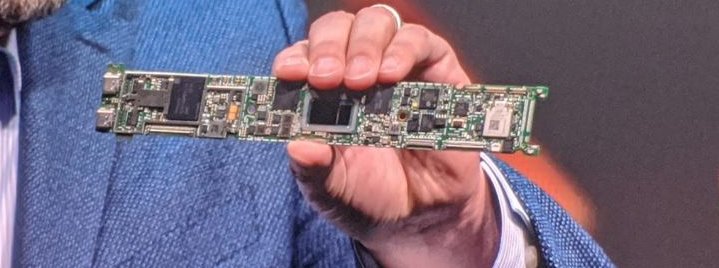
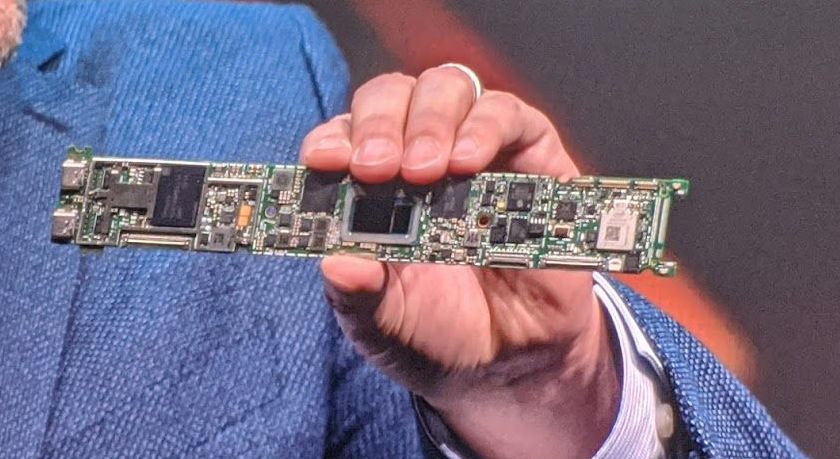
Enlarge/ The slightly darker black blob in the center of this board is a Tiger Lake mobile CPU.
Jim Salter
Yesterday at CES 2020, Intel previewed its next-generation line of mobile CPUs, code-named Tiger Lake, in several new form factors while running brand-new (and impressive) software designed with the platform in mind.
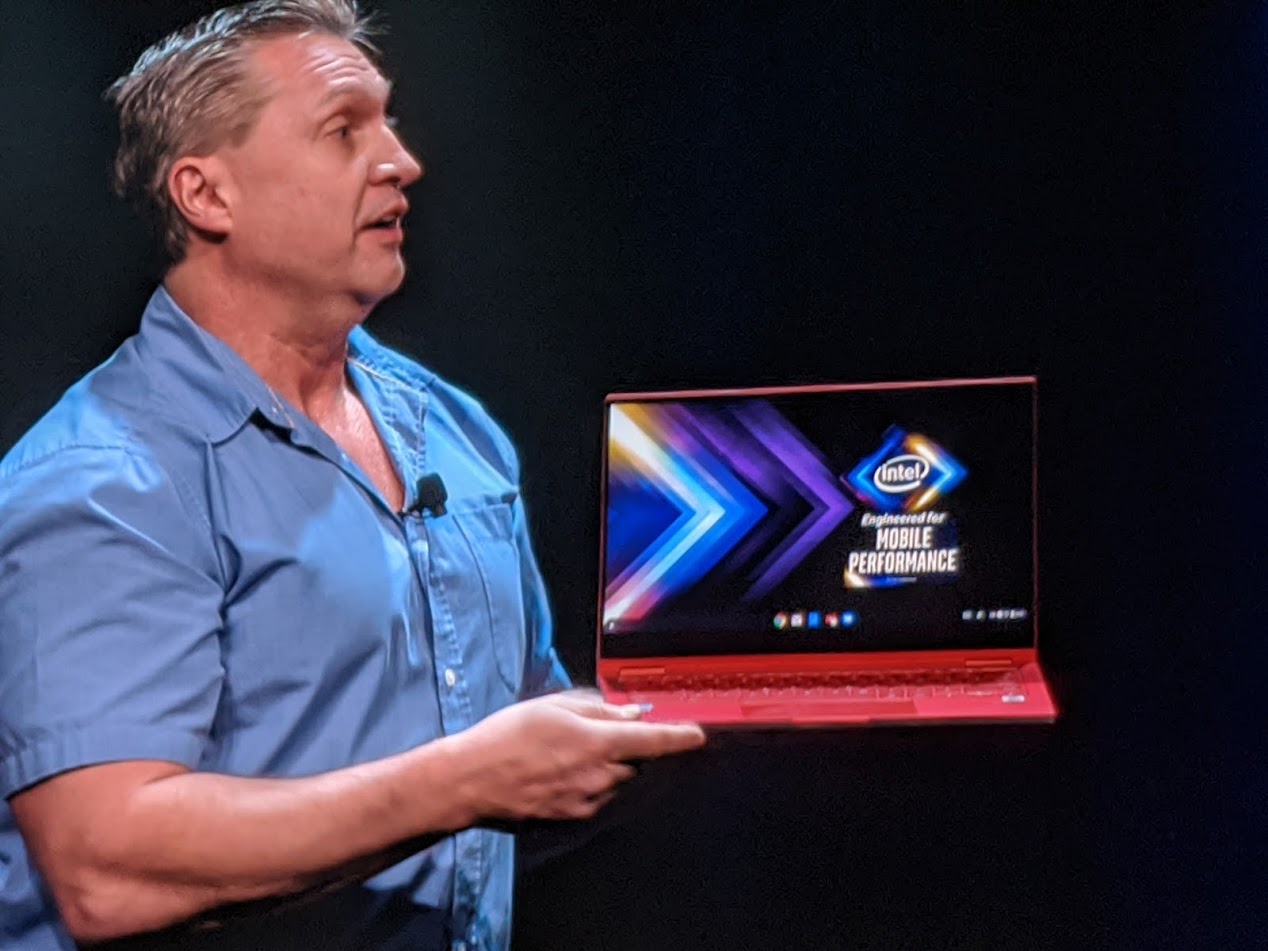
Enlarge/ This red ultralight is one of the new Project Athena compliant Chromebook models announced at CES 2020.
Jim Salter
Tiger Lake plays into Intel’s ongoing Project Athena program, which aims to bring a performance and usability standard with concrete, testable metrics to mobile computing—that includes at least nine hours of battery life with the screen at 250 nits of brightness, out-of-the-box display and system settings, and multiple tabs and applications running. Project Athena has now been expanded to cover some new Chromebook models, as well as traditional Windows PCs.
Several new foldable designs were announced during the presentation, ranging from a relatively conventional Dell hinged two-in-one to much more outré designs such as Lenovo’s X1 Fold—presented onstage by Lenovo President Christian Teismann—and an Intel concept design prototype called Horseshoe Bend. Both the X1 Fold and Horseshoe Bend will look immediately familiar to anyone who has been following Ron Amadeo’s coverage of the Samsung and Motorola foldable smartphones; in each design, the screen itself folds down the middle.
This Dell two-in-one was the most conventional design shown last night: it uses discrete physical hinges, not a foldable screen.
This Dell two-in-one has a removable chiclet keyboard covering the bottom screen in this shot.
Jim Salter
When unfolded, the Lenovo X1 Fold looks like a monstrous 17-inch tablet.
Jim Salter
This action shot shows a Lenovo X1 Fold partially folded, with the bottom half of the screen acting as a full-size onscreen keyboard.
Jim Salter
This half-folded Lenovo X1 Fold gives us a peek at an incredibly skeuomorphic “ebook reader.”
Jim Salter
Unfolded, the Horseshoe Bend concept prototype looks like an enormous tablet. The screen crease isn’t extreme, but it is often visible.
Jim Salter
Horseshoe Bend half-folded looks, for the most part, like a bigger version of the Lenovo X1 Fold.
Jim Salter
The software demonstrations, presented by Adobe “Principal Worldwide Evangelist” Jason Levine, were by far the most compelling part of Intel’s mobile presentation. Levine performed three separate demonstrations of AI-empowered work using Adobe Sensei, with all of the manic energy of Vince Offer selling you a Slap Chop. Levine’s antics aside, the demonstrations were impressive—an automatic boundary selection of a bird in the foreground of a complex photo, another of a rose with significant light bloom muddying up its edges, and finally an automatic video conversion from landscape to portrait for a short clip of an extreme skier. The automatic selection of the bird and rose weren’t instant, but they took place in about five seconds apiece—far less time than it would take even the most skilled human artist to manually trace the edges of the photos—and appeared extremely high quality. Levine placed the cropped-out images into other scenes quickly after selecting them, with excellent visual results.
He also showed the audience a clip of an extreme skier, slaloming back and forth and doing flips across the entire field of a landscape video. Commenting about how many social media platforms were designed for portrait images, he then engaged an automatic conversion on Adobe Sensei, which automatically recognized the skier as “foreground” of the clip and panned the portrait frame automatically back and forth as necessary to keep the skier in center-frame on conversion.
Levine spends some time selling the crowd on how difficult it is to find the right boundaries to crop an image with hair or feathers.
Jim Salter
The crowd gasped as Levine cropped out the background around the automatically boundary-selected bird, feathers and all.
Jim Salter
Levine prepares to automatically select boundaries on a rose in the foreground of a photo, despite light rays muddying up the edges.
Jim Salter
Jason effortlessly transports the cropped-out rose bloom into a new photo, scales it into place, and vamps for the crowd.
Jim Salter
Levine demonstrates telling Adobe Sensei to automatically reformat a video from landscape to portrait mode, and “follow the foreground” in the cropped-down video.
Jim Salter
After automatic conversion and reframing, the now-portrait video follows the skier back and forth perfectly.
Jim Salter
After the entire set of demos was complete, we got the reveal that Levine had been performing them live using a Tiger-Lake equipped 13-inch ultralight notebook. All of the automatic selection, cropping, and panning work shown uses Intel’s OpenVINO AI framework and is greatly accelerated by its DLB x86 instruction-set extensions—so while the same tasks should run on non-Intel (and/or non-DLB-capable) hardware also, they’ll likely run several times slower.
When Ars tested the impact of Deep Learning Boost hands-on, benchmarking the i9-10980XE versus AMD’s much more powerful Threadripper 3970x, we saw the DLB-equipped i9-10980XE perform image-classification tasks at roughly double to quadruple the rate of either the Threadripper or Intel’s own non-DLB-equipped i9-9980XE. As AI-powered tasks become more and more common in applications ranging from Office to Photoshop, we expect that the ability to make short work of inference workloads will become nearly as important as general CPU performance itself.
https://arstechnica.com/?p=1640189
Tired of hearing about Wi-Fi 6? Great, let’s talk about Wi-Fi 6E
Enlarge/ Expect to see an “e” tacked onto this logo somewhere in the near future, as an additional 1200MHz of spectrum becomes available to Wi-Fi 6 in the USA.
On Friday, the Wi-Fi Alliance announced a new branding for the expansion of Wi-Fi into an additional 1200MHz of unlicensed spectrum.
Dubbed “Wi-Fi 6E,” the new spectrum should be made available for general Wi-Fi device use shortly; the US Federal Communications Commission proposed expansion of Wi-Fi into 6GHz spectrum in October 2018, and FCC chairman and novelty-coffee-mug aficionado Ajit Pai expressed a desire for the agency to “move quickly” (no concrete decision timeline was given) in opening up the spectrum to Wi-Fi at the Americas Spectrum Management Conference in September 2019.
What is Wi-Fi 6E?
Wi-Fi 6E is the Wi-Fi alliance’s branding for accessing the proposed new 6GHz spectrum using the existing Wi-Fi 6 protocol, otherwise known as 802.11ax. The new spectrum is right next door to the 5GHz unlicensed spectrum we’ve all been using since 802.11n (Wi-Fi 4). That means its RF characteristics are close enough to what we’re already accustomed to to require no further explanation: it’ll act just like 5GHz networking already does, for the most part.
What the new spectrum does is allow for much denser device-deployment strategies, by opening up the number of Wi-Fi “channels” which can be presented in one space without overlapping (and therefore congesting) with one another. The additional 1200MHz can be divided into fourteen 80MHz-wide non-overlapping channels, or seven 160MHz-wide non-overlapping channels. Enterprise deployments could use the spectrum to allow much higher data-transfer rates to hundreds of devices all located near one another.
What would Wi-Fi 6E be good for?
The new spectrum would also be a potential large boon for consumer Wi-Fi mesh deployments—the great thing about Wi-Fi mesh is you don’t have to run any wires; but the crappy thing about Wi-Fi mesh is that you didn’t run any wires. When your mesh nodes have to talk to one another on the same channels that Wi-Fi devices already use to talk to them, latency goes up while speed and consistency go down.
The best Wi-Fi mesh kits already use three individual radios—one 2.4GHz for legacy devices: one 5GHz for modern design devices, and one 5GHz for backhaul. Unfortunately, this is generally enough for a single moderately-sized wireless LAN to effectively blanket the entire available Wi-Fi spectrum, all by itself. In very dense environments like apartment complexes, if any 5GHz neighbor networks are “audible,” it may not be possible to set up a completely congestion-free network using only the existing, non-DFS allocated spectrum.
Without expanding either into the new 6GHz spectrum or into DFS (which doesn’t work well in most urban areas), most users can realistically expect only two workable 5GHz, 80MHz, or 160MHz channels: one on the high band (above DFS frequencies), and one on the low band. In theory, the existing 5GHz spectrum can be divided into as many five non-overlapping, non-DFS 80MHz channels—but in practice, 160MHz deployments and the use of interstitial channels tend to make only one channel on each band viable, in spaces without tight RF controls.
If Wi-Fi gear is allowed to utilize another 1200MHz of contiguous spectrum, that suddenly makes it possible to have extremely high-bandwidth (and therefore throughput) backhaul and fronthaul links available. Due to the rapid attenuation and blocking of 5GHz and 6GHz signals, the vast majority of physical spaces should then realistically have access to uncongested airtime in enough spectrum to come far, far closer to the kind of network quality one only expects in wired-backhaul commercial-style access points (such as Ubiquiti UAP, or TP-Link EAP) today.
Will you be able to use Wi-Fi 6E?
Decisions made by the US Federal Communications Commission are, obviously, only directly relevant to US users. But European users should see some additional spectrum opened for their use as well, though probably not the full 1200MHz proposed by the FCC.
It’s unclear at this time whether existing Wi-Fi 6 hardware will be able to access the new spectrum once approved. In terms of physical design, existing hardware is more than likely OK—the antenna design to transmit and receive 5GHz should also work well at 6GHz. But there are serious questions about both how much is possible in firmware upgrades to existing Wi-Fi devices, and in how willing manufacturers will be to add this capability via free firmware upgrade rather than convincing consumers to buy a new gadget. We don’t think vendors would be thrilled to give the capability away for free, so expect most to only implement it in new device designs.
With that said, we expect just having the new spectrum available to make an enormous difference in how well consumer Wi-Fi mesh networks can scale and provide high-quality Wi-Fi—even if the devices themselves don’t support it. And very little guesswork or testing is needed in order to make this prediction—”more airtime, available over more spectrum” is much, much simpler to implement than radically new protocol features like Wi-Fi 6’s OFDMA.
In theory, even Wi-Fi 5 (802.11ac) would work in the new spectrum—but in practice, don’t expect manufacturers to be interested in moving what’s rapidly becoming a legacy protocol into the new spectrum.
https://arstechnica.com/?p=1639355
PoS malware skimmed convenience store customers’ card data for 8 months
US convenience store Wawa said on Thursday that it recently discovered malware that skimmed customers’ payment card data at just about all of its 850 stores.
The infection began rolling out to the store’s payment-processing system on March 4 and wasn’t discovered until December 10, an advisory published on the company’s website said. It took two more days for the malware to be fully contained. Most locations’ point-of-sale systems were affected by April 22, 2019, although the advisory said some locations may not have been affected at all.
The malware collected payment card numbers, expiration dates, and cardholder names from payment cards used at “potentially all Wawa in-store payment terminals and fuel dispensers.” The advisory didn’t say how many customers or cards were affected. The malware didn’t access debit card PINs, credit card CVV2 numbers, or driver license data used to verify age-restricted purchases. Information processed by in-store ATMs was also not affected. The company has hired an outside forensics firm to investigate the infection.
Thursday’s disclosure came after Visa issued two security alerts—one in November and another this month—warning of payment-card-skimming malware at North American gasoline pumps. Card readers at self-service fuel pumps are particularly vulnerable to skimming because they continue to read payment data from cards’ magnetic stripes rather than card chips, which are much less susceptible to skimmers.
In the November advisory, Visa officials wrote:
The recent attacks are attributed to two sophisticated criminal groups with a history of large-scale, successful compromises against merchants in various industries. The groups gain access to the targeted merchant’s network, move laterally within the network using malware toolsets, and ultimately target the merchant’s POS environment to scrape payment card data. The groups also have close ties with the cybercrime underground and are able to easily monetize the accounts obtained in these attacks by selling the accounts to the top tier cybercrime underground carding shops.
The December advisory said that two of three attacks bore the hallmarks of Fin8, an organized cybercrime group that has targeted retailers since 2016. There’s no indication the Wawa infections have any connection to the ones in the Visa advisories.
People who have used payment cards at a Wawa location should pay close attention to billing statements over the past eight months. It’s always a good idea to regularly review credit reports as well. Wawa said it will provide one year of identity-theft protection and credit monitoring from credit-reporting service Experian at no charge. Thursday’s disclosure lists other steps card holders can take.
https://arstechnica.com/?p=1635455
How to set up your own Nebula mesh VPN, step by step
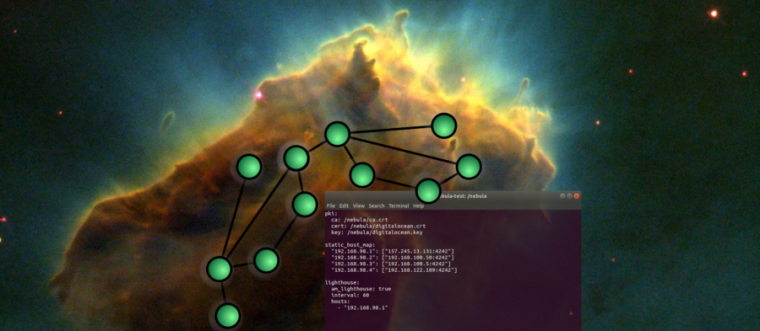
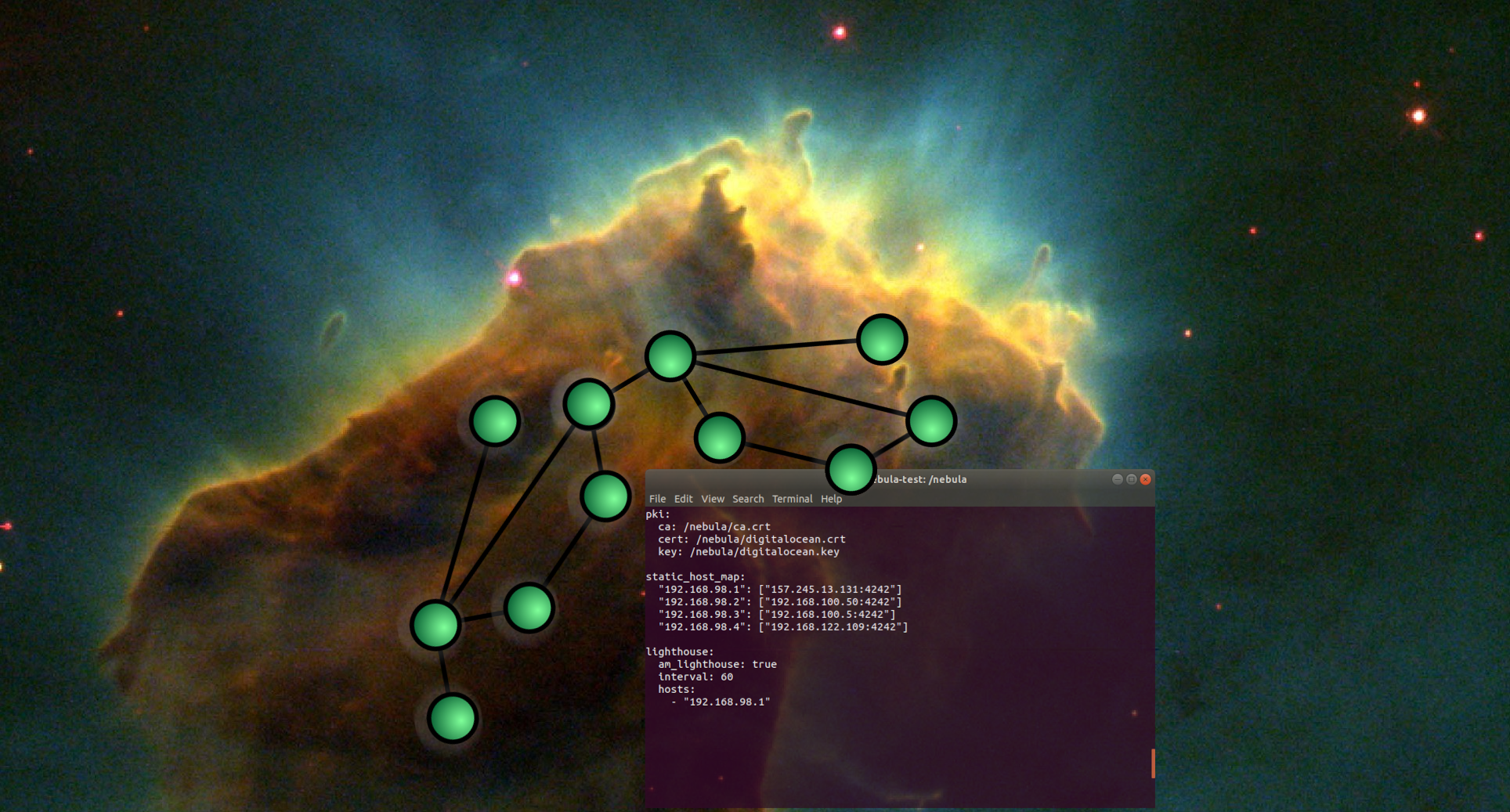
Enlarge/ Nebula, sadly, does not come with its own gallery of awesome high-res astronomy photos.
Last week, we covered the launch of Slack Engineering’s open source mesh VPN system, Nebula. Today, we’re going to dive a little deeper into how you can set up your own Nebula private mesh network—along with a little more detail about why you might (or might not) want to.
VPN mesh versus traditional VPNs
The biggest selling point of Nebula is that it’s not “just” a VPN, it’s a distributed VPN mesh. A conventional VPN is much simpler than a mesh and uses a simple star topology: all clients connect to a server, and any additional routing is done manually on top of that. All VPN traffic has to flow through that central server, whether it makes sense in the grander scheme of things or not.
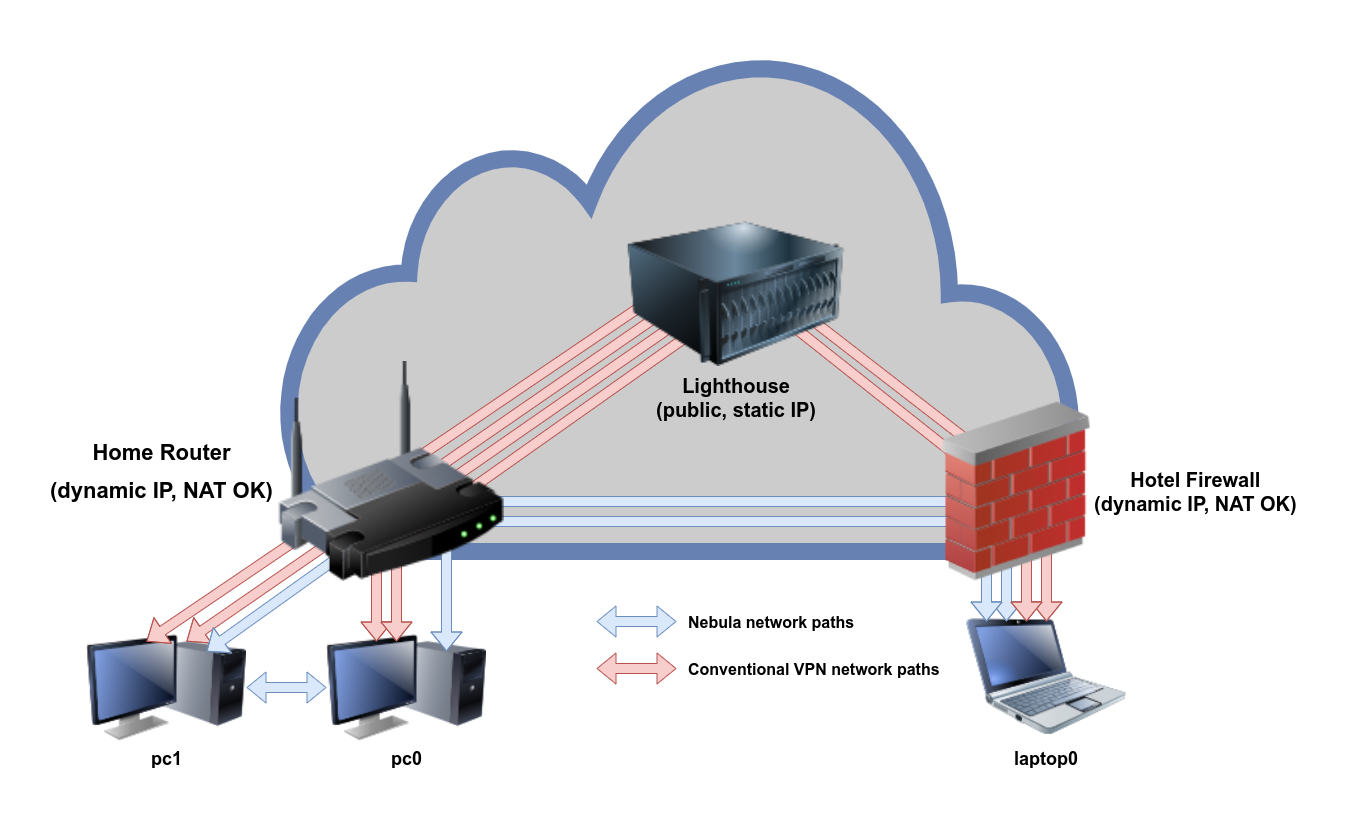
In sharp contrast, a mesh network understands the layout of all its member nodes and routes packets between them intelligently. If node A is right next to node Z, the mesh won’t arbitrarily route all of its traffic through node M in the middle—it’ll just send them from A to Z directly, without middlemen or unnecessary overhead. We can examine the differences with a network flow diagram demonstrating patterns in a small virtual private network.
Enlarge/ With Nebula, connections can go directly from home/office to hotel and vice versa—and two PCs on the same LAN don’t need to leave the LAN at all.
Jim Salter
All VPNs work in part by exploiting the bi-directional nature of network tunnels. Once a tunnel has been established—even through Network Address Translation (NAT)—it’s bidirectional, regardless of which side initially reached out. This is true for both mesh and conventional VPNs—if two machines on different networks punch tunnels outbound to a cloud server, the cloud server can then tie those two tunnels together, providing a link with two hops. As long as you’ve got that one public IP answering to VPN connection requests, you can get files from one network to another—even if both endpoints are behind NAT with no port forwarding configured.
Where Nebula becomes more efficient is when two Nebula-connected machines are closer to each other than they are to the central cloud server. When a Nebula node wants to connect to another Nebula node, it’ll query a central server—what Nebula calls a lighthouse—to ask where that node can be found. Once the location has been gotten from the lighthouse, the two nodes can work out between themselves what the best route to one another might be. Typically, they’ll be able to communicate with one another directly rather than going through the router—even if they’re behind NAT on two different networks, neither of which has port forwarding enabled.
By contrast, connections between any two PCs on a traditional VPN must pass through its central server—adding bandwidth to that server’s monthly allotment and potentially degrading both throughput and latency from peer to peer.
Direct connection through UDP skullduggery
Nebula can—in most cases—establish a tunnel directly between two different NATted networks, without the need to configure port forwarding on either side. This is a little brain-breaking—normally, you wouldn’t expect two machines behind NAT to be able to contact each other without an intermediary. But Nebula is a UDP-only protocol, and it’s willing to cheat to achieve its goals.
If both machines reach the lighthouse, the lighthouse knows the source UDP port for each side’s outbound connection. The lighthouse can then inform one node of the other’s source UDP port, and vice versa. By itself, this isn’t enough to make it back through the NAT pinhole—but if each side targets the other’s NAT pinhole and spoofs the lighthouse’s public IP address as being the source, their packets will make it through.
UDP is a stateless connection, and very few networks bother to check for and enforce boundary validation on UDP packets—so this source-address spoofing works, more often than not. However, some more advanced firewalls may check the headers on outbound packets and drop them if they have impossible source addresses.
If only one side has a boundary-validating firewall that drops spoofed outbound packets, you’re fine. But if both ends have boundary validation available, configured, and enabled, Nebula will either fail or be forced to fall back to routing through the lighthouse.
We specifically tested this and can confirm that a direct tunnel from one LAN to another across the Internet worked, with no port forwarding and no traffic routed through the lighthouse. We tested with one node behind an Ubuntu homebrew router, another behind a Netgear Nighthawk on the other side of town, and a lighthouse running on a Linode instance. Running iftop on the lighthouse showed no perceptible traffic, even though a 20Mbps iperf3 stream was cheerfully running between the two networks. So right now, in most cases, direct point-to-point connections using forged source IP addresses should work.
Setting Nebula up
To set up a Nebula mesh, you’ll need at least two nodes, one of which should be a lighthouse. Lighthouse nodes must have a public IP address—preferably, a static one. If you use a lighthouse behind a dynamic IP address, you’ll likely end up with some unavoidable frustration if and when that dynamic address updates.
The best lighthouse option is a cheap VM at the cloud provider of your choice. The $5/mo offerings at Linode or Digital Ocean are more than enough to handle the traffic and CPU levels you should expect, and it’s quick and easy to open an account and get one set up. We recommend the latest Ubuntu LTS release for your new lighthouse’s operating system; at press time that’s 18.04.
Installation
Nebula doesn’t actually have an installer; it’s just two bare command line tools in a tarball, regardless of your operating system. For that reason, we’re not going to give operating system specific instructions here: the commands and arguments are the same on Linux, MacOS, or Windows. Just download the appropriate tarball from the Nebula release page, open it up (Windows users will need 7zip for this), and dump the commands inside wherever you’d like them to be.
Download the right tar.gz for your OS and architecture here. (“Normal computers” will be amd64 architecture.)
Jim Salter
Linux, Windows, or MacOS, all you’re getting are two command-line utilities. If you were expecting a fancy installer, you’re out of luck.
Jim Salter
Once fully configured, each node needs five files—the CA certificate (not the key!), the node’s own cert and key, a config file, and the nebula CLI app itself.
Jim Salter
On Linux or MacOS systems, we recommend creating an /opt/nebula folder for your Nebula commands, keys, and configs—if you don’t have an /opt yet, that’s okay, just create it, too. On Windows, C:\Program Files\Nebula is probably a more sensible location.
Certificate Authority configuration and key generation
The first thing you’ll need to do is create a Certificate Authority using the nebula-cert program. Nebula, thankfully, makes this a mind-bogglingly simple process:
root@lighthouse:/opt/nebula# ./nebula-cert ca -name "My Shiny Nebula Mesh Network"
What you’ve actually done is create a certificate and key for the entire network. Using that key, you can sign keys for each node itself. Unlike the CA certificate, node certificates need to have the Nebula IP address for each node baked into them when they’re created. So stop for a minute and think about what subnet you’d like to use for your Nebula mesh. It should be a private subnet—so it doesn’t conflict with any Internet resources you might need to use—and it should be an oddball one so that it won’t conflict with any LANs you happen to be on.
Nice, round numbers like 192.168.0.x, 192.168.1.x, 192.168.254.x, and 10.0.0.x should be right out, as the odds are extremely good you’ll stay at a hotel, friend’s house, etc that uses one of those subnets. We went with 192.168.98.x—but feel free to get more random than that. Your lighthouse will occupy .1 on whatever subnet you choose, and you will allocate new addresses for nodes as you create their keys. Let’s go ahead and set up keys for our lighthouse and nodes now:
Now that you’ve generated all your keys, consider getting them the heck out of your lighthouse, for security. You need the ca.key file only when actually signing new keys, not to run Nebula itself. Ideally, you should move ca.key out of your working directory entirely to a safe place—maybe even a safe place that isn’t connected to Nebula at all—and only restore it temporarily if and as you need it. Also note that the lighthouse itself doesn’t need to be the machine that runs nebula-cert—if you’re feeling paranoid, it’s even better practice to do CA stuff from a completely separate box and just copy the keys and certs out as you create them.
Each Nebula node does need a copy of ca.crt, the CA certificate. It also needs its own .key and .crt, matching the name you gave it above. You don’t need any other node’s key or certificate, though—the nodes can exchange them dynamically as needed—and for security best practice, you really shouldn’t keep all the .key and .crt files in one place. (If you lose one, you can always just generate another that uses the same name and Nebula IP address from your CA later.)
Configuring Nebula with config.yml
Nebula’s Github repo offers a sample config.yml with pretty much every option under the sun and lots of comments wrapped around them, and we absolutely recommend anyone interested poke through it see to all the things that can be done. However, if you just want to get things moving, it may be easier to start with a drastically simplified config that has nothing but what you need.
Lines that begin with a hashtag are commented out and not interpreted.
#
# This is Ars Technica's sample Nebula config file.
# pki: # every node needs a copy of the CA certificate, # and its own certificate and key, ONLY. # ca: /opt/nebula/ca.crt cert: /opt/nebula/lighthouse.crt key: /opt/nebula/lighthouse.key static_host_map: # how to find one or more lighthouse nodes # you do NOT need every node to be listed here! # # format "Nebula IP": ["public IP or hostname:port"] # "192.168.98.1": ["nebula.arstechnica.com:4242"] lighthouse: interval: 60 # if you're a lighthouse, say you're a lighthouse # am_lighthouse: true hosts: # If you're a lighthouse, this section should be EMPTY # or commented out. If you're NOT a lighthouse, list # lighthouse nodes here, one per line, in the following # format: # # - "192.168.98.1" listen: # 0.0.0.0 means "all interfaces," which is probably what you want # host: 0.0.0.0 port: 4242 # "punchy" basically means "send frequent keepalive packets"
# so that your router won't expire and close your NAT tunnels.
#
punchy: true # "punch_back" allows the other node to try punching out to you,
# if you're having trouble punching out to it. Useful for stubborn
# networks with symmetric NAT, etc.
#
punch_back: true tun: # sensible defaults. don't monkey with these unless # you're CERTAIN you know what you're doing. # dev: nebula1 drop_local_broadcast: false drop_multicast: false tx_queue: 500 mtu: 1300 routes: logging: level: info format: text # you NEED this firewall section.
#
# Nebula has its own firewall in addition to anything
# your system has in place, and it's all default deny.
#
# So if you don't specify some rules here, you'll drop
# all traffic, and curse and wonder why you can't ping
# one node from another.
# firewall: conntrack: tcp_timeout: 120h udp_timeout: 3m default_timeout: 10m max_connections: 100000 # since everything is default deny, all rules you
# actually SPECIFY here are allow rules.
#
outbound: - port: any proto: any host: any inbound: - port: any proto: any host: any
The above config.yml is configured for a lighthouse node. To re-configure it for a non-lighthouse node, all that needs to be done is change the cert: and key: lines appropriately for the new node, set am_lighthouse to false, and uncomment (remove the leading hashtag from) the line # - "192.168.98.1", which points the node to the lighthouse it should report to.
Note that the lighthouse:hosts list uses the nebula IP of the lighthouse node, not its real-world public IP! The only place real-world IP addresses should show up is in the static_host_map section.
Starting nebula on each node
I hope you Windows and Mac types weren’t expecting some sort of GUI—or an applet in the dock or system tray, or a preconfigured service or daemon—because you’re not getting one. Grab a terminal—a command prompt run as Administrator, for you Windows folks—and run nebula against its config file. Minimize the terminal/command prompt window after you run it.
That’s all you get. If you left the logging set at info the way we have it in our sample config files, you’ll see a bit of informational stuff scroll up as your nodes come online and begin figuring out how to contact one another.
If you’re a Linux or Mac user, you might also consider using the screen utility to hide nebula away from your normal console or terminal (and keep it from closing when that session terminates).
Figuring out how to get Nebula to start automatically is, unfortunately, an exercise we’ll need to leave for the user—it’s different from distro to distro on Linux (mostly depending on whether you’re using systemd or init). Advanced Windows users should look into running Nebula as a custom service, and Mac folks should call Senior Technology Editor Lee Hutchinson on his home phone and ask him for help directly.
Conclusion
Nebula is a pretty cool project. We love that it’s open source, that it uses the Noise platform for crypto, that it’s available on all three major desktop platforms, and that it’s easy…ish to set up and use.
With that said, Nebula in its current form is really not for people afraid to get their hands dirty on the command line—not just once, but always. We have a feeling that some real UI and service scaffolding will show up eventually—but until it does, as compelling as it is, it’s not ready for “normal users.”
Right now, Nebula’s probably best used by sysadmins and hobbyists who are determined to take advantage of its dynamic routing and don’t mind the extremely visible nuts and bolts and lack of anything even faintly like a friendly interface. We definitely don’t recommend it in its current form to “normal users”—whether that means yourself or somebody you need to support.
Unless you really, really need that dynamic point-to-point routing, a more conventional VPN like WireGuard is almost certainly a better bet for the moment.
The Good
Free and open source software, released under the MIT license
Cross platform—looks and operates exactly the same on Windows, Mac, and Linux
Reasonably fast—our Ryzen 7 3700X managed 1.7Gbps from itself to one of its own VMs across Nebula
Point-to-point tunneling means near-zero bandwidth needed at lighthouses
Dynamic routing opens interesting possibilities for portable systems
Simple, accessible logging makes Nebula troubleshooting a bit easier than WireGuard troubleshooting
The Bad
No Android or iOS support yet
No service/daemon wrapper included
No UI, launcher, applet, etc
The Ugly
Did we mention the complete lack of scaffolding? Please don’t ask non-technical people to use this yet
The Windows port requires the OpenVPN project’s tap-windows6 driver—which is, unfortunately, notoriously buggy and cantankerous
“Reasonably fast” is relative—most PCs should saturate gigabit links easily enough, but WireGuard is at least twice as fast as Nebula on Linux